Lost Your Phone? Use Bluetooth RSSI Signal Strength for Indoor Tracking

Use Bluetooth RSSI signal strength to locate a lost silent phone indoors via gradient-based searching.
When a phone is on silent and out of sight, Bluetooth RSSI signal strength offers a practical indoor tracking method. By monitoring signal values from a nearby device and moving toward stronger readings, you can locate the phone using a gradient ascent approach. This article covers the underlying principles, ready-made BLE scanning tools, and how to write your own tracking script.
A Real Office Dilemma
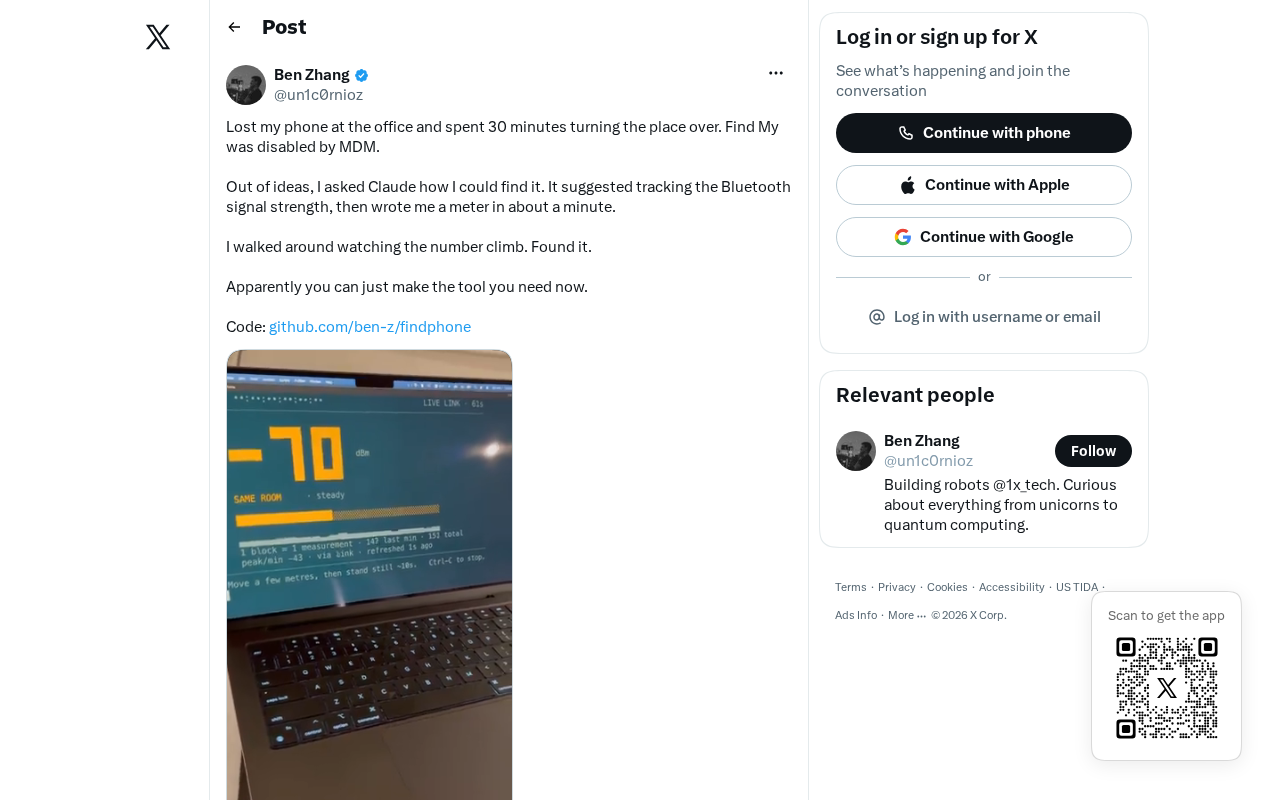
Losing your phone is one of the most frustrating modern-day scenarios. When your phone is on silent and out of sight, the traditional "ring to find" approach simply doesn't work. Recently, a developer shared their experience of losing their phone in the office on Hacker News — but instead of tearing the place apart, they turned to the AI assistant Claude and received a remarkably engineering-minded suggestion: track the phone by monitoring Bluetooth signal strength.
This seemingly simple request actually reveals a trend where AI assistants are evolving from "answering questions" to "providing actionable technical solutions." Compared to a search engine returning a pile of links, Claude delivered a hands-on approach grounded in physical principles.
How Bluetooth RSSI Signal Strength Positioning Works
What Is RSSI?
The core of Claude's suggestion is RSSI (Received Signal Strength Indicator). Nearly all Bluetooth devices report the strength of the received signal during communication. This value is measured in dBm and is typically negative: the closer to 0 (e.g., -40 dBm), the nearer the device; the more negative (e.g., -90 dBm), the farther away.
As long as the phone's Bluetooth is still broadcasting — which it often is even when locked or on silent — another device can continuously read this signal strength value to gauge relative distance.
From Signal Strength to Directional Tracking
A single RSSI reading can only roughly estimate distance, not direction. But by combining movement with observing value changes, you can achieve a "hot-cold" treasure hunt approach:
- When you move in the right direction, the RSSI value gradually increases (closer to 0);
- When you move the wrong way, the value decreases (more negative);
- By repeatedly adjusting your direction, you eventually converge on the strongest signal point — where your phone is.
This is essentially a "gradient ascent" search strategy, or in everyday terms, a "warmer means closer" game.
How to Build a Bluetooth Phone Finder
Using Ready-Made BLE Scanning Tools
For most people, the simplest approach is to use an existing Bluetooth scanning app. Install a BLE scanner like nRF Connect or LightBlue on another phone or laptop, and you can view the MAC addresses and RSSI values of nearby Bluetooth devices in real time. Find the entry corresponding to your target phone, watch the signal strength number, and walk toward the stronger signal.
Writing Your Own Positioning Script
For developers, you can write your own scanning script using cross-platform Bluetooth libraries. For example, Python's bleak library, Node.js's noble, or direct system-level BLE APIs. The core logic is straightforward:
- Start a BLE scan;
- Filter for the target device's advertisement packets;
- Continuously print or visualize its RSSI values;
- Adjust your search position based on value changes.
This is essentially the same basic principle behind commercial tracking devices like Apple AirTag and Tile — except they layer on additional technologies like UWB (Ultra-Wideband) direction finding and crowdsourced network positioning for greater precision.
The Shifting Value of AI Assistants: From Information Retrieval to Solution Design
Understanding Context and Delivering Actionable Plans
The real value of this story isn't about "finding a phone" — it's about showcasing the shift in how AI assistants interact with users. In the past, people would search for keywords, sift through results, and piece together answers. Now, models like Claude can:
- Understand real-world context: Recognizing the key constraint that "the phone is on silent and out of sight";
- Draw on domain knowledge: Connecting the problem to Bluetooth RSSI, a non-obvious technical approach;
- Provide executable steps: Rather than generic advice like "check between the couch cushions."
Democratizing Engineering Thinking — and Its Limitations
To be fair, this suggestion isn't exactly "advanced" — any engineer familiar with wireless communications could think of it. But the significance of AI lies in democratizing this kind of specialized thinking, giving users without a technical background access to engineer-level problem-solving approaches.
Of course, the approach has its limitations: if the phone is completely powered off, Bluetooth is disabled, or the battery is dead, this method won't work at all. This reminds us that AI-generated solutions are often optimal under ideal conditions, and real-world application still requires judgment based on specific circumstances.
Conclusion
From a simple everyday scenario like losing a phone, we can see AI assistants becoming personal "technical consultants." They're no longer just search engine replacements — they serve as bridges that translate abstract technical principles into concrete actions. Next time you face a tricky everyday problem, try asking AI from a different angle. You might get an unexpectedly engineered solution.
Related articles

DeepCell: One-Click AI Generation of Documents, Spreadsheets, and Slides
DeepCell tops Product Hunt with one-click generation of documents, spreadsheets, and slides, using the .deepcell format for linked updates, designed for System 2 tasks like modeling and sales reviews.

Doneas: 15-Minute Daily Accountability Calls That Keep Indie Developers From Procrastinating
Doneas is a daily accountability tool for indie developers: plan tasks on Monday, join a 15-minute call with five builders each day, and log deliveries on a public progress page. This article analyzes its core mechanics, effectiveness, and potential issues around retention and matching.

Fastlane 2.0: Fully Automated AI Ad Campaigns, From Creative to Optimization
Fastlane 2.0 is an AI ad automation tool: enter your website and it learns your brand, generates video and image ads, and runs and optimizes them on Meta, TikTok, Instagram, and YouTube.