Lovable Advanced Guide: Build and Launch a Full-Stack App from Scratch
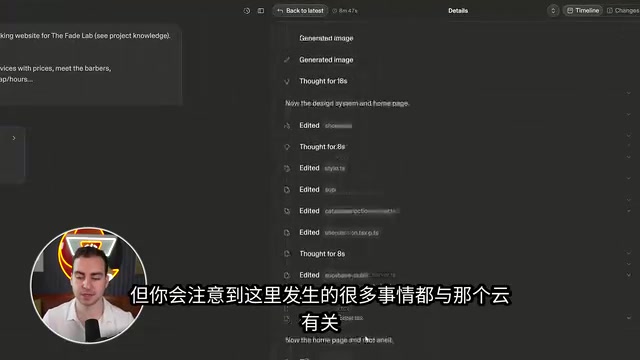
Build and launch a full-stack barbershop app with Lovable, covering every advanced feature from database to payments.
Using a barbershop web app as an example, this guide systematically demonstrates Lovable's advanced no-code capabilities. It covers plan mode for requirement planning, knowledge base for brand rules, and custom skills for design consistency. The Supabase-powered backend handles databases, row-level security, storage, and auth; Edge Functions manage event-driven tasks like generating ICS files; and scheduled jobs automate email reminders. The site also integrates an AI chat assistant, Stripe payments, and branded email — all without manual API key configuration. Pre-launch security scans and SEO optimization are built in, and GitHub bidirectional sync enables professional CI/CD workflows.
What Is Lovable, Exactly
Lovable is one of the simplest no-code website builders available today. Give the AI model a prompt, and you get a good-looking, fully functional website — with the ability to inspect and modify the underlying code at any time. It's designed to let non-technical users build genuinely production-ready applications, and is often compared to tools like ChatGPT, Claude Code, and Cursor.
Unlike most website builders, Lovable doesn't just handle frontend design and styling — it manages the entire backend stack, including databases, user systems, login and authentication, payments, and deployment. That means you can go from an idea to a live website with a custom domain entirely within a single platform.
This guide is based on a complete hands-on walkthrough building a barbershop website called "The Fade Lab," covering a homepage, booking page, my appointments view, and admin dashboard — with authentication, a database, services, payments, and email on the backend. The goal is to highlight the advanced features that rarely come up in beginner tutorials.
Before You Start: Planning, Knowledge Base, and Skills
Before diving in, it's worth spending some time with another AI model to sketch out a rough plan — features, goals, user types, problems to solve. The more context you bring, the better Lovable's output will be.
Once inside Lovable, the first thing you should do is switch to Plan Mode. This prevents Lovable from immediately starting to build (and burning your credits) — instead, it helps you think through requirements and create a more detailed plan. Paste in your prepared prompt and let it generate a first draft of the plan.
Before approving the plan, there are two advanced settings worth configuring first:
Project Knowledge Base
Under Settings, find the "Knowledge" section. Here you can write in fixed information about your project. In this example, that included the shop's context (a barbershop in Austin, Texas), brand colors, user types (customers booking and paying, staff managing schedules), haircut prices, and other business rules. This information persists across every conversation with Lovable — unlike typing it into a prompt each time, the knowledge base ensures the model consistently follows your rules.
The knowledge base is essentially a persistent system prompt mechanism. In typical conversational AI tools, you have to re-explain context every time you start a new session. The knowledge base locks that information in as project-level context, so the model "remembers" your business rules throughout the entire project lifecycle. This is different from RAG (Retrieval-Augmented Generation) — RAG retrieves relevant snippets from a large document collection, whereas the knowledge base is more like a briefing document always prepended to every conversation. For stable information like brand colors, pricing rules, and user roles, putting it in the knowledge base is more reliable than repeating it in every prompt — and less likely to get "forgotten" as the conversation grows longer.
Custom Skills
Similar to Claude Code, Lovable supports creating reusable "Skills" within the platform. It's worth building a "Brand Guidelines" skill right at the start, using the skill creator to generate it interactively. In this example, the rules were: use the carbon-gold color palette when building or editing UI, write all copy in full caps without exclamation marks, keep touch targets at a minimum of 44 points, and check mobile layout before finishing. Once saved to the workspace, skills can be manually invoked with a slash command or automatically referenced by Lovable during builds, keeping the style consistent throughout.
First MVP and Design System
With the knowledge base and skills in place, you can approve the first version of the plan and let it build out an MVP scaffold. During the build, Lovable spins up multiple sub-agents working in parallel, automatically initializing the database, connecting the schema, and configuring API routes.
The backend here is powered by Lovable Cloud, which is essentially a wrapped Supabase backend service handling endpoints, routing, databases, security, authentication, and email delivery. The frontend is what users see; the backend is where data and security operations happen — and Lovable connects both automatically.
Once V1 is built, you can preview the site and toggle between mobile, tablet, and desktop breakpoints. The next key step is building a design system: defining design tokens for a dark carbon and gold palette, spacing, and border radius, choosing Clash Display for headings and Inter for body text, and building reusable button, card, input, and badge components to apply consistently across the site. After applying them, the overall polish improves noticeably and creates a solid foundation for adding more pages.
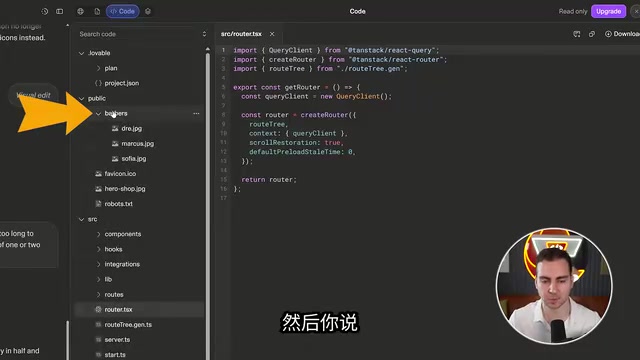
Lovable also supports visual editing: you can circle elements directly on the screen as a reference point and tell the AI what to change, or switch to text mode to edit copy directly. A full version history lets you roll back to any previous edit, and important states can be bookmarked.
Advanced Backend: Database, Edge Functions, and Scheduled Jobs
Once the MVP is running, you get into the features that reveal Lovable's real depth — backend expansion.
Database and Row-Level Security
The Cloud overview shows the auto-created database, tables, users, and storage buckets. One thing worth paying attention to is RLS (Row-Level Security), implemented by the underlying Supabase layer. It's enabled by default and controls which users can read or write which rows and tables in the database. Lovable handles the specific commands automatically, but it's worth doing a quick review before deployment. There are also logs (recording every backend request) and a SQL editor for debugging and custom queries.
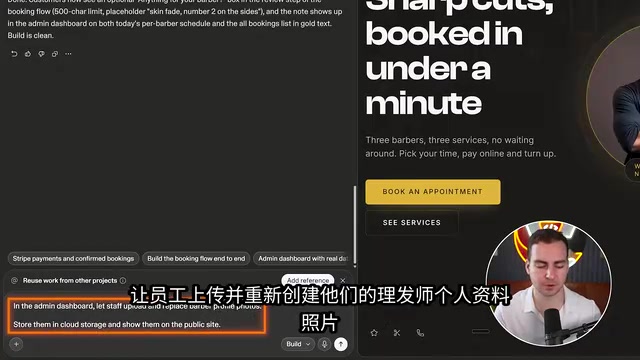
The walkthrough demonstrated two data-related feature additions: adding a "notes" field to bookings (so customers can leave a message for the barber), and allowing admin staff to upload and replace barber profile photos (stored in a cloud storage bucket). Both operations involve database migrations, which Lovable handles automatically and syncs across the frontend and admin panel.
RLS (Row-Level Security) is a native PostgreSQL feature, and Supabase provides a more user-friendly policy configuration interface on top of it. Traditional access control is typically handled at the application layer — backend code decides "can this user see this record?" RLS pushes that decision down to the database layer, so the policies remain in effect even if someone bypasses the application layer and queries the database directly. A typical rule might be: "customers can only read and write their own booking records; staff can read all bookings but cannot modify other staff members' personal information." The security value here is significant: even if the frontend or API has a vulnerability, an attacker who gains database access still can't access data beyond their permissions, dramatically shrinking the potential attack surface. For platforms like Lovable that auto-generate code, having RLS enabled by default is especially important, since auto-generated API routes may have unexpected permission gaps.
Edge Functions
When you need to trigger an operation rather than just manipulate data, that's where Edge Functions come in — functions that run on the backend, triggered by events. In this example, one was used to generate an ICS calendar file for confirmed bookings, letting users add their appointment directly to Google Calendar or Apple Calendar with one click. Lovable usually figures out when to use an Edge Function automatically, but you can specify it explicitly when needed.
Edge Functions are a form of serverless architecture, running on edge nodes close to the user rather than on a centralized server. Their core characteristics are "stateless, on-demand execution, billed per invocation" — they consume zero resources when idle and cold-start in milliseconds when triggered. Supabase's Edge Functions are based on the Deno runtime and support TypeScript. Compared to traditional backend services, Edge Functions are better suited for discrete, event-driven tasks: generating files, calling third-party APIs, sending notifications — rather than scenarios requiring persistent connections. ICS (iCalendar) is an open calendar data exchange format with the .ics extension, widely supported by Google Calendar, Apple Calendar, Outlook, and other major calendar applications. It's essentially a plain text file containing fields like event time, title, and description.
Scheduled Jobs
Many people don't realize Lovable supports Scheduled Jobs, which can run automatically on any schedule — hourly, daily, weekly, and so on. The demo created a job that: every hour, finds confirmed bookings in the next 24 hours that haven't had a reminder sent yet, sends each customer a branded reminder email, and marks them as reminded to avoid duplicates.
Built-in AI, Payments, and Email
Built-in AI Features
Lovable lets you integrate AI functionality directly into the websites you build, using your own Lovable credits — no API key management required. The demo added an "AI Booking Assistant" chat bubble that can answer questions, help users choose a time slot, and even deep-link directly to the booking page to complete the appointment. On the AI dashboard you can see credit usage, request count, success rate, and the current model in use (Gemini Flash), and switch models at any time.

Payments (Stripe)
Payments are set up through a conversational guided flow that connects to Stripe. Lovable automatically detects the required products and builds the checkout flow. During the build, it even opens its own browser window to auto-test the app, reading and filling in fields to verify functionality. After testing, purchases show up in Stripe. To accept real payments, just switch to live mode, connect a real Stripe account, and fill in your tax information.
Email functionality requires an upgrade and a sending domain (by adding DNS records to a domain registrar like Namecheap). The demo created a booking reminder email and a post-purchase confirmation receipt, with support for sending test emails to your own inbox to verify they work.
Security and SEO Before Launch
There are two automated tools worth using before deployment:
Deep Security Scan: Lovable can automatically detect security issues in your project and offer one-click fixes. Running this before publishing is strongly recommended.
SEO and AI Search Optimization: The platform can scan and fix issues like missing sitemaps, absent local business structured data, duplicate metadata, and overly generic titles — making the site more likely to appear in both traditional and AI-powered search results.
Deployment is as simple as clicking "Publish" — the site goes live on a free Lovable domain, with the option to connect a custom domain. You can also connect analytics tools like Google Analytics, Semrush, and BigQuery, or integrate Slack to receive event notifications.
The settings menu also includes a handy Git integration: connect to GitHub and Lovable syncs bidirectionally with your repository — changes in Lovable get pushed to Git, and developer changes in code sync back to Lovable (on the same branch), making it easy to add CI/CD and automated testing for a more professional workflow.
Wrapping Up
By the end of the entire process, you have a fully deployed full-stack application with frontend, backend, security, AI, email, and payments all in place. The workflow demonstrates Lovable's core value as a no-code platform: there's some upfront planning and setup work (plan mode, knowledge base, skills, design system), but once that foundation is in place, subsequent feature iterations can move very quickly.
For anyone looking to use AI to rapidly turn an idea into an operational product, Lovable's advanced features are genuinely worth exploring in depth — not just using it to generate a pretty static page.
Additional Context
Git bidirectional sync addresses a long-standing pain point with no-code tools: generated code is often a "black box" that's hard for developers to take over for fine-grained modifications, and impossible to integrate into an existing engineering workflow. Bidirectional sync means Lovable is no longer a closed island — product managers can iterate on features in Lovable using natural language, while engineers can handle complex logic or do code reviews in the same Git repository, with changes from both sides merged on the same branch. Once connected to GitHub, you can configure GitHub Actions for CI/CD: every time Lovable pushes code, tests, linting, or deployment to a staging environment can run automatically, subjecting AI-generated code to the same quality controls as hand-written code. This makes it well-suited for projects evolving from solo side projects into team-collaborative products.
Related articles

Gmod TTT: Boba's Winning Streak and Game Design Insights
An in-depth analysis of Gmod TTT's role system, creative items, and social gameplay mechanics, exploring the relationship between randomness design and game balance through Boba's winning streak phenomenon.

FlexBudget: Fair Comparison of KV Cache Eviction Strategies Under a Unified Compute Budget
AMD engineer proposes FlexBudget at PyTorch Conference: a training-free fair comparison method for KV cache eviction rules using fixed kernels and memory budgets, all in core PyTorch.
