M5 Ultra Mac Studio Review: A Performance Leap for Local AI Workstations

M5 Ultra Mac Studio's 256GB unified memory makes it the most compact private AI workstation for local LLMs.
Apple's M5 Ultra Mac Studio delivers ~68% multi-core CPU gains and doubled ray-tracing GPU performance over M3 Ultra. Thanks to Apple Silicon's unified memory architecture, 256GB of RAM can directly host a 155GB 4-bit quantized DeepSeek V4 Flash 284B model for fully local AI inference — no API tokens, no data leaving the device. The review team deployed it as a department-wide on-device AI hub for thumbnail evaluation, meeting transcription, and natural-language Blender modeling, while the GPU leap also pushes Cyberpunk 2077 to nearly 70 fps at 4K Ultra. Compared to Mac Mini (better for online AI workflows), Mac Studio targets users with local deployment needs — and its audience is expanding from niche pros to all AI-driven creators.
It took a year and a half, but Apple finally gave the Mac Studio — its most powerful desktop Mac — a new chip. And it wasn't just a minor refresh: Apple skipped the M4 generation entirely, jumping straight from M3 Ultra to M5 Ultra. During that same period, the semiconductor industry has been racing ahead under AI pressure, and the Mac Studio's identity has quietly shifted along with it. The 512GB top-spec model, once a slow seller, was suddenly sold out and flipping for premiums on the secondary market — all because of the local large language model boom. This year's M5 Ultra version tops out at 256GB of unified memory with a price tag pushing six figures (RMB). So what exactly does this machine offer creators in the AI era? Bilibili creator 凰家评测 (硕硕) put it through real-world workflows to find out.
Same Look, Double the Performance
The Mac Studio keeps its signature compact desktop form factor. Dimensions, ports, button layout — nothing has changed. It still only comes in silver. The reviewer couldn't resist a small jab: for a machine this capable, couldn't Apple consider adding a Space Black option like the MacBook Pro, just to visually signal all that power?
The real story is in the benchmarks. M5 Ultra delivers a meaningful generational leap over M3 Ultra:
- CPU: Geekbench single-core and multi-core scores up ~33.5% and ~32.5% respectively; Cinebench R26 single-core up ~36.7%, multi-core up a massive 68.4%
- GPU: Steel Nomad Light up ~25.2%; the ray-tracing-heavy Solar Bay Extreme literally doubled, up 108.4%
Zoom out to M1 Ultra and the gains are even more staggering: CPU single-core up ~70%, Geekbench multi-core up ~119%, Cinebench multi-core up ~186%. On the GPU side, Solar Bay Extreme jumped from 2,070 points to 27,048 — a more than 12x improvement. These numbers illustrate just how far Apple Silicon's GPU architecture and ray-tracing capabilities have come across generations.
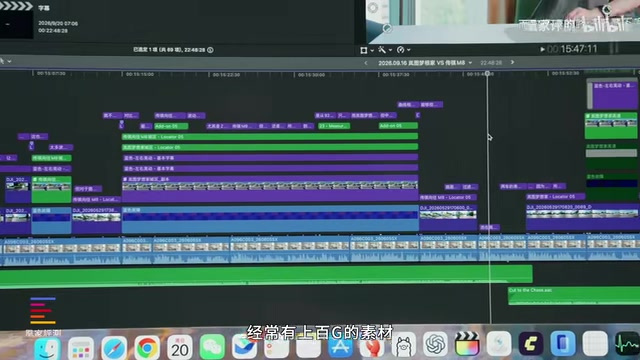
For a team like 凰家评测, which runs all video editing and visual design on Mac Studio, scrubbing through timelines packed with hundreds of gigabytes of footage and rendering quickly are already non-issues.
AAA Gaming Is No Longer a Question
The GPU leap gives Mac Studio the credentials to step outside the video production studio. The reviewer ran Cyberpunk 2077 benchmarks at Ultra quality without AI upscaling: 178 fps at 1080p, 131 fps at 2K, and a still-playable 68.8 fps at 4K.
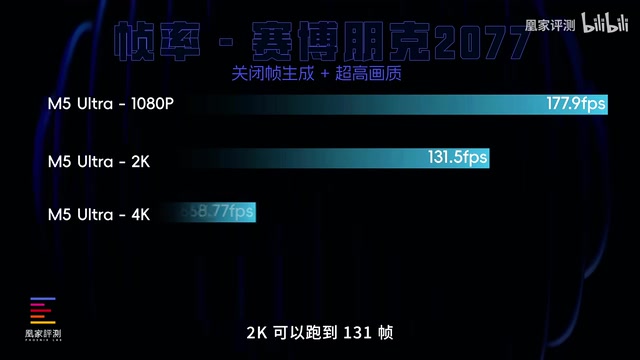
The question of "can Macs run AAA games" is essentially settled. What remains is just "which chip delivers the smoothest 4K Ultra experience." The GPU architecture improvements happen to align perfectly with AI's hunger for compute, extending this machine's relevance well beyond pure productivity.
AI Super Sampling is a key frame-rate-boosting technique in modern gaming. It works by rendering at a lower resolution and using a neural network to reconstruct a high-resolution image, significantly reducing GPU load with minimal visual quality loss. NVIDIA's DLSS, AMD's FSR, and Intel's XeSS all fall into this category, as does Apple's own MetalFX upscaling solution. The reviewer deliberately disabled AI upscaling to benchmark M5 Ultra's raw GPU floor — the ability to sustain near-70 fps at 4K Ultra without any frame-rate enhancement tech already clears the smoothness threshold for most displays. With MetalFX or in-game upscaling enabled, real-world frame rates would be even higher than these baseline numbers.
Large Unified Memory = The Ideal Local AI Container
The most valuable part of this review is how the Mac Studio was turned into an on-device AI processing hub for an entire team.
The reviewer's team had previously used DeepSeekAd V4 Flash's online API to let an agent auto-evaluate thumbnail appeal and organize product information — prized for its speed, comprehension, and token efficiency. This time, they loaded the 4-bit quantized version of DeepSeek V4 Flash 284B (155GB total) directly onto the large-memory Mac Studio, then connected their existing agent to the local model. The result: handling daily tasks that "cost electricity, not tokens." In practice, response speed and output quality were comparable to the online model for their use case.

The core value of local deployment is privacy. As a tech reviewer who regularly signs high-value NDAs, the creator had never felt comfortable uploading confidential materials to online AI services. Using Codex, he built a fully local voice transcription app that, after transcription, calls the local DeepSeek V4 Flash model to generate meeting summaries. The entire workflow never leaves the device — no leak risk, no monthly subscription fees.
He went further: financial records, medical reports, anything you wouldn't want on the internet can be analyzed by a local model. And Mac Studio, he argues, "might just be the best container for that in this era."
Unified Memory Architecture (UMA) is the key to understanding why Apple Silicon is particularly well-suited for local large language models. In traditional PC architecture, CPU RAM and GPU VRAM are physically separate — data moving between them creates latency and bandwidth bottlenecks. Apple Silicon integrates the CPU, GPU, Neural Engine, and memory controller on a single chip, with all compute units sharing one physical memory pool. This means a 155GB quantized model loaded into memory is directly accessible by the GPU, with no need to copy data between "VRAM" and "RAM." On a traditional high-end PC, even a flagship GPU with 24GB of VRAM hits a wall with models exceeding that capacity — it must either process in chunks or fall back to much slower CPU inference. Mac Studio's 256GB of unified memory effectively functions like 256GB of "VRAM" for AI workloads, which is virtually unmatched in consumer hardware and is the fundamental reason a 4-bit quantized 284B model runs smoothly.
AI + Professional Workflows: Imagination Is the Only Limit
Beyond text processing, the reviewer also demonstrated AI paired with professional creative software. Using Codex to drive Blender, he modeled an iPhone Duo entirely through natural language. Thanks to the abundant compute, Mac Studio can run the modeling task while simultaneously editing video — and then pull the finished model into a local video generation tool to produce a short AI film.
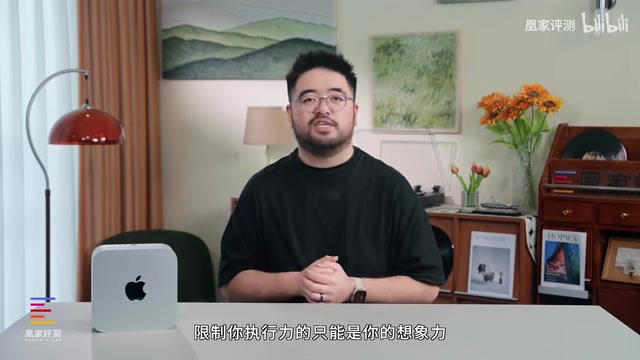
As the reviewer put it: "With AI and Mac Studio, the only thing limiting your execution is your imagination." Natural language can write code and build 3D models in Blender. Whether you can actually deliver on an idea depends on whether the hardware can carry it.
Codex is OpenAI's code generation model, now deeply integrated into ChatGPT and related toolchains, capable of translating natural language instructions into executable code. Both use cases demonstrated here — the local voice transcription app and natural-language-driven Blender modeling — are fundamentally about using Codex to bridge the gap between "what I want" and "code that does it," eliminating traditional software development barriers. Blender is an open-source 3D modeling and rendering application with comprehensive Python scripting support, making it highly controllable by AI-generated code. Together, they mean that even without programming or 3D modeling skills, you can accomplish complex creative tasks through conversation — while Mac Studio provides the local compute to run all of it in real time.
Mac Studio or Mac Mini?
With Mac Mini launching in the same cycle, the reviewer offered a clear breakdown:
- Mac Mini: Better suited for online AI workflows — handling documents, sparking ideas. Low power draw and compact footprint make it easy to leave running in the background.
- Mac Studio: Better for users who need local deployment — the more powerful processor and larger memory pool let AI run entirely on-device, supporting highly customized use cases.
More importantly, he noted a shift in how he thinks about recommending these machines. He used to reserve Mac Studio recommendations for extreme power users. In the AI era, he's willing to recommend it to anyone who wants to create — Apple's unified memory architecture seems to have landed perfectly in the local LLM moment, letting AI and Mac bring out the best in each other, offering creators the most compact high-performance container available.
Closing Thoughts
The significance of M5 Ultra Mac Studio isn't just about benchmark scores doubling. It's that unified memory architecture happens to meet the extreme memory capacity demands of local large language models. When 256GB (or more) of unified memory can hold hundred-gigabyte quantized models, privacy-conscious creators and professionals gain a private AI workstation that costs electricity instead of API tokens. For Apple, this may have been prescient planning or a fortunate coincidence — but the outcome is clear: Mac Studio's audience is expanding from a small group of pro users to anyone who wants to use AI to bring their ideas to life.
Related articles

Chain of Thought Isn't Just for AI: How Humans Can Use CoT to Improve Thinking Quality
Chain of Thought isn't just a prompt trick for large models. Starting from a Hacker News discussion, this article analyzes why CoT works for human thinking too, breaks down actionable ways to transfer it, and highlights the key differences between human CoT and machine CoT.
Cloudflare Teams Up with OpenAI: Closi…
Cloudflare Teams Up with OpenAI: Closing the Loop from Vulnerability Discovery to Defense with AI
Cloudflare uses OpenAI Daybreak to investigate security vulnerabilities and generate reviewable remediation plans, while developers use Codex to boost coding efficiency and quality.

Orca Multi-Agent Orchestration in Practice: A Guide to Parallel Collaboration with Claude and Codex
Orca is Stable AI's free open-source agent workbench supporting 34 agents like Claude Code and Codex in parallel. Learn its Git worktree isolation, multi-model orchestration, and mobile management.