M6 Mac Mini 32GB Running Local LLMs: A Practical Self-Hosting Analysis

M6 Mac Mini (32GB) is a solid local LLM self-hosting platform — stick to 9B–14B models, not 26B.
A self-hosting enthusiast plans to run Ollama headless on an M6 Mac Mini (32GB) to replace OpenRouter with fully local AI inference. Use cases span Frigate vision enhancement, Home Assistant voice assistants, bookmark tagging, and recipe parsing — mostly async, low-frequency text tasks. The article argues that 32GB unified memory struggles to smoothly run a 26B quantized model alongside other self-hosted services, recommending 9B–14B models as the practical primary choice. Apple Silicon's energy efficiency and unified memory architecture are well-suited for an always-on home AI hub, and the privacy goal is fully achievable with the right model selection.
From OpenRouter to Local Deployment: A Classic Privacy Use Case
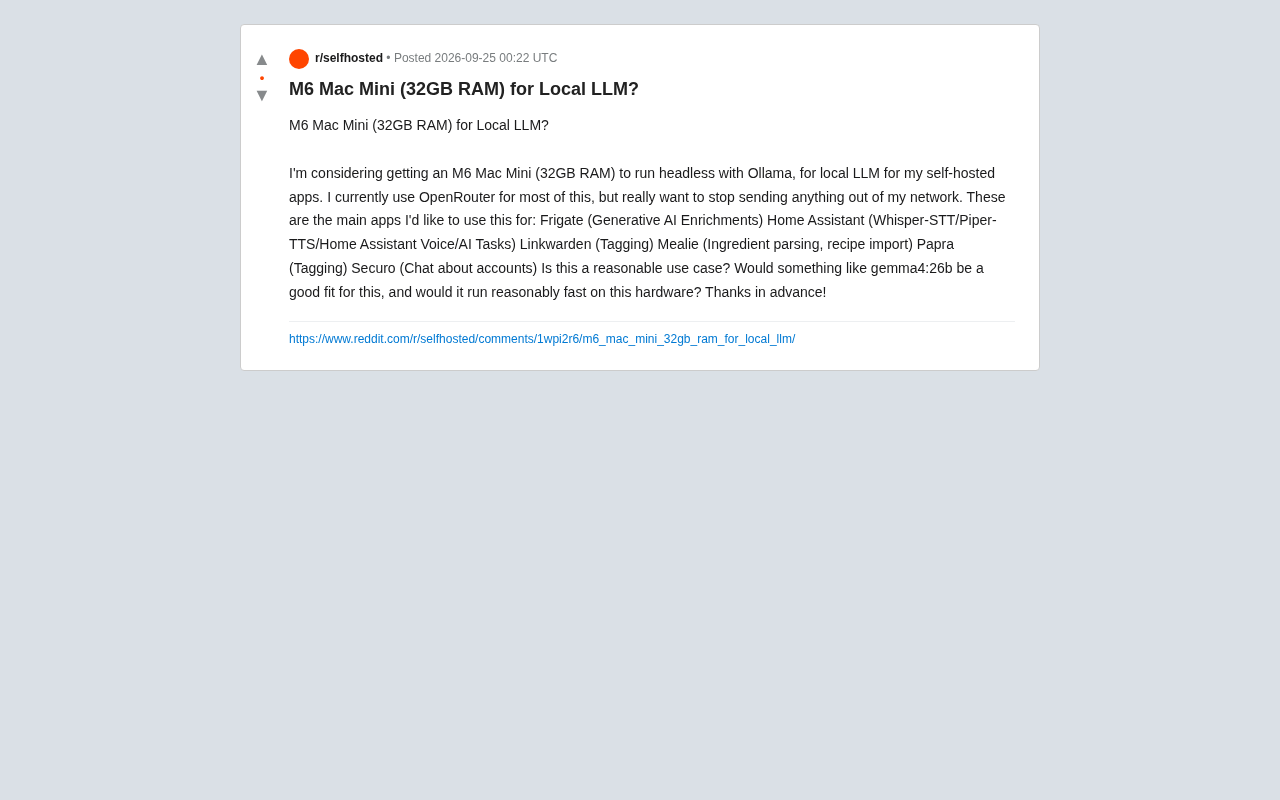
A self-hosting enthusiast on Reddit posed a question that resonates with many in the community: he's planning to buy an M6 Mac Mini (32GB RAM), run it headless with Ollama, and use it to power local LLM inference for a range of self-hosted applications at home. Most of his AI workloads currently go through OpenRouter, but for privacy reasons, he wants to "stop sending any data outside the network."
This concern is extremely common in self-hosting circles. As open-source tools like Home Assistant and Frigate increasingly integrate generative AI capabilities, users are becoming aware of the privacy risks involved in sending home camera footage, voice commands, and billing information to third-party APIs. Local deployment becomes the natural alternative — and the core question is: can an entry-level Apple Silicon machine handle it?
Ollama is one of the most popular local LLM runtime frameworks available today. It wraps the llama.cpp inference engine with a Docker-like model management experience and an OpenAI-compatible HTTP interface. Users can pull and run models with a single command like ollama run llama3, and the exposed REST API (listening on localhost:11434 by default) can be called directly by upstream applications like Home Assistant and Open WebUI — no significant code changes required. On Apple Silicon, Ollama uses the Metal API for GPU acceleration and automatically detects available memory to decide on layer offloading strategies. For headless server scenarios, Ollama can be configured as a systemd/launchd service to start on boot, and setting the environment variable OLLAMA_HOST=0.0.0.0 opens it up to LAN access, allowing other devices and containers on the home network to use local inference.
What's the Real Workload for These Applications?
The poster listed six specific use cases, each worth examining for its actual demands on the model:
- Frigate (generative AI enhancement): Generates descriptions for surveillance footage — a vision-understanding task that typically requires a multimodal model, but is triggered infrequently.
- Home Assistant (Whisper-STT / Piper-TTS / voice assistant / AI Tasks): Speech-to-text and text-to-speech have dedicated lightweight models; the real LLM consumers are "AI Tasks" and conversational voice assistants, which are sensitive to response latency.
- Linkwarden, Papra (tag generation): Automatic tagging of bookmarks and documents — short-text classification with very light workloads.
- Mealie (ingredient parsing, recipe import): Structured information extraction — another lightweight text task.
- Securo (account conversations): Requires some reasoning and contextual understanding.
The common thread across all these tasks is that most are asynchronous, low-frequency, short-text operations — not scenarios requiring sustained high throughput. This means that even if the hardware isn't top-of-the-line, the user experience won't suffer much as long as each individual response completes within an acceptable timeframe.
What Models Can 32GB Actually Run?
The poster specifically mentioned wanting to run gemma4:26b (presumably a model in the Gemma family with around 26B parameters). This deserves a reality check.
One of Apple Silicon's key advantages is its unified memory architecture, where the GPU can directly access system memory as VRAM. But 32GB of RAM isn't all freely available — the OS itself and other self-hosted services also consume resources. A 26B parameter model, even with 4-bit quantization, requires roughly 15–18GB just to load its weights. Factor in the KV cache and context overhead during inference, and 32GB gets tight fast — especially in a headless environment running multiple self-hosted services simultaneously.
More realistic choices are small-to-mid-sized models:
- 7B–9B range (e.g., Gemma 2 9B, Llama 3.1 8B, Qwen2.5 7B): Only 5–6GB after 4-bit quantization, runs smoothly, and is fully capable of handling the vast majority of listed tasks — tag generation, ingredient parsing, simple conversations.
- 12B–14B range: Runs comfortably on 32GB, strikes a good balance between quality and speed, and works well as a primary model.
- 26B+: Can run, but will noticeably squeeze resources for other services and slow inference speed.
Given that the poster's workload is primarily "tagging, parsing, and simple Q&A," a high-quality 9B–14B model is more than sufficient. Chasing a 26B model would be counterproductive.
Quantization is the key concept for understanding local model memory usage. Raw LLM weights are typically stored in float16 (2 bytes per parameter) or bfloat16 format — a 26B parameter model would require around 52GB in its original form. Quantization compresses model size by reducing the numerical precision of each parameter: 4-bit quantization shrinks each parameter to 4 bits (0.5 bytes), theoretically reducing memory usage to around 13GB. In practice, overhead pushes a 26B model's 4-bit quantized size to roughly 15–18GB. Common quantization formats include Q4_K_M and Q5_K_M within the GGUF format used by llama.cpp and Ollama — the suffix letters represent different quantization strategies, each striking a different balance between compression ratio and precision loss. Quantization inevitably introduces some output quality degradation, but at 4-bit precision and above, the impact on most practical tasks is relatively limited.
Real-World Speed: What Apple Silicon Actually Delivers
The speed of running local LLMs on M-series chips depends on memory bandwidth and GPU core count. Previous M-series base models offered around 100–120 GB/s of memory bandwidth. Running 7B–9B quantized models typically achieves 20–30+ tokens per second, which feels close to a cloud API experience. For 20B+ models, speed drops to single digits or low teens (tokens/s) — acceptable for async background tasks, but potentially noticeable lag for real-time voice conversations.
The good news for the poster is that most of his applications (tagging, parsing, Frigate enhancement) are async background tasks that aren't latency-sensitive. The one area to watch is the Home Assistant voice assistant, where conversational interaction has higher requirements for time-to-first-token. A smaller model is recommended here to ensure snappy responses.
Memory bandwidth is the core bottleneck for local LLM inference speed — not compute (FLOPS). When generating each token, an LLM needs to read nearly all of its model weights from memory into the compute units, making this a highly memory-bandwidth-bound operation. Take a Q4-quantized 8B model (~4.5GB): with 120 GB/s of memory bandwidth, you can theoretically complete about 26 full weight reads per second, corresponding to roughly 26 tokens/s generation speed. Larger models require reading more data per pass, so generation speed drops proportionally at the same bandwidth — this is exactly why a 26B model is significantly slower than an 8B model. The advantage of Apple Silicon's unified memory architecture is that the CPU and GPU share the same physical memory pool, eliminating the PCIe data transfer bottleneck of discrete GPUs. This means Macs can work with far more memory than comparably priced discrete GPUs offer in VRAM — but memory bandwidth itself remains a hard constraint.
Is This a Reasonable Setup?
All things considered, running Ollama headless on an M6 Mac Mini (32GB) to power this self-hosted AI stack is a pragmatic and sound choice:
- Privacy goals are achievable: All inference happens on the local network, completely eliminating dependence on external APIs like OpenRouter.
- Hardware matches the workload: The listed tasks are primarily lightweight and async — Apple Silicon's energy efficiency and unified memory architecture are an excellent fit for this kind of "always-on, low-load" scenario, with far lower power consumption and noise than a discrete GPU machine.
- Model selection needs to be realistic: Let go of the 26B fixation and use a 9B–14B model as the primary workhorse to maintain stability while running multiple services in parallel.
If budget allows, opting for a higher memory configuration (48GB or 64GB) would leave room to run larger models or load multiple models simultaneously in the future. But for the use cases listed here, 32GB paired with sensible model selection is already enough to build a privacy-first, capable local AI hub that genuinely gets the job done.
Related articles

Chain of Thought Isn't Just for AI: How Humans Can Use CoT to Improve Thinking Quality
Chain of Thought isn't just a prompt trick for large models. Starting from a Hacker News discussion, this article analyzes why CoT works for human thinking too, breaks down actionable ways to transfer it, and highlights the key differences between human CoT and machine CoT.
Cloudflare Teams Up with OpenAI: Closi…
Cloudflare Teams Up with OpenAI: Closing the Loop from Vulnerability Discovery to Defense with AI
Cloudflare uses OpenAI Daybreak to investigate security vulnerabilities and generate reviewable remediation plans, while developers use Codex to boost coding efficiency and quality.

Orca Multi-Agent Orchestration in Practice: A Guide to Parallel Collaboration with Claude and Codex
Orca is Stable AI's free open-source agent workbench supporting 34 agents like Claude Code and Codex in parallel. Learn its Git worktree isolation, multi-model orchestration, and mobile management.