MacDupl: One-Click Mac App Cloning for Running Multiple Accounts Simultaneously

MacDupl enables one-click Mac app cloning for running multiple isolated accounts simultaneously.
MacDupl is a Mac productivity tool that solves the long-standing pain point of running multiple accounts in the same application. By creating fully isolated app clones with independent login states, data storage, and Dock icons, it eliminates the need for constant account switching. The tool is ideal for separating work and personal accounts, social media multi-account management, and developer testing environments.
Multi-Account Switching on Mac: A Long-Overlooked Pain Point
In daily Mac usage, many people encounter an awkward problem: needing to constantly switch between different accounts within the same application. Work email and personal email, company Slack and personal Slack, multiple WeChat accounts… The vast majority of Mac apps are designed with the assumption of "one app, one account," making account switching not only tedious but also prone to data confusion.
The root cause lies in macOS's application identification mechanism. Every app in macOS identifies itself through a unique Bundle ID (e.g., com.apple.Safari), which the system uses to manage preference settings, data sandboxes, keychain access permissions, and push notifications. When users attempt to "multi-open" the same app, macOS detects the duplicate Bundle ID and refuses to launch a second instance—a design that makes sense from a security standpoint but creates inconvenience for multi-account users.
MacDupl, recently launched on Product Hunt, targets precisely this pain point. Its positioning is straightforward—"Clone any Mac app you're using into a completely isolated, independent instance." After launch, it received 85 upvotes, ranking 18th on that day's leaderboard. As the world's most influential new product discovery platform, Product Hunt sees dozens of products competing for exposure daily, with top products typically receiving 500-1000+ votes. While MacDupl's 85 votes don't make it a breakout hit, in Product Hunt's ecosystem, many quality vertical tools receive limited votes due to narrower target audiences yet build solid user bases in their niche markets. This performance reflects more the scale of its initial user circle rather than the product's potential ceiling—it touches on a high-frequency, practical need.
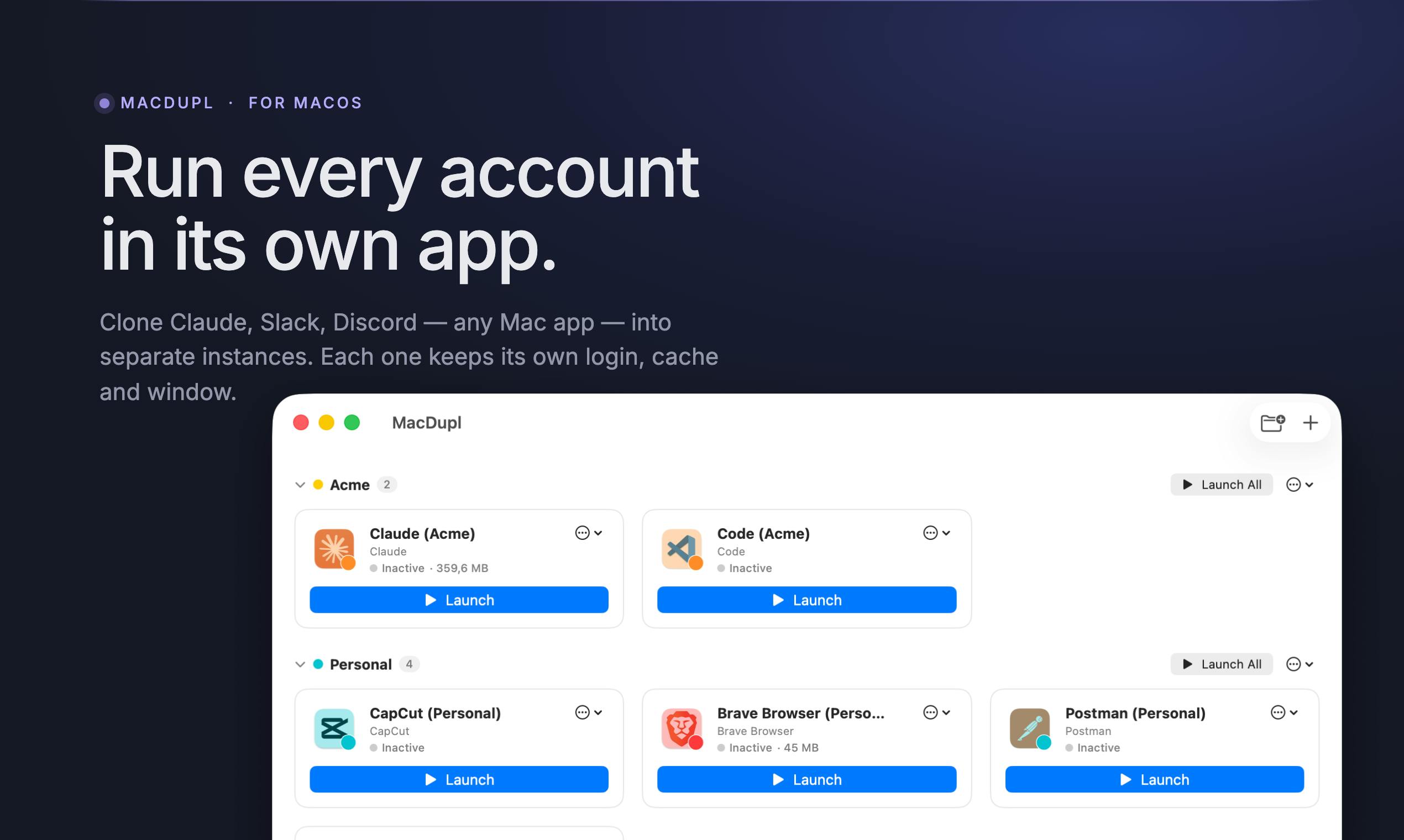
MacDupl Core Features: Fully Isolated App Cloning
Independent Login, Independent Data, Independent Dock Icon
MacDupl's core functionality can be summarized with three "independents": independent login, independent data, independent Dock icon.
When you clone an app with MacDupl, you get a "copy" that's functionally identical but completely data-isolated. This copy has its own independent login state, independent local data storage, and even appears as a separate icon in the Dock.
To understand the technical significance of this isolation, you need to understand macOS's sandbox mechanism. Since macOS 10.7, Apple introduced the App Sandbox mechanism, requiring apps distributed through the Mac App Store to run within restricted sandbox containers, where each app can only access data in its own ~/Library/Containers/ directory. However, many apps distributed via websites don't enable sandboxing—their data may be scattered across multiple system-level locations including ~/Library/Application Support/, ~/Library/Preferences/, and the Keychain. MacDupl's cloning mechanism needs to accurately identify and redirect all these related data paths to achieve true "complete isolation."
This means you can run two sets of work and personal accounts "side by side" without repeatedly logging out and in, and without worrying about cache and configuration contamination between accounts.
MacDupl vs. Traditional Multi-Open Solutions
Before MacDupl, Mac users wanting to multi-open apps typically had several clunky options:
- Multiple system user accounts: Creating multiple system users on macOS has extremely high switching costs, requiring a complete logout from the current user session;
- Command-line tricks: Manually creating app copies by modifying Bundle IDs, but the cloned copy is treated as an entirely new app at the system level, requiring reconfiguration of all permissions and authorizations—high barrier to entry and error-prone;
- Virtual machines / sandbox tools: VM solutions (like Parallels Desktop, VMware Fusion) achieve app isolation by emulating complete operating system environments, but at the cost of massive resource overhead—each VM instance typically requires several GB of memory and tens of GB of disk space. Containerization technology (like Docker) is mature on the server side but has limited applicability for macOS desktop apps, since GUI applications depend on macOS's WindowServer and graphics frameworks (like AppKit, SwiftUI), which cannot run natively in containers.
MacDupl's lightweight cloning approach essentially sits between virtual machines and simple copying—it doesn't create a complete system environment but instead implements data path redirection and identity isolation at the application level. It productizes and simplifies this process, enabling ordinary users to complete app cloning with one click—this is its greatest value.
Typical Use Cases for MacDupl
From a product positioning perspective, MacDupl suits several types of users:
Separating Work and Personal Accounts
For freelancers or remote workers who use "one Mac for everything," separating work and personal identities is particularly important. Using one cloned instance exclusively for work matters and another for personal use ensures both privacy and better focus.
It's worth noting that multi-account management isn't just a personal user concern—it's also a systemic issue in enterprise scenarios. Google's multi-account switching, Microsoft 365's organizational account management, and Slack's multi-workspace design are all attempts by major companies to solve the multi-identity problem at the application level. However, these solutions all depend on the app itself providing support and cannot cover third-party apps that don't have built-in multi-account features. With the growing trend of BYOD (Bring Your Own Device), how to securely isolate work and personal data on a single device has become one of the core topics in IT management. Apple itself is advancing this goal on the enterprise side through "Managed Apple IDs" and MDM (Mobile Device Management), but these solutions target enterprise IT administrators rather than ordinary users. MacDupl fills precisely this gap of "personal user self-service multi-identity management."
Social Media Multi-Account Operations
Social media managers, cross-border e-commerce operators, and customer service teams often need to manage multiple platform accounts simultaneously. MacDupl allows the same app to be logged into multiple accounts at once, dramatically improving multi-account operational efficiency.
Developer Testing Environment Isolation
For developers, isolated app instances can also be used to test different configuration environments without polluting the main account's data. For example, you can use a cloned instance to test how an app behaves in a fresh user state, or simultaneously run different configured versions for comparative debugging.
Important Considerations When Using MacDupl
App Compatibility Is Key
"Clone any Mac app" is a very ambitious promise. In reality, different apps have vastly different architectures—some have strict license verification (such as DRM protection based on hardware fingerprints), some store data in system-level directories rather than app sandboxes, and others employ anti-multi-open mechanisms (blocking duplicate launches by detecting process lock files or single-instance mutexes). Additionally, some apps use macOS's Hardened Runtime and code signature verification mechanisms, where modifying the Bundle ID may invalidate the signature, causing the system's Gatekeeper to block it. Whether MacDupl can truly achieve stable cloning for "any app" is the key factor determining its reputation. Currently, with only 1 product review, there's insufficient large-scale real-user validation feedback.
Data Security and Update Maintenance
After an app is cloned, whether its update mechanism and data synchronization are affected is also something users need to watch. Most Mac apps' automatic update mechanisms (whether through the Mac App Store or third-party update frameworks like Sparkle) are bound to the original Bundle ID, meaning cloned copies may not receive automatic update pushes, requiring users to manually maintain version synchronization. Additionally, the degree of data isolation in cloned instances and whether they incur additional storage overhead (especially for large applications, where full cloning may mean doubled disk usage) need to be verified in actual use.
Product Positioning: A Small but Beautiful Productivity Tool
MacDupl is categorized under Mac, Productivity, and SaaS—a precise positioning. It's not an all-in-one tool but focuses on the niche need of "app multi-opening and isolation," following a small-but-beautiful product approach.
Conclusion: An Elegant Solution for Mac App Multi-Opening
The emergence of MacDupl reflects a long-existing yet insufficiently addressed need in the Mac ecosystem—elegantly managing multiple identities on a single device. It transforms "app cloning," which previously required technical expertise, into a one-click operation, lowering the barrier to entry.
For users who frequently switch between work and personal accounts, or who need to operate multiple accounts simultaneously, the value of Mac multi-opening tools like MacDupl is clear. Of course, as a newly launched product, it still needs time and more users to validate its app compatibility, stability, and long-term maintenance. If you're troubled by multi-account switching on Mac, MacDupl is worth adding to your watchlist.
Related articles

EU AI Content Labeling Icons Explained: Unified Marking Scheme and Compliance Essentials
The European Commission has released unified AI-generated content labeling icons. This article explains the design philosophy, legal basis, and compliance implications under the EU AI Act.

Qwen3 Max Tops the Agentic Index Leaderboard: A Deep Dive into Agent Capability Evaluation
Qwen3 Max tops the Agentic Index leaderboard, excelling in tool use, multi-step reasoning, and code execution. A deep analysis of evaluation results and model selection in the agent era.

Sula: A Deep Dive into the Gemini Protocol Server Written in Scryer Prolog
Sula is an open source Gemini protocol server written in Scryer Prolog. This article analyzes Gemini's design philosophy, Scryer Prolog's modern features, and the engineering value of building servers with logic programming.