macOS 27 AI Model Removal Tool: How to Remove and Disable Apple's Local AI

An open-source tool removes macOS pre-installed AI models, reflecting widespread user pushback against vendor-default AI integration.
As Apple deeply integrates local AI into macOS, an open-source tool for removing and disabling these pre-installed AI models has gained significant attention on Hacker News. Its popularity reveals three key concerns among technical users: large model files and persistent background services consume CPU and memory, hurting performance and battery life on lower-end devices; some users want to explicitly audit whether their device is running background AI analysis for privacy reasons; and many developers oppose vendors forcing AI features on all users by default, advocating for a "minimal default" principle. The tool works by deleting model files and disabling launchd daemons, but carries compatibility risks due to system-level changes, making a full backup essential beforehand.
A Cleanup Tool for macOS AI Components
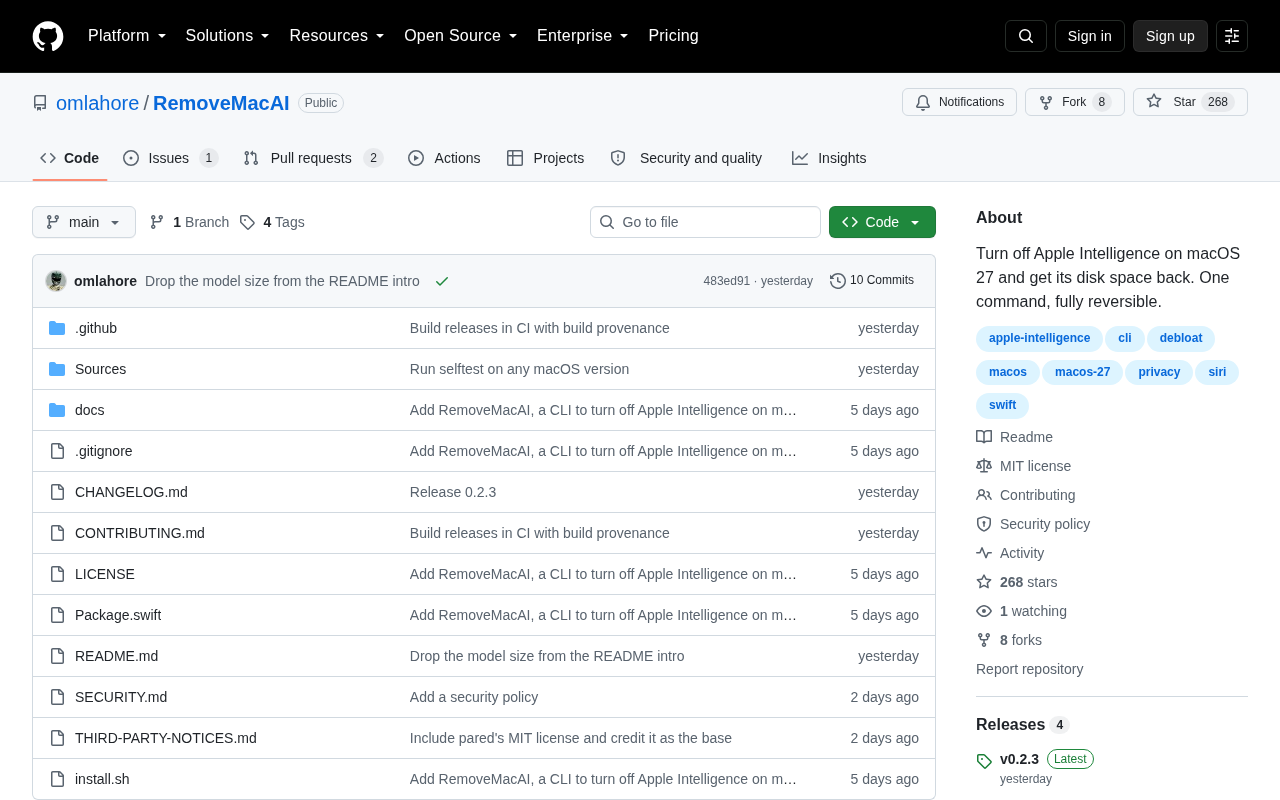
As Apple integrates more and more local AI capabilities directly into its operating system, macOS has begun shipping with a range of pre-installed machine learning models and background services by default. These components power system-level features such as intelligent text processing, image recognition, and Siri enhancements — but they also consume disk space, use memory, and run continuously in the background. An open-source tool that recently climbed to 99 points on Hacker News targets exactly this pain point: it's designed specifically to remove and disable Apple AI models in macOS 27.
The emergence of tools like this reflects a growing frustration among technical users with operating systems becoming increasingly bloated. When vendors treat AI as a default-on selling point, there will always be users who want to reclaim control over their own device resources.
Why Would Anyone Want to Turn Off Built-in AI?
Resource Consumption Is the Primary Driver
Local AI models tend to be large — individual model files can reach hundreds of megabytes or even several gigabytes. For MacBook users with limited storage, recovering that space has real, practical value. On top of that, background inference services can quietly consume CPU and memory without the user's knowledge, potentially affecting overall responsiveness and battery life, especially on lower-spec machines.
Apple Intelligence's local model architecture on macOS is stored in a layered fashion: base language models, adapter files, and various specialized models (such as those for image generation and speech processing) are distributed across /Library/Application Support/ and protected directories within the system volume. The full Apple Intelligence model package released in 2024, for example, can occupy more than 5GB on-device. Beyond static files, background daemons like intelligenceplatformd and coreduetd continuously listen for system events, loading models on demand whenever a relevant user action is triggered. Even in an "idle" state, this process causes periodic CPU wake-ups — an impact on battery life that is especially noticeable on thin-and-light laptops.
Privacy and Control Considerations
Although Apple consistently emphasizes that its AI processing happens on-device to protect user privacy, some users remain cautious about any form of automated data processing. Being able to explicitly disable these models means a user can know with certainty that their device is not performing any AI analysis in the background. This desire for something "auditable and turn-offable" is one of the core values that has long defined the open-source community.
Pushback Against Default Settings
In the Hacker News discussion thread (41 comments), many voices pointed to a broader issue: should OS vendors be allowed to force AI features on all users as default-on functionality? Many developers argue that system features should follow a "minimal default" principle — requiring users to actively opt in rather than passively accepting defaults and then hunting for the off switch.
The "Minimal Default" principle originates from software engineering and UX design, and its core argument is that a system should only enable features a user explicitly needs, rather than pre-activating every available capability. This principle is closely aligned with the UNIX philosophy of "do one thing well" and with the data minimization requirements found in Privacy by Design frameworks. In the Hacker News community and the broader developer world, this debate is tightly bound to discussions of "User Sovereignty" — the idea that users should have full awareness and control over the devices they own, rather than being subject to unilateral decisions made by vendors under the guise of "optimizing the experience."
How These Tools Typically Work
Tools of this kind generally achieve their goals through several approaches:
- Locating and deleting model files: Scanning system directories where AI models are stored and removing the corresponding model assets to free up disk space;
- Disabling background daemons: Shutting down the
launchdservices responsible for scheduling and running these models, preventing them from auto-starting; - Blocking system service calls: Using configuration changes to prevent features that depend on these models from triggering a model load.
It's worth emphasizing that directly modifying system-level components carries real risks. macOS's System Integrity Protection (SIP) restricts modifications to protected areas, and forcibly deleting certain files can cause system features to malfunction — or create compatibility issues after system updates. Always create a full backup before using tools like this.
macOS's System Integrity Protection (SIP) was introduced in OS X El Capitan. By default, it blocks write operations to core directories like
/Systemand/usr, even for users with root privileges. To modify these protected areas, you must reboot into Recovery Mode and runcsrutil disable— a step that significantly weakens the system's security posture. Most well-designed cleanup tools deliberately avoid SIP-protected territory, operating only on models and configuration files located in user-writable directories or under/Library, thereby achieving partial cleanup goals without disabling SIP. It's also worth noting that macOS's APFS snapshots and sealed system volume mechanism will reset protected system areas after each OS update — meaning that even if some modifications take effect temporarily, they may be automatically reverted after the next OTA update.
The Deeper Signal: A Tug-of-War Between Users and Vendors
The tool itself isn't particularly complex, but the fact that it reached the top of Hacker News suggests it struck a nerve. As AI becomes a standard feature of major operating systems, vendors tend to enable it by default and integrate it deeply, showcasing their technical capabilities while driving usage. Technical users, meanwhile, are increasingly focused on transparency, resource control, and the right to choose.
Taking a longer view, community tools like this also create indirect pressure on vendors: if official settings provided clear, well-documented toggles, users wouldn't need to rely on third-party tools to "disassemble" their own systems. Ideally, AI features should work like any other system service — visible, configurable, and switchable off.
Practical Advice
For users considering tools of this kind, a few points are worth keeping in mind:
- Assess your actual needs first: If you don't mind these AI features and have plenty of disk space, there's no reason to risk modifying your system;
- Create a complete backup: Use Time Machine or another method to back up your system so you can roll back if something goes wrong;
- Keep major update impacts in mind: macOS major version updates may re-write deleted components, or fail to update properly if certain files are missing;
- Prefer official toggles when available: If system settings already provide an option to disable related features, always use the official route first.
At its core, this tool represents an attitude — that users deserve genuine sovereignty over the hardware they've paid for. Whether or not you ever actually remove these AI models yourself, the debate it sparks about "default-on vs. active opt-in" is one worth considering for anyone who cares about technology ethics and user rights.
Related articles

How Big Can Stars Really Get? The Physical Limits of the Largest Stars
Red supergiants are the largest stars by volume, with radii up to 2,000 times the Sun, engulfing the inner solar system. But there is no precise upper limit on stellar size—models predict up to 15,000 solar radii. The most massive blue stars are far smaller than red supergiants—biggest and heaviest are two different things.

Apple HomeView Smart Display Full Feature Breakdown: Wall-Mount or Desktop, $299
Apple launches HomeView, a $299 smart display with wall-mount and desktop options, 12MP camera for facial recognition, smart home control, music playback, and recipe step-by-step cooking. Full breakdown of watch faces, apps, privacy, and cooking integration.

Where Did the Promised New Studio Go? Craft Computing Answers After Five Years
Craft Computing's host responds to viewer questions: the new studio promised five years ago was shelved as construction costs soared from $30,000 to $75,000, and was replaced by a 168-square-foot garage conversion.