macOS Memory Limits Don't Work: Kill Jobs Before They Swap with stageload

macOS can't cap memory with ulimit — use swap monitoring and a guard to kill jobs before they freeze the machine.
macOS has no systemd or cgroups, and ulimit refuses to set a memory cap while resource.setrlimit raises an error. Under memory pressure it compresses memory and writes to swap, so a job that doesn't fit doesn't fail — it just slows the whole Mac. Activity Monitor's footprint excludes swapped pages and can badly underestimate use, so monitor sysctl vm.swapusage and kern.memorystatus_level instead. stageload guard sends SIGTERM/SIGKILL to a process group before the machine freezes, and stageload run queues multiple heavy jobs with fair scheduling. The real fix is staged model loading, cutting peak memory from 43.6 GB to 19.0 GB.
On Linux, ulimit -v, systemd-run -p MemoryMax= or cgroups can cap a single job's memory. A job that exceeds its limit fails on its own instead of dragging down the whole machine. macOS has neither systemd nor cgroups, and ulimit flatly refuses to set a memory cap.
Measured on macOS 26.5.2:
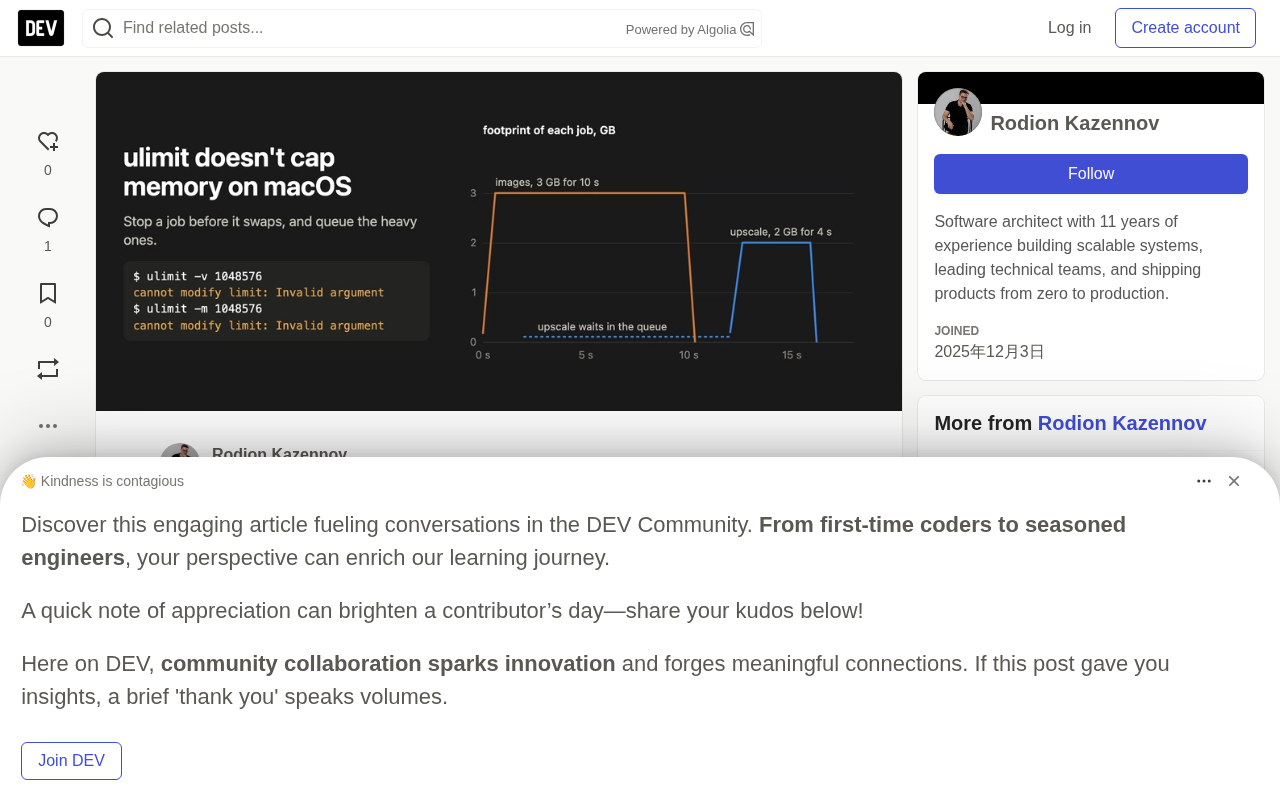
$ /bin/bash -c 'ulimit -v 1048576'
/bin/bash: line 0: ulimit: virtual memory: cannot modify limit: Invalid argument
$ /bin/bash -c 'ulimit -m 1048576'
/bin/bash: line 0: ulimit: max memory size: cannot modify limit: Invalid argument
In Python, resource.setrlimit(resource.RLIMIT_DATA, ...) raises ValueError. Worse, in the same shell where ulimit -m failed to set, a script went on to allocate and touch 3 GiB of memory.
macOS's approach is to compress memory and write to swap. A model that doesn't fit doesn't fail: it slows down, and everything else on the Mac slows down with it.
So the question worth asking changes: is there room before the job starts? Is swap growing while it runs?
Checking Swap at Runtime
sysctl vm.swapusage             # compare "used" before and during a run
sysctl kern.memorystatus_level  # system-wide free-memory percentage
Activity Monitor's process footprint excludes pages that have already gone to swap. In one Qwen-Image-2.1 run using diffusers with CPU offload, the footprint on a 48 GB M5 Pro never exceeded 18.5 GB, while swap grew by 9.6 GB. A chart looking only at footprint would conclude the run fit.
Swap vs. compressed memory: Rather than treating memory oversubscription as an error, macOS absorbs pressure through two mechanisms. The first is compressed memory: the kernel compresses less-frequently-accessed pages and keeps them in RAM, decompressing on demand at the cost of CPU overhead. The second is swap: as memory pressure keeps rising, pages are written to swap files on disk and swapped back in when needed. Both let programs avoid failing and merely slow down, dragging down every other process on the same machine. The used value reported by sysctl vm.swapusage is the currently occupied swap space (including the encrypted compressed swap file). Record it once before starting and compare the delta at intervals during the run to tell whether the job is pushing memory out to disk. kern.memorystatus_level is the kernel's system-wide free-memory percentage; the lower the number, the tighter the memory, making it a more immediate pressure indicator than swap alone.
It's worth noting that swap itself isn't a failure signal but a trend signal: a slow, steady small increase is usually acceptable, while a rapid climb over a short period means the job is approaching the machine's capacity limit — and the earlier you kill it, the shorter the time the machine spends being dragged down.
Killing Jobs Before They Swap
stageload is a small library written for staged model loading, and it ships with a guard:
stageload guard --wait-free 40 --swap-budget 8G -- python generate.py
It waits until kern.memorystatus_level is at least 40% before starting the command. If swap grows more than 8 GB beyond what was in use at start, or free memory drops below 10% on two consecutive samples, it sends SIGTERM to the command's process group, then SIGKILL to any remaining processes five seconds later. It needs no root and only terminates the command and its process group. Exit code 3 means the guard terminated the command, 4 means no room was found to start; otherwise it returns the command's own exit code.
That eager-mode Qwen-Image run ended exactly this way: it completed all 20 steps, VAE decoding pushed the footprint to 43.6 GB, swap grew by 8 GB, and the guard terminated it before the Mac froze.
The division of labor between SIGTERM and SIGKILL: The guard first sends SIGTERM to the command's entire process group. This is a catchable, handleable signal, giving the program a chance to save intermediate results, release resources, and exit gracefully. If the process hasn't ended within five seconds, it then sends SIGKILL — a signal that cannot be caught or ignored and is forcibly terminated by the kernel, guaranteeing cleanup. Sending to the process group rather than a single PID is critical: a training or inference script often forks data loaders, subprocesses, or worker pools, and killing only the main process leaves orphaned processes holding memory, rendering the limit useless.
Another detail is the exit-code convention: an ordinary shell command killed by a signal returns 128 plus the signal number, whereas the guard deliberately uses custom exit codes — 3 means the guard terminated the command itself (triggering memory protection), 4 means there wasn't enough free space to even start; everything else passes through the command's own exit code or signal result. This lets scripts and CI distinguish "the job failed on its own" from "it was stopped by the memory guard," deciding whether to retry, scale down, or tune parameters. The guard needs no root precisely because it only operates on the process group made up of itself and its children.
Running Two Heavy Jobs at Once
One guard decides on its own. Two guards that both see room will start their jobs simultaneously — and each job was sized for an idle Mac. On October 5, one of my runs started in the gap between another script's two video jobs, and the next video job pushed swap past budget within 20 seconds.
stageload run puts jobs into a queue on the same machine. It accepts the guard's parameters. Below, two jobs using 3 GiB and 2 GiB respectively, launched from two terminals:
stageload run --who images -- python3 alloc.py 3 10    # hold 3 GiB for 10 seconds
stageload run --who upscale -- python3 alloc.py 2 4    # hold 2 GiB for 4 seconds
$ stageload queue
ram     0 running  images               pid 32488   since 2026-10-12T14:08:56+00:00  python3 alloc.py 3 10
ram     1 waiting  upscale              pid 32499   since 2026-10-12T14:08:58+00:00  python3 alloc.py 2 4
The second job starts after the first finishes, and the guard's checks then run as usual:
14:08:58Z queue: waiting in ram (1 ahead: images)
14:09:08Z queue: start in ram after 10 s, swap 6.0 GB, stop above 14.0 GB or under 10% available twice
$ stageload queue --history 2
done   ram    exit 0    images               waited 0 s, ran 10 s, peak 3.0 GB  python3 alloc.py 3 10
done   ram    exit 0    upscale              waited 10 s, ran 4 s, peak 2.0 GB  python3 alloc.py 2 4
On a shared Mac, a few details matter:
- Jobs join a lane,
ramby default. Lanes don't wait on each other, so a job waiting on a remote API quota can go in its own lane (--lane api --wait-free 0) without blocking memory-hungry jobs. - Turns are fair between owners. The owner that has waited longest goes next, so a script queuing twenty jobs takes turns with other scripts rather than monopolizing the lane. The owner is set by
--owner, or defaults to the part of--whobefore the first hyphen. - Every run writes a memory trace for the command and all its processes, and records a line in
~/.stageload/history.jsonlincluding wait time, run time, peak footprint, and swap. - Engines started outside the queue write
~/.stageload/busy.txt, one pattern per line. Every run in theramlane waits until those patterns haven't been observed for 20 seconds.
Limitations
- The guard and the meter read macOS counters (
libproc,sysctl), so they only run on a Mac. - The guard kills a job but doesn't make it smaller. On the model side, staging a single model is exactly what brought Qwen-Image-2.1 down from 43.6 GB to 19.0 GB on the same Mac: How to run Qwen-Image-2.1 on a 48 GB Mac without swap.
- If you need a whole-machine safety net, macos-oom-guard runs as root and kills the largest process before a kernel panic. The two can be used together.
One-line Summary
macOS can't cap memory with ulimit, so you need swap monitoring and a guard to kill jobs before they freeze the machine.
Paragraph Summary
macOS has neither systemd nor cgroups, and ulimit flatly refuses to set a memory cap, while resource.setrlimit raises an error too. Under memory pressure the system chooses to compress memory and write to swap, so a job that doesn't fit doesn't fail — it just slows the whole Mac down. Activity Monitor's process footprint excludes pages already swapped and can badly underestimate memory use, so monitor with sysctl vm.swapusage and kern.memorystatus_level instead. stageload guard can send SIGTERM/SIGKILL to a process group when free memory is low or swap grows past budget, killing jobs before the machine freezes; stageload run puts multiple heavy jobs into one queue with fair, owner-based scheduling across lanes, avoiding simultaneous startups that exhaust memory. The fundamental fix is still staged model loading, cutting peak memory from 43.6 GB to 19.0 GB.
Related articles

How Big Can Stars Really Get? The Physical Limits of the Largest Stars
Red supergiants are the largest stars by volume, with radii up to 2,000 times the Sun, engulfing the inner solar system. But there is no precise upper limit on stellar size—models predict up to 15,000 solar radii. The most massive blue stars are far smaller than red supergiants—biggest and heaviest are two different things.

Apple HomeView Smart Display Full Feature Breakdown: Wall-Mount or Desktop, $299
Apple launches HomeView, a $299 smart display with wall-mount and desktop options, 12MP camera for facial recognition, smart home control, music playback, and recipe step-by-step cooking. Full breakdown of watch faces, apps, privacy, and cooking integration.

Where Did the Promised New Studio Go? Craft Computing Answers After Five Years
Craft Computing's host responds to viewer questions: the new studio promised five years ago was shelved as construction costs soared from $30,000 to $75,000, and was replaced by a 168-square-foot garage conversion.