Make AI Remember Your Project: A Guide to Building a Memory System for Claude Code

Use three plain text files—log, directory, and decision book—to give AI cross-window project memory.
The article addresses the pain point of AI "amnesia" in new conversation windows with a plain-text external memory solution. The core is a trio: a work log recording the reason for each change, pitfalls, and TODOs with specific tags; a directory giving each log entry time, summary, and tags, with a rule to search tags only (not summaries) to reduce irrelevant results; and a decision book that is append-only, recording long-term rules and pointing back to logs. The key mechanism is writing "read the directory first before starting" at the top of the master rules file so the AI looks up history before acting. Using a downloads folder organizing example across three brand-new windows, the author validates the approach. The article also covers installation tips, negative checks, a ~150,000-character directory read limit with archiving strategy, and notes that concurrent writes by multiple AIs left only 3 of 30 entries, so the memory system still needs to evolve.
Every time you open a new conversation window, the AI seems to have amnesia—project details discussed earlier and rules established before are all forgotten. This isn't a problem with the model itself; rather, you lack an "external memory" system for the AI. This article tackles exactly that pain point: using three plain text files to enable Claude Code to "remember" your project even in a new window.
Why AI Always Forgets You
Opening a new conversation window is like introducing a brand-new colleague to the AI—it knows nothing about what was discussed last time or what rules were set. Even within the same window, if the conversation drags on, earlier content gets compressed and details are lost. According to testing and analysis by a Bilibili creator, this forgetting stems from the inability to look back across conversation histories; relying on chat logs themselves is unreliable.
The solution is surprisingly simple: give the AI three things—a work log, a directory page, and a decision book. All three are ordinary text files—no plugins, no databases—and you can open and inspect them anytime.
Large language models are inherently stateless: each inference call generates a response based solely on the context window of the current input, and no conversation memory is stored in the model weights. What we call "chat history" is just text spliced into the current context, discarded once the window closes. The context window has a hard length limit; beyond that, the system typically truncates or summarizes/compresses, with earlier content more likely to be dropped. Hence early details gradually vanish in long conversations. This is why relying solely on chat logs is unreliable—it neither persists across windows nor guarantees full retention within a window. Writing key information to external files and actively reading them at the start of each session is equivalent to constructing a searchable, persistent external memory layer for the model, bypassing the limitation of statelessness.
The Trio: Work Log, Directory, Decision Book
Work Log: Record the Reason for Each Change
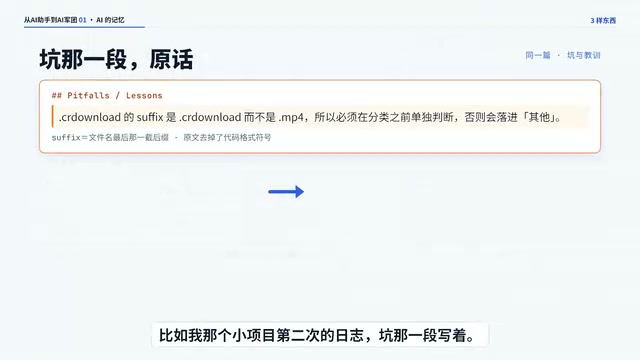
Each time a requirement is raised, the AI writes a log entry after completing it, in five sections: what was changed, why it was decided, what pitfalls were encountered, and what remains unclear. For fixing a typo, three sentences suffice; the bigger the change, the more thorough the log. According to the creator, in the second log entry for his small project, the "pitfalls" section recorded: the filename of an unfinished movie download didn't end with a video format but with a downloading marker—it had to be picked out separately first, otherwise it would get mixed in with other files.
Each log entry also starts with a string of tags, which should be specific—e.g., "unfinished," "same name," "classification rules"—rather than vague phrases like "fixed a problem." When the AI later digs through old records, it searches for this string of tags.
Directory: Let the AI See History at a Glance
Each log entry occupies one line in the directory, containing time, name, a one-sentence summary, and a string of tags, with the newest at the top. According to the creator's testing, when searching the entire line across 72 directory entries, two test words yielded irrelevant results at over 60% and over 70% respectively—too much noise, and the AI eventually couldn't be bothered to look. So the rule was simplified: search only the string of tags at the end of each line, not the sentence before it.

Here, "search" is not database full-text retrieval but pattern matching by the AI within the directory text already loaded into context. A full directory line includes time, name, summary, and tags; the summary often uses natural language with low literal overlap with user query terms, easily introducing semantically similar but topic-irrelevant entries—the measured 60–70% irrelevance rate stems from this. Tags, however, are a set of manually distilled keywords with high discriminability and low noise. Narrowing the search scope to tags is equivalent to replacing free-text matching with a manually built controlled vocabulary, yielding more accurate recall. This also explains why tags must be specific: the more abstract the tag, the broader the hit range and the more irrelevant results; the closer the tag to the specific problem domain, the higher the probability the AI finds the correct log.
Decision Book: Answering "What Exactly Did We Decide?"
The decision book records rules established long ago, one sentence per item stating what was decided and why, then pointing back to the log entry. For example: "Skip unfinished files and leave them in place—why? Moving a half-downloaded file will cause the download to fail." The decision book only allows appending; if a decision is overturned someday, don't modify the old one—add a new entry stating which one it supersedes. The log answers "why was it changed this way at the time," while the decision book answers "what exactly did we decide."
The append-only approach draws on event sourcing: state is not represented by a single overwritable record but accumulates over time from a series of immutable events. This allows tracing back at any moment "when and why a rule was established or superseded," avoiding loss of decision context when old records are rewritten. For the AI, the decision book is a stable snapshot of rules; after loading it in a new window, the AI immediately obtains the currently effective set of constraints without having to sift through logs to re-infer. Explicitly stating which entry is superseded by a new one is equivalent to maintaining an effective version chain over the append-only sequence, making rule evolution both auditable and rollback-capable.
Key Mechanism: Read the Directory First Before Starting
Writing alone isn't enough; what's truly valuable is the AI looking things up before acting. According to the creator, he wrote a line at the very top of the master rules file: "Read the directory first before starting," and had the AI automatically include the entire directory page. Thus, no matter how many new windows are opened, the first thing the AI sees is this directory page.
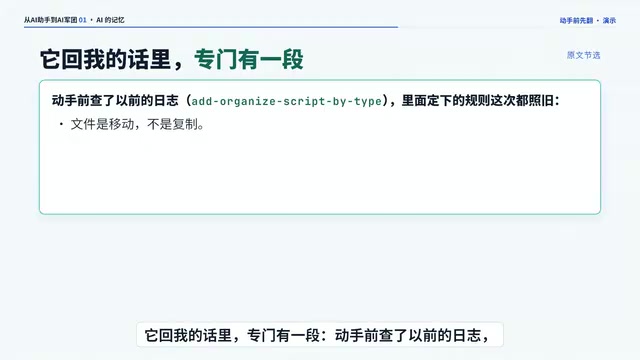
He walked through a small script for organizing a downloads folder from scratch, raising three requirements, each in a brand-new window: the first time, he handed the instructions to the AI and had it set up the three items itself—it took a minute and a half from start to finish; the second time, writing the organizing script, the AI set four rules on its own—move files rather than copy them, skip unfinished files, rename rather than overwrite duplicates, and support a dry run that lists what would be moved without touching files—all recorded in the log and decision book; the third time, again a new window, he asked to add a feature to organize into folders by month. The AI didn't remember the previous conversation, but upon starting it read the directory, so before acting it searched the directory for the words "classification," "move," and "month" one by one, and immediately found the previous log entry. Its reply included a dedicated section: "Checked previous logs before acting; the rules set there are all followed this time as well."
How to Install: Clarify Three Things
Installation is just like the first time: hand the instructions to the AI and clarify three things.
First, pick one timezone for timestamps—don't mix them, or the directory order will be scrambled. Second, specify which places in the project trigger a look-back before changes—the more specific, the less likely the AI forgets to check. Third, decide whether to also enable the AI's built-in memory feature—small projects can leave it off for now.
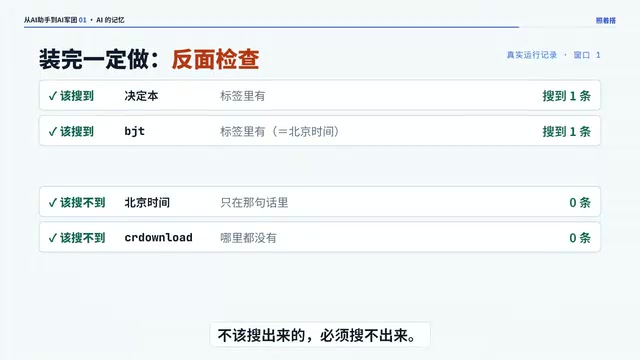
After installation, be sure to do a negative check: what should be found must be found, and what shouldn't be found must not be found. Have it follow the instructions—for example, search for the word "instructions": searching only tags yields zero results, while searching the entire directory yields two hits—this shows the search isn't broken; rather, the rule "search tags only" is working.
One more thing: the directory will grow longer and longer, and the AI must read it at the start of every session. The limit for what it can automatically load is about 150,000 characters; when approaching 140,000, move the oldest entries into an archive file, and search both together.
The "automatic loading limit of about 150,000 characters" corresponds to the model's context window token budget: Chinese characters and tokens are not one-to-one—150,000 characters roughly correspond to hundreds of thousands of tokens, approaching or exceeding the window limits of common models, so headroom is needed. The directory is fully loaded at each session start, a fixed overhead that eats into context space for actual tasks; as log entries keep growing, the fixed overhead expands, the model's remaining budget for reasoning shrinks, and both response quality and speed suffer. Moving the oldest entries into an archive file controls the resident context size while maintaining search completeness—daily searches read only the main directory, and when tracing history, search the archive along with it, effectively implementing hot/cold data tiering.
Enough for One Person, What About a Group?
As the creator puts it, one person paired with one AI is enough. But what if a group of AIs write to the same directory page simultaneously without any protection? He ran an experiment: 30 entries written concurrently, only 3 remained. Moving from single-assistant to multi-assistant collaboration, the memory system needs new approaches—that's the direction for the next installment.
What does your AI most often forget? Feel free to share in the comments.
Related articles
 Tech Frontiers
Coldframe: A Honeypot Disguised as a Supermarket Freezer Controller
Coldframe is a honeypot disguised as Danfoss AK-SM 800A and Dixell XWEB freezer controllers, built as a single Python file that detects CVE-2025-41450 attempts and is identified as real devices on Shodan.
 Tech Frontiers
GRFNet: A Lightweight PyTorch Model Designed for Multichannel Time-Series Classification
GRFNet is a lightweight PyTorch model for multichannel time-series classification, originating from EEG decoding research. With only 3,847 parameters, it is based on the ROCKET architecture, combining random convolution kernels with learnable spatial filters, supports arbitrary input lengths, and will soon be evaluated on the PhysioNet dataset.
 Tech Frontiers
CUDA-Accelerated Rocket League Simulator: A Player-Made Hardcore Experiment
A Reddit post shows a "100% Accurate" Rocket League simulator accelerated with CUDA. We analyze its technical context, CUDA's value in game physics simulation, and the significance and limitations of such community projects.