Manus AI in Action: Building a Phone Camera Blind Test Website from Scratch with Zero Code

Building a complete phone camera blind test website using Manus AI 1.5 with zero code
A tech YouTuber used Manus AI 1.5 to build a complete phone camera blind test website entirely through natural language conversation with zero coding. The site features a frontend blind test experience with photo zoom and pan, smart ranking, and comments, plus a backend admin system with batch upload and automatic HEIC conversion, and an auto-generated analytics dashboard. Key upgrades in Manus AI 1.5—stronger contextual understanding, auto-repair, and version rollback—made the project possible.
The Real Need: Why Build a Phone Camera Blind Test Website
Tech YouTubers who review smartphones all face the same problem: when showing photo comparisons in videos, viewers can only watch passively—they can't zoom in, pan around, or examine details on their own. One YouTuber had long wanted to build a dedicated blind test website that lets users manipulate photos themselves to discover which camera style they truly prefer.
This time, he used Manus AI 1.5 to bring that idea to life—without writing a single line of code. Through pure natural language conversation, he built a complete website with frontend, backend, and database.
Technical Background on No-Code Development: No-code development platforms represent a major trend in software engineering. Traditionally, building a full web application with frontend, backend, and database requires mastering HTML/CSS/JavaScript, server-side languages (like Python or Node.js), database management (MySQL, PostgreSQL), and API design—a steep learning curve. AI-driven no-code tools like Manus AI combine natural language processing (NLP) with code generation models, converting text descriptions directly into runnable code and deployment configurations. Under the hood, these tools typically leverage the code generation capabilities of large language models (LLMs), paired with automated testing and deployment pipelines, to achieve end-to-end automation from requirements to production.
Feature Breakdown: Frontend, Backend, and Data Dashboard
Frontend Blind Test Experience
The website homepage is clean and minimal—users immediately see the active blind test project. This test included sample shots from the OPPO Find X9 Pro, iPhone 17 Pro, and Galaxy S25 Ultra.
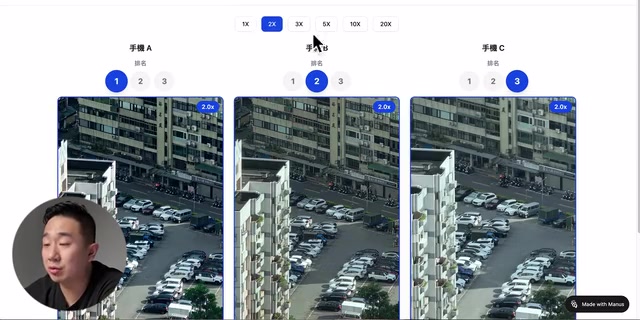
The core experience flow is remarkably smooth:
- Photo Zoom: Clicking the zoom button triggers a smooth animation, allowing pixel-level magnification for detailed comparison
- Free Panning: After zooming in, users can drag to any position—focusing on signboard text, leaf textures, or other key areas
- Smart Ranking: After selecting first place, other rankings auto-adjust without conflicts
- Comments: Users can leave notes beneath each photo (e.g., "This one has less aggressive AI processing"), visible to other users
After completing the blind test, the system automatically calculates total scores (3 points for first, 2 for second, 1 for third) and generates a personal results report. Users can also view aggregate statistics from all participants to understand overall preference trends.
Backend Management System
The backend is more polished than expected. Admins can create new test projects, configure 2 to 5 phones for comparison, and upload 1 to 15 sets of sample shots.

Several noteworthy design choices:
- Batch Upload: Supports uploading 15 photos at once—only one operation needed per phone
- Automatic HEIC Conversion: Detects iPhone's HEIC format and converts automatically, eliminating manual conversion
- Status Management: Tests can switch between "Draft," "Active," and "Closed" states—closed tests retain data but become invisible to users
- Data Reset: One-click reset when test data needs to start over
HEIC Format and Mobile Image Processing: HEIC (High Efficiency Image Container) is Apple's default image format since iOS 11, based on the still-image variant of HEVC (H.265) video coding. Compared to traditional JPEG, HEIC reduces file size by approximately 50% at equivalent quality while supporting 12-bit color depth, HDR, Live Photos, and other advanced features. However, cross-platform compatibility has always been a pain point—Windows requires additional codecs, and many web browsers and image processing libraries lack native support. Handling HEIC in web applications typically requires server-side conversion using libraries like libheif or ImageMagick, converting to JPEG or WebP before serving to the frontend. Manus AI's ability to automatically identify and handle this technical detail demonstrates the depth of understanding AI code generation tools have for real-world usage scenarios.
Auto-Generated Data Dashboard
Manus AI also produced a complete data dashboard covering hourly page views, visitor counts, session duration, bounce rate, most popular pages, traffic sources, geographic distribution, and device types. This data is invaluable for optimizing the website experience going forward.
Three Key Upgrades in Manus AI 1.5
Upgrade 1: Stronger Contextual Understanding
The creator's initial prompt was actually quite brief:
"I want to build a phone camera blind test website. There might be 15 photos uploaded, with 2 to 5 phones varying per test. I need upload and naming functionality. Users shouldn't need to log in to take the test. Each group should display all phone photos with zoom capability."
From just this single description, Manus AI generated a complete website with frontend interface, backend management, and database storage.
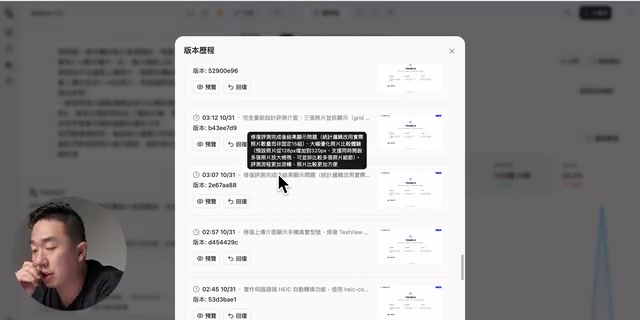
During subsequent iterative conversations, Manus 1.5's context handling was noticeably stronger—maintaining consistency across longer dialogues without "forgetting" previously discussed requirements mid-conversation. For complex projects requiring continuous iteration, this is crucial.
Context Windows and Long-Conversation Consistency: A large language model's "context window" determines how much information it can remember and process within a single conversation, typically measured in tokens (1 token ≈ 0.75 English words or 0.5 Chinese characters). Early models had context windows of only 4K–8K tokens, making them prone to "forgetting" earlier requirements during multi-round iterations of complex projects, causing later modifications to contradict initial designs. Manus AI 1.5's emphasis on "stronger contextual understanding" means the model has not only expanded its window capacity but also optimized its modeling of long-range dependencies—accurately referencing design constraints from dozens of conversation turns earlier. This is especially critical for product development requiring continuous iteration, eliminating the inefficiency of developers repeatedly restating requirements.
Upgrade 2: Auto-Repair and Version Rollback
During the build process, Manus 1.5 automatically opens its built-in browser for testing and fixes issues it discovers. This "self-testing" approach significantly reduces the back-and-forth typically needed in development.
Related articles
 Product Reviews
The Programmer's Desk Setup Guide: Building a Workspace That Feels Like Home
Discover how programmers build productive, comfortable workspaces. From multi-monitor setups to ergonomic design, explore the desk philosophy that drives focus and flow.
 Product Reviews
Qoder vs Cursor Real-World Comparison: Which $20/Month AI IDE Is Better?
Hands-on comparison of Qoder vs Cursor AI IDEs: Agent autonomy, human interaction count, and architecture decisions. Qoder needed only 2 interactions vs Cursor's 8.
 Product Reviews
Cursor Cloud Agent Demo: Eliminating Bottlenecks Across the Entire Software Development Lifecycle
Deep analysis of Cursor's Cloud Agent demo showing how cloud VMs, automated test artifacts, and a full-chain control plane systematically eliminate human bottlenecks across the software development lifecycle.