Master n8n in 2 Hours: Build Your AI Automation Empire with Zero Code

n8n hands-on course: build AI agents from scratch and achieve business automation.
This article introduces a hands-on AI automation course based on n8n, taught by Aslam, founder of an automation company with four years of experience and over 100 clients. The article first compares n8n with Zapier, emphasizing n8n's flexibility and self-hosting advantages; then deconstructs the triangular structure of AI agents (trigger, processing, action), and through six progressive projects shows how to build Telegram customer service bots, AI email support systems, content generation and automatic publishing, lead scraping and cold email outreach, and other real business scenarios. The course also explains in detail API key configuration, Webhook and ngrok usage, helping learners bridge the last mile of automation. Finally, it points out that the course is suitable for beginners and business operators, but attention should be paid to the long-term costs of third-party services.
AI automation is no longer the exclusive domain of programmers. A founder of an automation company with four years of experience and over 100 clients uses a complete hands-on course to show how to build AI agents that can actually handle business operations from scratch using n8n. This is not just a tool tutorial, but a systematic methodology for "how to make AI work for you."
Why n8n? Redefining the Boundaries of Automation
Among the many automation tools, n8n is often compared to Zapier. But the video's author offers a more precise positioning: if Zapier is the "calculator" of automation, then n8n is an "engine" you can assemble freely.
Its core advantage lies in flexibility. n8n offers over 500 integrations, but the real value is that you can use "nodes" like building blocks to connect any service that has an API. From OpenAI and Google Sheets to Telegram, each node is like a dedicated worker in a factory, responsible for just one process, and the "trigger" is the factory gate, determining when the entire workflow starts running.
For learners, the author offers a pragmatic suggestion: prioritize trying self-hosting. Deploying via Docker lets you use all of n8n's features for free, avoiding the cloud version's subscription fee starting at €20 per month and bypassing the free trial's "1,000 executions" limit. Even if you choose the cloud version, you can extend your learning period during the 14-day trial by registering with multiple email addresses.
Self-hosting and Docker deployment: Self-hosting means installing n8n on your own server or local computer rather than using n8n's official cloud service. Docker is an open-source containerization platform that allows you to package an application and its dependencies into an independent container, ensuring consistent operation in any environment. By deploying n8n with Docker, you only need to run a single command to start the service, with no manual Node.js environment configuration, and you can easily manage data persistence and version upgrades. This approach is not only free but also gives you full control over data privacy and system resources.
Deconstructing AI Agents: The Triangular Structure of Trigger, Processing, and Action
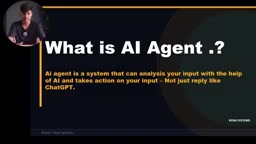
Many people confuse ChatGPT with AI agents. One point repeatedly emphasized in the video is: ChatGPT is just a "tool that talks," while an AI agent is a system that can perceive, decide, and execute.
A complete AI agent consists of three parts:
- Trigger: The gate of automation, which can be form submission, scheduled tasks, webhooks, or Telegram messages.
- Processing: The brain of the AI, which analyzes input, determines intent, and generates content through prompts.
- Action: The hands and feet of the agent, sending results to Gmail, saving to Google Sheets, or pushing to Instagram.
The author uses three cases to illustrate this structure: a customer feedback system (form trigger → AI analysis → automatic reply), a recipe expert (input dish name → AI generates recipe → save PDF and send), and a content system (input topic → AI generates copy → automatically schedule and publish). These three cases seem different, but the underlying logic is completely identical—this is the key to understanding automation thinking.
Webhook: A webhook is a "reverse API" mechanism that allows one application to push data to another application in real time. Unlike traditional API polling (where the client actively requests), a webhook immediately sends an HTTP POST request to a preset URL when an event occurs (such as a new order or form submission), carrying the event data. In n8n, the Webhook node acts as a trigger, generating a unique URL that external services can call to start the workflow. This enables n8n to seamlessly integrate with any service that supports webhooks (such as Stripe, GitHub, Typeform) for real-time responses.
Hands-on Practice: From Telegram Bots to Fully Automated Business Systems
The core value of the course lies in six progressive hands-on projects, each pointing to a real business scenario.
The First AI Agent: Telegram Customer Service Bot
This is the most beginner-friendly entry project. Create a bot through BotFather, obtain the Access Token, and then connect the Telegram trigger in n8n. The author specifically reminds of an easily overlooked detail: n8n by default adds the watermark "This message was sent automatically with n8n" at the end of messages, and you need to disable the append n8n attribution option in the node settings, otherwise customers can tell at a glance that this is an automation tool.
After adding the Simple Memory node, the bot can remember context, making the conversation experience close to that of a real person. By attaching the SERP API tool, it can search the web for information in real time and answer time-sensitive questions.
Advanced: AI Email Support and Intelligent Escalation
This workflow demonstrates the power of "decision branching." The Gmail trigger checks for new emails every few minutes, and the AI agent analyzes the customer email's intent, urgency, and sentiment. If the system determines that "escalation is needed" (such as refund delays or complaints), it automatically forwards to the human team; otherwise, it directly generates a polite reply email and sends it to the customer.
According to the video demonstration, when an angry email containing "The refund has been delayed for three days, I want it now" enters the system, the AI returns structured data: intent: request refund status, urgency: high, sentiment: frustrated, should be escalated: true. This means automation can not only reply but also judge when not to reply.
Simple Memory node: In n8n, the Simple Memory node is used to provide short-term conversation memory for AI agents. It is essentially a session cache that stores the history of the most recent rounds of conversation, enabling the AI to reference context when generating replies and avoid "amnesia." This node is usually used in conjunction with the AI Agent node, balancing performance and cost by setting the memory window size (e.g., retaining the last 5 messages). For scenarios such as customer service bots, this memory mechanism significantly improves conversation coherence and user experience.
High-level: Content Generation and Automatic Publishing
The AI title and tag generator receives topics from Telegram, uses an AI agent to generate multi-platform copy suitable for Instagram, LinkedIn, and Twitter, then uses a Code node to split the format, and finally sends it via Gmail or Telegram. A more complete social media agent sets a scheduled trigger at 9 a.m. every day to automatically complete the entire process of "topic selection → image generation → copy and tag generation → save to Google Sheets → upload to Instagram."
Business-level: Lead Scraping and Cold Email Outreach
This is the most complex project in the course. The workflow uses the SERP API to search for target customers on Google Maps (such as "dentists in Bangalore"), extracting business names, ratings, addresses, and websites. It then uses HTTP requests to scrape the HTML of each website, and a Code node extracts email addresses from them. If an email exists, the AI agent analyzes the business characteristics of the merchant, generates a personalized cold email, sends it via Gmail, and updates the status back to Google Sheets.
The author mentions that his company, Renax Systems, has used similar systems to serve over 100 enterprise clients, with each automation solution saving clients an average of more than 1,000 hours of repetitive work.
API and Webhook: Bridging the Last Mile of Automation
The course spends considerable time explaining how to obtain and configure API keys, which is exactly where beginners get stuck most easily.
- OpenAI API: Create a key at
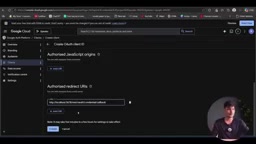
platform.openai.com; a small prepaid amount is required (about 500 rupees can last 6-7 months). - Google API: Create a project through Google Cloud Console, enable Google Sheets and Gmail API, configure the OAuth consent screen, fill in the callback URL provided by n8n as the redirect URI, and obtain the Client ID and Secret.
- Webhook: As the "digital gate," it is divided into Test URL (local debugging) and Production URL (online deployment). During local development, you can use Postman to simulate requests, then use ngrok to expose the local service as a public URL for seamless integration with real websites.
The significance of this methodology is: once you understand how to configure an API for one tool, you can apply the same approach to connect any service that has an API.
OAuth 2.0 and callback URL: OAuth 2.0 is an authorization protocol that allows third-party applications to access a user's resources without obtaining their password. When configuring Google API in n8n, you need to create an OAuth client ID and fill in the callback URL provided by n8n (usually https://your-n8n-domain/rest/oauth2-credential/callback) into the redirect URI in Google Cloud Console. When n8n requests authorization, Google redirects the user to the consent screen; after the user authorizes, they are redirected back to the callback URL with an authorization code, and n8n exchanges that code for an access token. Understanding this flow is key to connecting any OAuth service (such as Gmail, Google Sheets, Slack).
Who Is This Course For?
The background of the video's author, Aslam, gives the content a strong practical orientation—he is not talking theory but demonstrating the systems he delivers to clients every day. For beginners who want to enter the field of AI automation, this course provides a clear path from "understanding the tool" to "delivering solutions." For business operators, the cases on customer service escalation, lead scraping, and content distribution can be directly mapped to the need to reduce costs and increase efficiency.
The only thing to note is that the course relies heavily on the free quotas of third-party services (such as OpenAI trial credits and SERP API's 250 searches), and long-term costs need to be evaluated for actual commercial deployment. But as a learning path, it is already complete enough.
One-line Summary
n8n hands-on course: build AI agents from scratch and achieve business automation.
Paragraph Summary
This article introduces a hands-on AI automation course based on n8n, taught by Aslam, founder of an automation company with four years of experience and over 100 clients. The article first compares n8n with Zapier, emphasizing n8n's flexibility and self-hosting advantages; then deconstructs the triangular structure of AI agents (trigger, processing, action), and through six progressive projects shows how to build Telegram customer service bots, AI email support systems, content generation and automatic publishing, lead scraping and cold email outreach, and other real business scenarios. The course also explains in detail API key configuration, Webhook and ngrok usage, helping learners bridge the last mile of automation. Finally, it points out that the course is suitable for beginners and business operators, but attention should be paid to the long-term costs of third-party services.
Related articles

JobRunner MCP Server: AI Agents Can Now Fix Failed Java Jobs
JobRunner launches an open-source MCP server enabling AI agents to view cluster status, diagnose failures, and recover Java jobs—incident response from any cloud coding environment or existing agent.

MLAI Digital Launches 9 Security Agents: MCP Server Safeguards the Full Lifecycle of Agentic AI
MLAI Digital launches Security MCP Server with nine built-in specialized security agents covering vulnerability discovery, attack simulation, prompt injection detection, API and infrastructure assessment, and accelerated remediation—embedding security validation across the full Agentic AI lifecycle from development to production.

Running Isaac Lab on H100 GPUs: Exploring Better Approaches
Exploring optimization methods for running Isaac Lab on NVIDIA H100 GPUs, including MIG configuration, mixed precision, TensorRT acceleration, and community experience to improve robotics simulation and reinforcement learning efficiency.