MCP from Zero to One: A Complete Guide to Building Production-Grade MCP Servers

A step-by-step guide to evolving an MCP Server from a local script into a Kubernetes-powered production cluster.
Using the "USB-C port of the AI era" analogy as a starting point, this article walks through MCP's three-role architecture (Host/Client/Server) and details the full path to production-grade deployment. It explains why Stdio falls short for scaling, why Streamable HTTP is the right choice, and unpacks the four pillars of enterprise architecture: stateless design, environment variable injection, health probes, and distributed tracing — culminating in Docker, Nginx, and Kubernetes deployments with self-healing capabilities.
What Is MCP: The USB-C Port of the AI Era
Before the Model Context Protocol (MCP) came along, wiring various data sources and local tools into large language models was an architectural nightmare. Developers were forced to write non-reusable "glue code" for every different model, keeping maintenance costs perpetually high.
The significance of MCP is best captured by an analogy: it's the "USB-C port of the AI era." Who wants to carry around a bag of adapters and proprietary charging cables anymore? AI development is no different. MCP provides a unified standard — implement the backend once, and every MCP-compatible client can plug right in.
The system is built around three core roles:
- Host: The environment running the LLM, such as your IDE or Claude Desktop;
- Client: Lives inside the Host, responsible for parsing the protocol and establishing connections;
- Server: The workhorse — exposes underlying tools, resources, and prompts to the LLM.
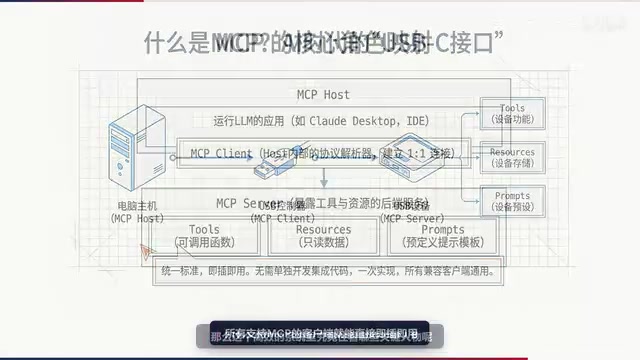
This article focuses entirely on the Server — the goal is to evolve it from a bare-bones local script into an industrial-grade service capable of handling massive traffic.
Transport Protocol Comparison: From Stdio to Streamable HTTP
How do these three roles communicate in the real world? It all comes down to choosing the right transport protocol.
Stdio (Standard Input/Output) is the "training wheels" option for beginners. It requires no network configuration and works out of the box, but its fatal flaw is that it's tightly bound to the lifecycle of a single process. It's fine for local testing, but it has no path to a real cloud production environment.
Streamable HTTP is the production-ready choice. It supports HTTP POST combined with SSE (Server-Sent Events), making it a stateless transport and the absolute foundation for building highly available clusters.
Writing a Hello World in Stdio mode is straightforward: a few lines of code on the server side to expose a tool, and a single async call on the client side to invoke it. But this mode is like talking to yourself in a mirror — safe and simple, yet incapable of projecting your voice to a stadium. It simply cannot scale horizontally.

This is the exact dividing line between a toy and a production system.
SSE (Server-Sent Events) is a unidirectional, real-time push technology built on HTTP: the server can continuously push data to the client over a persistent connection, without the client needing to poll repeatedly. Unlike WebSockets, SSE is one-directional (server → client), but precisely because of this, it is natively compatible with HTTP infrastructure (such as reverse proxies and load balancers) and more easily traverses corporate firewalls. In MCP's Streamable HTTP mode, the client sends requests via POST, while the server streams tool call results back via SSE. This combination preserves HTTP's stateless nature while supporting the token-by-token streaming responses generated by LLMs — making it the mainstream choice for production MCP deployments today.
The Four Pillars of Enterprise-Grade Architecture
Once you leave the comfort of localhost and face real enterprise scenarios, there are four "load-bearing walls" where there is absolutely no room for compromise.
Stateless Design
Ensure every request is independent and does not rely on session state held in server memory. This is the baseline for horizontal scaling — only a stateless service can be freely cloned to distribute load.
Environment Variable Injection
Fully decouple the application from its external environment. Ports, secrets, and connection strings should all be dynamically sourced from environment variables, never hardcoded. This is also a prerequisite for containerized deployment.
Dedicated Health Check Endpoints
Think of it as attaching an ECG monitor to your server, continuously reporting its health status to the cluster. Both Docker and Kubernetes rely on this to "check in" on your services.
End-to-End Distributed Tracing
Tag every request with a UUID. In an ocean of distributed traffic, this is the only way to pinpoint the exact path of any given call.
When translating this to code, a few key changes stand out: the port is now dynamically sourced from an environment variable; stateless_http is set to True to sever session binding and make the service fully stateless; and a dedicated /health route is added to handle health checks from Docker and Kubernetes.
The UUID generated for each request in distributed tracing is typically called a Trace ID or Request ID. In a microservice or distributed MCP cluster, a single client call may pass through Nginx, multiple MCP Server instances, and downstream databases across several nodes. If all nodes embed the same Trace ID in their logs, operators can stitch together the entire call chain from a sea of log data to precisely pinpoint latency bottlenecks or anomalous nodes. This mechanism is highly compatible with standardized observability frameworks like OpenTelemetry and is a core enabler of efficient troubleshooting in enterprise AI services.
Containerization and Load Balancing
Enterprise-grade code needs a standardized packaging format — Docker is the ultimate "shipping container."
In a Dockerfile, beyond the standard EXPOSE instruction, the feature that best demonstrates production maturity is the HEALTHCHECK mechanism. Think of it as a strict on-duty physician who probes the /health endpoint every 30 seconds, checking the container's pulse. Only after confirming a 200 OK response (a heartbeat) will the container be marked as Healthy — and only then will the system dare route real traffic to it.

When traffic spikes and dozens of healthy containers are spun up, you need a smart "traffic officer" to direct the flow — that's where Nginx comes in. By configuring the upstream block, Nginx intercepts incoming client requests and distributes them evenly across healthy backend MCP Servers in a round-robin fashion. The moment one instance goes down, traffic is instantly rerouted, ensuring a single point of failure never brings down the entire AI service.
The Final Boss: Kubernetes Elastic Cluster Deployment
In the world of Kubernetes, managing hundreds or thousands of containers depends on a "ruthlessly efficient" probe system.
The Liveness probe is like a short-tempered security guard — the moment it detects a frozen process, it doesn't ask questions; it kicks the container out and forces a restart.
The Readiness probe is gentler. If the /health endpoint goes dark, it won't kill the Pod, but it will "coldly send it to the corner" — refusing to route any traffic until it fully recovers.
This dual-probe mechanism is the underlying logic that allows Kubernetes to guarantee rolling updates with zero downtime.
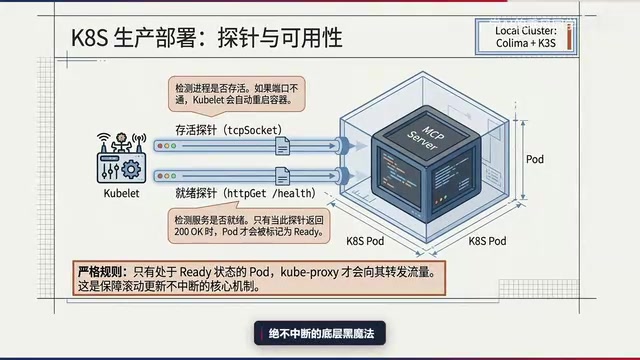
Once all Pods have passed inspection and entered the Ready state, the climactic moment of full traffic flow arrives: external requests first hit the node's NodePort, then kube-proxy instantly takes over, seamlessly routing traffic to the correct target Pod via low-level networking rules. The entire process is silky smooth — and that's the beauty of a production-grade elastic cluster.
kube-proxy is the network proxy component running on every Kubernetes node, responsible for maintaining network rules on the node (typically based on iptables or IPVS). When an external request arrives at a node via NodePort, kube-proxy forwards it to a healthy Pod backing the corresponding Service and load-balances across multiple Pods. Rolling Update is Kubernetes' default update strategy: it gradually replaces old-version Pods with new ones rather than swapping everything at once. During this process, the Readiness probe is critical — only after a new Pod passes its readiness check will the old Pod be terminated. This ensures that healthy instances are always online to handle requests throughout the entire update window, achieving true zero-downtime deployments.
Key Takeaways
This architecture journey from zero to one can be distilled into a few pivotal milestones:
- MCP is the "USB-C standard" for unified AI connectivity — implement once, plug in anywhere;
- Use the minimal Stdio mode for local testing, but production environments must embrace Streamable HTTP and stateless design;
- The four pillars of enterprise-grade architecture — stateless design, environment variable injection, health probes, and distributed tracing — are all non-negotiable;
- Docker's HEALTHCHECK combined with Nginx load balancing solves containerization and traffic distribution;
- Kubernetes' dual-probe mechanism and kube-proxy routing ultimately deliver a self-healing, resilient cloud cluster that can take a punch.
Once your AI brain has a standardized interface and a rock-solid server backing it up, the next step is plugging in even cooler "gear" — whether that's a database connecting to vast amounts of data or an automation executor that can interact with the physical world. A production-grade MCP node is worth building yourself.
Related articles

JobRunner MCP Server: AI Agents Can Now Fix Failed Java Jobs
JobRunner launches an open-source MCP server enabling AI agents to view cluster status, diagnose failures, and recover Java jobs—incident response from any cloud coding environment or existing agent.

MLAI Digital Launches 9 Security Agents: MCP Server Safeguards the Full Lifecycle of Agentic AI
MLAI Digital launches Security MCP Server with nine built-in specialized security agents covering vulnerability discovery, attack simulation, prompt injection detection, API and infrastructure assessment, and accelerated remediation—embedding security validation across the full Agentic AI lifecycle from development to production.

Running Isaac Lab on H100 GPUs: Exploring Better Approaches
Exploring optimization methods for running Isaac Lab on NVIDIA H100 GPUs, including MIG configuration, mixed precision, TensorRT acceleration, and community experience to improve robotics simulation and reinforcement learning efficiency.