MCP OAuth in Practice: Give Your AI Agent a Key, Not Your Password

MCP OAuth spec gives AI agents narrow-scoped tokens instead of master API keys, keeping risk contained.
Using the risk of handing passwords to AI as a starting point, this article explains the complete MCP (Model Context Protocol) network authorization flow. The core idea: never give agents a master key — issue OAuth tokens with both audience and scope constraints. The flow covers 401-driven metadata discovery, PKCE-based authorization with the resource parameter, per-call server-side validation, and step-up authorization that requires explicit user approval for every permission expansion.
Would you hand your password directly to an AI agent? Probably not. But when you paste a master API key into an agent's config file, that's essentially what you're doing — it gets the exact same permissions as you, valid indefinitely, until you notice something's wrong one day.
There's a better way, and it's already built into MCP (Model Context Protocol): give the agent a key, not your password. This article breaks down the entire authorization flow and walks through every step with a real, working demo.
Local vs. Remote: Two Completely Different Scenarios
Before diving in, one critical distinction. If your MCP server runs locally over stdio (standard input/output), the spec explicitly recommends: don't bother with any of this — just read credentials from environment variables.
But the moment your server moves to the network and serves requests over HTTP, everything changes — anyone can come knocking. That's exactly where the MCP authorization spec comes in. It's not some exotic technology; it's standard OAuth under the hood, just with a strict set of rules applied on top.
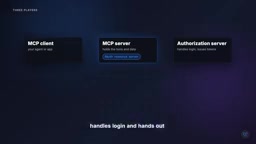
The whole mechanism has three roles:
- MCP Client: your agent or application.
- MCP Server: holds the tools and data, called the "Resource Server" in OAuth terminology.
- Authorization Server: handles login and issues tokens.
The core idea: the MCP server never sees your password. It only ever sees a token, and uses that to determine what the token is allowed to do.
What Happens When a Request Arrives Without a Token
The demo uses a minimal note-taking server with two tools: one to read notes, one to write them.
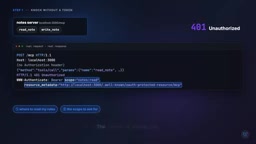
When a client calls it without any token, it gets back a 401 Unauthorized. But the real value is in the response headers — rather than simply saying "no," the server explicitly tells the client where the rules are (a resource metadata link) and what permission scope is required (scope: notes.read).
In other words, the server proactively tells the client exactly how to "ask correctly."
Following that link, the client reaches a small JSON document at /.well-known/oauth-protected-resource. Every protected MCP server must publish this document. It declares the server's identity, lists supported permission scopes, and most importantly — identifies which authorization server is authorized to issue tokens for it.
The Login Step: PKCE and the resource Parameter
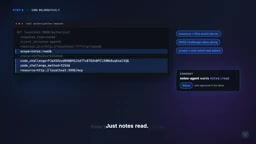
The client then initiates a standard OAuth login, but with two important additions.
PKCE: Preventing Authorization Code Theft
The client generates a secret value locally, but only sends a hashed, "scrambled" version of it. When collecting the token later, it proves it knows the original value. This way, even if the authorization code is intercepted, it's useless on its own.
The resource Parameter: Tokens Valid Only for a Specific Server
The client explicitly declares, using the full URL, that this token is intended for "our notes server." It also only requests the permission scope it was told it needs — not "all permissions," just notes.read.
Decoding the returned token reveals two critical fields:
- audience: indicates this token belongs exclusively to the notes server and nothing else.
- scope: indicates it can only read notes, nothing more.
This means even if the token is leaked, the damage is tightly contained: it can't be used with other services, and it can't write a single note.
OAuth is an industry-standard authorization framework over a decade old (RFC 6749), built around the concept of "delegated authorization": a user delegates a limited set of permissions to a third-party application without handing over their credentials. In OAuth, the client requests an Authorization Code from the authorization server, then exchanges that code for an Access Token — typically a signed JSON Web Token (JWT) that can be verified server-side without a database lookup. The MCP authorization spec is based on the OAuth 2.1 draft, which mandates PKCE, prohibits lower-security flows like implicit flow, and uses the resource parameter (RFC 8707) to bind tokens to a specific server — tightening a general industry standard into a secure subset tailored for machine clients (AI agents).
Server-Side Enforcement in Just a Few Lines
On the server side, permission enforcement is straightforward:
- Validate the signature;
- Validate the token hasn't expired;
- Validate the audience is exactly this server — any failure returns a 401.
Then, for each tool, check the scope: reading notes requires notes.read, writing requires notes.write.
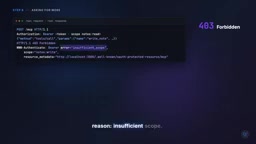
A read call with the current token passes right through. But when the agent tries to write a note, the server returns 403 Forbidden with a precise reason: Insufficient scope — you need notes.write.
Step-up Authorization
This mechanism is called "step-up authorization." The client goes back to the user to request this additional permission, while preserving existing permissions, then retries with the new token. Throughout this process, every permission expansion is explicitly approved by the user — rather than handing over broad permissions all at once.
Two Rules That Are Constantly Broken
Two high-frequency pitfalls in this entire flow — commit them to memory:
First, tokens go only in the Authorization header — never in the URL. Once a token appears in a URL, it gets captured by all kinds of logs, effectively leaking it in plain text.
Second, an MCP server must only accept tokens issued for itself — never pass a client's token along to another API. This mistake is called the "Confused Deputy" problem, and it's the classic path by which a narrowly-scoped key bloats back into a master key.
The "Confused Deputy" attack gets its name from a classic 1988 paper, describing a vulnerability where an intermediary program (the deputy) with certain privileges is tricked into using those privileges to perform actions the attacker couldn't perform directly. In the MCP context, if a server forwards a received client token to a downstream API as-is, an attacker only needs to control the MCP server (or inject a malicious tool call into it) to impersonate the user and access any downstream resource. The correct approach: whenever an MCP server needs to call a downstream service, it should request a new, dedicated token from the authorization server using its own identity — not "borrow" the key that was passed in.
The Complete Flow, Revisited
Putting the entire chain together:
- Knock on the door → get a 401, with guidance on where to find the rules;
- Read the metadata document;
- Log in using PKCE, explicitly specifying the target server;
- Receive a token with a narrow audience and scope;
- The server validates both on every single call;
- When the agent needs more permissions, it asks the user again.
One sentence summary: give a key, not a password.
For developers building AI agents, the greatest value of this approach is keeping risk within a controllable boundary — even if something goes wrong, the damage is confined to one specific tool and one specific permission, not a total compromise of the entire account. If you're building an agent, start with a narrow key.
Related articles

MCP Protocol in 60 Seconds: A Real Session, Message by Message
Dissecting a real MCP session message by message: how an Agent dynamically discovers tools, forwards call requests, and has an MCP server execute them — all in just 9 JSON messages, with the model and reasoning loop untouched.

n8n 40-Minute Masterclass: Build Your First AI Automation Workflow from Scratch
Distilled from a 40-minute n8n masterclass: the core differences between automation, AI, and AI Agents, a comparison of n8n's four deployment methods, and a complete guide from dashboard to your first workflow.

Why Does a 35GB Quantized Model Blow Up an 80GB GPU? The Truth About KV Cache VRAM
Why does a 35GB 4-bit quantized LLM still blow up an 80GB GPU? This article breaks down the four components of inference VRAM, provides precise KV Cache formulas, compares GQA vs DeepSeek MLA memory, and offers production-grade OOM prevention like FP8 KV Cache.