n8n 40-Minute Masterclass: Build Your First AI Automation Workflow from Scratch

40-minute n8n masterclass essentials: clarify automation, AI, and Agent differences, master deployment and hands-on entry.
This article distills a 40-minute n8n masterclass to help readers build an overall understanding of AI automation from scratch. It clarifies three foundational concepts—automation, AI, and AI Agents—compares their essential differences, explains why enterprises are betting on n8n (open source, low-code, rich integrations, AI-native, self-hostable), analyzes four deployment methods (Cloud, local, Docker, VPS), and introduces core modules along with three practical project directions.
If you're looking for a path to master AI automation from zero, n8n might be one of the most worthwhile tools to invest your time in right now. This YouTube video, structured as a 40-minute masterclass, systematically walks through the core concepts of automation, artificial intelligence, and AI Agents, and demonstrates the complete process of going from installing n8n to building your first workflow. This article distills the key takeaways from the course to help you quickly build an overall understanding of n8n and AI automation.
Automation, AI, and Agents: Three Concepts You Must Clarify
The course opens by breaking down foundational concepts using definitions paired with examples. Automation refers to having computers or software execute tasks automatically according to preset rules. It doesn't "think"—it simply faithfully repeats established procedures. A typical scenario: every morning, opening Gmail to download invoices, renaming files, uploading to Google Drive, and sending Slack notifications—these steps can be entirely replaced by automation. In everyday life, bank SMS alerts, delivery notifications, and automatic cloud backups are all common forms of automation.
Artificial Intelligence is a different matter. It's software designed to perform tasks that typically require human intelligence, such as understanding language, answering questions, summarizing documents, translating, generating images, or writing code. The video emphasizes a key distinction: modern AI models are essentially performing pattern matching based on massive training data to predict the most likely output, rather than understanding the world through experience, emotion, and common sense like humans do. When you ask AI to "write an email to a customer," it's predicting the next word, not truly understanding the nuances of business communication.
AI Agent goes a step further than the previous two. It's an AI-driven system capable of receiving goals, planning steps, calling tools, remembering useful information, and making decisions within a framework of instructions until the goal is achieved. The course example is intuitive: an Agent can understand a customer's intent when they say "I'm interested in the premium plan but have a few questions," then answer the questions, search and recommend suitable options, schedule a demo, and notify the sales team—flexibly adjusting next steps based on new information.
Pattern Matching is key to understanding the capabilities and limitations of modern AI. Taking large language models as an example, their training process is essentially learning statistical associations between words and sentences across massive text corpora; when generating responses, the model predicts the most likely next word based on context, appends that word back into the context, and continues predicting—cycling through this process. This means AI output is probabilistically the "most answer-like" text, rather than a conclusion that has undergone fact-checking or logical deduction. This also explains why models can confidently fabricate nonexistent citations—they're simply generating plausible-looking word sequences. Understanding this helps clarify why, when incorporating AI into automated workflows, you typically need additional validation nodes, human review, or knowledge base retrieval to constrain the output.
"Tool calling" in AI Agents refers to the Agent's ability to proactively request external systems to perform specific operations during its reasoning process. Large language models themselves can only input and output text—they can't directly query databases, send emails, or create calendar events. The tool-calling mechanism lets the model output a structured call request (e.g., "Search knowledge base, keyword: refund policy"), which an external program executes and returns the result to the model, which then decides the next step. It's precisely this "think—call—observe—think again" loop that enables Agents to complete multi-step tasks. The AI nodes in n8n are essentially orchestrating this kind of tool calling and data flow.
The Essential Difference Between Automation and Agents
This is the most critical comparison in the entire course, and the video makes a clear distinction across multiple dimensions.
Automation executes the same workflow every time, has no planning capability, and has no memory unless manually edited. An Agent, on the other hand, can change the order of actions within its own structure, respond differently depending on the situation, plan multi-step operations, and remember context. The comparison scenario presented in the video is highly compelling: faced with the same customer inquiry, automation runs all customers through the same process, while an Agent can identify the type of question, search for answers, recommend solutions, schedule a demo, and notify sales—all without human intervention.
This flexibility difference determines their applicable scenarios. Tasks that are highly repetitive with clear rules are suitable for automation; scenarios requiring judgment and dynamic customer interaction are better suited for Agents. Understanding this distinction is the prerequisite for choosing a technical approach.
Why Enterprises Are Betting on Automation and n8n
The course lists the core motivations for enterprises: saving time, reducing repetitive work, lowering costs, running 24/7, responding to customers faster, boosting productivity, and scaling the business without hiring heavily. The more fundamental value lies in automation freeing human labor from mechanical repetition and channeling it into creative and strategic work.
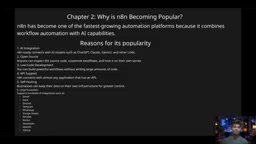
n8n has become a popular choice because it simultaneously possesses several key characteristics: open source, meaning anyone can view the source code, customize workflows, and deploy to their own servers; low-code, allowing users to build powerful processes through a drag-and-drop interface without writing large amounts of code; powerful integrations, supporting hundreds of applications including Gmail, Slack, Discord, Telegram, and WhatsApp; AI-native, able to directly connect to mainstream models like ChatGPT, Claude, and Gemini; and self-hosting options, letting enterprises keep data on their own infrastructure. These characteristics combined enable n8n to serve both individual learners' entry-level needs and enterprise-grade production automation.
On the open-source versus closed-source choice, the course offers practical advice: open source provides greater flexibility and community contributions, suitable for enterprises that value data control and customization capabilities; closed source is typically ready out of the box with simpler management, suitable for teams seeking rapid onboarding. There's no absolute superiority—only fit.
Low-Code is an application development approach that primarily uses visual interfaces and pre-built components, supplemented by minimal code. In n8n, users define business processes by dragging nodes, connecting lines, and filling in parameters, then insert a few lines of JavaScript or Python when encountering complex logic. Compared to traditional development, low-code encapsulates a large amount of repetitive integration work into ready-made nodes, compressing development cycles from weeks to hours. But low-code is not "zero-code": when processes involve custom data transformations, exception handling, or performance optimization, programming thinking is still required. Understanding the boundaries of low-code helps determine which scenarios are suitable for rapid building with n8n and which require standalone services.
Self-Hosting refers to deploying software on servers you control, rather than using vendor-provided cloud services. For n8n, self-hosting means workflow definitions, execution logs, credentials, and business data flowing through processes all remain within the enterprise's own infrastructure. This is particularly critical in industries with strict data compliance requirements (finance, healthcare, government), because keeping data within the internal network satisfies regulatory requirements. The trade-off is that enterprises must handle server operations, backups, upgrades, and security patches themselves. Whether to self-host is essentially a trade-off between "data control" and "operational burden."
Four Deployment Methods: From Learning to Production
n8n offers multiple ways to run, and the course analyzes the applicable scenarios for each.
n8n Cloud is the simplest way to get started—no installation required, just register an account and build workflows in the browser, with automatic updates and no infrastructure management, suitable for beginners, students, and small businesses. The trade-off is a monthly fee after the free trial, and less control than self-hosting.
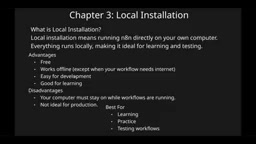
Local installation runs n8n directly on your own computer, fully local, suitable for learning and testing, free and easy to develop with. The downside is needing to keep your computer on, making it unsuitable for production environments.
Docker packages the application and its dependencies into isolated containers, providing consistent behavior across machines and easy updates—a common choice for developers. It requires some Docker fundamentals.
VPS deployment installs n8n on a remote virtual private server, achieving 24/7 operation and accessibility from anywhere, suitable for startups, agencies, and SaaS products. The trade-off is monthly rent and server management costs.
The course's selection advice is straightforward: beginners start with local or n8n Cloud, developers choose Docker, and production environments choose VPS.
Docker is a technology that packages applications and their runtime environment (dependency libraries, configurations, system tools) into standardized "containers." Containers are isolated from the host machine but share the operating system kernel on the same machine, making them lighter and faster to start than traditional virtual machines. For n8n, official Docker images are provided—a single command can spin up the complete service, and behavior remains consistent across machines, avoiding "it works on my machine" environment issues. In production environments, Docker is often paired with Docker Compose or Kubernetes for multi-container orchestration, automatic restarts, and horizontal scaling—which is why developers prefer it.
VPS (Virtual Private Server) is a product that uses virtualization technology to partition a physical server into multiple independent virtual machines. Each VPS has its own operating system, CPU, memory, and IP address, and users can remotely log in and configure it like an independent server. For n8n, a VPS provides a publicly accessible fixed address and 24/7 online capability, suitable for hosting workflows that need to continuously listen for messages or trigger on schedules. When choosing a VPS, pay attention to configuration specs, bandwidth, data center network latency, and whether snapshot backups are offered—these directly affect the stability and recovery capability of automated workflows.
Hands-On Practice: Dashboard, Nodes, and Core Modules
After logging into n8n, the dashboard provides clear entry points: create workflow, credentials, variables, data tables. The video spends considerable time demonstrating these core concepts.
Workflows are formed by connecting nodes, where each node represents an operation, and connections between nodes define data flow. This is n8n's most fundamental building block. Executions let you track the results of each run—success, failure, or error—for easy debugging. Credentials are used to connect external applications.
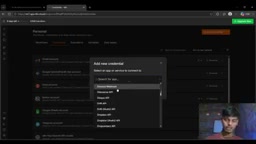
Credentials support a large number of services including Gmail, Telegram, Notion, Google Sheets, and ChatGPT—configure once and reuse across workflows. Variables store reusable data in key-value pair format. Data tables allow you to create and use structured data within workflows, starting from scratch or importing CSV. Additionally, n8n provides a command bar, template library, AI assistant, documentation access, and rich template categories (AI, sales, IT operations, marketing, documentation, etc.), greatly lowering the barrier to building from scratch.
Personal settings allow adjusting name, email, password, and theme; advanced configurations like AI users, roles, external keys, and environments are aimed at team and enterprise scenarios. The course also reminds viewers that n8n's built-in official documentation is the best path for deep learning, covering deployment, building, integrations, AI, code, and keyboard shortcuts, with systematic guidance from the first line to production environments.
Nodes are the smallest functional units in an n8n workflow. Each node encapsulates a specific type of operation: triggering the flow (e.g., receiving an email, timer expiry), calling external APIs (e.g., sending Slack messages), processing data (e.g., filtering, merging, transforming fields), or calling AI models. Nodes have inputs and outputs, with data passed between nodes in JSON format—the output of an upstream node becomes the input of a downstream node. A node typically contains three parts: credential selection, operation type, and parameter configuration. Understanding the node's "input—process—output" model lets you decompose complex business logic into reusable node chains—this is also the core mindset of n8n workflow design.
Executions are n8n's complete tracking of each workflow run. Each record contains the trigger time, every node traversed, the data received and output by each node, duration, and success or failure status. When a process fails, you can open the corresponding execution record and examine node by node where the data deviated from expectations, quickly pinpointing the problem. Executions also support re-running and retrying from the failed node, avoiding restarting the entire workflow from scratch. For production environments, executions serve as both debugging tools and audit and performance analysis references—it's recommended to regularly clean up historical records to control database size.
Three Practical Projects Worth Building
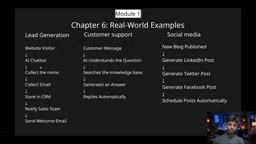
The video offers three project directions you can directly practice: Lead Generation—a chatbot collects names, stores them in CRM, notifies the sales team, and sends welcome emails; Customer Support—customer messages are understood, knowledge base is searched, responses are generated and sent automatically; Social Media—after a new blog is published, posts for LinkedIn, Twitter, and Facebook are automatically generated and scheduled. These projects cover the complete chain from data collection and AI processing to multi-platform distribution, making them an excellent starting point for understanding n8n's capabilities.
Looking at the entire course, it doesn't stop at the tool operation level, but first builds a conceptual framework before grounding it in specific practice. For those who want to systematically get started with AI automation, this structure—from definitions to deployment, from concepts to projects—offers more long-term value than scattered tips-and-tricks videos. As an open-source, self-hostable, AI-native automation platform, n8n is becoming a key hub connecting business systems with AI capabilities, and mastering it will add an important piece to your competitiveness in the automation era.
One-line Summary
40-minute n8n masterclass essentials: clarify automation, AI, and Agent differences, master deployment and hands-on entry.
Paragraph Summary
This article distills the core content of a 40-minute n8n masterclass to help readers build an overall understanding of AI automation from scratch. It first clarifies three foundational concepts: automation executes tasks according to preset rules, AI predicts output based on pattern matching, and AI Agents can plan steps, call tools, and flexibly adjust based on new information. It then compares the essential differences between automation and Agents: the former has fixed processes with no planning or memory, while the latter can dynamically change the order of actions. The article further explains why enterprises are betting on n8n—open source, low-code, rich integrations, AI-native, and self-hosting support—and analyzes the applicable scenarios for four deployment methods: Cloud, local, Docker, and VPS. Finally, it introduces core modules including the dashboard, workflows, nodes, executions, credentials, variables, and data tables, and offers three directly actionable project directions: Lead Generation, Customer Support, and Social Media.
Related articles

Chain of Thought Isn't Just for AI: How Humans Can Use CoT to Improve Thinking Quality
Chain of Thought isn't just a prompt trick for large models. Starting from a Hacker News discussion, this article analyzes why CoT works for human thinking too, breaks down actionable ways to transfer it, and highlights the key differences between human CoT and machine CoT.
Cloudflare Teams Up with OpenAI: Closi…
Cloudflare Teams Up with OpenAI: Closing the Loop from Vulnerability Discovery to Defense with AI
Cloudflare uses OpenAI Daybreak to investigate security vulnerabilities and generate reviewable remediation plans, while developers use Codex to boost coding efficiency and quality.

Orca Multi-Agent Orchestration in Practice: A Guide to Parallel Collaboration with Claude and Codex
Orca is Stable AI's free open-source agent workbench supporting 34 agents like Claude Code and Codex in parallel. Learn its Git worktree isolation, multi-model orchestration, and mobile management.