MCP Protocol Explained: From Core Concepts to Building a Weather Service

A full walkthrough of MCP protocol concepts and hands-on Python weather service development with Claude Desktop.
MCP (Model Context Protocol) is an open standard by Anthropic that solves compatibility issues between LLMs and external tools through a unified protocol — much like a USB port. Its three-layer architecture (Host, Client, Server) drives an "invoke → return → summarize" loop via JSON-RPC 2.0, supporting both stdio (local) and SSE+HTTP (remote) transports. This guide walks through building a Python-based weather MCP Server with UV, configuring it in Claude Desktop, and writing a custom MCP Client, highlighting common pitfalls along the way.
What Is MCP: The "USB Port" for Large Language Models
MCP (Model Context Protocol) is an open standard introduced by Anthropic to solve the communication problem between large language models (LLMs) and external data sources or tools. Before a unified standard existed, API implementations varied wildly from vendor to vendor — some used JSON, some XML, and others WebService — making it extremely painful for LLMs to achieve compatibility when calling these tools.
At its core, MCP is a standardized invocation protocol. With it, LLMs can interact with different tools using the same protocol, with differences only in the parameters. Request initiation, message handling, and other steps are all standardized. This allows AI applications to access and operate on local and remote data more efficiently and securely, giving AI a universal "connect to everything" interface.
The official documentation offers a fitting analogy: MCP is like the USB port on a computer. USB provides a standardized way to connect devices like mice and keyboards, while MCP provides a standardized way to connect AI models to different data sources and tools. Most mainstream model providers now support MCP.
The Relationship Between MCP, Function Calling, and Agents
These three concepts are easy to conflate, so it's worth clarifying them. Function Calling is a low-level mechanism by which AI models invoke functions. MCP is a standard protocol that enables seamless interaction between AI models and various APIs. An AI Agent is an autonomous intelligent system that uses Function Calling and MCP to analyze and execute tasks toward a specific goal. Simply put: Function Calling is the capability, MCP is the specification, and an Agent is the application form.
Function Calling is a capability now widely supported by mainstream LLMs: when generating a response, the model can output a structured "intent" — declaring which function it wants to call and what parameters to pass — and an external program executes it and returns the result. This mechanism was formally introduced by OpenAI in GPT-4, and was subsequently adopted by Claude, Gemini, DeepSeekAd, and others. Function Calling is essentially an "intent relay" between the model and the host program, but it only specifies the input/output format on the model side — it says nothing about how the tool's server side should be implemented. MCP fills that missing layer of "server-side specification" on top of Function Calling: it defines how tools register themselves, how parameters are described, and how results are returned, so the same tool service can be reused by different models and different hosts without requiring per-model adaptation.
MCP's Core Architecture
To understand MCP development, you first need to understand its three-layer architecture.
MCP Host: The client program that initiates MCP requests. For example, the Claude Desktop app, or AI-enabled IDEs like Cursor and VSCode, can all serve as MCP hosts. When you chat within them, the host is what drives the invocations behind the scenes.
MCP Client: Runs inside the host and maintains a one-to-one persistent connection with the MCP server. Most mainstream IDE tools have a built-in MCP Client that establishes a sustained data transfer channel with the server.
MCP Server: Provides context, tools, and prompt information to the client. For example, a weather-query MCP server needs to have a weather-querying tool with parameter descriptions. A server can access both local resources (such as files and databases) and remote resources (such as a weather API).
The Client's Workflow
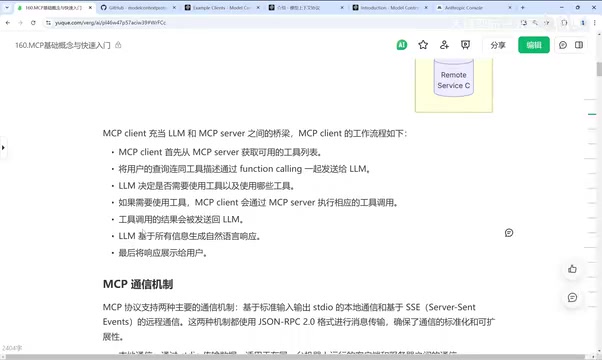
The MCP Client acts as a bridge between the LLM and the MCP Server. Its workflow can be broken down into a few steps: the Client first fetches the list of available tools from the Server; it then sends the user's query along with the tool descriptions to the LLM via Function Calling; the LLM decides whether to use a tool and which one; if a call is needed, the Client executes the appropriate tool through the Server; the result returned by the tool (typically a JSON payload) is then handed back to the LLM for summarization, which finally produces a natural-language response the user can understand.
This "invoke → return → summarize" loop is the core of MCP's practical value. Raw JSON weather data is unreadable to users — it's the LLM's summarization capability that transforms it into something like "Beijing is X degrees with Y weather conditions."
Two Communication Mechanisms and Server Capabilities
The MCP protocol supports two communication mechanisms, both transmitting messages in JSON-RPC 2.0 format.
- stdio (Standard Input/Output): A local communication method, suitable when the client and server run on the same machine. Efficient and low-overhead.
- SSE + HTTP: Used for remote, web-based communication. Suitable for cross-network scenarios, remote resource access, or distributed deployments.
As the key component, the MCP server primarily provides three types of capabilities: Resources (file-like data that clients can read, such as API responses and file contents), Tools (functions that LLMs can invoke, requiring user approval), and Prompts (pre-written templates that help complete specific tasks).
JSON-RPC 2.0 is a lightweight remote procedure call (RPC) protocol with a JSON-based message format. It is stateless and transport-agnostic — it can run over HTTP, WebSocket, stdio, or any byte stream. A typical request message contains four fields: jsonrpc (fixed value "2.0"), method (the method name to call), params (the parameter object), and id (an identifier for matching responses). By choosing JSON-RPC 2.0 as its message format, MCP natively supports asynchronous and batch calls and is easy to debug — you can manually construct requests using any client capable of sending JSON. SSE (Server-Sent Events) is a unidirectional HTTP-based push technology that allows servers to continuously push event streams to clients. MCP combines it with HTTP POST to achieve bidirectional interaction: the client sends requests via POST, and the server asynchronously pushes results back via SSE. This makes it well-suited for remote tool scenarios across a network.
Hands-On: Building a Weather Query MCP Service in Python
Let's get practical. The goal is to develop a weather-querying MCP Server using Claude Desktop as the client.
Environment Setup
Prerequisites: Python 3.10 or higher, Claude Desktop installed, and the UV Python package manager installed. UV is an all-in-one management tool that makes Python package management straightforward. To install UV, open PowerShell and run the install command. After installation, make sure to set the environment variable so the uv command remains available after a restart.
UV is a next-generation Python package manager written in Rust by the Astral team (also the creators of the Python linter Ruff). It aims to replace the combination of pip, pip-tools, virtualenv, and poetry. Its key advantages are blazing speed (dependency resolution and installation is 10–100x faster than pip) and a unified CLI that integrates project initialization, virtual environment management, dependency locking, and script execution. uv init generates a project skeleton and pyproject.toml; uv venv creates an isolated virtual environment in the project directory; uv add adds a dependency while automatically updating the lock file; and uv run executes scripts in the isolated environment without needing to manually activate it. For MCP Server development, another benefit of using UV is that Claude Desktop's config file can directly use uv run to launch scripts, avoiding conflicts between the system Python environment and project dependencies.
Creating the Project and Writing the Server
The setup process looks roughly like this:
uv init weather        # Initialize the project
cd weather
uv venv                # Create a virtual environment
uv add "mcp[cli]" httpx # Install MCP-related packages
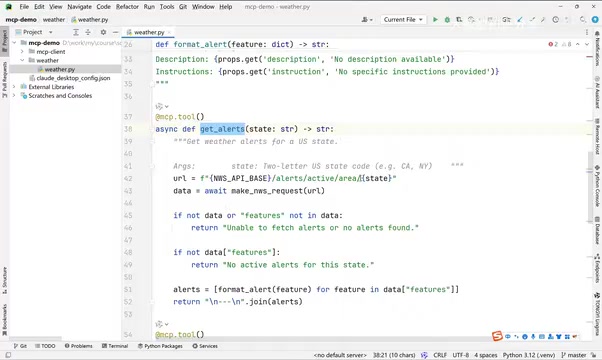
Next, create a weather.py file. The core is to instantiate a FastMCP instance that accesses the api.weather.gov endpoint to retrieve weather information. The code declares two MCP tools: one that gets a weather forecast by city name, and another that retrieves location information by latitude and longitude.
Configuring the Service in Claude Desktop
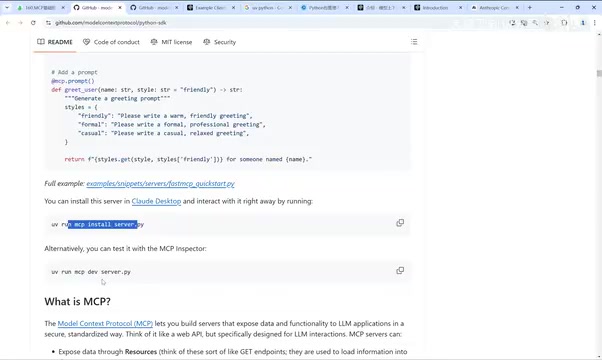
Open Claude Desktop, go to File → Settings → Developer, click Edit Config to edit the claude_desktop_config.json file, and add the MCP service configuration — the key is to set the working directory correctly and use the UV command to run the weather.py script. After making changes, you need to fully quit and restart Claude for the service to enter the running state.
Verifying the Integration
After restarting, you'll see a tools icon in the chat interface, showing the two integrated tools. Type "What's the weather in New York" — Claude will first use the LLM to derive New York's latitude and longitude, package them as parameters, call the get_forecast function, and ask for user authorization before doing so. The result is a chunk of JSON in English. Add "please respond in Chinese" and the LLM will organize the week's weather into readable Chinese content.
Calling the Service Programmatically with an MCP Client
Beyond using an existing client application, you can also write your own MCP Client in code to connect to the service.

The core logic of the client code includes: defining an MCPClient class and initializing the session (using Anthropic's library here); connecting to the MCP server via connect_to_server, handling Python or JS files differently, and establishing the connection using stdio; calling list_tools to retrieve the tool list; assembling the tool descriptions and sending them to the LLM along with the user's query to trigger Function Calling; when a tool_use block appears in the response, executing the tool call using the MCP session client, then passing the result back to the LLM for summarization; and finally entering a command-line-based chat loop for continuous conversation.
The run command is:
uv run client.py d:/weather/weather.py
Note that the client code calls the Claude 3.5 model, which requires configuring an Anthropic API Key (stored in a .env file) and topping up your account. If you can't top up the API Key, you can easily swap in DeepSeek or another model — just change one model configuration. The calling approach itself works the same way.
Summary: Key Takeaways for Developers
Having walked through the entire process, here are the key points worth keeping in mind:
- MCP addresses the data silo problem and provides AI applications with a standardized "connect to everything" interface.
- The core architecture consists of three layers — Host, Client, and Server — with the Client serving as the bridge between the LLM and the Server.
- The two communication mechanisms serve different scenarios: stdio for local use, SSE + HTTP for remote use.
- The Server provides three types of capabilities: Resources, Tools, and Prompts.
- In practice, the three most common pitfalls are: UV environment setup, ensuring config file paths are correct, and having a funded API Key.
Once you've mastered these foundational concepts and the development workflow, you can extend the weather example to build richer MCP services for database queries, file operations, web search, and much more.
Related articles

Chain of Thought Isn't Just for AI: How Humans Can Use CoT to Improve Thinking Quality
Chain of Thought isn't just a prompt trick for large models. Starting from a Hacker News discussion, this article analyzes why CoT works for human thinking too, breaks down actionable ways to transfer it, and highlights the key differences between human CoT and machine CoT.
Cloudflare Teams Up with OpenAI: Closi…
Cloudflare Teams Up with OpenAI: Closing the Loop from Vulnerability Discovery to Defense with AI
Cloudflare uses OpenAI Daybreak to investigate security vulnerabilities and generate reviewable remediation plans, while developers use Codex to boost coding efficiency and quality.

Orca Multi-Agent Orchestration in Practice: A Guide to Parallel Collaboration with Claude and Codex
Orca is Stable AI's free open-source agent workbench supporting 34 agents like Claude Code and Codex in parallel. Learn its Git worktree isolation, multi-model orchestration, and mobile management.