MCP Tool Mechanics Explained: How a Malformed Date Can Freeze an AI Agent

MCP tool descriptions and correct error typing are the keys to building stable, self-correcting AI agents.
This article systematically explains the core mechanics of MCP (Model Context Protocol) tools. Each tool consists of a name, a description, and a JSON Schema input schema; the model relies on reading descriptions to decide when to invoke a tool, so description quality directly determines agent behavior. Applications discover tools via `tools/list` and invoke them via `tools/call`. Tools can carry annotations (read-only, destructive, etc.), but these are hints, not guarantees. The most critical warning is the distinction between two failure modes: a protocol error means the request itself was broken, while a tool execution error (`isError=true`) means the tool ran but failed internally. Misreporting the latter as the former leaves the model with no actionable feedback, causing the agent to stall or loop. The correct approach is to wrap business-logic failures as tool errors with readable messages so the model can self-correct and retry.
MCP Tools: The Service Window Model
An MCP (Model Context Protocol) tool is a concrete action that a server exposes to an AI application — for example, "get weather." A useful mental model is to think of each tool as a service counter window: each window handles exactly one thing.
Every tool is made up of three parts: a name, a description, and an input schema. The critical insight is that MCP tools are model-controlled — the model decides which tool to call based on the user's request, rather than having the developer hardcode that decision. This means the quality of a tool's "self-introduction" directly determines whether an agent works correctly.
MCP (Model Context Protocol) is an open standard proposed by Anthropic in 2024, designed to unify how AI applications interact with external tools and data sources. Before MCP, every AI application had to write custom integration code for each external service, resulting in massive duplication of effort. MCP defines a standardized client-server protocol so that any compatible AI application (client) can directly invoke tools exposed by any MCP server, without needing to understand its internal implementation. All communication is based on JSON-RPC 2.0 — a lightweight remote procedure call specification that encodes requests and responses in JSON format, which AI models can naturally process and generate. This design fully decouples "tool implementation" from "tool usage," and is the fundamental reason the MCP ecosystem can scale so rapidly.
Descriptions Make or Break Tools: The Model Reads the "Sign," Not the Code
If a tool is a service window, then the description is the sign hanging above it. The model reads that sign to decide whether to walk up to that window.
A sign that just says "tool_1" communicates nothing. A sign that says "Get today's weather for a given city in Celsius" lets the model accurately judge when to use it. A key point worth emphasizing: most mysterious agent behaviors trace back to poor tool descriptions — because the model is guessing at what your sign means, not reading your code logic.
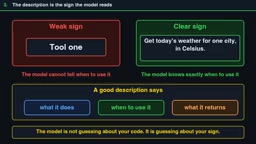
A well-written description should cover three things: what the tool does, when to use it, and what it returns.
Input Schema: The Form the Model Fills Out
The input schema is essentially a form the model must fill out, written in JSON Schema. It lists each field, its type, and which fields are required.
A few practical conventions are worth remembering: if a tool requires no input, use an empty object and set additionalProperties to false; tool names should be as concise as possible and must not contain spaces. These details may seem minor, but they are foundational to preventing chaotic model behavior.
JSON Schema is a JSON-based vocabulary for describing and validating the structure of JSON data. In MCP tool definitions, the input schema uses JSON Schema to precisely declare what parameters the tool accepts, the data type of each parameter (e.g., string, number, boolean), which parameters are required (via the required array), and value constraints (such as enum, maxLength, etc.). Setting additionalProperties to false is a defensive practice — it means the model cannot pass in any undeclared fields, preventing silent failures caused by misspelled parameter names or semantic misunderstandings. For AI models, a clear JSON Schema is essentially a precise instruction manual: the more specific the field descriptions, the lower the chance of errors when the model fills in parameters.
Tool Discovery and the Call Flow
MCP defines a clear interaction protocol. To discover tools, an application sends a tools/list request; the server responds with all available tools along with their descriptions and schemas. When the list is long, results are paginated.
To actually use a tool, the application sends tools/call with the tool name and arguments. The result comes back as a content list, and may also include structured content.
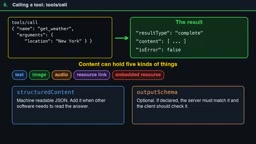
Tools also carry annotations such as read-only, destructive, idempotent, and open-world. But a critical reminder: these annotations are hints, not guarantees. Unless the server itself is trusted, applications must treat annotations as untrusted information — just as a label a store puts on its own product isn't the same as an independent safety certification.
Humans Must Always Have Veto Power
Because tools take real actions in the real world, application design must ensure humans can say "no" at any point. Applications should display what tools exist and seek confirmation before executing sensitive operations. On the server side, every input must be validated, access must be controlled, and calls should be rate-limited.
There's also a relatively new development worth noting: starting July 2026, a no-sessions mode is supported. Servers that need memory return a handle (similar to a "shopping cart ID") that the model passes back in subsequent calls. Servers can also request additional input and hand off tasks to an extended flow.
The Core Trap: Two Completely Different Ways to Fail
The most important part of understanding MCP tools comes down to two fundamentally different failure modes — and this is exactly the error that can freeze an agent.
A protocol error means the request itself was bad — for example, calling a tool name that doesn't exist. It comes back as a standard JSON-RPC error.
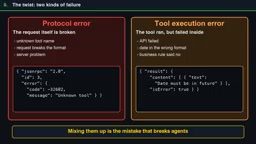
A tool execution error means the tool actually ran, but failed internally — for example, receiving a malformed date. This comes back as a normal result with the isError field set to true, along with a human-readable message the model can process.
Why Confusing the Two Freezes Your Agent
Here's the real danger: if a "bad date" error gets reported as a protocol error, the model often receives no useful feedback and has no way to self-correct. The result is that the agent either stops entirely or keeps making the same mistake in an endless loop.
The correct approach is to report it as a tool error with an actionable message — for example, "date must be in the future." The model can then read the message, self-correct, and retry. Conflating these two error types is the single most reliable way to break an agent.
The root cause of this problem lies in how large language models reason. In multi-step tasks, models depend on what tools return to determine their next action. When a tool fails with a protocol error (JSON-RPC error), most agent frameworks treat it as a "system-level exception" and abort the current task chain — because the framework can't distinguish between a bad parameter format and a server crash. By contrast, a tool execution error with isError=true is designed to be a normal part of the task flow: the model can read the error message, reason about a fix, and retry within the same conversation context. This "recoverable error" pattern is a key design philosophy for building robust agents: make failure informative, not terminal. When implementing MCP servers, developers should default to wrapping all business-logic-layer errors (invalid parameters, missing resources, insufficient permissions, etc.) as tool errors. Only genuine protocol violations should trigger a JSON-RPC error response.
Quick Quiz and Key Takeaways
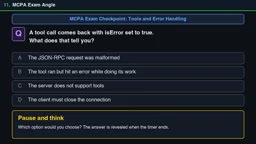
Here's a useful test question: when a tool call returns with isError set to true, what does that indicate?
- A. The JSON-RPC request itself was malformed
- B. The tool ran, but encountered an error while doing its work
- C. The server doesn't support tools
- D. The client must close the connection
The correct answer is B — the tool ran but failed internally. This is a tool execution error, not a protocol error, and the model should read the message and retry.
The core takeaways can be summarized as follows:
- Tools consist of a name, a description, and an input schema; description quality directly determines whether the model selects the right tool;
- Use
tools/listto discover tools andtools/callto invoke them; - Annotations are hints only — they cannot be relied upon as security guarantees;
- Protocol errors mean the request itself was broken; tool errors (
isError=true) mean the tool ran but failed — in the latter case, the message must be surfaced to the model.
For developers building MCP servers, this is an extremely valuable practical warning: what keeps an agent running reliably isn't just whether tools can execute — it's whether failures are reported in a way the model can understand and fix.
Related articles

ChatGPT Space Launches: Team Collaboration and New Pages Features Explained
ChatGPT Space is OpenAI's new team collaboration feature with Pages, real-time collaboration, and Slack/Google Drive sync. We break down its privacy design, multi-platform integration, and the full workflow from conversation to document.

Migrating Apache Spark UDFs to GPU Acceleration with AI Agents
NVIDIA developer blog explains how AI Agents rewrite Apache Spark UDFs for GPU acceleration, covering migration criteria, agent rewriting and verification workflows, plus pitfalls like result consistency and CPU-GPU transfer overhead.

Zed Editor v0.40.4-rc2 Released: Usage Credits Now Available Without Upgrading
Zed editor releases v0.40.4-rc2, allowing users to use usage credits for AI features without upgrading to a paid plan, lowering the trial barrier.