Mechvibes 3: Give Your Keyboard and Mouse Any Sound You Want

Mechvibes 3 is free open source software that plays custom sound effects in real time for any keyboard and mouse action.
Mechvibes 3 is free open source software that plays custom sound effects in real time whenever the user presses any key or clicks the mouse, compatible with all applications. It includes a community sound library covering mechanical switches, typewriters, game sound effects, and more, and supports creating sound packs directly in the browser. The software supports Windows, Linux, and Mac, and earned 70 upvotes and #8 ranking on Product Hunt.
The crisp clatter of a mechanical keyboard, the click-clack of a vintage typewriter, even sound effects from games—now all of these can be added to your ordinary keyboard and mouse through a single piece of software. Mechvibes 3 earned 70 upvotes and ranked #8 after launching on Product Hunt, and behind it is an interesting story of open source and community-driven development.
What It Is: Adding Sound to Every Keystroke and Click
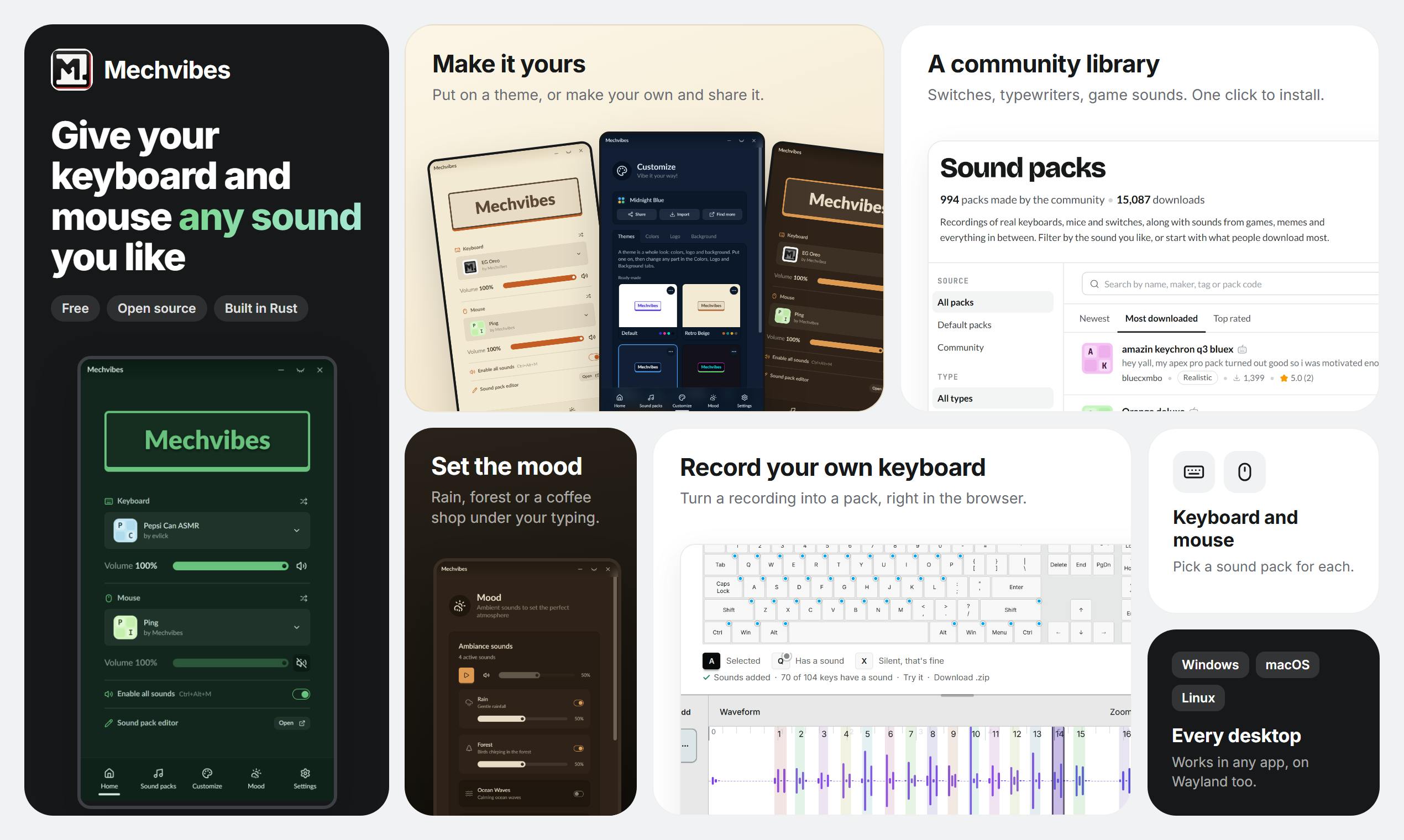
The core function of Mechvibes 3 is straightforward: whenever you press any key or click the mouse, it plays a sound in real time. No matter which application you're using, the sound follows along. This means you don't need to buy an expensive mechanical keyboard to experience the auditory feedback of different switches.
According to its Product Hunt page, users can choose sounds from a community library, including mechanical switches, typewriters, game sound effects, and more, or create their own sound packs directly in the browser. The software is free and open source, supporting Windows, Linux, and Mac.
Community Library and DIY Sounds: A Crowdsourcing Experiment in Sound
The most appealing aspect of Mechvibes 3 is its community-driven sound library. Rather than the official team providing a fixed set of sounds, users upload and share sound packs they've created themselves. This model allows the variety of sound effects to expand almost infinitely—from classic Cherry MX Blue switches to retro typewriters to iconic game sound effects, all of which may appear in the library.
For users who want to personalize their experience, the in-browser creation tool lowers the barrier to entry. You don't need to install additional audio editing software—you can record, edit, and package sounds directly in the web page. This "lightweight creation" approach is in line with the "extensibility" that today's open source communities champion.
Sound Pack is the core resource unit of Mechvibes 3, typically containing a set of audio files (such as press/release sounds for each key) and a configuration file that defines the mapping between keys and sounds. This modular design allows community members to independently create, share, and reuse sound packs without modifying the software itself.
The sound pack creation process generally includes: recording or collecting audio material, trimming it into short key sounds, organizing files according to naming conventions, and writing a JSON or similar configuration file. Mechvibes 3's in-browser tool simplifies these steps, enabling non-professional users to quickly create sound packs. The community library serves as a distribution platform where users can directly download sound packs shared by others or upload their own work. This crowdsourcing model not only enriches the variety of sound effects but also reduces official maintenance costs—a common collaboration approach in open source communities.
Cross-Platform and Open Source: The Technical Choices Behind a Small Tool
Mechvibes 3 chooses to support Windows, Linux, and Mac simultaneously, which is uncommon among small utility software. Cross-platform support means developers must handle the audio interfaces and input events of different operating systems, increasing development costs. But it also gives the software a broader audience base within the open source community.
The open source nature brings another advantage: users can review the code, submit improvements, or even build their own versions from the source. For software that needs to access system input events and audio output, transparency is especially important. Mechvibes 3's free and open source model also makes it easier to integrate into other workflows.
Global input event listening is the key technology that enables Mechvibes 3 to "play sounds in any application." Different operating systems provide different low-level interfaces: Windows typically uses Low-Level Keyboard Hooks, macOS requires accessibility APIs or Event Taps, and Linux may rely on X11 or Wayland input event capture mechanisms. These interfaces allow programs to intercept keyboard and mouse events at the system level, not limited to the currently focused window.
Implementing global listening requires handling permission issues (such as macOS accessibility authorization) and event conflicts (avoiding interference with other shortcut software). Mechvibes 3 encapsulates these differences through a cross-platform framework (such as Electron or similar solutions), but developers still need to adapt and test for each platform. This is one of the reasons why such small tools rarely support all three major platforms simultaneously.
Practical Use Cases and Potential Controversies
The practical uses of this type of software may be broader than imagined. For users accustomed to the feel of a mechanical keyboard but using a laptop, Mechvibes 3 can provide auditory compensation; for content creators, customized sound effects can add fun to video recordings; for those who need to focus, certain white-noise-like keystroke sounds may help them get into the zone.
However, sound feedback can also cause trouble. In open-plan office environments, extra keyboard sounds may disturb colleagues; during meetings or voice calls, sudden clicking sounds may cause awkwardness. Whether Mechvibes 3 provides convenient mute or scenario-switching features will affect its actual experience.
Scenario switching and mute control are crucial for sound feedback software. Ideal implementations include: a global shortcut for one-click mute, automatic configuration switching based on the currently active application (such as automatically disabling during meeting software), and saving presets for different scenarios (such as office mode and game mode). Whether Mechvibes 3 offers these features directly affects its usability in open-plan offices or voice calls.
Additionally, sound playback latency and resource usage are also practical considerations. Real-time audio playback requires low latency (typically under 50 milliseconds), otherwise the desynchronization between keystrokes and sounds will feel jarring. The open source community can improve these details through performance optimization and feedback loops, but users should still pay attention to compatibility with their own hardware and system environment when choosing.
Conclusion: A Lightweight but Fun Open Source Tool
Mechvibes 3 is not a revolutionary product, but it hits a niche need: extending the sensory experience of hardware through software. Its 70 upvotes and #8 ranking show that it has gained some recognition in the Product Hunt community, while its open source and cross-platform features provide a foundation for long-term development. If you have a passion for keyboard sounds, or just want to add a bit of novelty to your daily operations, it's worth a try.
One-line Summary
Mechvibes 3 is free open source software that plays custom sound effects in real time for any keyboard and mouse action.
Paragraph Summary
Mechvibes 3 is free open source software that plays custom sound effects in real time whenever the user presses any key or clicks the mouse, compatible with all applications. It includes a community sound library covering mechanical switches, typewriters, game sound effects, and more, and supports creating sound packs directly in the browser. The software supports Windows, Linux, and Mac, and earned 70 upvotes and #8 ranking on Product Hunt. Its community-driven model lowers the barrier to creation, but office environment noise and the convenience of scenario switching remain potential issues. Overall, it hits the niche need of extending hardware sensory experience through software.
Related articles
 Tech Frontiers
Coldframe: A Honeypot Disguised as a Supermarket Freezer Controller
Coldframe is a honeypot disguised as Danfoss AK-SM 800A and Dixell XWEB freezer controllers, built as a single Python file that detects CVE-2025-41450 attempts and is identified as real devices on Shodan.
 Tech Frontiers
GRFNet: A Lightweight PyTorch Model Designed for Multichannel Time-Series Classification
GRFNet is a lightweight PyTorch model for multichannel time-series classification, originating from EEG decoding research. With only 3,847 parameters, it is based on the ROCKET architecture, combining random convolution kernels with learnable spatial filters, supports arbitrary input lengths, and will soon be evaluated on the PhysioNet dataset.
 Tech Frontiers
CUDA-Accelerated Rocket League Simulator: A Player-Made Hardcore Experiment
A Reddit post shows a "100% Accurate" Rocket League simulator accelerated with CUDA. We analyze its technical context, CUDA's value in game physics simulation, and the significance and limitations of such community projects.