MergeImage: Free Browser-Based Image Merging Tool with Zero Uploads

A free, privacy-first browser tool that merges up to 30 images locally with zero server uploads.
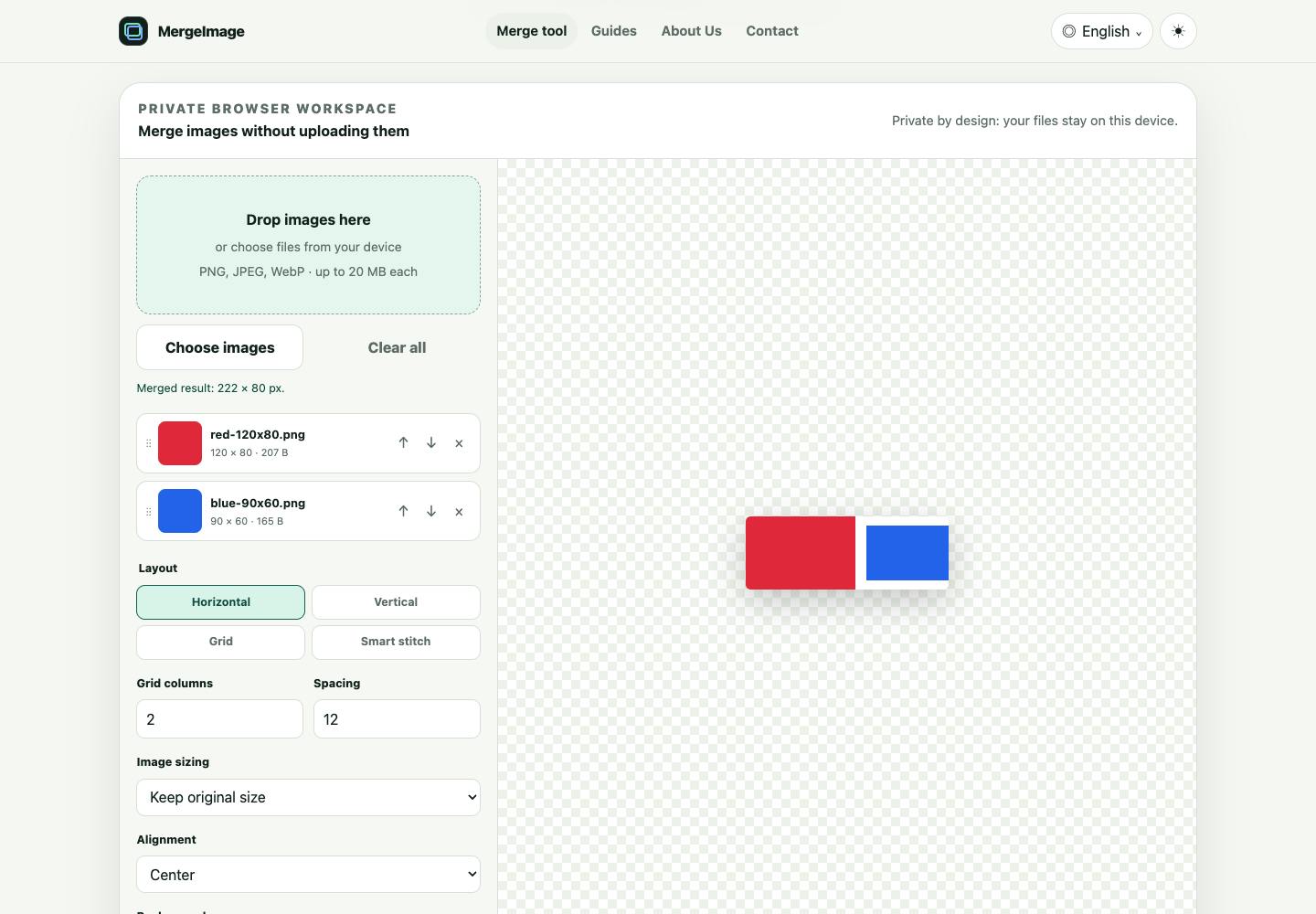
MergeImage is a free image merging tool that runs entirely in your browser with no server uploads. It supports horizontal, vertical, grid, and smart stitching layouts for up to 30 images in PNG, JPEG, or WebP formats. With no watermarks, no registration, and no fees, it's ideal for users who need to combine screenshots or create comparison images while keeping sensitive data private.
In everyday work, we often need to combine multiple images into one—whether it's stitching long screenshots, creating comparison images, or assembling product showcases. While there are plenty of online image merging tools available, most require uploading images to remote servers, which raises privacy concerns and often comes with watermarks, account registration, or paywalls. MergeImage takes a fundamentally different approach: all image processing happens locally in your browser, achieving true zero-upload privacy.
Core Philosophy: Local Processing, Privacy First
MergeImage's value proposition is crystal clear—merge up to 30 images in your browser, completely local, private, and free. It supports PNG, JPEG, and WebP formats, with the entire processing pipeline requiring no server uploads whatsoever.
This means several important things:
- Your image data never leaves your device—no risk of third-party storage or analysis
- No reliance on paid APIs or backend computing power—the tool is completely free
- For processing screenshots containing sensitive information (financial reports, internal documents, chat logs), this "zero-upload" design is practically a necessity
From a product philosophy standpoint, MergeImage represents the increasingly popular "local-first" approach—leveraging modern browsers' powerful Canvas and file handling capabilities to perform image merging tasks that previously required servers directly on the client side.
Local-first is a software architecture philosophy that has gained momentum in recent years, with the core principle of returning data ownership and computing power to user devices. The technical foundation includes HTML5 Canvas API, Web Workers for multi-threaded processing, and the maturation of browser-native capabilities like the File API. The Canvas API enables browsers to perform pixel-level image operations—drawing, cropping, compositing, and exporting—with performance approaching native application levels. It's precisely these underlying capabilities that make pure frontend image tools like MergeImage possible.
Feature Breakdown: More Than Simple Image Stitching
Multiple Layout Options
MergeImage supports four main merge layouts:
- Horizontal: Ideal for side-by-side comparisons
- Vertical: Perfect for workflow displays or long image stitching
- Grid: Great for showcasing collections of similar images
- Smart Stitching: A "conservative" stitching mode specifically designed for scrolling screenshots
The Smart Stitching feature deserves special attention. Scrolling screenshots (e.g., capturing a long webpage or chat history in segments and then combining them) are a common pain point. Regular stitching often results in content overlap or breaks, while MergeImage employs a "conservative" strategy to handle these scenarios, minimizing content loss from misjudgment.
From a technical perspective, the challenge in scroll screenshot stitching lies in overlap region detection. Common approaches involve pixel similarity comparison of edge regions between adjacent images (similar to template matching algorithms) to find optimal stitching points and remove duplicate content. The "conservative" strategy typically means preserving slight overlap when matching confidence is insufficient, rather than risking the removal of valid content—a pragmatic choice given limited frontend computing resources, ensuring users don't lose important information due to algorithmic errors.
Flexible Editing Controls
Beyond basic image merging, MergeImage offers a range of editing options:
- Reorder image sequence
- Rotate and flip individual images
- Resize images
- Set spacing and background color
- Real-time merge preview
Export supports PNG, JPEG, and WebP formats, allowing flexible choices based on use case (quality priority vs. file size priority).
MergeImage vs. Traditional Online Tools
To better understand MergeImage's differentiation, here's a comparison with common online image merging tools:
| Dimension | Traditional Online Tools | MergeImage |
|---|---|---|
| Processing Location | Remote server | Browser local |
| Privacy Protection | Requires image upload | Data stays on device |
| Watermark | Common | None |
| Account Required | Often requires registration | No account needed |
| Cost | Some features paid | Completely free |
MergeImage takes a subtractive approach across nearly every dimension—no accounts, no watermarks, no payments, no uploads. This "less is more" product philosophy hits exactly the points that utility tool users care about most.
Use Cases and Limitations
Ideal Use Cases
- Stitching multiple scrolling screenshots into complete long images
- Creating product or design comparison images
- Arranging multiple photos into grid displays
- Processing images containing sensitive information (no leak concerns)
Current Limitations
While local processing provides privacy advantages, it also means performance is constrained by the user's device—processing 30 high-resolution images at once may hit browser memory and rendering bottlenecks. Specifically, mainstream browsers like Chrome typically limit single-tab memory to 1-4GB, while a single uncompressed RGBA image at 4K resolution occupies approximately 32MB of memory. Thirty such images plus Canvas rendering buffers can easily hit browser limits, causing page crashes or rendering failures. Additionally, pure frontend solutions struggle to implement more complex AI-assisted features (like automatic content recognition or intelligent deduplication), which is the practical tradeoff behind the "conservative" smart stitching approach.
However, for the vast majority of lightweight image merging needs, MergeImage's feature set is quite comprehensive. Its value lies not in flashy features, but in making a common small task clean, private, and barrier-free.
Summary
MergeImage is a quintessential "small but beautiful" image merging tool that uses a local-first technical approach to solve the privacy and cost pain points of online image stitching. For users who frequently need to stitch screenshots or create comparison images without uploading to unfamiliar servers, this is a free option worth bookmarking. In an era of growing data privacy awareness, client-side tools like this may well become the standard form for an increasing number of lightweight applications.
Related articles

Missing Midjourney V3: The Fading of a Unique AI Art Aesthetic
Exploring why Midjourney V3's dreamlike aesthetic is missed, how AI image tools lose artistry through technical progress, and the deeper reasons behind narrowing AI aesthetic diversity.

Bonsai: A Deep Dive into Jane Street's Open-Source Functional UI Library for OCaml
Deep dive into Jane Street's open-source functional UI library Bonsai, exploring its OCaml-based incremental computation model, strongly-typed component architecture, and performance advantages for high-frequency data scenarios.

Apple's Trade Secret Theft Lawsuit Against OpenAI Backfires: Leaked Communications Expose Management Failures
Apple accused ex-engineer Chang Liu of leaking hardware secrets to OpenAI, but disclosed communications reveal Apple employees still sought his help post-departure, exposing offboarding failures.