Mermaid Flow: Building Runnable Agentic Workflows with Diagrams

Mermaid Flow replaces long prompts with visual flowcharts to orchestrate runnable agent workflows.
Mermaid Flow is a visual builder for agent workflows that solves the "invisible structure, hard to modify and debug" problem of long prompts and skill files. It generates Mermaid flowcharts from natural language, templates, or imported files, with each step as a node and conditions shown as connections. It connects to GitHub, Slack, and Notion, supports issue triage, weekly recaps, and PR review, and offers scheduled runs with step-by-step logs. It ranked 8th on Product Hunt with 90 upvotes, but execution details and readability at scale remain unverified.
From a Long Prompt to an Executable Flowchart
Mermaid Flow's tagline on Product Hunt is straightforward — "The visual builder for agentic workflows." The core problem it aims to solve isn't new, but it has long been overlooked: when handing repetitive work over to AI, you often need to write a lengthy prompt or maintain a skill file packed with steps, conditions, and API calls. These "textualized workflows" have no visible structure — change one thing and you risk affecting everything, and when something goes wrong, it's hard to trace back.
Mermaid Flow's approach is to switch the medium — to diagrams. You describe what you need in natural language, apply a template, or directly import an existing file, and the tool generates a flowchart with clear nodes, with every step laid out on the canvas. Once you've confirmed it looks right, click run — or schedule it to run on a timer.
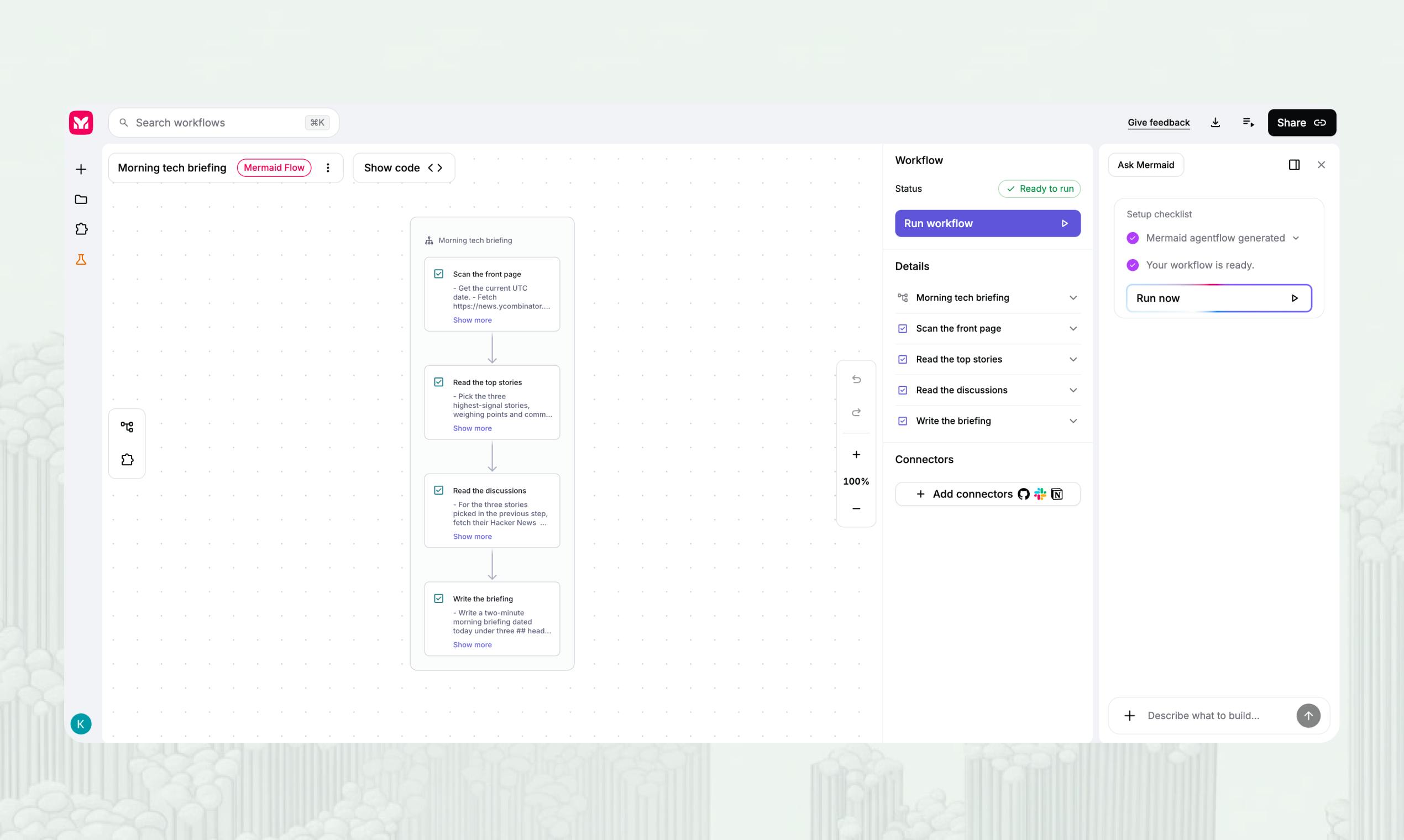
Workflow as Diagram: Turning Abstract Steps into Readable Structure
Traditional agent orchestration tools tend to have an interface that feels "engineering-heavy": nodes, connections, and parameter panels are all there, but the learning curve is steep. Mermaid Flow chooses Mermaid syntax as its intermediate layer, which brings an interesting side benefit — the workflow itself is readable text. When a team reviews a workflow, they see more than just boxes and arrows — they see a structured description that can be version-controlled and diffed.
On the canvas, each step corresponds to a node, and conditional branches and dependencies are shown as connections. Compared to logic buried in thousands of words of prompt text, this layout makes "what does this step actually do" immediately clear.
Mermaid is a text-based diagram description language that uses Markdown-like syntax to define nodes and connections, commonly seen in documentation rendering on platforms like GitHub and GitLab. It doesn't execute logic itself — it "draws" structured text into a diagram. Mermaid Flow borrowing this syntax as an intermediate layer means workflow definitions can be stored in Git like code, participate in diffs and code reviews — nodes and connections are no longer private data on a canvas that's hard to track, but readable, versionable text assets. This also explains why importing existing files works: parsing prompts or skill files into Mermaid structures and rendering them as editable flowcharts is essentially a bidirectional mapping between text and graphics.
Describe, Template, Import: Three Ways to Get Started
The product offers three starting points, covering users of different skill levels:
- Natural language description: Tell it what you want to accomplish, the tool generates an initial workflow, and you fine-tune it on the canvas.
- Start from a template: Begin with a preset workflow, ideal for quickly getting common scenarios up and running.
- Import an existing file: Bring in an existing prompt or skill file and convert it into a visual structure.
The third path deserves a mention. Many teams have accumulated a batch of prompt assets that "work but nobody dares to touch." Mermaid Flow's import capability essentially gives these legacy assets a "visual makeover," turning them from black boxes into maintainable workflows.
One-Click Connections and Step-by-Step Trails
On the integration side, the product supports one-click connections to services like GitHub, Slack, and Notion. This determines the types of tasks it can handle — official examples include issue triage, weekly recaps, and PR review. What they have in common: cross-system, fixed cadence, well-defined steps — exactly the kind of "errands" best suited for agents.
There are two design choices on the execution side worth noting. First, scheduling: workflows can be triggered manually or run automatically on a schedule. Second, run records — each execution is saved step by step, so you can review what happened at each stage. For team collaboration, this means members can follow along with the workflow through the records without relying on someone's verbal explanation. The most painful part of debugging agent workflows is often "where exactly did it go off track" — step-by-step trails directly target this pain point.
Issue triage refers to automatically classifying, labeling, assigning owners to, or flagging the priority of newly submitted issues, typically requiring reading issue content, matching rules, and writing back fields. Weekly recaps involve summarizing activity across multiple systems (such as GitHub commits, Slack discussions, and Notion docs) on a fixed cadence to generate structured summaries. In PR review scenarios, an agent can pull code changes, check against standards, and leave comments. The common structure of these three task types is "trigger — read from multiple sources — judge — write back," which maps neatly onto combinations of conditional branches and external calls in a flowchart. Mermaid Flow's one-click connections to these services mean nodes can directly call the corresponding APIs, without users having to manually stitch together authentication and request logic.
Who It's For, and What Questions Remain
In terms of positioning, Mermaid Flow targets the gap between "pure prompts" and "full code orchestration": product and operations people who don't want to write code, and engineering teams that want auditable workflows. The free-to-start strategy also lowers the barrier to experimentation.
However, the product page doesn't reveal much technical detail: how the generated workflows are executed under the hood, how complex the conditional logic can get, and what the scale limits are for a single run — all of these need to be verified through actual use. The common pitfall of visual orchestration tools is that simple scenarios look elegant, but complex ones easily turn into a tangled mess of connections. Whether Mermaid Flow can maintain readability as complexity grows is the question it needs to answer next.
Signals Worth Watching
On Product Hunt, Mermaid Flow received 90 upvotes and 11 comments, ranking 8th for the day. That's not a breakout hit, but in the intersection of developer tools and productivity tools, it shows that people are indeed waiting for the "visual agent workflow" direction. As agents move from demos to daily use, the competition over orchestration experience is just beginning — and "being visible" may be the most straightforward yet effective differentiator.
One-line Summary
Mermaid Flow replaces long prompts with visual flowcharts to orchestrate runnable agent workflows.
Paragraph Summary
Mermaid Flow is a visual builder for agent workflows that aims to solve the "invisible structure, hard to modify, hard to debug" problem of long prompts and skill files. It generates Mermaid flowcharts through natural language descriptions, templates, or importing existing files, with each step corresponding to a node and conditions and dependencies shown as connections — the workflow itself remains version-controllable text. The product supports one-click connections to GitHub, Slack, and Notion, with typical scenarios including issue triage, weekly recaps, and PR review; workflows can be triggered manually or scheduled, with each run recorded step by step for easy team review and troubleshooting. It received 90 upvotes on Product Hunt, ranking 8th for the day, positioning itself in the gap between pure prompts and full code orchestration — but the underlying execution details and readability under complex scenarios remain to be verified.
Related articles

Prospero: A Lightweight Native AI Coding Tool Built with ImGui
Prospero is a bloat-free native AI coding tool built with ImGui, emphasizing lightweight design, high performance, and low dependencies. This article analyzes its design philosophy, technical choices, and the divergence between platformization and toolization in AI coding tools.

WebRTC Abused: New Variant of Credit Card Skimming Scripts on Shopping Sites
Security researchers found skimming scripts on popular shopping sites using WebRTC data channels to exfiltrate credit card data. This article analyzes the technical原理, differences from traditional Magecart attacks, and defense strategies for e-commerce platforms in third-party script governance and CSP policies.

Single GB10 Card Hits 101 tok/s: Inkling 2 Mini Performance Tested on vLLM
A developer shared on Hacker News running Inkling 2 Mini with vLLM on a single GB10 at 101 tok/s. This article analyzes the technical context, the significance of vLLM with small models on single cards, and caveats for interpreting tok/s metrics.