Meshy AI 3D Model Hands-On Test: Why Do 3 Texture Maps Need 69MB?

Hands-on test shows Meshy and SupaVoxel tie on visual quality, but file sizes differ by 6x — the lighter one wins.
The author tested Meshy and SupaVoxel image-to-3D tools with the same hand-drawn graduation monkey, rendering from identical camera angles and comparing identical rectangular crops, scoring Meshy 59 and SupaVoxel 89. The gap isn't in appearance but engineering efficiency: both contain 3 textures and the same GLB format, yet Meshy's file is 69.18MB versus SupaVoxel's 11.17MB — a 6x difference. Face, diploma, and top-down hat crops show that Meshy's extra 586,096 triangles, ~58MB size, and ~14.67MB memory buy no visible quality advantage. Meshy's real strengths are only three: seamless face, no required extensions, and no holes on the back — at a high cost. SupaVoxel also offers dual compressed/original export. Neither has skeletons or animations.
A hand-drawn image of a graduation monkey was fed simultaneously into two image-to-3D tools, Meshy and SupaVoxel, then rendered from the same camera angle and compared using identical rectangular crops. The result: Meshy's model is visually almost indistinguishable from its competitor, yet its file size is 6 times larger. This is a signal every 3D content creator should pay attention to — what exactly are you buying with all that extra geometry?
Core Conclusion: 59 Points vs 89 Points
This is an independent test. Both tools were used with the author's own accounts, with no special vendor authorization. The test material is a hand-drawn image of a graduation monkey — wearing a mortarboard, a graduation gown, a red sash, and holding a rolled-up diploma.
The author's scores: Meshy 59/100, SupaVoxel 89/100. This score gap does not come from model appearance quality, but from engineering efficiency.
Both files contain exactly the same number of color texture maps — 3 each. Both use the GLB format and can be opened without conversion. But Meshy needs 69,179,580 bytes to carry these 3 texture maps, while SupaVoxel needs only 11,165,408 bytes. The same three "coats," but Meshy demands a box 6 times larger.
On a 12 Mbps mobile network, the 69.18 MB Meshy file takes about 46 seconds to download, while the 11.17 MB SupaVoxel file takes only about 7 seconds. For a use case that simply needs to display properly on a classroom page, this gap is decisive.
Face Crop Comparison: What Did the Extra 580K Triangles Buy?
The face is where viewer attention concentrates most, and it's the area the author focused on for comparison. Using the same crop rectangle, the same front-facing angle, and the same 2x zoom, the same region was cut from both rendered results.
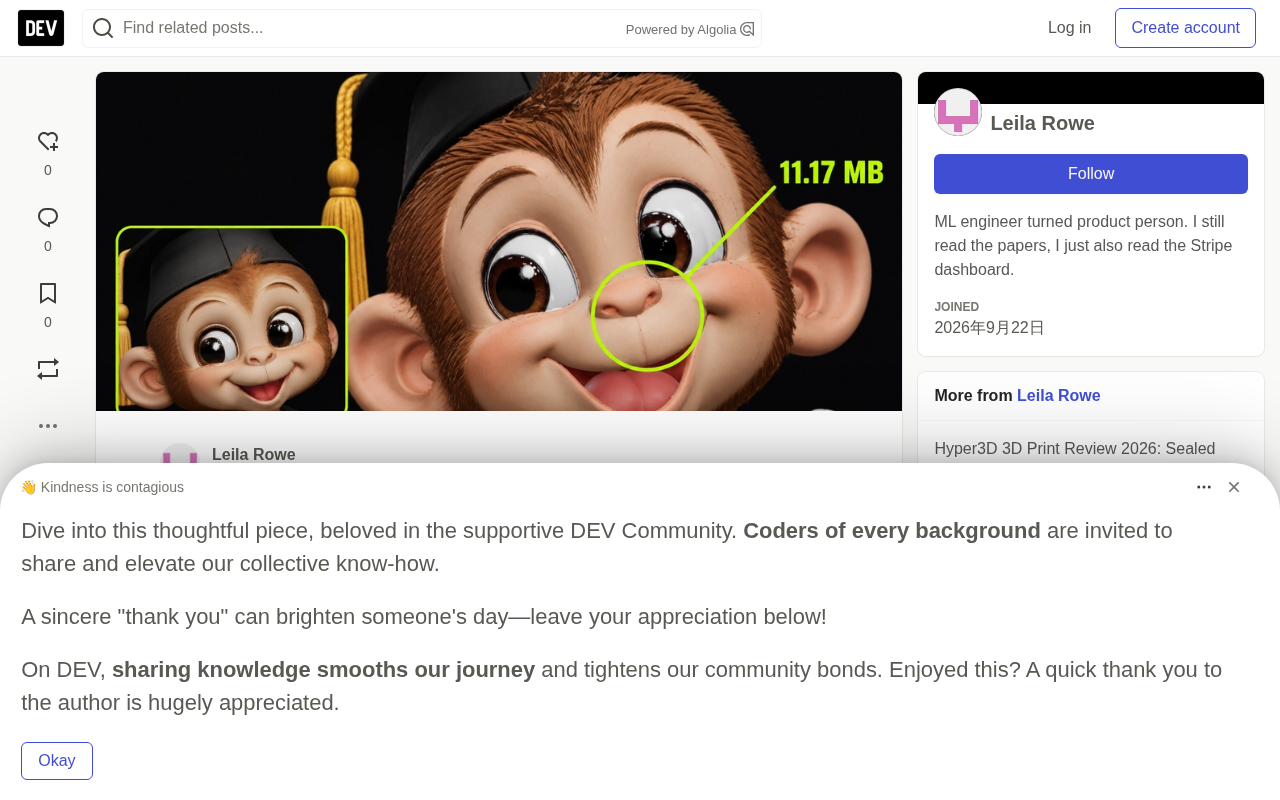
Meshy's face crop: eyes, nose, smile, and hat brim are all clearly readable, with smooth transitions from mouth to nose to cheeks and no visible seams.
SupaVoxel's face crop: the same four features are equally clear, but there is a subtle seam at the bridge of the nose and the cheek boundary.
Both are equally readable. This means Meshy's extra 586,096 triangles bought no visible advantage in this most critical frame. The author specifically notes: when parents zoom in on the class page, the heavy file and the light file convey exactly the same information.
When the heavy option and the light option look the same, the heavy one must prove its value. In this crop, Meshy can't.
What is the relationship between triangles and vertices? A triangle is the smallest polygonal unit of a 3D model's surface. Any complex curved surface is assembled from countless triangles. More triangles theoretically mean a smoother surface, but also a larger file. A vertex is the endpoint of a triangle, and each triangle is formed by 3 vertices, so the vertex count is typically about one-third to one-half of the triangle count. In binary formats like GLB, each vertex usually contains attributes such as position, normal, and UV coordinates, occupying space according to a standard 32-byte layout; each triangle requires 4 bytes of index to point to the three vertices it uses. This is where the "61.17 MB memory" estimate in the original comes from — the cost of a heavy model in GPU memory and loading time is silently borne by these invisible numbers.
Diploma, Sash, and Top-Down Hat: All Ties
The second set of crop comparisons focuses on the diploma and red sash. Meshy's scroll reads like a scroll, the sash reads like a distinct color band layered over the gown, and the sleeve edges remain distinguishable from the hands. SupaVoxel, under the same crop frame and zoom, delivers exactly the same result.
The top-down angle is usually a weak point for 3D models — the four corners of a square mortarboard easily become soft and blurry. But both Meshy and SupaVoxel firmly preserve all four right angles. The difference: Meshy used 2,086,002 triangles, while SupaVoxel used only 1,499,906.
Converting these numbers into a rough memory estimate: with a standard layout of 32 bytes per vertex and 4 bytes per triangle index, Meshy's geometry requires approximately 61.17 MB of memory, while SupaVoxel's requires about 46.50 MB. The extra ~14.67 MB of memory buys nothing visible in these crop comparisons.
Export Options: One File vs Two Weights
This is another difference in engineering practicality between the two.
Meshy gives you only one 69,179,580-byte GLB file per generation. This single file must serve the classroom page, archiving, and any downstream needs simultaneously.
SupaVoxel's export menu offers two choices: a compressed 11,165,408-byte GLB and an original-size 82,060,632-byte uncompressed GLB. The same model, two weights, chosen by target scenario — compressed version for mobile pages, original version for downstream needs requiring full data. No regeneration needed, no conversion tools, no extra credits consumed.
Same appearance, two shipping weights, choose by destination.
What are meshopt and quantization? Both are extensions inside GLB files used to compress geometry data. Quantization reduces the precision of vertex coordinates originally stored as 32-bit floats down to 16-bit or even lower integers, dramatically shrinking file size at the cost of extremely tiny positional errors. Meshopt is a mesh optimization solution for glTF that further reduces file size by reordering indices and compressing attributes. They are not supported by default in all 3D software, so when loading such files, the viewer must first declare that it can handle these extensions. This is exactly why Meshy's zero-extension list is cited as a compatibility advantage: the file opens right out of the box, no decoder needed.
Where Are Meshy's Real Advantages?
The author honestly lists three points where Meshy genuinely wins, along with the cost of each.
First, no face seams. SupaVoxel's face has a subtle line at the bridge of the nose and cheek boundary; Meshy doesn't. If you plan to rig skeletal animation in the facial region, Meshy offers a cleaner surface — a real advantage.
Second, no required extensions. GLB files internally declare extensions that software must support. Meshy's extension list is empty. SupaVoxel's compressed file declares two — meshopt and quantization, both ways of compressing shape data. Switching to SupaVoxel's original-size export eliminates the need for a decoder, but going straight from the menu, Meshy's file can be thrown at any software and opened.
The cost: for this compatibility, you accept 580K extra triangles, 58 MB extra file size, ~14.67 MB extra memory, and ~39 extra seconds of mobile download time — and the face crop you get back isn't any closer to the original image.
Third, clean back. Meshy's gown has no holes on the back, and neither does SupaVoxel's. It's a tie, but worth mentioning given that these tools often leave gaps on the back.
The author also admits two limitations: no files were actually imported into specific software for testing, so compatibility is only a label-level judgment; and whether the tassel and eye shapes truly match the original image was not verified on either side.
Back and Skeleton: Where No One Can Score
The original image has no back view, so both tools are "guessing" at the back. Meshy invented a continuous gown surface and a plausible hood shape; SupaVoxel is equally continuous, equally hole-free, equally fabricated. With no reference answer, no one can judge who "got the back right."
Another overlooked fact: both files contain zero skeletons and zero animation clips. Meshy is zero and zero; SupaVoxel is also zero and zero. For a tool that markets itself on character generation, this blank checkbox is worth noting. Both monkeys can only be viewed and rotated — they can't blink, wave, or talk unless someone manually rigs a skeleton, and that person would much rather drag around 1.49 million triangles than 2.08 million.
Test Methodology and Limitations
The author ran the same image once through Meshy (High Detail, Ultra 2K, texture and image enhancement enabled) and once through SupaVoxel (5 steps, guidance 5.5, background removal enabled, resolution 256). The two tools expose completely different control parameters, so the only thing kept consistent was the input image itself.
All renders came from the same offline viewer, the same lighting setup, and identical camera parameters. Since the two files may have their own internal orientations, matching camera parameters don't guarantee pixel-level alignment — this should be treated as same-angle rather than pixel-aligned.
File size, texture count, triangle count, vertex count, skeleton and animation counts were all measured directly from the files. Download times are arithmetic estimates based on stable 12 Mbps or 100 Mbps connections, excluding handshake and decoding. Memory estimates are illustrative calculations based on standard layouts, not actual GPU measurements.
Items not recorded: Meshy's generation time (not shown in records; SupaVoxel's was recorded as 304.808 seconds), failure and retry counts for both sides, and whether the tassel and eyes truly match the original image. Regarding credit consumption, Meshy recorded 35 credits and SupaVoxel 3 credits, but these are two different plans with two different units, so no price comparison can be made.
The essence of the image-to-3D workflow. Feeding a hand-drawn image into a tool like Meshy or SupaVoxel typically follows a pipeline of "image understanding → implicit representation → mesh extraction → texture baking." The model first infers the approximate shape of an object from a single image (called single-view reconstruction), then generates surrounding viewpoints through neural rendering or diffusion methods, and finally extracts a triangle mesh with color textures attached. Since the original information is only a single front view, parts not covered by the image — the back, the skeleton — can only be "filled in" by the algorithm. This is exactly why the original emphasizes that both tools are "guessing" at the back. Understanding this pipeline makes it clear why engineering metrics like file size, triangle count, and texture count are often evaluated on a completely separate axis from the visual judgment of "does it look like the original."
Final Verdict
Meshy turned a hand-drawn image into a complete, textured, open-anywhere graduation monkey in one shot — clean face crop, square mortarboard, no holes on the gown's back. This is solid work, and it's why Meshy passes 59 points.
But Meshy didn't turn its 2.08 million triangles, 1.13 million vertices, or 69 MB file into any advantage visible to the naked eye. It carries 3 color textures — a file 6 times smaller also carries 3. Face crop is a tie, diploma crop is a tie, top-down hat is a tie, three-view is a tie. And on the back, no one has a reference answer.
For a monkey that needs to display properly on a classroom page, the author's recommendation is: publish the 11.17 MB compressed version, but check the nose bridge seam first. If downstream needs the uncompressed model, the original-size download from the same generation is right there in the same menu.
The best approach is to do it yourself: run the image through both Meshy and SupaVoxel, render from the same angle, and crop identical rectangles for comparison. It takes twenty minutes and is more convincing than any review — including this one.
One-line Summary
Hands-on test shows Meshy and SupaVoxel tie on visual quality, but file sizes differ by 6x — the lighter one wins.
Paragraph Summary
The author tested Meshy and SupaVoxel image-to-3D tools with the same hand-drawn graduation monkey, rendering from identical camera angles and comparing identical rectangular crops, scoring Meshy 59 and SupaVoxel 89. The gap isn't in appearance but engineering efficiency: both contain 3 textures and the same GLB format, yet Meshy's file is 69.18MB versus SupaVoxel's 11.17MB — a 6x difference. Face, diploma, and top-down hat crops show that Meshy's extra 586,096 triangles, ~58MB size, and ~14.67MB memory buy no visible quality advantage. Meshy's real strengths are only three: seamless face, no required extensions, and no holes on the back — at a high cost. SupaVoxel also offers dual compressed/original export. Neither has skeletons or animations.
Related articles

ChatGPT Space Launches: Team Collaboration and New Pages Features Explained
ChatGPT Space is OpenAI's new team collaboration feature with Pages, real-time collaboration, and Slack/Google Drive sync. We break down its privacy design, multi-platform integration, and the full workflow from conversation to document.

Migrating Apache Spark UDFs to GPU Acceleration with AI Agents
NVIDIA developer blog explains how AI Agents rewrite Apache Spark UDFs for GPU acceleration, covering migration criteria, agent rewriting and verification workflows, plus pitfalls like result consistency and CPU-GPU transfer overhead.

Zed Editor v0.40.4-rc2 Released: Usage Credits Now Available Without Upgrading
Zed editor releases v0.40.4-rc2, allowing users to use usage credits for AI features without upgrading to a paid plan, lowering the trial barrier.