Meshy AI Image-to-3D Tested: Coarser Mesh, Where Does It Lose?

Same-image comparison of Meshy vs SupaVoxel image-to-3D: 61 vs 90, SupaVoxel wins on mesh density and file size.
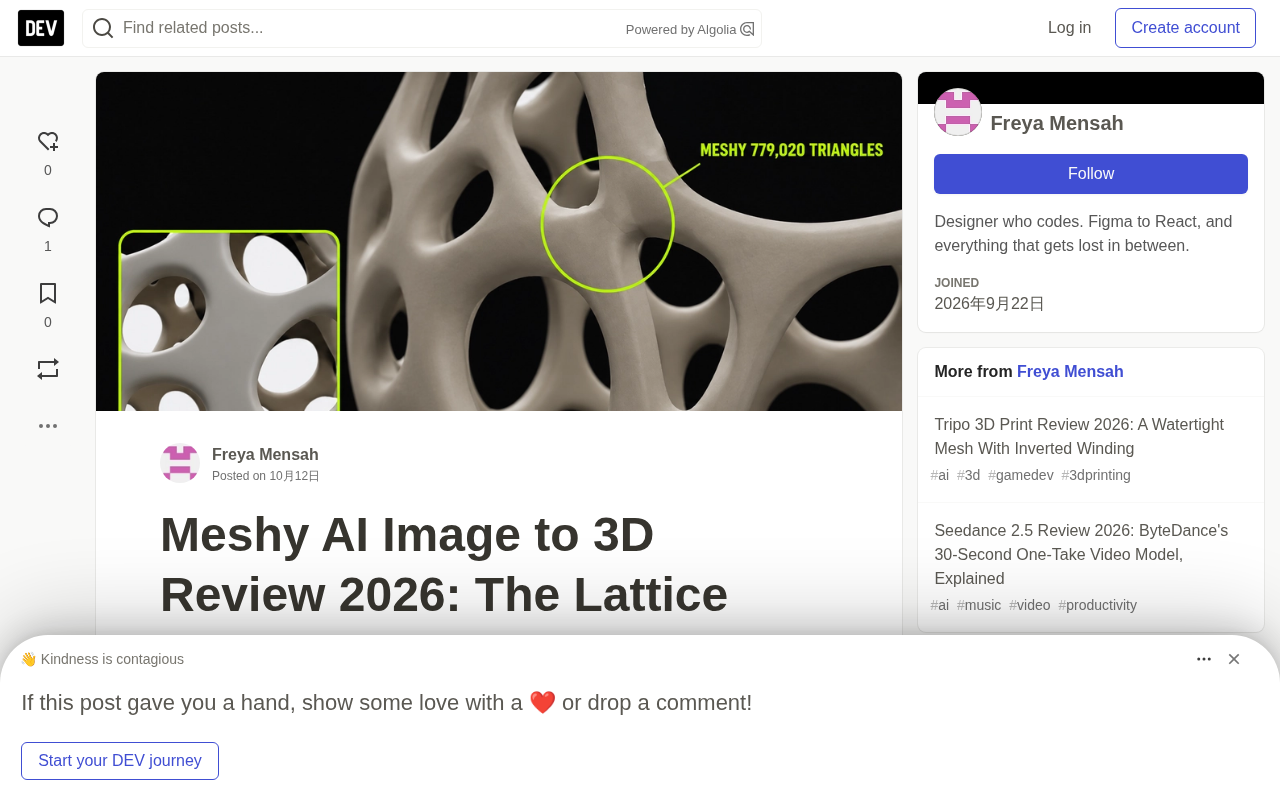
The author ran the same Voronoi eggshell image through Meshy and SupaVoxel and compared them under identical offline browser, lighting, and camera angles, giving Meshy 61 and SupaVoxel 90 as subjective scores. Both match the front view similarly, but SupaVoxel wins with 1.5 million triangles and 0.295mm average edge length, while Meshy has only 779,000 triangles and 0.306mm, making ribs blunter in close-ups. Meshy's export is 27.4MB—three times SupaVoxel's 9.0MB—with 2.8MB of screen-only textures wasted for printing. Both backs are invented and unverifiable, yet both are fully closed after cleanup. Meshy wins on color data (3x) and mesh cleanliness (419 vs 2,849 elongated triangles). The author kept SupaVoxel for printing and stresses that one test isn't a universal conclusion.
Can a single image become a 3D model? I ran the same Voronoi eggshell image through Meshy and SupaVoxel, then dropped both into the same offline browser, with identical lighting and camera angles, and compared them one by one. The verdict straight up: Meshy scored 61 this time, SupaVoxel scored 90.
Every score is subjective, and only applies to this one task. But the numbers below all come from the two tools' own exported files.
Who reproduces the original image better?
From the front, both pass. Porous outer shell, interwoven frame, egg-shaped silhouette—Meshy and SupaVoxel both captured the object in the photo. At thumbnail size, you probably can't call a winner.
This is the honest baseline. What a reference image can prove is whether the front looks right; it cannot prove whether the back, interior, wall thickness, or color are accurate—because the photo contains none of that information, and I didn't measure it.
Worth noting: both Meshy and SupaVoxel export GLB format. Geometry and images are packaged together, so the differences below are not caused by format.
GLB (Graphics Language Binary) is the binary packaging format of the glTF 2.0 spec, maintained by the Khronos Group and often called "the JPEG of 3D." It packs scene structure, geometry mesh, material definitions, textures, and animation into a single .glb file, avoiding the scattering of .gltf + .bin + textures across multiple files. Compared with traditional formats like OBJ and FBX, GLB is friendlier to PBR materials, vertex compression extensions, and runtime loading, which is why it is widely supported by Three.js, Babylon.js, Unity, Unreal, and various online viewers.
In practical use, GLB's key advantage is being "self-contained": geometry and images live in the same container, so textures don't go missing after export. But that also means file size is driven by both mesh precision and texture volume—in this case, both Meshy and SupaVoxel are GLB, so the 27.4MB vs 9.0MB gap can't be attributed to format, only to the mesh and textures themselves. In addition, GLB supports extensionsUsed / extensionsRequired fields to declare extensions; if a receiver can't recognize required extensions, it will reject or degrade loading—which is exactly the root of the decoder issue discussed later.
Mesh density determines rib clarity
Once you zoom in, the tie is over.
Meshy's ribs are wider and blunter, with fewer and rounder gaps. SupaVoxel's rib network retains more structure at the same zoom level. The numbers back up this impression:
| Metric | Meshy | SupaVoxel |
|---|---|---|
| Triangles | 779,020 | 1,500,000 |
| Vertices | 424,152 | 865,508 |
| Average edge length at 120mm height | 0.306 mm | 0.295 mm |
Each rib is a thin twisted tube. Twice the triangles means twice the cross-sections to keep the tube round. Meshy describes the same shape using half the material.
For a 0.4mm print nozzle, a 0.306mm step is a coarser curve description—and on a lampshade where the ribs are only a few beads thick, that's exactly where the faceting shows up first.
The renders and the triangle counts are saying exactly the same thing, which is the only reason I trust either one.
The back is entirely made up—and neither can be verified
Here's the fact that image-to-3D reviews rarely state outright: your image only shows one side, so the back is invented—Meshy invents it, SupaVoxel invents it. There's no reference, so when Meshy's back looks plausible, that's "reasonable," not "accurate." Same for SupaVoxel.
What can be tested is this: after cleanup, both files are fully closed—zero open edges, no edges shared by three faces, consistent surface orientation, and one connected shell each. Neither is a hollow shell with holes. This part is measured; the rest is imagination, and it's the same on both sides.
One unexpected detail: before cleanup, Meshy reported 67,946 loose edges and SupaVoxel reported 225,446. These are all seam bookkeeping from wrapping a flat image onto a 3D shape, and they all disappear after merging co-located vertices. Don't be scared by raw edge counts in some viewers.
Open edge refers to an edge used by only one triangle, usually meaning there is a crack or hole in the mesh surface; manifold requires each edge to be shared by exactly two triangles and each vertex neighborhood to be flattenable into a disk. Non-manifold geometry—such as three or more faces sharing the same edge—makes it impossible for slicing software and finite element tools to determine "which side is solid interior," leading to errors or outright failures.
Loose edge is an isolated edge that doesn't belong to any triangle, often produced by seam bookkeeping when wrapping an image onto a 3D surface. They don't form solids, but in some viewers' statistics panels they show up as shocking numbers that can mislead people about model quality. After welding co-located vertices, these seam edges usually vanish entirely. So when evaluating whether an image-to-3D model is "usable," what really matters is the cleaned open edge count, non-manifold edge count, and number of connected shells—not the raw loose edge count.
File size: Meshy weighs three times as much
| Metric | Meshy | SupaVoxel |
|---|---|---|
| Exported file size | 27,408,396 bytes | 9,044,340 bytes |
| Screen-only textures | 2,826,340 bytes | 235,772 bytes |
| Color image | 1,658,610 bytes | 519,966 bytes |
| Texture count | 3 | 3 |
Both come with 3 texture images, so that's a tie. But the weight is worlds apart. Meshy's two screen-only textures (bump detail and sheen) total 2,826,340 bytes, while SupaVoxel's are only 235,772. For pure printing, that's 12 times the useless payload.
Adding the color image, Meshy's file has 4,484,950 bytes of images, SupaVoxel has 755,738 bytes—16.4% and 8.4% of their respective files. This shows: Meshy's bulk isn't carried by textures; the rest is all uncompressed mesh data.
If displayed as a rotating model on a webpage, over a 12Mbps mobile connection, Meshy would wait 18.3 seconds and SupaVoxel 6.0 seconds. At 100Mbps it's 2.19 seconds vs 0.72 seconds. These are arithmetic based on byte counts, not measured page loads.
After loading, the ranking flips: at an estimated 32 bytes per vertex and 4 bytes per index, Meshy's geometry occupies about 22.9MB in memory, SupaVoxel about 45.7MB. Compression shrinks the download, not the loaded mesh. Again, arithmetic, not measured memory.
Meshy's version is only prettier when nobody needs to download it.
EXT_meshopt_compression is a glTF geometry compression extension provided by the meshoptimizer project. It can do lossy or lossless compression on vertex attributes, indices, and animation data, significantly reducing GLB size. It is usually paired with KHR_mesh_quantization: the latter quantizes 32-bit float coordinates into 16-bit or even 8-bit integers, further shrinking the data at the cost of tiny precision error.
These two extensions are "required extensions," declared in the GLB's extensionsRequired field. Loaders that support them (like Three.js's GLTFLoader with meshopt_decoder) can transparently decompress; receivers that don't support them will directly refuse to load or throw an error. So compressed GLB wins in web transmission scenarios, but in offline pipelines that need maximum compatibility, old engines, or strict validation environments, raw-size export is still the safer choice. In this case, SupaVoxel output both a compressed and a raw version, precisely to serve both types of downstream.
Where Meshy actually wins
Two lines, both real.
More color data. Meshy's color image is 1,658,610 bytes, SupaVoxel's is 519,966 bytes. Same lampshade, more than three times the color data. If what you want is a richly textured model on screen, more color information is the right direction. But I have to be honest—I didn't measure either side's color accuracy. So what I can say is Meshy's color image is "bigger," not "better."
Cleaner mesh. Stretched, elongated triangles that give repair software headaches: Meshy has 419, SupaVoxel has 2,849. Meshy also has no degenerate, near-zero-area faces; SupaVoxel has two. Part of this is simple arithmetic—more triangles, more chances to become elongated—but if your workflow goes through a picky cleanup step, Meshy gives you a file that's easier to handle.
The third point isn't about appearance: Meshy's GLB declares no required extensions; SupaVoxel's compressed GLB declares EXT_meshopt_compression and KHR_mesh_quantization, so the receiving program needs a decoder. Switching SupaVoxel to the raw-size export makes the decoder issue disappear—the same run already produced two files, one for the web and one for environments that refuse decoding.
What the renders can't tell you
No color measurement, no pixel-level registration between the two models, no texture resolution, no slicing, wall thickness, or actual printing.
Two more gaps: neither run recorded failure or retry counts, and Meshy's generation time was not captured at all. SupaVoxel's record is 274.715 seconds, Meshy's is blank, so this article makes no speed claims.
Listing these gaps because visualization articles are where impressions most easily masquerade as measurements. All numbers here come from Meshy's and SupaVoxel's files, and all visuals are renders you can judge with your own eyes, labeled with camera parameters.
Final verdict
Meshy turned one image into a recognizable Voronoi eggshell, fully closed all around, with the mesh readable from every shooting angle. Task accomplished, and that's not easy.
But Meshy used 48% fewer triangles and a coarser average edge length, so in every close-up Meshy's ribs are blunter. Meshy brought more than three times the color data, which is a real advantage if the lampshade lives on a screen rather than a print bed.
Mine is going on a print bed. So this time I kept SupaVoxel's 1,500,000-triangle model—the compressed version for the web, the raw-size GLB from the same run for pickier uses.
But don't take my eggshell as your answer. Run your own image through Meshy and SupaVoxel and look at your own cropped comparison. Different objects will behave differently, and one run is one run.
One-line Summary
Same-image comparison of Meshy vs SupaVoxel image-to-3D: 61 vs 90, SupaVoxel wins on mesh density and file size.
Paragraph Summary
The author ran the same Voronoi eggshell image through Meshy and SupaVoxel, comparing them item by item in the same offline browser, lighting, and camera angles, giving Meshy 61 and SupaVoxel 90 as subjective scores. Front-side fidelity is comparable, but SupaVoxel wins with 1.5 million triangles and 0.295mm average edge length, while Meshy has only 779,000 triangles and 0.306mm, making ribs blunter in close-ups. Meshy's exported file is 27.4MB, three times SupaVoxel's 9.0MB, with 2.8MB of screen-only textures—a serious waste for pure printing. Both backs are invented and unverifiable, but both are fully closed after cleanup. Meshy wins on color data volume (3x) and mesh cleanliness (419 vs 2,849 elongated triangles). The author kept SupaVoxel for printing and stresses that a single test doesn't represent a general conclusion.
Related articles

ChatGPT Space Launches: Team Collaboration and New Pages Features Explained
ChatGPT Space is OpenAI's new team collaboration feature with Pages, real-time collaboration, and Slack/Google Drive sync. We break down its privacy design, multi-platform integration, and the full workflow from conversation to document.

Migrating Apache Spark UDFs to GPU Acceleration with AI Agents
NVIDIA developer blog explains how AI Agents rewrite Apache Spark UDFs for GPU acceleration, covering migration criteria, agent rewriting and verification workflows, plus pitfalls like result consistency and CPU-GPU transfer overhead.

Zed Editor v0.40.4-rc2 Released: Usage Credits Now Available Without Upgrading
Zed editor releases v0.40.4-rc2, allowing users to use usage credits for AI features without upgrading to a paid plan, lowering the trial barrier.