Meta Muse Cloud Registration Tutorial: Bypass IP Restrictions to Claim Huge Token Rewards

Breaking down the process and risks of using a cloud browser to bypass region restrictions and register for Meta Muse.
The article addresses the registration challenges of Meta's AI assistant Muse, noting that local registration failures stem from IP geolocation detection, account binding, and age/identity verification. A Bilibili creator's solution moves registration into a cloud browser with a clean exit IP in a supported region. The process covers Google login to a cloud browser platform, binding GitHub and Starring a project for one month of Pro, enabling the official proxy to launch Chrome, and completing Muse email registration. Age verification can be passed with a China-issued card since only format is checked. It also clarifies that "30 billion Tokens" is a referral reward cap, not given upon registration, and warns of terms-of-service violations, account bans, and data leakage risks.
Meta's recently launched AI assistant Muse has drawn widespread attention, with capabilities spanning conversation, generation, and tool calling, and the company has also rolled out a fairly generous Token allowance to attract users. But many people get stuck right at the registration step—region not supported, IP restricted, identity verification failing. A Bilibili creator shared an approach called "cloud remote registration," the core idea being to use a cloud browser to bypass local environment restrictions. This article breaks down the key steps and the reasoning behind them.
Why Local Registration Often Fails
The registration barriers for Meta AI-type products mainly come from three layers: IP geolocation detection, account system binding, and age/identity verification. In a local network environment, once your IP is judged to be from an unsupported region, the registration flow is cut off immediately; even if you manage to get through, subsequent bank card or social account verification may also fail due to region mismatch.
The creator's solution is to move the entire registration process into a cloud browser. A cloud browser's exit IP is usually located in a supported region, and the environment is clean, carrying no local cookie traces, which to some extent helps evade interception based on the local environment. It should be noted that this practice is a gray-area workaround of platform rules, and there is no official guarantee as to whether the account will remain stable afterward or be reclaimed by risk control.
The Relationship Between Exit IP and Risk Control
"Exit IP" refers to the public IP address that the target server sees when you access the internet. Platform risk control systems typically map IPs to geographic location, ASN (Autonomous System Number), and IP reputation databases to determine whether a request comes from a supported region and whether it belongs to a data center or proxy pool. Cloud browser exit IPs often fall in countries supported by the platform, and the IP ranges are relatively "clean," making them easier to pass initial screening than local home broadband. But this also means that once that IP range is polluted by a large volume of registration activity, risk control will quickly tighten—which is the fundamental reason such solutions have a short shelf life.
Setting Up the Cloud Environment: From Registration to Claiming Pro
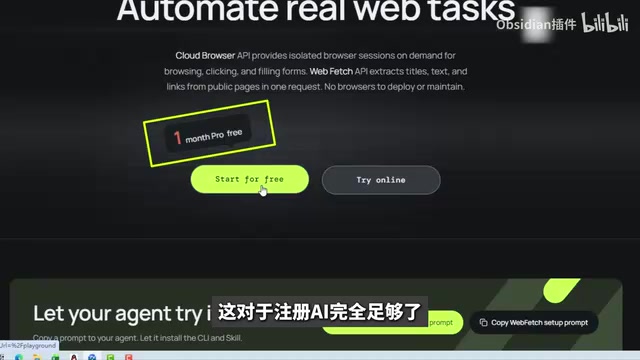
The first step in the whole process is to find a cloud browser service that offers free trial credits. The tutorial uses BrowserNextMode (as spoken in the original; refer to the actual platform for the exact name), and registration is done via one-click Google account login—just click Setup with Google to complete it.
After logging in, you enter the Cloud for free section, where you need to bind a GitHub account and Star a designated open-source project as a verification action. Once done, return to the platform and click verify to claim one month of Pro access. The tutorial specifically notes that one month of Pro is more than enough to complete one AI registration.

The design intent behind this step is worth noting: the platform uses "GitHub account + project Star" as a threshold, essentially filtering out bulk registration bots while driving traffic to open-source projects. The cost for ordinary users is very low, but it means you need a usable GitHub account.
Completing Muse Registration in the Cloud Browser
After claiming Pro, enter the cloud browser from Open Playground. The interface has preset shortcuts for several AI tools, the first being Muse AI, and you can also customize opening other platforms. The key setting is checking "Enable official proxy" on the right side—that is, making the browser go through a remote proxy—then clicking Run Chrome to launch.

After launching, the Muse AI registration page opens automatically. Enter your email, receive the verification code, fill in your birthday (must be an adult), and you can proceed to the next step. At this point you've only completed basic account creation—the real hurdle comes later.
Age Verification Is the Biggest Obstacle
The registration flow requires proving the user is 18 or older. The tutorial mentions two paths: one is binding a Facebook or Instagram account, and the other is verifying with a bank card or credit card. Users without social accounts can only go the card verification route.

You may not have noticed, but the creator explicitly states that cards issued in China can be used to complete verification, with the country option left at the default United States, and the ZIP code only needs to be the correct number of digits—any five-digit number will pass. This exposes a weak point in the platform's verification logic: it checks format and connectivity, not the real match between card issuing location and address. How long this laxity lasts depends on whether Meta tightens risk control afterward.
Why Platforms Insist on Age Verification
Meta sets an 18+ threshold for AI products partly for compliance—multiple jurisdictions impose additional regulation on AI services aimed at minors—and partly as a risk control measure: binding a social account or bank card effectively converts anonymous registration into a traceable real identity. Credit card verification usually involves a small pre-authorization or address verification (AVS), but different acquiring banks vary widely in their tolerance for foreign cards and ZIP code matching. The fact that "any five-digit ZIP code" passes in the tutorial shows that the platform only performs format validation at this step rather than strict address matching—a tradeoff in risk control strategy, not a technical vulnerability.
How the 30 Billion Tokens Are Actually Obtained
The most eye-catching "30 billion Tokens" in the title is actually an invite reward mechanism, not something given upon registration. The process is to click Invite in the upper right corner, get your own invite code and share it with others, and accumulate Tokens based on the number of invitees, with a cap of 30 billion. In other words, this is a referral growth design, and the allowance a single person can get from registering is far lower than the number shown in the title.
This point is easily misread in circulation. Treating the cap as the default allowance creates false expectations about actual returns. If your goal is personal use rather than promotion, the actual Tokens you receive need to be re-estimated according to the invite rules.
A Few Practical Reminders
The technical substance of the whole tutorial boils down to three words: "change the environment." The operation itself isn't complicated, but you need to weigh the risks yourself. Registering with a cloud browser and proxy may violate the platform's terms of service; if the account is judged abnormal, there is a possibility of being banned or having Tokens zeroed out; in addition, entering email and payment card information into a third-party cloud environment carries inherent risk of information leakage.
The tutorial author positions it as "zero-basics, hand-holding level," and for users who want to try Meta AI but are limited by region, it does provide an actionable path. However, it's safer to treat it as a one-time trial solution; relying on this environment long-term for your main account is not a good risk-reward tradeoff. Technical means can solve the registration problem, but they can't solve the compliance and sustainability of the account.
One-line Summary
Breaking down the process and risks of using a cloud browser to bypass region restrictions and register for Meta Muse.
Paragraph Summary
The article centers on the registration challenges of Meta's AI assistant Muse, pointing out that local registration failures mainly stem from three layers of restriction: IP geolocation detection, account binding, and age/identity verification. The Bilibili creator's solution is to move the registration process into a cloud browser, using its clean exit IP located in a supported region to evade interception. The process includes logging into the cloud browser platform with a Google account, binding GitHub and Starring a project to claim one month of Pro, enabling the official proxy to launch Chrome, and then completing Muse email registration. Age verification is the biggest obstacle—a bank card issued in China can pass, as the platform only validates format rather than real address. The article also clarifies that "30 billion Tokens" is actually the cap for referral rewards, not something given upon registration, and warns that such operations carry risks of violating terms of service, account bans, and information leakage.
Related articles

Python 3.15 New Feature: Is the sentinel Type Better Than None?
Python 3.15 adds the sentinel type, using named unique sentinel objects to replace None and bare object(), resolving confusion among missing values, explicit emptiness, and invalid input while avoiding type hint failures.

Deep Learning's Three Architectures and the Universal Approximation Theorem: A Complete Guide to MLPs, CNNs, and Transformers
Explaining the inductive bias differences among MLP, CNN, and Transformer, the existence meaning of the Universal Approximation Theorem (UAT), and the role of Taylor expansion in approximation analysis, while clearing up common misconceptions.

GitLab Emergency Patch Release: Analysis of Critical Security Fixes
GitLab releases critical patch 19.5.1, sparking 355 points of discussion on Hacker News. This article analyzes the background, upgrade steps for self-hosted instances, and verification points to help DevOps teams respond quickly to security updates.