Microsoft 365 Copilot Super App Deep Dive: How Chat and Co-work Are Reshaping the Workplace

Microsoft 365 Copilot's Super App strategy, Work IQ differentiator, and hidden productivity features explained.
Microsoft 365 Copilot is evolving from a simple AI assistant into an enterprise Super App platform, with Work IQ — powered by Microsoft Graph — as its core differentiator. The platform's three strategic pillars are market alignment, reduced switching costs, and a compounding flywheel effect. Chat handles embedded daily assistance while Co-work handles complex delegated tasks. Deep integrations across Word, Excel, PowerPoint, Outlook, and Teams unlock brand-aware generation, real-time meeting notes, and email priority management. Key underrated features include data source switching, org-specific prompts, and voice/vision interactions.
The Microsoft Copilot product team recently shared a comprehensive breakdown of Microsoft 365 Copilot's platform positioning, its Super App strategy, and a range of practical features that many users have yet to discover. As a product leader who has been involved since the project's inception, the presenter offered a platform-level perspective on where Copilot is headed — along with plenty of productivity tips worth trying.
Copilot's Positioning: A Unified AI Platform Built for Work
Microsoft 365 Copilot is defined as a unified AI platform "tailor-made for work," and its most important differentiator is Work IQ. The presenter described Work IQ as Copilot's "special sauce" — it understands your organization's context, relationships, and work patterns, personalizing general AI capabilities for each user and each organization.
The platform rests on several key pillars: multi-model selection so users can choose the best model for a given task, built-in agent-building tools accessible to users of varying technical backgrounds, and a "security-first" approach to governance and administration. In short, Copilot aims to balance personalization, flexibility, and enterprise-grade control.
The technical foundation of Work IQ is the Microsoft Graph — a unified API layer spanning user emails, calendars, documents, Teams messages, org charts, and more. Through Microsoft Graph, Copilot can understand context like "which project team you're on," "who you collaborate with most frequently," and "what structure your documents typically follow" — rather than relying solely on conversation history. This is the fundamental difference from general consumer AI assistants: those tools understand users only within a single session or through limited personal memory, while Copilot can draw on the entire organization's knowledge graph as reasoning context, within the bounds of enterprise permissions. This deep integration is Microsoft's key competitive barrier in the enterprise AI market against standalone AI products.
Why Build a Super App?
Microsoft is building Copilot into a Super App — a direction already publicly announced by Satya Nadella. The presenter outlined three reasons behind this move.
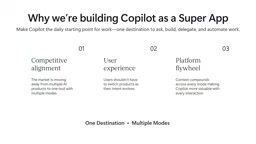
The first is competitive alignment. The entire market is evolving toward "one product, many modes," and users increasingly expect a single unified entry point that can handle everything — from writing code to conducting research to chatting.
The second is a better user experience. Users shouldn't be forced to switch between multiple products just because the task changes. The Super App goal is to "meet users where they are."
The third is the platform flywheel effect, which the presenter sees as Microsoft's true moat. When all interactions — chat, research, agent work — converge on a single entry point, every interaction contributes to a shared understanding of that user. The more you interact with Copilot, the better it understands your needs and habits, becoming increasingly personalized over time.
The Super App concept was first proven at scale by WeChat in China: a single entry point supporting chat, payments, shopping, transportation, and nearly every other high-frequency need, where users can complete most of their digital lives without leaving the platform. The core advantage of this model lies in the compounding accumulation of data and habits — the platform's understanding of the user deepens exponentially over time, forming a moat that competitors struggle to replicate. Microsoft is applying this logic to enterprise productivity software, essentially betting that once AI assistance is deeply integrated into daily workflows, switching costs will rise dramatically and the platform's accumulated "work context" will become a harder-to-replace asset than model capability alone. Unlike consumer Super Apps, enterprise Super Apps must also satisfy additional requirements around compliance, data isolation, and permission management — which is why the presenter listed "security-first" as a core platform pillar.
Chat vs. Co-work: Understanding the Two Modes
"What's the difference between Chat and Co-work?" is a question the presenter gets asked repeatedly. Her answer was clear:
- Chat is the "in-flow assistant," embedded across all everyday applications — Outlook, Teams, PowerPoint, Excel — suited for drafting, summarizing, co-authoring, meeting recaps, and other daily needs that every employee has.
- Co-work is designed for more complex, multi-step delegated tasks — for when you need to hand off an entire chunk of work to AI to complete.
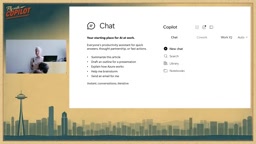
The ideal Chat experience makes you feel like "Copilot knows you and knows what you're working on" — without having to re-explain your context every time. The presenter gave an example: when she asks a question, Copilot sometimes proactively connects it to "your Teams conversation with so-and-so." That kind of context awareness is exactly what the team is working toward. About a month ago, Chat and Co-work were merged into a single unified view globally — the early form of the Super App has started to take shape.
The Co-work mode points toward the rapidly evolving Agentic AI paradigm: unlike traditional question-and-answer AI interactions, agents can autonomously break down goals, invoke tools, execute multi-step tasks, and make intermediate decisions along the way to deliver complete results. This model requires stronger task planning capabilities and broader tool-calling permissions, but it also carries a higher risk of error — if an intermediate step goes wrong, all subsequent results may go off track. For this reason, the presenter emphasized that "users always remain in control" is especially important in Co-work scenarios: the ideal design has AI actively seeking confirmation at critical decision points rather than executing autonomously from start to finish. Microsoft's current agent framework (Copilot Studio) allows enterprises to customize agents' tool-calling boundaries and trigger conditions, striking a balance between automation efficiency and human review.
Underrated Features Worth Knowing About
The presenter specifically called out several "product surprises" that many users have yet to discover:
Switching data sources: At the very bottom of the plus menu, there's a "change data sources" option that lets you turn different data sources on or off, giving you precise control over Copilot's output.
Organizational prompt suggestions: Companies can add prompts tailored specifically to their own context — for example, using internal company jargon to customize Copilot. The presenter used Microsoft's internal semi-annual performance review system, "Connect," as an example of how organizations can bake proprietary context into Copilot. Organizations can also add their own logo to the bottom of the page.
Prompt Lab (formerly Prompt Gallery): A centralized place to store all these prompts — worth spending time exploring.
Voice and Vision experiences: Copilot is moving toward a "voice-first" interaction model. In voice mode, it doesn't just exchange text back and forth — it can simultaneously display visual content on screen like calendar reviews and meeting agendas, making the experience much richer. The Vision feature lets you share your screen with Copilot — for example, showing it a whiteboard and discussing the content together.
Copilot Across the Microsoft 365 Suite
Across Word, Excel, PowerPoint, and Outlook, Copilot is shifting from "one-off answers" to deeper collaboration, with all edits happening natively within each application.
Word: Copilot can work directly inside a document — generating executive summaries, rearranging sections, rewriting conclusions, and even telling you "what changed since you last looked at this" during multi-person collaboration.
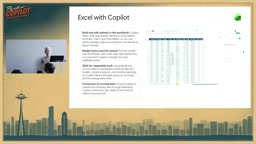
Excel: All edits are written natively into the workbook, with collaborative support for formulas and pivot tables.
PowerPoint: The standout feature is brand kit awareness — Copilot can follow the organization's defined formatting and visual styles, making generated content feel natively on-brand. Built-in image generation can also produce relevant illustrations directly.
Outlook: Beyond drafting and polishing emails, Copilot can manage RSVPs and automatically respond to meeting invitations based on priorities you set.
One point the presenter repeatedly emphasized: users always remain in control. In these applications, Copilot won't automatically modify content without your explicit approval. You also retain model selection rights, with the ability to switch between auto, faster, or more powerful models.
Copilot in Teams: Transforming Meeting Productivity
The presenter named Teams' Copilot as one of her favorite features. You can bring Facilitator into a meeting, tell it the agenda in advance, and it will help manage the flow — reminding you when a topic is running long, generating meeting notes in real time, and summarizing action items. After the meeting, you can directly ask questions like "what action items came out of this meeting and who should they be assigned to?" — work that used to require manual note-taking is now handled by Copilot.
Prompting Tips: More Context Means Better Results
The core principle is simple: the more information and detail you give Copilot, the higher the quality of its output. The presenter shared several high-frequency everyday use cases:
- Condensing a 20-page PDF into five key points or a few paragraphs;
- Drafting emails and other content (a non-native English-speaking colleague on her team uses Copilot to proofread the grammar of every important email they send);
- Generating images for emails, posters, and presentations;
- Acting as a tutor for learning new skills — generating flashcards or explaining concepts;
- Helping make sense of the heavy volume of specialized terminology and complex concepts encountered at work.
Her own work habits have already changed: whenever she faces a long document or presentation, she now has Copilot summarize it first before deciding whether to read it in depth. This "summarize first, read later" approach is a perfect encapsulation of how Copilot is reshaping day-to-day office work.
Related articles

Workbuddy for Absolute Beginners: How a Desktop AI Agent Fits Into Real Workflows
A beginner's guide to the Workbuddy desktop AI agent: installation, claiming credits, file management, and building automated workflows—compared with CodeX for fit and cost, helping professionals shift from AI question-askers to AI managers.

OpenAI's New Agent Stack: Computer Use, Decisions API, and Ultra-Fast Workflows
OpenAI Dev Day unveiled a new agent stack: Computer Use outperforms humans, Decisions API delivers ultra-low-latency classification via Luna, Agents API opens the same Computer Use capabilities, and GPT-6.1 Sol costs only one-seventh of Astra. Core updates, benchmark data, and developer insights.

Liang Wenfeng Open-Sources DeepInfo Inference Framework, Takes On U.S. Ban
DeepSeek open-sources its DeepInfo inference framework after its models, featuring GPU/CPU cross-pipelining, small-model prediction with large-model verification, and full Huawei Ascend and NVIDIA chip support—facing the U.S. federal ban head-on. This article analyzes its significance for AI deployment and open-source strategy.