Microsoft Fabric Database Hub Officially GA: Free Unified Monitoring for Multi-Source Databases
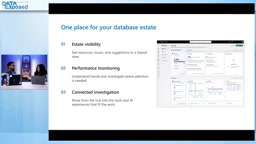
Microsoft Fabric Database Hub is now GA, offering free unified management of cross-cloud heterogeneous database assets with Copilot intelligent recommendations.
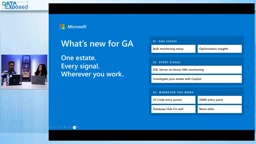
Microsoft announced on Data Exposed that Database Hub in Fabric is now generally available. The product addresses the pain point of unified monitoring after enterprise database assets expand across clouds and environments, bringing SQL Server, Postgres, Cosmos DB, Arc-enabled SQL Server, and SQL Server on Azure VM into a single free pane. The GA version adds bulk performance monitoring configuration, cost optimization insights, database alerts, SSMS registered server context import, and Copilot intelligent recommendations. Database Hub is free for Azure, Fabric, and Arc-enabled SQL Server users, requires no Fabric capacity, and can be onboarded from the Azure portal in a few clicks. The team maintains a biweekly release cadence and encourages user feedback to shape the roadmap.
Microsoft announced on the Data Exposed show that Database Hub in Fabric is now generally available (GA). This product aims to solve an enterprise-level pain point: when databases expand from a few servers in a data center into a large portfolio spanning clouds, environments, and services, DBAs and developers can no longer rely on memory or scattered tools to grasp the big picture. Database Hub's approach is to bring the entire database estate onto a single pane of glass, and it is free for Azure and Fabric users.
From "Remembering Server Names" to "Managing Tens of Thousands of Resources"
According to Amar, head of the SQL team, in the show's recap, early database administrators could easily remember every server name because there were simply so few of them. The cloud era changed everything: applications began depending on multiple services, multiple databases, and multiple environments, and enterprises pushed multi-cloud and multi-environment strategies, causing the asset scale to keep expanding.
Problems followed—every enterprise had a different monitoring model, lacking a unified view that could simultaneously see performance, security, and cost. Database Hub's positioning is precisely to absorb this feedback, rebuild the monitoring experience in a modern way, aggregate scattered assets into one place, and layer intelligence on top.
Multi-Source Coverage Beyond SQL Server
An easily overlooked detail is that Database Hub is not limited to Microsoft's own SQL Server. Amar explicitly stated that it covers any Microsoft-managed database type: Postgres, Cosmos DB, SQL Server enabled by Arc, and SQL Server on Azure VM, forming "ground to cloud" coverage. The GA version also added Azure VM as a data source, responding to many user inquiries.
The value of this multi-source unification is that enterprises no longer need to build a separate monitoring setup for each database type; instead, they manage a heterogeneous portfolio with the same experience.
Azure Arc is Microsoft's hybrid and multi-cloud management platform that brings servers, Kubernetes clusters, and databases running in on-premises data centers, other clouds, or edge environments into Azure's unified management plane. For database scenarios, SQL Server enabled by Arc can obtain asset inventory, performance monitoring, security assessments, and some Azure service integration capabilities in the Azure portal without migrating data. This explains why Database Hub can manage on-premises SQL Server and cloud resources in the same pane—Arc acts as the bridge between on-premises resources and the Azure control plane, making the "ground to cloud" unified view technically possible.
Free Strategy: Get Started Without Fabric Capacity
The selling point Amar repeatedly emphasized on the show is "free." Many tools on the market charge high fees for insights and intelligent capabilities, while Database Hub is free for Azure, Fabric, and Arc-enabled SQL Server users, with no additional Fabric capacity or license required.
The demo showed the complete onboarding path: users start from the Azure portal, complete registration, and go directly into the Fabric shell; with a few clicks, Database Hub is connected and the entire database estate loads. It follows Azure's permission model, so users only see resources they have access to. For users who have never used Fabric or do not have Fabric capacity, this path is equally smooth.
Microsoft Fabric is Microsoft's integrated data analytics platform covering workloads such as data engineering, data warehousing, real-time analytics, data science, and business intelligence. Fabric uses a capacity billing model, typically purchasing compute and storage resources in SKUs such as F2 and F64, and users need to own or associate a Fabric capacity to use most of its features. Database Hub is special in that it runs inside the Fabric shell but is open to users without Fabric capacity—it is essentially a lightweight entry interface that does not consume Fabric compute capacity, so Azure users can use database asset monitoring for free even without investing in Fabric.
Several Key Capabilities Added in GA
Bulk Performance Monitoring Configuration
In the past, configuring performance monitoring required operating resource by resource and going through self-service steps, which was a major pain point in customer feedback. The GA version provides bulk configuration: select multiple databases and resources in Database Hub and enable performance monitoring with one click, no scripting required. In the demo, the user managed about 60K resources and 14,000 issue items, and the value of bulk operations is especially obvious at such scale.
Cost Optimization Insights
As the asset scale grows, operational costs naturally become a focus. Database Hub adds an optimization pillar that centralizes cost-related scenarios. In the demo, the system directly gave recommendations, such as optimizing assets through the PAYGO licensing model, along with a benefit summary. Amar described it as "from knowing your assets to knowing where you can save money in three steps." He also mentioned that with the introduction of AI capabilities, more migration suggestions and licensing strategy recommendations will be provided in the future.
Database Alerts
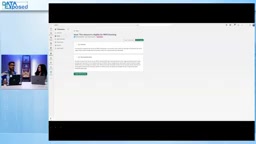
Alerting capabilities shift teams from reactive response to proactive defense. Users can set thresholds based on workload fluctuations; when signals approach critical points, alerts are pushed through tools such as Teams, eliminating the need to log into Database Hub daily to check for issues.
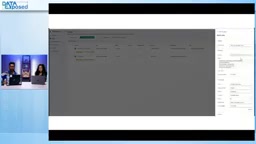
Database Hub's alerting mechanism is built on Azure Monitor's signal system but is scenario-wrapped for database workloads. Thresholds set by users (such as CPU or compute resource utilization reaching 80%) continuously evaluate resource metrics, and when triggered, notifications are pushed to channels such as Teams, email, or webhooks through Azure Action Groups. Unlike traditional per-resource alert rules, Database Hub allows unified configuration on the asset page and supports applying the same rule to bulk-selected resources, consistent with the scale-oriented operations approach emphasized in the GA version. Note that the reliability of alert actions depends on permissions and connection configuration between Azure resources and the target notification channel; ensure the Action Group is correctly associated on first use.
Client Tool Entry and Copilot
The existing "Registered Servers" scenario in SSMS can now be opened directly in the context of Database Hub, bringing resources that were originally like a small asset collection into a larger asset pool, without requiring Arc. In addition, Database CLI skills allow users to understand asset status through GitHub Copilot without staying in the Web UI.
Amar described Copilot's positioning as a "personal shopping advisor": when facing a huge estate, what users really need is prioritization—which few things to tackle first. In the demo, Copilot scanned the entire estate and gave summary-style recommendations with chart evidence for users to verify, from understanding the problem to taking action to sustaining the result in just three clicks.
SSMS (SQL Server Management Studio) is Microsoft's long-standing Windows desktop client for managing SQL Server instances and databases. Its "Registered Servers" feature allows DBAs to save commonly used servers in groups for bulk connections and query execution, but this asset list has long been confined to the local client and cannot be synchronized with the cloud view. Database Hub moves this scenario into the web context, meaning users can import server registration information accumulated in SSMS into a larger asset pool for unified management, without first enabling these SQL Servers through Arc. This lowers the migration cost of existing DBA workflows and avoids asset information being split between desktop tools and the cloud pane.
An End-to-End Alerting Demo
The show used a retail e-commerce scenario to tie the above capabilities together. The demo showed obvious lag during order checkout; the user returned to Database Hub and found recurring anomalies in compute resources. He set an alert rule on the asset page: threshold at 80%, while the actual level had reached 90%, with the action configured to send a Teams message. After that, every time it exceeded 80%, a notification was received, allowing the team to scale up before the website actually went down.
In another scenario, a large number of product icons on the website failed to load. Facing 14K issue items, the user directly asked Copilot for a database performance overview; Copilot scanned the entire estate across services and scenarios in the background and produced a summary of recommendations within seconds. After executing the fix, the website's product loading returned to normal.
Continuous Iteration and Feedback Loop
Amar said the team maintains a weekly or biweekly release cadence, with the roadmap published in the release planner and a large number of blog posts updated in sync. GA is only the starting point; more scenarios will be added, and the team hopes user feedback can directly shape the product direction.
For teams managing heterogeneous database estates who do not want to pay extra for monitoring tools, Database Hub offers a free entry point worth trying—this is probably the most direct call to action from this GA.
Related articles

Satirical Viral Hit "Rich Girl's Christmas Haul": A Consumption Frenzy or an Isolated Case?
A Bilibili satirical rich-girl Christmas haul video sparks debate. This article breaks down the consumption symbols in its gift list, analyzes the blurred line between showing off and gratitude, and explores the narrative template of wealth-flaunting content on platforms and its impact on teenagers' wealth perception.

Before You Get Your Ears Pierced: A Professional Piercer Explains Placement, Pain, and Aftercare
A professional piercer explains the full ear piercing process: why a max of three per session, pain ratings and healing times by location, 18K gold vs. pure silver, hollow needles vs. piercing guns, and aftercare.

Follow the Light: How Light-Triggered ASMR Commands Your Attention
Analyzing Bilibili creator Veda's command-based ASMR video: how pen light and otoscope use visual tracking commands to command attention, upgrading sound relaxation into an interactive attention game, and what it means for immersive content creation.