Microsoft Puts a 137B Code Model on Your PC: Windows Becomes Your Unlimited Software Factory

Microsoft pushes a 137B code model and AI agent capabilities down to local PCs, reshaping the cost and security boundaries of AI programming.
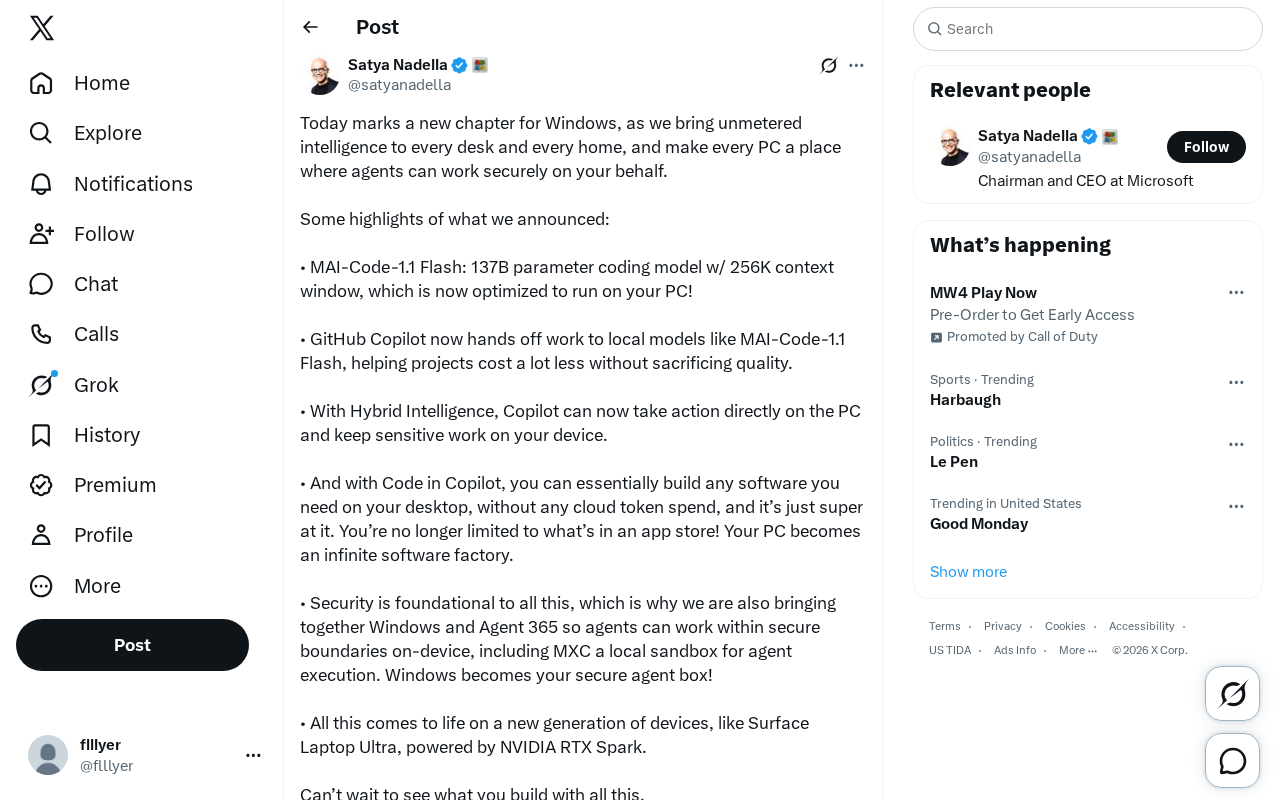
Microsoft unveiled a series of Windows updates centered on moving AI from the cloud to local PCs. The highlight is MAI-Code-1.1 Flash, a 137B-parameter code model with a 256K context window, optimized for local PC execution; GitHub Copilot can hand high-frequency, context-heavy tasks to the local model, cutting per-token cloud costs while maintaining quality. Hybrid Intelligence upgrades Copilot from "giving suggestions" to "taking direct action," keeping sensitive work on-device. Code in Copilot envisions users building any software on their desktop via natural language without consuming cloud tokens. On security, Windows integrates with Agent 365 and the local MXC sandbox, positioning the PC as a controlled "agent box." Supporting hardware like the Surface Laptop Ultra with NVIDIA RTX Spark shows clear compute thresholds for local inference. The announcement gives a vision and parameters but lacks benchmarks, compatibility lists, and timelines.
Microsoft is redefining the boundaries of the PC. In a newly announced set of Windows updates, the company declared it is bringing "unlimited intelligence" to every desk and every home, turning each PC into a workplace where AI agents can safely act on your behalf. The core moves include: optimizing the 137B-parameter code model MAI-Code-1.1 Flash to run locally on PCs, letting GitHub Copilot hand off tasks to local models, enabling Copilot to take direct action on the PC via Hybrid Intelligence, and building a local secure sandbox with Windows and Agent 365.
What It Means to Run a 137B Model on Your PC
The most striking number in this announcement is MAI-Code-1.1 Flash: 137B parameters, a 256K context window, and optimized to run locally on a PC.
Previously, models of this scale could realistically only run on cloud inference clusters. By placing "optimized to run on PC" prominently in the announcement, Microsoft is sending a clear signal — local inference is no longer the exclusive domain of toy-sized small models. For developers, a 256K context window is enough to bring the core codebase of a mid-sized project into view, rather than bouncing between a few files and repeatedly refilling context as before.
Of course, the announcement doesn't disclose specifics like VRAM footprint, quantization schemes, or actual generation speed. These details determine the distance between "it runs" and "it's usable," and are likely key points to verify later.
Parameter Scale and the Threshold for Local Inference
A large model's parameter count directly determines its storage footprint and compute requirements. At common 16-bit floating-point precision, 137B parameters alone would require roughly 274GB of VRAM for the weights — far beyond any single consumer-grade GPU. So "running on a PC" necessarily relies on model quantization (e.g., 4-bit, 8-bit weight compression) and tiered memory/VRAM loading techniques, compressing weights to the tens-of-gigabytes range and coordinating CPU memory with NVMe storage. This also explains why the announcement emphasizes being "optimized for local PC execution" — the core of that optimization is usually not the algorithm itself but the quantization scheme, operator fusion, and memory scheduling. The trade-off is that quantization introduces some accuracy loss, and generation speed is constrained by memory bandwidth — these are the key variables for judging "it runs" versus "it's usable."
What a 256K Context Window Actually Means
The context window is the total number of tokens a model can "see" at once. 256K is roughly a hundred-plus thousand Chinese characters or tens of thousands of lines of code — enough to hold the core modules of a mid-sized project. But long context isn't free: attention computation and memory overhead rise significantly with length, and the practical usable length on a local device often requires strategies like chunking and retrieval augmentation. It shouldn't be equated simply with "stuffing an entire codebase in at once."
Copilot's Task Handoff: A New Division of Labor Between Cloud and Local
Paired with the local model is a new GitHub Copilot capability: it will now hand off some work to local models like MAI-Code-1.1 Flash. Microsoft's rationale is straightforward — dramatically lower project costs without sacrificing quality.
This logic deserves unpacking. Per-token billing for cloud large models accumulates steadily over long projects, whereas once a local model is deployed, marginal cost approaches zero. Microsoft is effectively promoting a tiered workflow: tasks requiring complex reasoning stay in the cloud, while high-frequency, repetitive, context-heavy code edits go to the local model. For indie developers and small-to-mid-sized teams, this shift in cost structure may be more attractive than the model parameters themselves.
Hybrid Intelligence Lets Copilot Actually "Take Action"
A further upgrade is Hybrid Intelligence. Previously, Copilot mostly offered suggestions and generated code snippets that users manually pasted and executed; now Copilot can take action directly on the PC while keeping sensitive work on the device.
This changes the role of AI coding tools — from "copilot" to "agent." It also explains a design choice: once AI can directly manipulate files and run commands on your machine, security boundaries become an unavoidable issue.
The Difference Between AI Agents and "Copilots"
Traditional Copilot is a "suggestion-style" tool: the model outputs text or code snippets, and a human copies, pastes, and executes them — control always stays with the user. An AI agent, by contrast, has the ability to act — it can call tools, read and write files, run commands, observe results, and adjust its next step based on feedback, forming an autonomous "perceive–decide–execute" loop. This shift brings not just efficiency gains but also questions of permission and responsibility: every step an agent takes can alter the real environment, so clear authorization scopes, operation logs, and rollback mechanisms are needed. Hybrid Intelligence placing some reasoning locally and some in the cloud also means data flows across different boundaries, so privacy and compliance design must evolve in step with execution capability.
Code in Copilot: Turning the PC into an Unlimited Software Factory
The most aggressive phrasing in the announcement: your PC becomes an "unlimited software factory," and you're no longer limited by what's available in the app store.
With Code in Copilot, users can build whatever software they need right on their desktop, without consuming cloud token fees. Microsoft claims it's "extremely good" at this. This is essentially replacing the process of hunting for off-the-shelf software with natural-language programming — need a small tool, an internal script, a customized app? Just describe the requirement and let Copilot generate locally running software.
If this vision holds, the supply side of applications would undergo a structural change: users no longer wait for developers to list products but produce their own. However, there's still a gap between "generating software that works" and "generating software that is maintainable and deliverable," and the announcement doesn't elaborate on the engineering quality and iteration approach of the generated output.
Secure Sandbox: Windows Becomes an "Agent Box"
Microsoft positions security as the foundation of all these capabilities, integrating Windows with Agent 365 so agents work within the device's controlled boundaries, with MXC serving as the local sandbox for agent execution. Microsoft's new positioning for Windows is blunt: your secure agent box.
This "agent box" framing effectively acknowledges a premise — when AI agents gain the ability to execute operations at the OS level, isolation mechanisms are not optional but essential. The MXC sandbox restricts an agent's execution scope to a controlled area, keeps sensitive work on the device, and reduces the exposure surface for data leakage.
Sandboxes and the Principle of Least Privilege
A sandbox is an isolated execution environment that lets programs run within restricted resources and permissions, so that even abnormal behavior struggles to affect the host system. Common implementations include virtualization-based isolation, system call filtering, and file system redirection. For AI agents, the value of a sandbox is constraining "can execute" to "can only execute within a demarcated area": the agent can read and write specified directories and call whitelisted tools but cannot touch critical system configurations or sensitive user data. MXC as a local sandbox puts this idea into practice at the agent execution layer. It aligns with the principle of least privilege — granting only the capabilities necessary to complete a task, thereby limiting damage when an agent errs or is manipulated.
New Hardware to Carry New Capabilities
All these capabilities ultimately land on a new generation of devices, such as the Surface Laptop Ultra with NVIDIA RTX Spark. Running large models locally has real compute demands, and Microsoft choosing to launch supporting hardware alongside new software capabilities indicates that this experience has a clear terminal compute threshold — not every existing PC can fully enjoy it.
Specific Terminal Compute Requirements for Local Large Models
The performance bottleneck for local inference lies mainly in memory capacity and memory bandwidth rather than raw peak compute. Model weights need to reside in or be frequently swapped into memory, and bandwidth determines how many parameters can be read per second, directly affecting generation speed (tokens/sec). Devices with high-bandwidth unified memory or large VRAM therefore have a clear advantage in local large-model scenarios. Microsoft launching supporting hardware alongside new software capabilities shows the full experience has a definite compute threshold: even if an existing PC can load the model, insufficient memory or limited bandwidth may make it hard to achieve usable speed. This also means the spread of local AI capability will be tied to upgrade cycles, creating a rhythm of coordinated hardware and software advancement.
The Watershed for Local AI Programming
A clear throughline emerges from this announcement: Microsoft is shifting the cost center of AI programming from the cloud to the local machine. Model capability (the 137B code model), workflow (Copilot task handoff), execution capability (Hybrid Intelligence acting directly), and security boundaries (the MXC sandbox) — these four layers combine into a relatively complete local AI development loop.
What warrants caution is that the announcement provides a vision and parameters but not benchmarks, a list of compatible devices, or concrete availability dates. These gaps determine whether the "unlimited software factory" is marketing rhetoric or deliverable reality. For developers, the most pragmatic metric is just one: on your own machine, can MAI-Code-1.1 Flash deliver usable code at an acceptable speed?
Related articles

Chain of Thought Isn't Just for AI: How Humans Can Use CoT to Improve Thinking Quality
Chain of Thought isn't just a prompt trick for large models. Starting from a Hacker News discussion, this article analyzes why CoT works for human thinking too, breaks down actionable ways to transfer it, and highlights the key differences between human CoT and machine CoT.
Cloudflare Teams Up with OpenAI: Closi…
Cloudflare Teams Up with OpenAI: Closing the Loop from Vulnerability Discovery to Defense with AI
Cloudflare uses OpenAI Daybreak to investigate security vulnerabilities and generate reviewable remediation plans, while developers use Codex to boost coding efficiency and quality.

Orca Multi-Agent Orchestration in Practice: A Guide to Parallel Collaboration with Claude and Codex
Orca is Stable AI's free open-source agent workbench supporting 34 agents like Claude Code and Codex in parallel. Learn its Git worktree isolation, multi-model orchestration, and mobile management.