Milking Musk's Wool: A Complete Guide to Getting Cursor Pro for Free, Plus Risk Warnings

MLH hackathons offer free Cursor Pro, but the process has five steps and code timing/duration are unknown; the online claim of a free year has no official basis.
This article explains the complete process and risks of getting a free Cursor Pro membership through MLH's Global Hack Week. The event is jokingly called "milking Musk's wool" because SpaceX acquired Cursor. Participants need to complete five steps: MLH registration and check-in, downloading Cursor, waiting for the discount code email, manually redeeming on the Billing page, and submitting a screenshot for the challenge. The creator emphasizes that the discount code will not take effect automatically and that manual redemption is the most error-prone step. The online claim of "free for a year, worth $240" has no official page basis, and both the timing of code distribution and the duration of use are unspecified, subject to the email terms. The deadline is 1 PM Eastern Time on the 15th (1 AM Beijing Time on the 16th). It is suitable for developers willing to spend half an hour trying, but one should not expect to reliably obtain long-term Pro.
Milking Musk's Wool: A Complete Guide to Getting Cursor Pro for Free, Plus Risk Warnings
Recently, Bilibili creator "Lin Tian" posted a video claiming that through MLH (Major League Hacking)'s global hackathon event, you can get a free Cursor Pro membership. A regular email is enough to register, working professionals can also participate, and the deadline is this week. Once the news broke, many developers were eager to try. But is this actually reliable? What pitfalls are there in the process? This article combines the creator's demonstration and official page information to walk you through the complete process and offer a calm risk assessment.
Background: Why Is This Called "Milking Musk's Wool"?
At the start of the video, the creator explained that in August of this year, SpaceX fully acquired Cursor, making it a wholly-owned subsidiary, which is why this perk is jokingly called "milking Musk's wool." The actual source of the event is MLH—an international hackathon community—which is hosting a Global Hack Week this week, and one of the challenge tasks is to register a Cursor Pro account.
According to the event page, the barrier to entry is very low: working professionals and students (including high schoolers) can all participate, no student ID is required, and a single email is enough to register.
MLH (Major League Hacking) is the world's largest student hackathon league, founded in 2013, and has long partnered with tech companies like GitHub and Meta to host hackathons for students. Its events are usually structured as "challenge tasks," where participants complete designated tasks to receive rewards from sponsors, such as cloud service credits and software memberships. MLH's registration process is relatively lenient and does not strictly verify student status, so non-students often participate. This Global Hack Week is one of MLH's regular series of events, aimed at encouraging developers to get familiar with new tools through short-term tasks.
Five-Step Redemption Process in Detail
In the video, creator "Lin Tian" demonstrates the complete process from registration to submission step by step. Here is a breakdown of the key stages.
Step 1: MLH Registration and Check-In
Open mlh.link/ghw and you'll be redirected to the Global Hack Week event page. Click to log in and register; after you enter your email, MLH will send a login verification code. First-time users need to enter a name to create an account, then fill out three pages of information: on the first page, gender and ethnicity are required; the second page asks about education level, and working professionals can simply select "I am not a student"; the third page asks for your birthday. After filling in the information, click "Register and Check In," and a set of registration questions will pop up, including country, whether you are 18 or older, and you must check the boxes agreeing to the code of conduct and terms. If you don't have a GitHub username, enter NA. After submitting, seeing "Checked In" means you've succeeded.
Step 2: Download and Register for Cursor
Get the desktop version from Cursor's official download page; versions are available for Mac, Windows, and Linux. After installation, register an account. It is recommended to use the same email you used for MLH registration to make later matching easier.
Step 3: Wait for the Discount Code Email
MLH will send the discount code to your registration email. If you don't receive it, check your spam folder first. The email will state the duration and restrictions, so be sure to read it carefully. The creator also mentioned that the official side has not clearly stated when codes will be sent, so you need to wait patiently.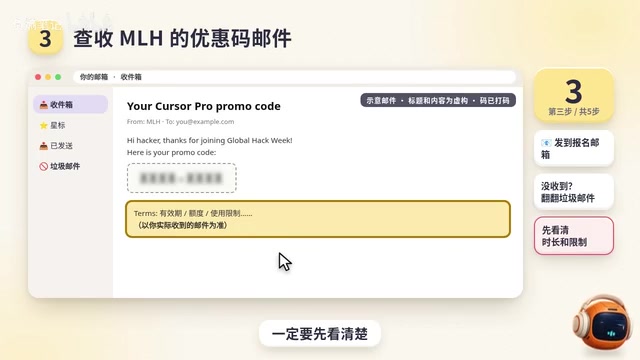
Cursor is an AI coding editor built on VS Code, and its Pro subscription offers faster code completion, access to advanced models (such as GPT-4 and Claude), and unlimited AI conversations. The Pro version is billed monthly, with an official price of $20/month; the widely circulated claim of "$240 a year" is derived from this. Cursor's billing system is independent of MLH. The discount code is essentially a discount code or redemption code that must be manually entered on Cursor's Billing page to take effect; the system will not automatically link to your MLH account. Therefore, even if MLH registration succeeds, Pro benefits will not be activated unless redemption is completed in the Cursor backend.
Step 4: Manually Redeem Pro (The Most Error-Prone Step)
The discount code will not take effect automatically. You need to log in to Cursor's web backend, go to the Billing page, manually upgrade to Pro, enter the discount code from the email, and only when Pro is displayed is the redemption successful. The creator repeatedly emphasized that this step is the "easiest to get wrong."
The Billing page is the core area of a Cursor account for managing subscriptions, payment methods, and invoices. Here users can view the current plan, upgrade or downgrade subscriptions, and enter discount codes. When redeeming, note that discount codes usually have expiration dates and usage limits, and may only apply to new subscribers; if the account already has a paid subscription, it may not stack. After successful redemption, the page will display the "Pro" label and expiration date. It is recommended to take a screenshot of the successful redemption page, which can be used both for challenge submission and as evidence in case of later disputes.
Step 5: Submit a Screenshot for the Challenge
Upload the backend screenshot (which must show that Pro has been redeemed) to the challenge page and click submit project to finish. The creator also mentioned that if you find it troublesome, you can hand the prompt to an AI assistant capable of operating a computer to fill out the form on your behalf, but when encountering CAPTCHAs, agreement checkboxes, and final submission, the AI will stop and ask, so be sure to fill in real information.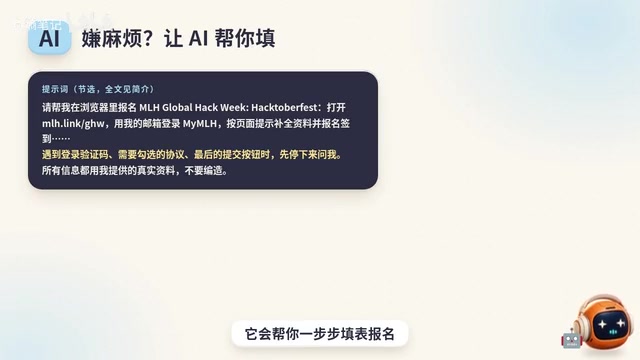
Risks and Limitations That Must Be Made Clear
In the video, the creator proactively clarified several key issues, and this information is more worthy of attention than the "free" offer itself.
The Widely Circulated Claim of "Free for a Year, $240" Has No Official Basis
The claim circulating online is free for one year, worth $240, but the creator clearly pointed out that the official page has no such statement; it is only an online rumor. The official side also does not guarantee that everyone will receive a code. How long it can be used and what restrictions apply are all subject to the terms in the email you receive.
Both the Timing of Code Distribution and the Duration of Use Are Uncertain
As of the video's publication, the official side had not specified when codes would be sent, nor could the duration of use be confirmed. This means that even after completing all the steps, you may still face waiting or reduced terms. The creator reminded: "Don't treat it as a guaranteed benefit before you actually get it."
The Deadline Is Tight
The event deadline is 1 PM Eastern Time on the 15th, which is 1 AM Beijing Time on the 16th. The creator suggested that if you want to try, you should register that same night.
"Freebie" activities are often accompanied by information asymmetry risks: the organizer reserves the right of final interpretation, and reward distribution may be delayed, reduced, or even canceled. In this event, neither MLH nor Cursor has promised a specific duration on their official pages or guaranteed that everyone will receive a code, so participants must bear the time cost themselves. In addition, using automated tools to fill out forms on your behalf may violate the event terms and lead to account bans. It is recommended to read MLH's code of conduct and Cursor's terms of service before participating, so as not to lose more than you gain.
A Rational View: Who Should Try?
From the process, the core of this event is the MLH hackathon challenge task, and the Cursor Pro discount code is the reward for completing the task. The barrier is indeed low, but the uncertainty is equally obvious: the timing of code distribution is unknown, the duration is unknown, and the restrictions are unknown. For developers already using Cursor who are willing to spend half an hour going through the process, this can be treated as a low-cost attempt; but if you are hoping to reliably obtain a year of Pro, it is advisable to remain cautious.
In addition, although the creator's mention of "an AI assistant filling out the form" saves effort, it involves personal information and account operations. It is recommended to complete the key steps manually to avoid triggering risk controls due to automated operations.
Conclusion
This free Cursor Pro offer is essentially a promotional challenge for MLH's hackathon. The process is clear, but there are many variables. The widely circulated claim of "free for a year" lacks official backing, and both code distribution and duration are subject to the email. If you want to chase the freebie, go ahead, but don't set your expectations too high—after all, Musk's wool isn't that easy to milk.
Related articles

DeepCell: One-Click AI Generation of Documents, Spreadsheets, and Slides
DeepCell tops Product Hunt with one-click generation of documents, spreadsheets, and slides, using the .deepcell format for linked updates, designed for System 2 tasks like modeling and sales reviews.

Doneas: 15-Minute Daily Accountability Calls That Keep Indie Developers From Procrastinating
Doneas is a daily accountability tool for indie developers: plan tasks on Monday, join a 15-minute call with five builders each day, and log deliveries on a public progress page. This article analyzes its core mechanics, effectiveness, and potential issues around retention and matching.

Fastlane 2.0: Fully Automated AI Ad Campaigns, From Creative to Optimization
Fastlane 2.0 is an AI ad automation tool: enter your website and it learns your brand, generates video and image ads, and runs and optimizes them on Meta, TikTok, Instagram, and YouTube.