Mini PCs for Homelab Builds: A Low-Power, High-Value Setup Guide

Mini PCs offer low power draw, compact size, and solid multi-core performance — making them an ideal entry-level homelab build.
More homelab enthusiasts are replacing traditional tower servers with Mini PCs. Using the AceMagic K1 as an example — with an AMD Ryzen 7 7730U (Zen 3, 8-core, ~15W TDP), a Samsung T7 SSD, and a Mediasonic ProBox DAS — you can reliably run VMs, Docker containers, Jellyfin, and other self-hosted services. The key advantages are ultra-low power consumption, compact quiet operation, and sufficient multi-core performance for most home workloads. The main trade-offs are limited internal storage, no PCIe slots, and potential thermal concerns under sustained load.
Mini PCs Are Becoming the Go-To Choice for Homelabs
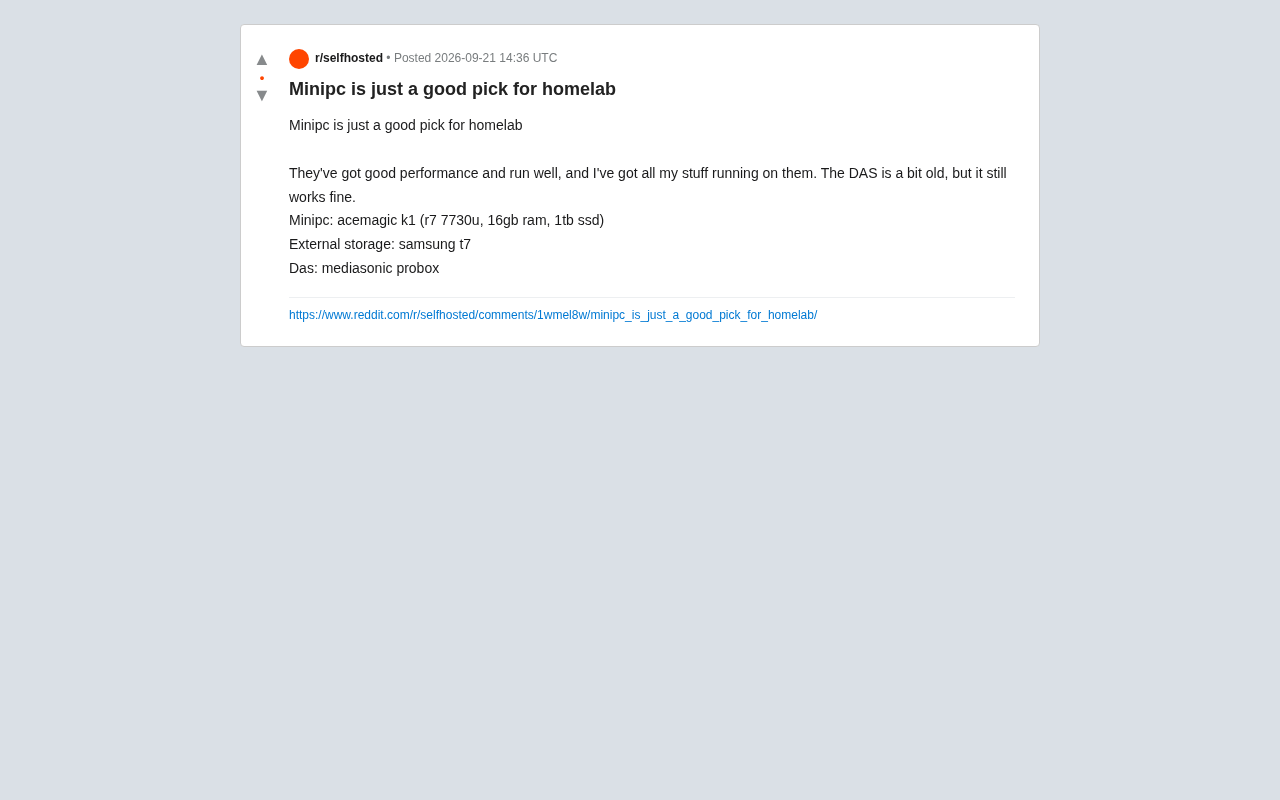
In the homelab community, more and more enthusiasts are moving away from traditional tower servers and secondhand enterprise gear, opting instead for Mini PCs as their core nodes. A Reddit user recently shared their experience: a single AceMagic K1 Mini PC paired with external storage was enough to run all their home services — reliably and without issues.
This isn't an isolated case. Mini PCs are redefining what an entry-level homelab looks like, thanks to their compact form factor, respectable performance, and ultra-low power consumption. For most home users running devices 24/7, power draw and noise levels matter far more than peak performance.
A Typical Low-Cost Setup
Looking at this user's actual configuration, the approach is straightforward: use a capable Mini PC as the compute core, then expand storage capacity externally.
Core Compute: AceMagic K1
- Processor: AMD Ryzen 7 7730U
- RAM: 16GB
- Storage: 1TB SSD
The R7 7730U is a mobile 8-core, 16-thread processor based on the Zen 3 architecture, with a typical TDP of around 15W. That means it delivers multi-threaded performance close to a mid-range desktop CPU while keeping total system power draw remarkably low under full load. For running virtual machines, Docker containers, home media servers (like Jellyfin or Plex), and various self-hosted applications, this configuration is more than sufficient.
Storage Expansion: External Solutions
- Portable SSD: Samsung T7
- DAS (Direct-Attached Storage): Mediasonic ProBox enclosure
The biggest weakness of Mini PCs is limited internal storage — typically just one or two M.2 slots. This user supplements fast storage with the Samsung T7 and adds bulk capacity via the Mediasonic ProBox multi-bay DAS loaded with spinning hard drives. He mentioned the DAS is "a bit old" but still works fine, which speaks to the durability of this kind of storage expansion approach.
What is DAS? DAS (Direct-Attached Storage) is a multi-bay storage device connected directly to a host machine via USB or eSATA, as opposed to NAS (Network-Attached Storage), which is accessed over a network. Products like the Mediasonic ProBox typically offer 4–8 × 3.5" drive bays and communicate with the host over USB 3.0 or USB-C, dramatically expanding storage capacity without consuming any motherboard slots. The trade-off: USB-based I/O has higher latency and lower throughput than native SATA or SAS, and bandwidth is shared when multiple drives read/write simultaneously. For cold-data archiving and media libraries — workloads dominated by sequential reads — this bottleneck is rarely noticeable. However, running databases or ZFS RAIDZ arrays on top of a USB DAS warrants careful consideration of the I/O overhead.
The Pros and Trade-offs of Mini PCs for Homelabs
Why They're Worth Considering
Mini PCs appeal for several reasons. Low power consumption is the primary one — a device that idles at just a few watts and peaks at a few dozen watts has negligible long-term electricity costs. Small size and low noise mean you can tuck one behind a monitor, on a shelf, or even in a drawer — no bulky tower eating up floor space. Sufficient performance is the third pillar, thanks to recent advances in mobile processors: a Zen 3 APU's multi-core performance handles the vast majority of home self-hosting workloads without breaking a sweat.
Where You'll Need to Compromise
Mini PCs aren't without drawbacks. Limited internal storage expansion is the most obvious — you're forced to rely on USB external drives or a DAS, which can't match native SATA/HBA in terms of data reliability and I/O performance. Zero PCIe expandability means no discrete GPU or add-in network cards. Thermal performance under sustained load can also be a concern depending on the model's cooling design.
For users who need large-capacity ZFS arrays, GPU-accelerated transcoding, or heavy virtualization, a dedicated NAS motherboard or a secondhand server may still be the better fit. But for entry-level and moderate homelab use cases, the overall experience a Mini PC delivers is genuinely hard to beat.
What is ZFS? ZFS (Zettabyte File System) is an advanced storage solution that combines a file system with logical volume management, renowned for features like data integrity checksumming, snapshots, compression, and built-in RAID. It's a popular choice among serious homelab users. ZFS has meaningful memory requirements (typically 1GB+ of ECC RAM per TB of storage is recommended), and best practice involves connecting drives via an HBA (Host Bus Adapter) card in passthrough mode to ensure full disk control. Because Mini PCs lack PCIe slots, there's no way to install an HBA card or directly manage individual physical drives inside a USB enclosure — making them fundamentally unsuitable for large-scale ZFS redundancy arrays. This is the primary reason users requiring high-capacity reliable storage still gravitate toward dedicated NAS motherboards or secondhand servers with PCIe expansion.
Advice for Homelab Beginners
If you're thinking about building your first homelab, a Mini PC is an extremely accessible starting point. When shopping, keep these factors in mind: prioritize a low-power APU with integrated graphics; choose a model with user-upgradeable SO-DIMM slots rather than soldered RAM; confirm there's at least one M.2 slot and enough USB 3.x ports for external storage; and look for 2.5GbE networking to future-proof your bandwidth needs.
For storage, a practical approach is to keep cold data on a DAS with mechanical hard drives, while your OS and hot data live on an NVMe SSD. This "compute and storage separation" strategy keeps costs in check while preserving flexibility for future upgrades.
As the Reddit user put it — the Mini PC performs well and runs stably, with no issues running all their services on it. For the vast majority of home use cases, it really is a good enough choice.
Related articles

Felix Rieseberg Personal Homepage
Felix Rieseberg's personal homepage sparks attention on Hacker News. This article covers the Slack engineer's technical background, the rise and fall of nativefier, and the value of a developer homepage as a tech calling card.

@ai-sdk/vue 3.0.306 Patch Release Syncs with [email protected] Update
@ai-sdk/vue 3.0.306 released, synced with [email protected]. A routine patch release for the Vercel AI SDK ecosystem with no public API changes; the Vue adapter layer stays version-aligned with the core package.

Gemini 4 Argon API Launches: The Era of Million-Token Output Begins
Google launches Gemini 4 Argon with sparse MoE architecture, up to 1M output tokens, and a 68.90% Vals Index score, available across API, AI Studio, and the Gemini app.