MiniCPM 2B Local Deployment & Agent Tool Calling Tutorial

Deploy MiniCPM-2B locally on 4GB VRAM with LM Studio and enable tool-calling via DeepSeek Hermes.
MiniCPM-2B is a 1.56GB open-source model that runs on just 4GB VRAM, with native Function Calling support as its standout feature. Using LM Studio's Q4_K_M quantized build, it achieves 57 tokens/sec locally and exposes a standard OpenAI-compatible API on port 1234. Connected to DeepSeek Hermes, it handles document translation and web search via tool calls — though complex tasks like SVG animation are beyond its reach. The setup delivers local, private, tool-augmented AI at minimal hardware cost.
MiniCPM, the open-source small model series from ModelBest (面壁智能), has long been known as a "pocket powerhouse" — built for edge deployment and exceptional cost-efficiency. This tutorial from the Gaojialing channel walks through deploying MiniCPM-2B locally on a machine with just 4GB of VRAM, setting it up with tool-calling capabilities, and connecting it to a DeepSeek Hermes Agent to handle tasks like document translation and web search.
2B Model Taking On 4B Rivals — Tool Calling Is the Star Feature
Based on the benchmark comparisons shown in the video, MiniCPM-2B punches well above its weight despite having only 2B parameters. Competing models include Qwen 3.5 (4B), Gemma (4B), and relevant versions of MiniMax (MF) 2.5. According to the presenter, MiniCPM-2B leads across code reasoning and mathematical reasoning benchmarks — competing against models with twice the parameter count.
To be fair: some model names and parameter comparisons in the narration are loosely stated, so always refer to official benchmark releases for exact numbers. That said, the core selling point is clear — outstanding Function Calling capability, which is what enables integration with various Agent frameworks. The presenter emphasizes that native tool-calling support is precisely what allows this small model to act as the "brain" of a lightweight agent inside clients like DeepSeekAd Hermes, Codex, or Claude Code.
For positioning small models, the presenter offers a pragmatic take: let small models handle simple tasks, and leave complex ones to large cloud-based models. This is a sound philosophy — a 2B model's value isn't in replacing GPT-level general capabilities, but in handling high-frequency, lightweight tasks like document summarization, translation, and format conversion at minimal resource cost, while keeping data local and response times fast.
What is Function Calling? Function Calling refers to the ability of a large language model to autonomously decide, during a conversation, to invoke a predefined external function or API based on user intent — and then incorporate the result into its response. The typical flow is: user makes a request → model identifies which tool to call and outputs structured parameters → an external program executes the tool and returns the result → model generates a final response based on that result. This upgrades a model from "just chatting" to "actually doing things" — web search, file reading, code execution, database queries, and more can all be implemented via tool calls. For a small model like 2B, native tool-calling support is especially valuable: while the model's built-in knowledge and reasoning are limited, as long as it can accurately identify when to call a tool and output valid parameter formats, it can dramatically extend its practical utility through external tools. This is the core logic of the "small brain + external tools" architecture.
Loading in LM Studio: 1.56GB Size, Runs on 4GB VRAM
The first step is installing LM Studio (referred to as "MS Studio" in the narration). It's a desktop application for loading and running open-source large language models locally, with built-in search, download, and chat interface features.
Installation is straightforward: after a standard next-next-finish setup, open the app, click the robot icon, search for "MiniCPM 2B", and select the GGUF quantized version. The presenter highlights a few key specs:
- Model size is just 1.56GB, with a small disk footprint and high download ranking
- The Q4_K_M quantized version is recommended for most users
- Q8 or F16 versions offer higher quality but require significantly more VRAM
Choosing the right quantization level is the central trade-off in local deployment. Q4 dramatically reduces resource requirements while maintaining usable accuracy — which is exactly what makes it possible to run smoothly on 4GB VRAM.
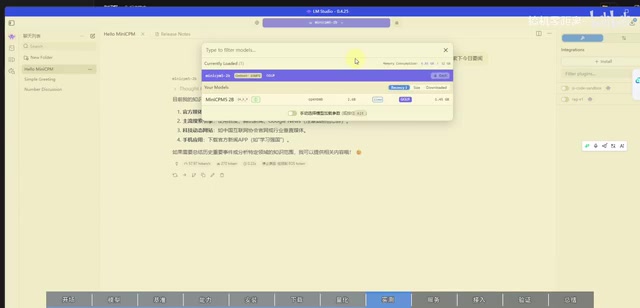
Once downloaded, create a new chat in LM Studio, select the downloaded model from the dropdown, and click load — the software will load the model onto the GPU. On the presenter's 4GB VRAM machine, generation speed hit 57 tokens per second with a first-token latency of just 0.22 seconds — impressive performance for a locally-running small model.
What is GGUF? GGUF (GPT-Generated Unified Format) is a model file format popularized by the llama.cpp project, specifically designed for local inference. Compared to raw PyTorch weight files, GGUF bundles the model architecture, weights, and metadata into a single file with no extra dependencies, making it easy to distribute and use cross-platform. Quantization is the technique of compressing model weights from high-precision floating-point numbers (e.g., FP16, 2 bytes per parameter) into lower-precision integer representations. In Q4_K_M: "Q4" means 4-bit quantization, where each parameter averages roughly 0.5 bytes of storage; "K" refers to a K-means grouped quantization strategy; and "M" indicates a medium group size, striking a good balance between compression ratio and precision loss. By comparison, Q8 is closer to the original model in quality but roughly twice the size of Q4, while F16 is full half-precision floating point — largest in size, closest to the original. For 4GB VRAM devices, Q4_K_M is essentially the optimal choice for running a 2B model smoothly.
Exposing an OpenAI-Compatible Endpoint for Third-Party Agents
To allow external agents to call the local model, you need to use LM Studio's built-in local server feature. In settings, find the terminal-like icon, select "Local Service", and enable a standard OpenAI-format API endpoint — which also supports Claude Code format access.
The default port in the service settings is 1234. The presenter explains that this port is used to access the locally exposed MiniCPM model service. Since everything runs locally, there's no external access risk, so the API key authentication can be left disabled. If port 1234 is occupied, any other available port works fine.
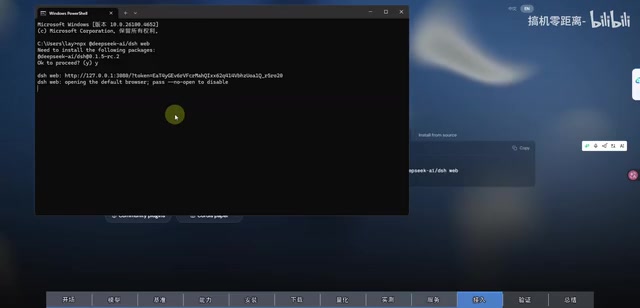
In essence, this step disguises a local model as a standard OpenAI-compatible service. Any client that supports the OpenAI protocol or Claude Code format can connect — which is the foundation of local deployment's broad compatibility.
Why OpenAI-compatible APIs matter The OpenAI-compatible interface has become the de facto standard in the local model ecosystem. When OpenAI launched its GPT API, it defined an HTTP interface spec with
/v1/chat/completionsas the core endpoint, accepting JSON-formatted conversation messages and returning model responses. Due to OpenAI's market dominance, a huge number of Agent frameworks, programming libraries, and clients (such as LangChain, Continue, Open WebUI, etc.) prioritize this protocol. By simulating this interface locally, LM Studio allows any OpenAI-protocol-compatible tool to treat the locally running MiniCPM as a remote API call — from the caller's perspective, the local model and a cloud API are completely interchangeable at the interface level. This "protocol masquerade" design is a key reason the local model ecosystem has expanded so rapidly, and lets users switch from cloud to local without changing their existing workflows.
Connecting to DeepSeek Hermes — Giving the Small Model Superpowers
DeepSeek Hermes can be installed with a one-line command from its official site, provided Node.js is already set up locally. The presenter notes that other Agent clients supporting custom model providers follow essentially the same configuration pattern.
The key configuration fields are in the custom model provider section:
- API endpoint: enter
http://localhost:1234/v1— where 1234 matches LM Studio's service port, and/v1is the standard OpenAI interface suffix - Protocol: select OpenAI protocol
- Model: click "Fetch available models" to auto-populate, then select MiniCPM 2B
- API Key: since local authentication is disabled, enter any arbitrary string and save
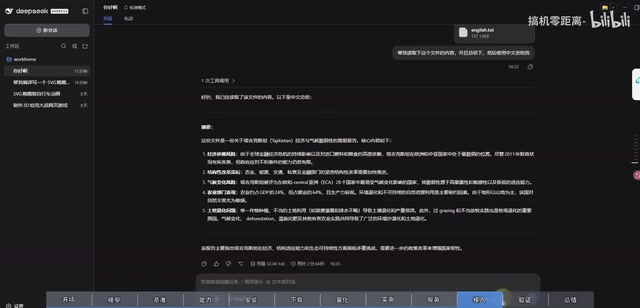
Once saved, select the local model from the dropdown in the chat interface and start using it.
Real-World Capability Boundaries
The presenter shared several real test cases that honestly reflect both the capabilities and the limits of this small model:
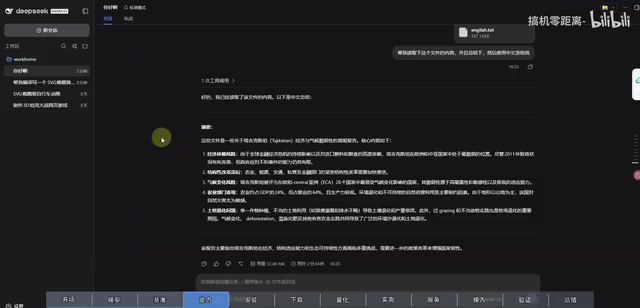
- Document translation and summarization: Given a purely English document, the model was asked to read and translate it into Chinese. It completed the translation quickly and extracted the key content — solid performance.
- Web search: Since the model has no internet access or knowledge of the current date, the user must manually provide the date. After that, the model calls a search tool to retrieve the day's news — this is the tool-calling capability in action, essentially giving a "smart brain with no superpowers" access to real-time information.
- SVG animation generation: Clearly beyond the model's capabilities — it couldn't complete the task.
These cases draw a clear line around what small models are good for: document processing, translation, and tool-assisted information retrieval are all fine, but complex code generation and creative design tasks still require larger models.
Final Thoughts
The value of this setup lies in combining local deployment + privacy + tool calling with an extremely low barrier to entry. Running on 4GB VRAM, taking up just 1.56GB of disk space, and generating at 57 tokens per second — MiniCPM-2B makes it genuinely feasible for individual users to run a lightweight, capable local agent on their own machine. For users who care about data privacy or need to handle everyday text tasks in an offline environment, MiniCPM-2B paired with LM Studio and the Hermes client is a combination worth trying. Just keep in mind: small models have a clear capability ceiling. Understanding and respecting their positioning is what makes them actually useful.
Related articles

Chain of Thought Isn't Just for AI: How Humans Can Use CoT to Improve Thinking Quality
Chain of Thought isn't just a prompt trick for large models. Starting from a Hacker News discussion, this article analyzes why CoT works for human thinking too, breaks down actionable ways to transfer it, and highlights the key differences between human CoT and machine CoT.
Cloudflare Teams Up with OpenAI: Closi…
Cloudflare Teams Up with OpenAI: Closing the Loop from Vulnerability Discovery to Defense with AI
Cloudflare uses OpenAI Daybreak to investigate security vulnerabilities and generate reviewable remediation plans, while developers use Codex to boost coding efficiency and quality.

Orca Multi-Agent Orchestration in Practice: A Guide to Parallel Collaboration with Claude and Codex
Orca is Stable AI's free open-source agent workbench supporting 34 agents like Claude Code and Codex in parallel. Learn its Git worktree isolation, multi-model orchestration, and mobile management.