MiniMax Agent Desktop Hands-On: A Chinese AI Assistant That Can Control Your Computer

MiniMax Agent desktop launches, evolving AI from chat to directly controlling computers for real tasks.
MiniMax Agent's desktop client achieves the leap from AI conversation to real-world action. Based on the ReAct framework's perception-decision-action loop, it can directly control users' computers for web data collection, intelligent file organization, and data analysis report generation. It employs a multi-agent architecture with a built-in expert role system, supports quick activation and cross-platform use, truly embedding AI capabilities into daily workflows.
From Chat to Action: AI Agents Enter the Desktop Era
While most AI products are still stuck in the "chatbox conversation" stage, MiniMax Agent's desktop client has quietly launched, bringing a fundamental shift — it no longer just answers questions, but directly enters your work environment and controls your computer to complete real tasks.
Understanding this change requires clarifying the technical essence of AI Agents. The fundamental difference between an AI Agent (intelligent agent) and a traditional chat AI lies in the closed-loop capability of "perception-decision-action." Traditional large language models (LLMs) are essentially text prediction systems — input a question, output a text answer, and the entire process stops at "saying." Agents add tool use and environment interaction capabilities on top of this — they can invoke browsers, file systems, code executors, and other external tools, transforming language understanding into real-world operation sequences. This architecture is commonly referred to as the ReAct (Reasoning + Acting) framework, where the Agent continuously cycles through "think → act → observe results → think again" during the reasoning process until the target task is completed.
What does this mean? You don't need to switch back and forth between an AI chat window and your work software, you don't need to manually copy and paste — just issue a command in one sentence, and the AI will act like an assistant sitting next to you, opening browsers, manipulating files, and generating reports. This is what the word "Agent" truly should represent.
MiniMax Agent Hands-On: Full Scenario Coverage from Job Hunting to File Organization
Automated Web Data Collection
The first test scenario was job information gathering. You simply tell MiniMax Agent "Help me search for AI Product Manager positions in Shanghai on Boss Zhipin, filter for monthly salary above 30,000 RMB, and organize them into a spreadsheet," and it automatically delegates the task to a browser expert.
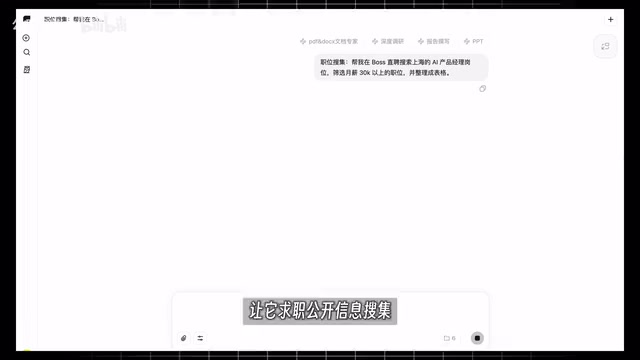
In just a few minutes, 7 qualifying positions were organized into an Excel spreadsheet, including job titles, company names, salary packages, and other complete information — even thoughtfully appending job detail links. The core capability behind this is Web Automation — no manual webpage browsing, copy-pasting, or tool-switching required throughout the entire process.
Web Automation is not a new concept — earlier tools like Selenium and Puppeteer have been widely used by developers for web scraping and testing. However, traditional automation tools require writing precise code scripts and are extremely sensitive to changes in webpage structure. AI-driven Web Automation introduces visual understanding and natural language instruction capabilities — the Agent can "read" webpage interfaces like a human, recognizing the semantic meaning of buttons, forms, and lists, rather than relying on fixed CSS selectors or XPath paths. This significantly improves fault tolerance for webpage redesigns, allowing ordinary users to describe task objectives without any programming knowledge.
For people who need to do extensive information gathering daily, the value of this capability is obvious. What used to take an hour of manual work can now be done with a single sentence.
Intelligent Desktop File Organization
The second scenario is even more relatable to daily life: your desktop is cluttered with downloaded images — inconsistent names, messy formats. MiniMax Agent can complete the following operations step by step:
- Unify image formats: Analyze all images on the desktop that need conversion and uniformly convert them to PNG format
- Rename by date: Automatically create a script to rename images by the current date
- Intelligent categorization: Analyze image content, automatically create folders and categorize files
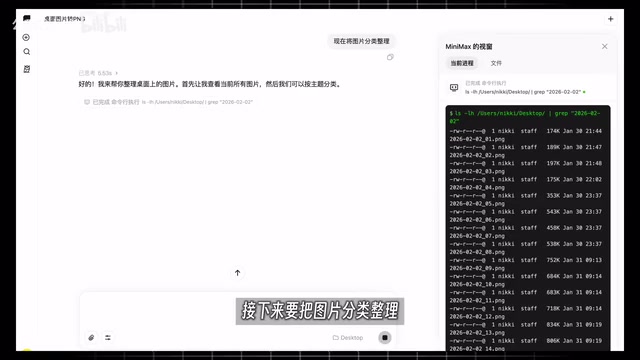
In the end, the originally messy desktop was organized into 5 clearly categorized folders — friend gatherings, travel photos, pets, etc., each in its proper place. The key point is that it's actually operating your computer's file system, rather than giving you a "suggested plan" for you to execute yourself.
This involves the technical implementation paths for desktop-level Agents. There are mainly two technical paths for letting AI truly "control a computer": one is the API integration path, executing operations through standard interfaces provided by operating systems or applications (such as AppleScript, Windows COM interfaces), which offers high stability but limited coverage; the other is the computer vision path (Computer Use), where the Agent "sees" the screen through screenshots and operates any interface by simulating mouse and keyboard events — Anthropic's Claude Computer Use is a representative exploration in this direction. MiniMax Agent combines multiple capability modules (browser expert, file system operations, code execution), belonging to a hybrid architecture. The core challenge for such desktop Agents lies in error recovery for multi-step tasks — when an intermediate step fails, the Agent needs the ability to self-correct and re-plan.
This type of repetitive labor used to take 30 minutes every day, but now only requires issuing a single command.
Advanced Capabilities: Data Analysis and Content Generation
From Data to Visual Reports
What's even more impressive is MiniMax Agent's analytical capability. Ask the Agent to analyze "why AI-topic videos went viral on Bilibili in the past 7 days," and it will directly output a PDF report. If you find PDF not intuitive enough, you can also request a visual HTML report.

The generated report includes data visualization analysis, trending video rankings, and core content insights — logically clear and ready for team use without secondary processing. For content creators and operations staff, this eliminates the most time-consuming steps of "finding data, scraping comments, making spreadsheets, and organizing materials."
Expert Role System: Invoking Different Capabilities On Demand
MiniMax Agent also has a built-in "expert" role system that can invoke experts from different domains to complete specific tasks:
- Trending Topics Expert: Searches the entire web for trending content on specific topics, mining high-quality viral angles
- GIF Sticker Pack Expert: Upload an image and automatically generate a themed sticker pack
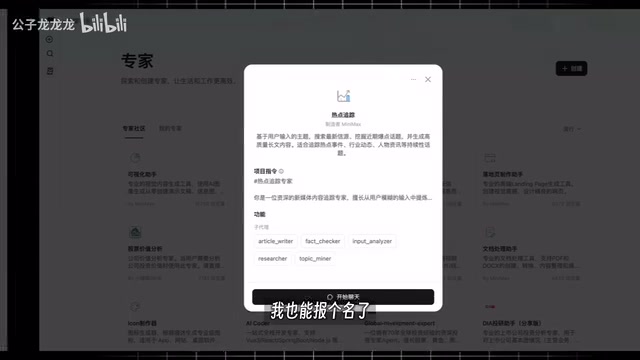
This design embodies the core concept of Multi-Agent architecture. In this architecture, a master Agent (Orchestrator) is responsible for understanding user intent and task decomposition, then distributing subtasks to expert Agents with specific capabilities for execution. This division of labor is similar to the collaboration between a project manager and specialized teams in a company — compared to a single omnipotent Agent, the advantage of multi-Agent architecture is that each expert model can be deeply optimized for specific domains, while multiple subtasks can be executed in parallel to improve efficiency. OpenAI's Swarm framework and Microsoft's AutoGen are representative open-source implementations in this direction, while commercial products packaging this as user-friendly "expert" concepts significantly lowers the barrier to entry for ordinary users.
In testing, the trending topics expert mined five high-quality viral angles for the "Spring Festival travel rush" topic, covering travel volume, new energy charging stations, high-speed rail ticket scrambling, and other popular directions, and produced a complete stand-up comedy script based on these. While AI-generated creative content still needs human polishing, as a first draft and source of inspiration, the efficiency improvement is tangible.
MiniMax Agent Technical Highlights and User Experience
From a product design perspective, MiniMax Agent's desktop client has several noteworthy features:
- Quick activation: Option+A (Mac) instantly brings up a small window, available on demand without interrupting your workflow
- Cross-platform support: Supports both Mac and Windows systems
- Real environment operations: Not simulated operations, but tasks truly executed at the user's operating system level
- Multi-capability coordination: Web automation, file management, data analysis, content generation, and other capabilities can be chained together
This design philosophy of "embedding capabilities into the workflow" is far more practical than a standalone chat window. It's closer to a true "digital employee."
Related articles
 Product Reviews
The Programmer's Desk Setup Guide: Building a Workspace That Feels Like Home
Discover how programmers build productive, comfortable workspaces. From multi-monitor setups to ergonomic design, explore the desk philosophy that drives focus and flow.
 Product Reviews
Qoder vs Cursor Real-World Comparison: Which $20/Month AI IDE Is Better?
Hands-on comparison of Qoder vs Cursor AI IDEs: Agent autonomy, human interaction count, and architecture decisions. Qoder needed only 2 interactions vs Cursor's 8.
 Product Reviews
Cursor Cloud Agent Demo: Eliminating Bottlenecks Across the Entire Software Development Lifecycle
Deep analysis of Cursor's Cloud Agent demo showing how cloud VMs, automated test artifacts, and a full-chain control plane systematically eliminate human bottlenecks across the software development lifecycle.