MiniMax H3 Arrives on Draw Things: A Guide to Running the Best Open-Source Audio-Video Model Locally on Mac and iPad
MiniMax H3 audio-video model hits Draw Things — runs locally on a 16GB iPad.
MiniMax H3, a leading open-source audio-video generation model, now has full support in Draw Things for Mac and iPad. It offers two variants — FLR VA (first-last frame) and REF VA (reference-based) — across eight quantization levels. With acceleration LoRAs, Apple Silicon devices from M2 Ultra onward can run the model locally; M4 with 32GB+ RAM is recommended for smooth performance. Bilibili creator "工具狂" completed real-world tests on an M5 iPad Pro with just 16GB RAM, recommending Talmate's 3-step LoRA (optimized to 182MB) and advising users to start small before scaling up resolution and frame count.
MiniMax H3 has earned a reputation among creators as one of the most capable open-source audio-video generation models available today. It now has official support in Draw Things, the AI tool built for Apple's ecosystem — meaning Mac and iPad users can run this model locally for the first time, without relying entirely on cloud compute. Bilibili creator "工具狂" put it through its paces on an M5 iPad Pro with just 16GB of RAM. This guide distills his findings into a practical, actionable walkthrough.
Two Model Variants: First-Last Frame and Reference Generation
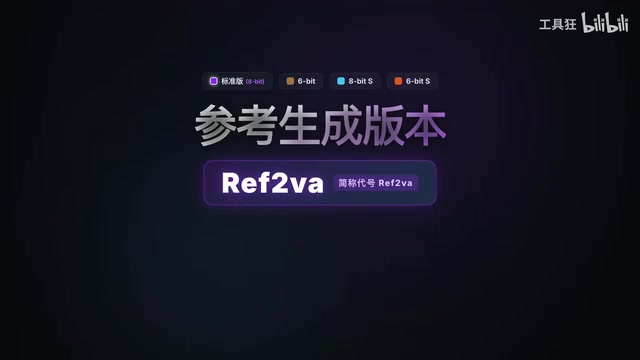
Searching for "MiniMax" in Draw Things' model list returns two types of models across eight quantization levels. Understanding what each variant can do is the essential first step.
The first is the First-Last Frame version (FLR VA — First and Last Frame to Audio Video). It supports three modes: text-to-video, image-to-video, and first-last frame video. It's also the first model on Draw Things to support first-last frame generation. You can supply both a starting and ending frame in the creative panel, and the model will interpolate the motion in between while simultaneously generating synchronized audio.
The second is the Reference Generation version (REF VA — Reference to Audio Video). This variant accepts two or more reference images — for example, two character portraits — to generate a two-person dialogue video. The creator used a tongue-in-cheek dialogue prompt like "Sam, why did you turn OpenAI into CloseAI" to demonstrate character consistency and audio-visual sync.
The creator downloaded 8-bit and 6-bit quantized versions of each variant. Higher quantization precision yields better image quality but demands more disk space and RAM. The general recommendation: users aiming for local inference should target at least an M4-class device with a 6-bit or 8-bit version downloaded, and plan for ample storage.
Quantization is the process of compressing model weights from high-precision floating-point formats (such as FP16/BF16) into lower-bit integers. The core goal is to run larger models within limited memory. 8-bit quantization stores each weight as an 8-bit integer, cutting memory usage by roughly 50% compared to the original precision; 6-bit compresses further, reducing memory footprint even more at the cost of a slight theoretical quality loss. For a model with the raw parameter count of MiniMax H3, quantization isn't an optional optimization — it's a prerequisite for running locally on consumer hardware. When choosing a version, users typically need to balance image quality against hardware feasibility: devices with ample RAM (64GB or more) can prioritize the 8-bit version, while more memory-constrained setups should start with 6-bit to ensure the pipeline runs at all.
Hardware Requirements and Acceleration LoRAs
"Can my device actually run this locally?" is the question every Apple user wants answered. The key lies in acceleration LoRAs.
Several vendors and individuals have already released LoRAs for MiniMax H3. The creator tested three: the four-step version from LightX RV, the four-step version from LarryVRH, and the three-step version from Talmate. His clear favorite was Talmate's three-step version — it achieved better results in fewer steps. After optimization by community member K神 (KeyJay), the resulting file weighs just 182MB and runs perfectly once imported into Draw Things.

With an acceleration LoRA in place, the hardware bar drops considerably. Based on the creator's own testing and community feedback, many devices starting from M2 Ultra and above in Apple Silicon lineup can run the model locally — more RAM always helps. For a smoother experience at larger resolutions and longer durations, M4 or newer chips paired with 32GB or more of RAM is the recommended baseline.
For practical parameter tuning, the creator suggests a pragmatic starting point: begin with a small resolution (e.g., 576×384) and a modest frame count (e.g., 107 frames) to get the pipeline running end-to-end first. Getting the parameters to work at all is the priority — chasing high-resolution output genuinely requires stronger hardware, or alternatively Draw Things' official cloud compute service as a fallback for lower-spec devices.
In the context of video generation, acceleration LoRAs (Low-Rank Adaptation) serve a different purpose than in text generation — rather than shifting the model's style, they use distillation training to teach the model to produce near-original-quality output in far fewer denoising steps. Traditional diffusion-based video generation typically requires dozens of iterations; with an acceleration LoRA, just 3 to 4 steps are sufficient, cutting inference time to roughly one-tenth of the original. This approach is conceptually similar to Consistency Distillation in the text model world, and in recent years it has been widely adopted to accelerate local deployment of mainstream open-source video models like Wan and HunyuanVideo. It is the key ingredient that makes large video models practical on consumer-grade Apple hardware.
Using an LLM to Write Prompts
Prompt planning for video generation today is almost entirely delegated to large language models — users simply describe what they want in plain language. The creator compiled the prompt-writing guidelines for both the FLR VA and REF VA variants into two Markdown documents.
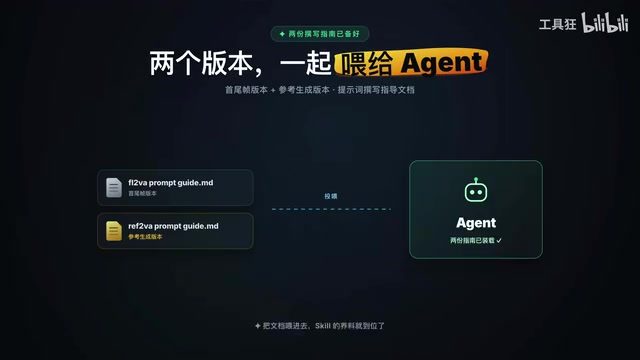
The workflow is straightforward: feed both documents to an LLM and have it create a dedicated skill — something like a "MiniMax H3 Prompt Generator." From that point on, whether you need text-to-video, image-to-video, first-last frame video, or reference-based generation, you simply invoke the skill with a slash command and describe your vision.
For instance, when doing image-to-video, paste in the starting frame and tell the LLM: "The scene needs the violent eruption of a volcano with the sound of flowing lava, a drone diving at a steep angle toward a massive 'MiniMax' text logo, heart-pounding tension, then the text begins to crumble." The LLM outputs a structured prompt ready to paste directly into Draw Things — and the results are genuinely impressive.
What to Look Forward to Next
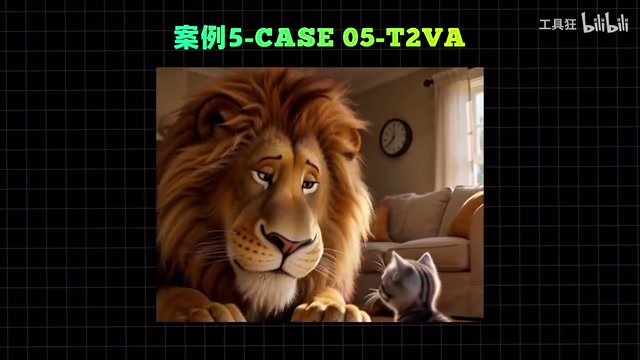
The creator openly acknowledged that time constraints left plenty of ground uncovered. His most anticipated direction: once Draw Things supports audio combined with images as joint conditioning inputs, it should become possible to generate clips longer than 15 seconds with consistent, continuous sound. That would push what's currently a short-clip generation capability into genuine narrative storytelling territory.
For Apple ecosystem users, MiniMax H3 landing on Draw Things represents a real democratization of capability: audio-video generation, once assumed to require a dedicated GPU and significant VRAM, can now run on a 16GB iPad. For content creators, now might be exactly the right moment to push your own device to its limits and find out what it can do.
Related articles
DeepSeek Harness Penetration Testing Mode in Practice: Capabilities and Boundaries of AI-Assisted Vulnerability Hunting
A hands-on look at AI-assisted vulnerability hunting using DeepSeek Harness with a dedicated SKILLS package, covering recon, WebShell backdoors, RCE, and database credential leaks.
Low-VRAM Local LLM Showdown: Why the Quantized Bonsai 2 Comes Out on Top
RTX 5090 comparison of Bonsai 2 27B, Gemma 4 12B, and Qwen 3.5 9B. Ternary-quantized Bonsai fits 27B params in 7.2GB VRAM and wins on voxel pagoda rendering quality.
Yue2 Music Model LoRA in Practice: Cloning a Celebrity Voice in 400 Steps
A celebrity voice LoRA built on Yue2 with AI-Toolkit in just 400 steps went viral on Reddit. We break down the tech, its limits, and the voice cloning ethics involved.