MiniMax H3 Local Deployment Guide: Run AI Comic Video Generation Even on Low VRAM

Run MiniMax H3 locally on 12GB VRAM for unlimited, credit-free AI video generation.
This ComfyUI workflow built on MiniMax H3 lowers the hardware barrier to 12GB VRAM through chunk-processing nodes, making unlimited local AI video generation a practical reality without cloud credits. It uses a merged FL+RE model and supports scene-specific LoRA switching (linework, speed, and action); second-pass sampling operates entirely in latent space to skip re-encoding and improve speed. A fully Chinese interface and pre-configured parameters make onboarding straightforward for ComfyUI users. Core strengths are no credit limits, low VRAM support, and zero language barrier — though the lack of content moderation requires responsible use, and third-party packages carry security risks.
Why Local AI Video Model Deployment Matters
Cloud-based AI video generation tools are convenient, but credit consumption, generation limits, and content restrictions are persistent pain points. Locally deployable models like MiniMax H3 offer an alternative: run all computation on your own hardware, with no cloud account required — and therefore no credits or generation caps to worry about.
As demonstrated by a Bilibili creator, this ComfyUI workflow built on MiniMax H3 lets you feed in reference images and generate AI comic strips and short dramas complete with sound effects and voiceovers. The fully Chinese interface lowers the barrier to entry considerably for domestic creators.
That said, it's worth keeping perspective: the "world's strongest" marketing language is mostly hype. The real value lies in bringing the hardware requirements for local video generation down to a level that ordinary users can actually meet.
Low VRAM Devices Can Run It Too
The most noteworthy aspect of this workflow is its optimization for low-VRAM users. The creator behind the demo reports using a 5060Ti with 16GB VRAM and 32GB system RAM — hardly a high-end rig.
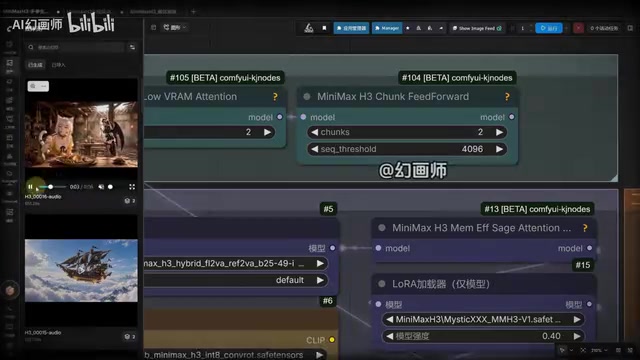
The key is two "low-VRAM booster" nodes built into the workflow, which work by splitting model data and video generation data into chunks. The larger the chunk number you set, the lower the VRAM pressure. According to the creator, even a 12GB VRAM GPU can handle it.

The trade-off is speed. On a mid-range card like the 5060Ti, an 8-second video takes roughly 10 minutes, and a 14-second video around 20 minutes. That's slow for efficiency-focused users, but perfectly acceptable for anyone who just wants unlimited, free local generation. Step up to a 4090 or 5090 and the same clips would come out in well under 10 minutes.
Model and LoRA Pairing Optimization
This workflow makes a deliberate model selection change, moving away from a single FL model to a merged model that combines characteristics of both FL and RE — preserving reference fidelity while adding stronger aesthetic expressiveness.
On the LoRA side, the creator distinguishes several use cases:
- Linework LoRA: Primarily reduces the "greasy" look on generated characters and fixes previously poor facial results.
- Speed LoRA: Boosts generation efficiency.
- Action LoRA (Combat): An optional addition suited to high-motion scenes like fight sequences and weapon swings. When the Action LoRA is enabled, it's not recommended to also run Mystic simultaneously — or if you do, lower Mystic's weight to 0.2.
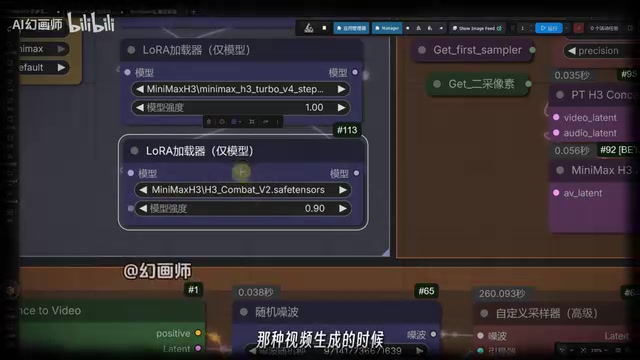
This scene-based approach to swapping LoRA combinations reflects a solid understanding of real creative needs — different genres demand very different model capabilities, and no single fixed parameter set works for everything.
LoRA (Low-Rank Adaptation) is a lightweight fine-tuning technique. Rather than modifying the original large model's weights, it trains a small "adapter layer" that shifts the model's generation style or capabilities. For video generation, a single base model can be paired with multiple LoRA files — each just tens to hundreds of megabytes — yet each can significantly influence character appearance, motion smoothness, or visual style. The weight parameter (typically between 0 and 1) controls how strongly a given LoRA affects the final output. Higher weight means more pronounced characteristics, but also greater risk of conflict with other active LoRAs — which is exactly why the guide recommends reducing Mystic's weight when the Action LoRA is on.
Second-Pass Sampling and Step Configuration
Another optimization in this workflow is the second-pass sampling ("二采") stage. The conventional approach requires re-encoding, but this workflow uploads the first-pass latent data directly to the node, performs upscaling within latent space, and then feeds it into the sampler — skipping the re-encoding step entirely, which makes it faster.
For sampling steps, the base scheduler is set to 12 total denoising steps, split via Sigma separation: 8 steps for the first pass and the remainder for the second. For faster output, you can switch to 10 total steps — 6 for the first pass and 4 for the second. On resolution, the first-pass pixel coefficient is 0.4 and the second-pass is 0.7; users can adjust these against the reference parameter table based on their GPU capability and target resolution.
Latent space is the core working environment of diffusion models. Images and videos aren't generated directly at the pixel level — instead, denoising and sampling computations happen first in a compressed, lower-dimensional space (the latent space), and the result is then decoded back into visible pixels via a VAE Decoder. The conventional second-pass workflow decodes the first-pass result into pixels, re-encodes it back to latent space, and only then begins the second round of sampling — a round trip that costs time and can introduce quality degradation. The approach described here performs upscaling and handoff entirely within latent space, skipping that round trip and gaining both speed and detail retention. Sigma separation, meanwhile, is the mechanism that controls how much "denoising work" each pass is responsible for — early steps establish overall structure, while later steps refine the details.
How to Use It and Overall Assessment
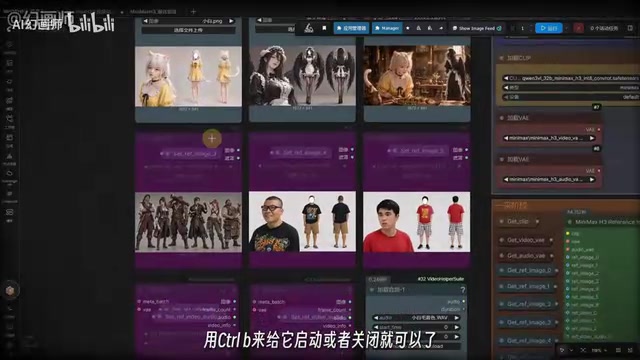
The full workflow comes pre-configured with six standard loader nodes, two video upload nodes, and two audio reference nodes, toggleable via Ctrl+B. There are dedicated controls for prompt input, resolution selection, video duration, and second-pass pixel size, making it reasonably accessible to existing ComfyUI users.
From a creator's standpoint, the core value comes down to three things: no credit or generation limits, runs on low VRAM, and fully Chinese with no language barrier. It's a meaningful step forward for the practical usability of local AI video generation.
A few caveats are worth noting, however. The "no moderation, no restrictions" aspect the creator highlights means content generation is largely unconstrained — users should take it upon themselves to comply with applicable laws and platform rules. Additionally, the all-in-one package comes from a third-party source, so download and usage carry inherent security considerations. For professional users prioritizing stability and maximum output quality, a high-end GPU paired with official toolchains remains the safer and more reliable choice.
Related articles

Chain of Thought Isn't Just for AI: How Humans Can Use CoT to Improve Thinking Quality
Chain of Thought isn't just a prompt trick for large models. Starting from a Hacker News discussion, this article analyzes why CoT works for human thinking too, breaks down actionable ways to transfer it, and highlights the key differences between human CoT and machine CoT.
Cloudflare Teams Up with OpenAI: Closi…
Cloudflare Teams Up with OpenAI: Closing the Loop from Vulnerability Discovery to Defense with AI
Cloudflare uses OpenAI Daybreak to investigate security vulnerabilities and generate reviewable remediation plans, while developers use Codex to boost coding efficiency and quality.

Orca Multi-Agent Orchestration in Practice: A Guide to Parallel Collaboration with Claude and Codex
Orca is Stable AI's free open-source agent workbench supporting 34 agents like Claude Code and Codex in parallel. Learn its Git worktree isolation, multi-model orchestration, and mobile management.