MiniMax H3 Local Deployment Hands-On: An AI Video Generation Workflow Without ComfyUI

A locally-deployed tool wrapping MiniMax H3 for AI video generation without ComfyUI's complexity.
Sign Open AGI is a free, locally-run AI workflow tool that packages MiniMax H3 for video generation, bypassing ComfyUI's complex setup. It offers text-to-video with adjustable quality steps, batch rendering queues, built-in multimodal agents for prompt optimization, and produces results comparable to Seedance 2.0. Requires an RTX 4090 with 24GB VRAM for optimal performance.
A Local AI Video Workflow Tool That Bypasses ComfyUI
Recently, a Bilibili content creator known as "Shenshi" released version 1.0 of his independently developed open-source AI tool called "Sign Open AGI" (Scientific Open Artificial General Intelligence). This is his second AI software following "Sign Cloud AGI," with the core concept of integrating local AI video generation, image processing, audio creation, and intelligent agent capabilities into a single visual workflow interface, offered free to users.
The tool's biggest selling point is its local packaging of the open-source video model MiniMax H3. According to the developer, he has been dissatisfied with the mainstream ComfyUI interface and interaction paradigm—despite years of use, the complex environment configuration, tedious node connections, and high barrier to entry motivated him to build his own "simple and easy-to-use" alternative from scratch.
ComfyUI is currently the most mainstream node-based workflow tool in the open-source AI image/video generation space. Built on Python, it allows users to freely combine inference pipelines for models like Stable Diffusion and Flux through visual node connections. Its strengths lie in extreme flexibility and extensibility, with an incredibly rich community plugin ecosystem. However, its drawbacks are equally apparent: installation requires configuring Python environments, CUDA drivers, and various dependency packages; node connections aren't intuitive for non-technical users; and different plugins occasionally have version conflicts. This makes ComfyUI powerful but steep in its learning curve, creating an entry barrier for many content creators.
For the large number of users who want to use local AI video generation but don't want to wrestle with ComfyUI environments, these "out-of-the-box" packaging tools genuinely address a real pain point: turning brain-burning configuration into a few clickable buttons.
MiniMax H3 Video Generation Capability: Hands-On Testing
The software's video generation module directly calls the MiniMax H3 open-source model, supporting multiple modes including text-to-video, first/last frame generation, and reference image generation, with parameter settings for dimensions, resolution, generation duration, quality tiers, and acceleration levels. Compared to ComfyUI where you need to manually connect LoRA and configure nodes, everything here is presented as buttons, dramatically lowering the operational barrier.
MiniMax H3 is a video generation large model open-sourced by Chinese AI company MiniMax (Xiyü Technology) in 2025. MiniMax was previously known for its closed-source video generation service Hailuo AI, and H3 represents their move to open-source core capabilities. The model supports text-to-video, image-to-video, first/last frame interpolation, and other generation modes, achieving near-commercial-API levels in motion consistency, physical plausibility, and prompt adherence. After open-sourcing, the community quickly integrated it into frameworks like ComfyUI and Diffusers, but due to the large model size and high VRAM requirements, local deployment still presents challenges for average users.
Recommended Parameter Settings
The developer's tested parameter recommendations are worth noting:
- Testing phase: Use 480P resolution + 8 steps for fastest speed, but prompt reasoning and image generation will have noticeable artifacts (such as facial distortion and inaccurate prompt following);
- Production phase: Recommended 768 standard or 480P, no fewer than 24 steps, cost-effective choice around 30 steps, final output recommended at 50 steps;
- Speed reference: With accelerator enabled, generating 1 second of video takes about 2 minutes; a 480P ten-second video takes about 14 minutes, and a 768P ten-second video takes about 20–30 minutes.
The "steps" here refer to the diffusion model's denoising sampling steps. Video generation models work on diffusion principles, gradually denoising from pure noise to restore a clear image. More steps mean more thorough denoising and higher image quality, but computation time increases proportionally. 8 steps is an ultra-fast preview level, while 50 steps approaches the model's optimal performance ceiling.
Task Queue and Batch Rendering
The task queue feature deserves special mention. Since GPU rendering cannot run concurrently and must process one task at a time, generation takes considerable time. The developer designed a mechanism similar to C4D render queues, where users can add multiple tasks to a queue and batch render during lunch breaks, after work, or overnight idle periods, significantly improving output efficiency.
The "cannot run concurrently" limitation exists because AI video generation has extremely high VRAM usage (MiniMax H3 still requires close to 24GB VRAM even at NF4 quantization), making it nearly impossible for a single consumer-grade GPU to run two generation tasks simultaneously. The task queue is essentially an asynchronous scheduling strategy that has long been standard workflow in the 3D animation industry (Cinema 4D, Blender), and bringing it to AI video generation is a pragmatic design choice.
H3 vs. Seedance 2.0 Quality Comparison
In quality comparisons, the developer compared MiniMax H3 with Seedance 2.0, concluding they are "roughly comparable," with both performing quite well in image consistency, character consistency, prompt understanding, and visual effects. However, both have bugs with small text generation, which is a common shortcoming across current AI video models.
Seedance 2.0 is a video generation model from ByteDance, known for its excellent motion expressiveness and character consistency. Together with MiniMax H3, Kling, Vidu, and others, it forms the first tier of Chinese AI video generation in 2025. Seedance 2.0 is currently available primarily through cloud APIs and official platforms, and has not been fully open-sourced. Comparing H3 with Seedance 2.0 is essentially validating whether open-source local models have caught up with commercial closed-source services in generation quality—this is crucial for judging the practicality of local workflows.
The difficulty with text generation stems from how diffusion models are trained—models learn visual patterns at the pixel level rather than semantic symbols. For text that requires precise stroke arrangements, even minor sampling deviations can cause stroke misalignment or character omission, which is especially evident in frame-by-frame video generation.
Multimodal Agent: Adding a "Brain" to the Workflow
The software includes a built-in multimodal agent, currently integrating Tongyi Qianwen and Zhipu models, both supporting image recognition and memory functions.
A multimodal agent refers to an AI system capable of simultaneously processing multiple input modalities such as text, images, and audio. Tongyi Qianwen (Qwen) mentioned here is developed by Alibaba's DAMO Academy, while Zhipu (GLM series) is developed by Zhipu AI, a Tsinghua University-affiliated startup. Both offer open-source multimodal large language model versions supporting visual understanding, text generation, and other capabilities. In this tool, the agent serves as the workflow's "cognitive hub"—analyzing reference image content, automatically generating or optimizing prompts, and assisting with script creation, thereby elevating AI video generation from simple "input prompt, output video" to an intelligent creative process with contextual understanding.
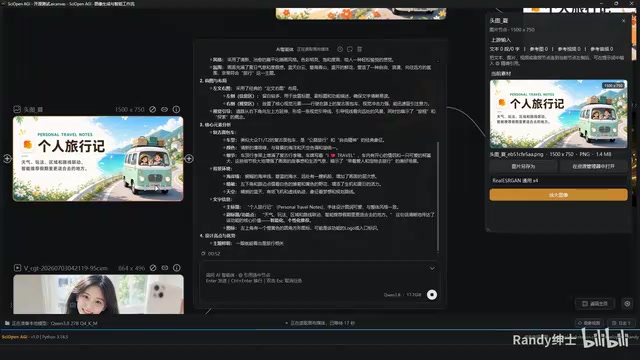
In the developer's demonstration, after sending a cartoon travel image to the agent, it completed recognition within two seconds, accurately analyzing scene elements (a car, characters, a puppy, luggage), composition, atmosphere, environmental elements, and even the English slogan "I love travel" in the image. Additionally, the agent can infer image dimensions, engage in continuous conversation, and remember the user's name, delivering a remarkably smooth interaction experience.
The developer describes this as "giving the software a free brain"—users no longer need to separately open Doubao, DeepSeekAd, or other web pages for conversation; they can complete script creation, prompt optimization, and other tasks directly within the workflow.
Memory requirement note: The agent has high memory demands. 64GB RAM delivers instant results, while 32GB or 16GB will be slower on the first conversation, requiring a "warm-up" process before speeds improve. This is because multimodal large language models need to load several GB of model weights from disk into memory during initial inference—the more RAM available, the more generous the operating system's file cache, allowing subsequent calls to read directly from memory without repeated disk IO.
Workflow Interaction Design: Polished Details
As a self-developed tool, Sign Open AGI puts considerable effort into interaction details, which forms the basis of the developer's confidence in "bypassing ComfyUI."
Node and Connection Operations
The software uses an orange-themed UI with connections supporting curve and right-angle toggle (Shift+S), complete with flow animation effects. It retains some keyboard shortcuts familiar to ComfyUI users while incorporating custom shortcuts from the developer's years of professional experience, reducing the learning cost for existing users.
Inheritance Node Feature
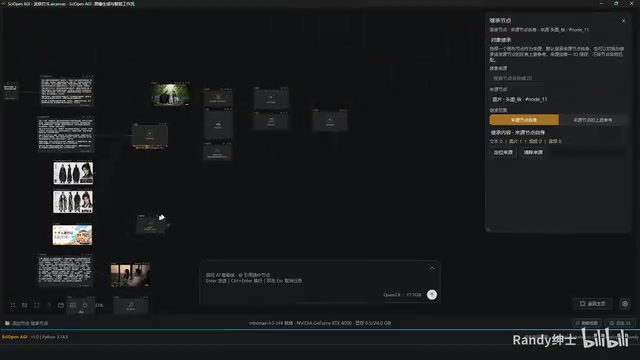
This is an original feature the developer highlights. In long workflows, if you need to repeatedly reference the same image or upstream node, dragging connections one by one makes the canvas cluttered. "Inheritance nodes" can directly inherit upstream reference content—a single node can aggregate multiple images, avoiding numerous crossing connections and keeping the canvas clean.
From a workflow design perspective, this is similar to the concept of "variable references" in programming. While ComfyUI has Reroute nodes and Primitive nodes to simplify connections, wiring can still become complex in scenarios requiring multiple references to the same resource. Inheritance nodes are essentially an implicit data flow passing mechanism that decouples visual canvas cleanliness from logical data flow direction.
One-Click Prompt Optimization
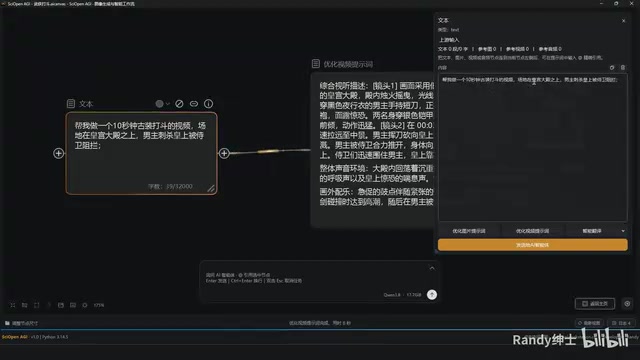
The software includes built-in prompt optimization buttons for text-to-video and text-to-image, strictly following MiniMax H3's official guidelines. Users input brief natural language (such as "ten seconds of ancient costume combat, male protagonist assassinating in imperial palace hall"), and within seconds it expands into detailed structured prompts including shot breakdowns, duration, environment, actions, and soundtrack.
Prompt optimization (Prompt Enhancement) is important because video generation models are extremely sensitive to the format, detail level, and descriptive structure of input prompts. MiniMax H3's officially recommended prompt format includes multiple dimensions such as scene description, camera movement, character actions, and temporal rhythm. Manually writing such structured prompts is both time-consuming and requires experience. The built-in agent's automatic expansion essentially uses a large language model to translate the user's creative intent into technical language that the model can optimally understand.
Additional features include regional annotation (segment frame selection), grid snap alignment, link addition, node ignoring, quick wire cutting (Y key), and other practical functions, with the overall interaction positioned as "professional but lag-free."
Local Deployment Method and Hardware Configuration Recommendations
The software runs entirely locally without requiring internet connectivity to generate video. The core directory structure consists of three folders: model, project, and runtime. Users need to copy the developer's separately packaged large model files (several GB) and runtime environment (approximately 10GB) into the corresponding directories and specify storage paths in settings.
Fully local operation means all computation during video generation happens on the user's own GPU, with no frame content uploaded to the cloud. This is a significant advantage for creators working with commercially sensitive or copyright-sensitive content. It also means generation quality and speed depend entirely on local hardware configuration, without the ability to elastically scale compute like cloud services.
Recommended Hardware Configuration
| Component | Recommendation |
|---|---|
| Storage | SSD with at least 250GB free space |
| GPU | RTX 4090 (optimal) / RTX 4070 (compatible) / RTX 3060 (testing only) |
| RAM | 64GB (recommended) / 32GB (usable) |
| Model precision | Currently NF4, future support for int8 (5090 and other high-end GPUs) |
NF4 (4-bit NormalFloat) and int8 (8-bit Integer) are two precision formats for large model quantization compression. The core idea of quantization is compressing the model's original FP16/FP32 floating-point parameters into lower bit-width representations, dramatically reducing VRAM usage and computation at the cost of some precision loss. NF4 is a 4-bit quantization format proposed in the QLoRA paper, capable of compressing model VRAM requirements to approximately 1/4 of the original, enabling a 4090 with 24GB VRAM to run models that would otherwise require 48GB or more. int8 quantization offers higher precision and better image quality but requires more VRAM, making it suitable for high-end GPUs like the 5090 with 32GB or more VRAM.
The developer's test configuration was a Ryzen 5950X + 128GB RAM + RTX 4090. For new users planning to purchase hardware, a second-hand 4090 or 5090 is recommended for professional work, while a 3060 suffices for casual testing. It's worth noting that the RTX 4090 has 24GB GDDR6X VRAM and 16,384 CUDA cores, making it the optimal consumer GPU for running AI large models; the RTX 3060 with only 12GB VRAM can barely run under NF4 quantization, but generation speed will be significantly slower than the 4090.
Conclusion: Worth Following but Requires Realistic Expectations
The core value of these locally packaged AI workflow tools from individual developers lies in lowering the usage barrier for open-source models like MiniMax H3, making them especially suitable for content creators and small studios who don't want to deal with environment setup. The developer emphasizes that video, image, and audio features are entirely free, with charges only applying when calling cloud APIs like GPT or Claude.
However, several limitations should be viewed realistically:
- Model files depend on the developer's individual packaging and distribution; update cadence depends on the individual developer
- Some features are still in beta testing, with stability yet to be verified
- Common large model artifacts (text generation, complex combat actions) persist
From an industry ecosystem perspective, tools like this represent a "middle layer" trend: the bottom layer consists of open-source models (such as H3, Wan2.1), the top layer is end users, and middle-layer developers create value through packaging and interaction optimization. This is similar to the relationship between WebUI and various one-click installers in the early Stable Diffusion ecosystem. Long-term sustainability depends on whether the developer can continuously follow upstream model updates, maintain community ecosystems, and sustain software quality.
For teams requiring production-grade stability, thorough testing before committing to actual projects is still recommended. Overall, Sign Open AGI is a local AI tool that reflects its developer's aesthetic sensibility and pragmatism, offering users who want to "click a few buttons and get to work" a new alternative that bypasses ComfyUI.
Related articles

Python 3.15 New Feature: Is the sentinel Type Better Than None?
Python 3.15 adds the sentinel type, using named unique sentinel objects to replace None and bare object(), resolving confusion among missing values, explicit emptiness, and invalid input while avoiding type hint failures.

Deep Learning's Three Architectures and the Universal Approximation Theorem: A Complete Guide to MLPs, CNNs, and Transformers
Explaining the inductive bias differences among MLP, CNN, and Transformer, the existence meaning of the Universal Approximation Theorem (UAT), and the role of Taylor expansion in approximation analysis, while clearing up common misconceptions.

GitLab Emergency Patch Release: Analysis of Critical Security Fixes
GitLab releases critical patch 19.5.1, sparking 355 points of discussion on Hacker News. This article analyzes the background, upgrade steps for self-hosted instances, and verification points to help DevOps teams respond quickly to security updates.