MiniMax Workflow: A Deep Dive into the All-in-One Open-Source AI Video Generation Tool

Blocked after a critique, a Reddit user rebuilt a better MiniMax H3 ComfyUI video workflow and open-sourced it.
After being blocked for critiquing a MiniMax workflow, Reddit user roycho87 rebuilt the entire project from scratch and released it on GitHub. Built on ComfyUI and optimized for the MiniMax H3 multimodal video model, the workflow consolidates scattered nodes into a unified control panel and supports up to 6 image, 3 audio, and 2 video references simultaneously. It introduces sparse attention and chunking for low-VRAM compatibility, built-in RIFE frame interpolation, and intelligent video stitching for longer outputs — a practical tool and a compelling example of open-source culture at work.
From Community Conflict to Open-Source Contribution
A small friction within a tech community ended up spawning a far better open-source project. Reddit user roycho87 was blocked by an author after critiquing their MiniMax workflow — and that frustration became the fuel he needed to rebuild the entire thing from scratch. He eventually published an improved version on GitHub, transforming what had been a complex AI video generation pipeline into an accessible, all-in-one tool friendly enough for beginners.
This story is a textbook example of how open-source communities operate: technical disagreements can create friction, but they ultimately drive tools to evolve. roycho87 didn't just fix several broken features in the original workflow — he also added practical capabilities like forced audio extraction and frame rate control, and simplified the overall experience through a centralized control panel.
Core Features: An All-in-One AI Video Generation Solution
Built on ComfyUI and deeply optimized for the MiniMax H3 model, the workflow's core philosophy is to consolidate scattered control nodes into a single unified panel — so users never have to manually rewire connections or bypass nodes when switching between different generation scenarios.
Multi-Reference Mixed Input
Multi-reference support is the standout feature of MiniMax Workflow. The system allows you to simultaneously load up to 6 image references, 3 audio references, and 2 video references — and mix them freely. In practice, this flexibility is enormously useful. You can use images to define visual style, audio to drive rhythm, and video to provide motion references, letting all three work in concert to handle complex AI video generation tasks.
Video Continuation and Intelligent Stitching
The video continuation feature uses an overlap-based stitching approach. The system intelligently handles the join between the original clip and newly generated content while synchronizing the audio track to ensure audiovisual consistency. For projects that require generating longer videos, this feature significantly reduces the amount of post-production editing needed.
Technical Details: Balancing Performance and Usability
The workflow includes several performance optimizations that make the MiniMax H3 model accessible to users across a wide range of hardware configurations.
Low VRAM Mode and Sparse Attention
The introduction of sparse attention and a low VRAM mode allows lower-end hardware to run MiniMax H3. Chunking technology breaks computation into smaller blocks, effectively relieving VRAM pressure — a feature that's especially valuable for independent developers and small studios.
Built-in RIFE Frame Interpolation
The built-in RIFE frame interpolation module directly addresses the smoothness problem in AI-generated video. Users can perform frame interpolation immediately after generation, upscaling low-frame-rate footage to higher frame rates without relying on external tools. Latent upsampling also supports refined post-processing of fully stitched videos, improving final output quality.
Beginner-Friendly Control Panel
The control panel was designed with new users firmly in mind. All key parameters are consolidated into a single interface, so users don't need to understand the underlying node connection logic. The system automatically adjusts internal routing based on how many reference types are enabled — delivering a genuinely streamlined "load assets → set parameters → generate" workflow.
Use Cases and Community Feedback
This ComfyUI workflow is particularly well-suited for:
- Proof-of-concept work: Quickly testing how different reference combinations affect AI video generation output
- Content creation: Generating base footage for short-form videos, ads, and similar projects
- Learning and research: Understanding how multimodal references influence video generation results
From community feedback, the initial release had an output bug where the final result was the first pass rather than the upsampled version — an issue the author fixed in V2. The shift parameter was also removed in favor of an optional sub-graph for connecting turbo LoRA, a modular design choice that enhances extensibility.
One interesting quirk: the workflow requires a placeholder image to be uploaded in order to run correctly. This is a deliberate design trade-off — the pre-set node structure eliminates the need for manual bypassing, but it does add an extra step to the initial setup.
Open Source in Action
The story behind this project's creation is itself a microcosm of open-source culture. A technical disagreement didn't end in stalemate — it was channeled into something constructive. roycho87 chose to make his code public rather than keep his improvements to himself, letting a much wider audience benefit.
For users who want to explore AI video generation but have been put off by the technical barrier, all-in-one ComfyUI workflows like this dramatically lower the cost of entry. For experienced developers, the open-source code provides a solid foundation for customization and further optimization. This ability to serve users at different skill levels is a hallmark of great open-source tooling.
Project repository: https://github.com/roycho87/minimax_wf
Related articles

DeepSeek Harness: A Beginner's Installation and Testing Guide
A DeepSeek Harness tutorial for test engineers: set up Node.js, launch with one NPX command, configure official and third-party models, and explore web search, file I/O, and trace-view agent observability.
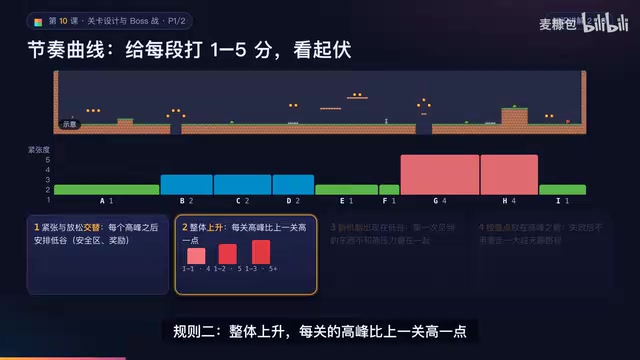
AI Game Development in Practice: Designing Levels with the Four-Step Method and Pacing Curves
AI game development lesson 10: design levels with the four-step method (teach, practice, combine, test) and a 1-5 pacing curve, plus sightline guidance and safety zones—implement Animatable Body 2D moving platforms and generate ASCII sketches for 1-2 Underground Cavern and 1-3 Guard Hall.

AI Game Development in Practice: Two-Phase Boss State Machines and Death Heatmap Tuning
AI game development lesson 10: implement a two-phase Boss with a state machine, guarantee fairness with color signals and a 0.4-second warning floor, locate difficulty cliffs with a death heatmap, and apply lightest-to-heaviest fixes one at a time, with an acceptance checklist and common pitfalls.