MinkNote: An In-Depth Look at the Local-First Markdown Note-Taking App for macOS

MinkNote is a local-first macOS Markdown note app that puts data ownership back in users' hands.
MinkNote is a native macOS note-taking application built on local-first principles, storing all notes as plain Markdown files with no database, no account required, and no vendor lock-in. It offers projects, journals, tags, dual-mode editing (rich text and Markdown), and automatic image management. Targeting privacy-conscious macOS users who value long-term data ownership, it positions itself as a lightweight alternative to Obsidian and cloud-based tools.
In an era dominated by cloud-based note-taking apps, a native macOS application called MinkNote is swimming against the current. With its philosophy of "pure Markdown files, no database, no account, no vendor lock-in," it climbed to #7 on Product Hunt, earning 183 upvotes and 58 comments. It attempts to answer a question that more and more users are asking: Who actually owns my note data?
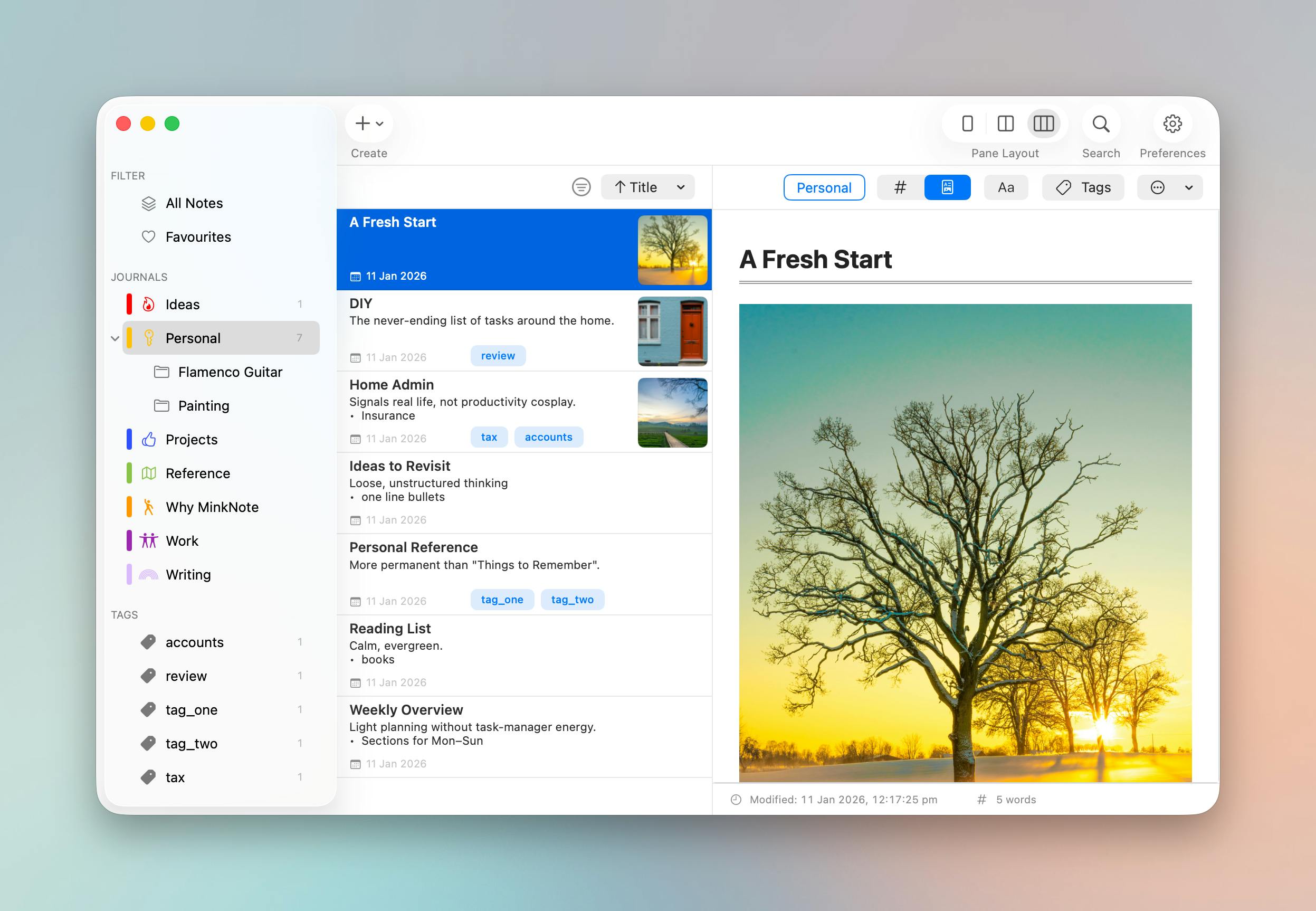
MinkNote's Core Philosophy: Returning Data Sovereignty to Users
MinkNote's most distinctive positioning is "Local-First." This concept was systematically proposed by the Ink & Switch lab in a 2019 research paper. Its core principles are: data is stored on the user's local device, the application runs fully without network connectivity, and users have complete control over their data. Unlike traditional "cloud-first" architectures that treat network connectivity as a fundamental dependency, local-first applications treat syncing as an optional enhancement. On the technical level, these applications typically store data using the local file system and use algorithms like CRDTs (Conflict-free Replicated Data Types) to handle potential multi-device sync conflicts.
Unlike note-taking tools like Notion and Evernote that rely on cloud databases and account systems, MinkNote stores all content as plain Markdown files on your own disk.
This means several key differences. First, no database — your notes aren't encapsulated in some proprietary binary format, but are individual human-readable .md text files. Second, no account — you don't need to register, log in, or worry about being unable to export your data if the service shuts down someday. Finally, no vendor lock-in — even if you stop using MinkNote one day, these Markdown files can still be opened and used by any text editor or other note-taking software.
Vendor lock-in is particularly severe in the note-taking app space. Evernote uses its proprietary ENML format, Notion's Block structure significantly degrades when exported to Markdown, and Apple Notes locks data deep within iCloud's CoreData database. The deeper risk lies in service termination — when Springpad shut down in 2016, massive amounts of users' knowledge bases evaporated instantly. These cautionary tales have made users realize the fragility of entrusting decades of accumulated thinking to a single commercial service.
For users who have long struggled with their note data being held hostage by platforms, MinkNote's design fundamentally returns data control to the individual.
MinkNote Feature Breakdown: More Than Just Minimalism
While emphasizing lightweight design and local storage, MinkNote hasn't stripped its features down to the bare minimum. According to official descriptions, it integrates the following capabilities within a "private, local-first workspace":
Note Organization and Management
- Projects: Ideal for grouping notes by work or topic
- Journals: Built-in diary/journal functionality for chronological recording
- Tags: A cross-project organizational dimension that compensates for the limitations of folder structures
- Quick Search: Local full-text search that locates content in seconds without an internet connection
Markdown Editing Experience
MinkNote supports both rich text editing and Markdown editing modes. This is quite pragmatic — pure Markdown users can enjoy the syntax's simplicity and portability, while users unfamiliar with Markdown syntax get a WYSIWYG writing experience. This dual-mode design lowers the barrier to entry.
Markdown itself was created by John Gruber and Aaron Swartz in 2004 as a lightweight markup language designed to let people write in plain text and easily convert to HTML. Over 20 years, it has become the de facto standard for technical writing — GitHub uses it for documentation, and virtually all static site generators support it. The CommonMark specification (initiated in 2014) further unified syntax differences across implementations. The core advantage of choosing Markdown as a note storage format is: extremely small file sizes, version control friendliness (seamless integration with Git), and the guarantee that files can still be opened by any text editor twenty years from now — truly making data "future-proof."
Automatic Image Management
Worth highlighting is the "automatic image organization" feature. In pure Markdown workflows, image management is often a pain point — after inserting images, files scatter everywhere and references are easily lost. MinkNote uses automation to help users organize image assets, which is a notable advantage among similar plain-text note-taking tools.
Who Is MinkNote For? Target User Profile Analysis
From a product positioning perspective, MinkNote's target user profile is quite clear:
Privacy-conscious users. All data stays local and never uploads to the cloud, naturally avoiding data breach risks and third-party analysis. It's suitable for handling sensitive information or compliance-required scenarios.
Users seeking long-term durability. Markdown is a time-tested open format. Choosing it means your notes can "last a decade" without worrying about format obsolescence or software discontinuation.
Dedicated macOS users. As a native application (developed with Swift/SwiftUI or AppKit), MinkNote directly calls system APIs and can fully leverage Apple Silicon performance optimizations, system-level animation frameworks, and memory management mechanisms. By comparison, many cross-platform note-taking tools are built on the Electron framework — essentially embedding a complete Chromium browser and Node.js runtime in each instance. A simple Electron app typically consumes 100-300MB of memory at launch, while a native app might only need 20-50MB. In battery-sensitive laptop usage scenarios, native apps have lower CPU wake frequencies and significantly less impact on battery life.
Conversely, if your core needs are multi-user collaboration, real-time cross-device cloud sync, or mobile access on the go, then the local-first MinkNote may not currently be the best choice — this is also an inherent trade-off of the local-first philosophy.
Industry Trends in Local-First Note-Taking Tools
MinkNote's popularity is not an isolated case. In recent years, Markdown-based local note-taking tools like Obsidian and Logseq have continued to grow, reflecting a clear industry trend: user trust in cloud services is being re-examined.
Obsidian (released in 2020), developed by the Dynalist team, emphasizes bidirectional links and knowledge graph visualization. It currently has over a million users, with a plugin ecosystem covering 1,500+ community plugins, monetized through paid Sync and Publish services. Logseq, also born in 2020, centers on outliner-style editing with a focus on block-level references and journal-driven workflows, operating under an open-source model. The differences between these and MinkNote are: Obsidian, while local-first, uses the Electron framework (not macOS native), is feature-rich but has a steep learning curve; Logseq is developed in Clojure and experiences performance degradation with large knowledge bases. MinkNote has chosen a lighter path — native performance, a streamlined feature set, and zero-configuration onboarding, positioned more as an "enhanced text editor" than a "knowledge management system."
The proliferation of subscription models, platforms arbitrarily changing terms of service, and frequent data privacy incidents have all made "what do I actually own" a real question. The value of local-first architecture lies precisely in this — software is a tool, data is an asset, and the two should be decoupled. MinkNote is yet another implementation of this philosophy on the macOS platform.
Conclusion: Is MinkNote Worth Trying?
MinkNote was built by independent developer Demian Turner. Judging from the Product Hunt community response, it precisely hits the core needs of a specific user segment. It doesn't try to win with an overwhelming number of features, but instead attracts writers and note-takers tired of cloud constraints with its philosophy of "simple, private, yours."
For users looking for a macOS note-taking app they can "trust for the long term," MinkNote offers a new option that balances practical features with data sovereignty. Of course, whether it can further grow in feature breadth and ecosystem maturity remains to be seen.
Related articles

AI Agents for Automated Vulnerability Discovery: A New Paradigm in Security Practice
An in-depth analysis of how AI Agents are reshaping vulnerability discovery, covering AI-powered bug hunting, code auditing, and CTF solving, plus AI security defense essentials.

8.3 Billion AI Digital Humans Mirroring All of Humanity: A Disruptive Shift in Product Testing Methodology
Harvard, MIT, and OpenAI jointly publish paper on 8.3B AI digital humans with 1,290-dimension profiles for product testing. Deep dive into methodology, judgment signals, pitfalls, and the representation crisis.

Observations from Tencent Cloud's AI Game Competition: How General-Purpose Agents Are Ushering in a Golden Age for Narrative Games
Tencent Cloud's AI Game Competition reveals how general-purpose AI Agents are dramatically lowering barriers for narrative game creation, with practical examples of AI voice acting workflows and code generation.