Mistral Vibe Hands-On Review: Is This $15/Month Claude Code Alternative Actually Worth It?

Mistral Vibe: an open-source, free terminal AI coding agent emerging as a high-value Claude Code alternative.
Mistral Vibe is Mistral's terminal-native AI coding agent positioned against Claude Code, with open-source and free access as its core advantage. Powered by DevStral, CodeStral, and CodeStral Embed, it supports parallel sub-agent collaboration, multi-choice clarification, custom slash command skills, and async task processing. Its highest paid plan at $24.99/month is less than one-eighth of Claude Code's $200/month, competing aggressively for developer market share with exceptional cost-performance ratio.
Claude Code's $200 monthly price tag has scared off plenty of developers, but Mistral's team has launched Mistral Vibe as a highly competitive alternative. This terminal-native AI coding agent is not only open-source and free, but also features advanced capabilities like async tasks, sub-agent orchestration, and custom skills — redefining the cost-performance standard for AI-assisted development.
What Is Mistral Vibe? A Terminal-Native AI Coding Agent
Mistral Vibe is a terminal-native AI coding agent positioned similarly to Claude Code and OpenAI's Open Code. "Terminal-native" means it runs directly in the command-line interface. Unlike traditional IDE plugins (like GitHub Copilot), it doesn't rely on a graphical editor — instead, it handles everything from code generation to deployment through CLI interactions.
This design philosophy stems from the Unix/Linux development culture's preference for command-line tools — terminal tools are inherently scriptable, pipeable, and automatable, seamlessly integrating into CI/CD pipelines and DevOps workflows. Claude Code first validated market demand for this product form in early 2025, followed by OpenAI's Codex CLI and Mistral Vibe, establishing a new competitive landscape for terminal-native AI coding agents.
Compared to similar tools, Mistral Vibe's core differentiators include: async task processing, integration with mainstream development tools like GitHub/Jira/Slack/Jenkins, customizable workflow integration, and most critically — it's open-source with free basic functionality.
Mistral Vibe's Underlying Model Architecture
On the technical stack side, Mistral Vibe is powered by three core models:
- DevStral: Handles code generation and deployment. This is Mistral AI's code model specifically optimized for software engineering tasks, fine-tuned on Mistral's open-source model architecture, with excellent performance on benchmarks like SWE-bench.
- CodeStral: Processes large project tasks with support for large context windows, capable of handling extremely long code files and cross-file dependency analysis — particularly suited for global understanding and refactoring of large projects.
- CodeStral Embed: Provides state-of-the-art semantic search capabilities by converting code snippets into high-dimensional vector representations, enabling the system to retrieve and navigate code based on semantic similarity rather than simple keyword matching — crucial for understanding function call relationships, discovering duplicate code patterns, and intelligent code completion.
The three models work together to form a complete "understand-generate-retrieve" capability loop.
Deep Dive into Mistral Vibe's Core Features
Sub-Agents and Task Delegation: Multi-Agent Collaboration in Practice
One of Mistral Vibe's most noteworthy features is its sub-agent system. The sub-agent architecture is an important design pattern in the current AI Agent field, with its core concept derived from Multi-Agent System (MAS) theory. In this architecture, the main agent (Orchestrator) handles task decomposition and scheduling, while sub-agents each focus on execution within specific domains. You can create specialized sub-agents to handle specific tasks — deployment scripts, PR reviews, test generation, or any repeatable workflow — and invoke them on demand with a single command.
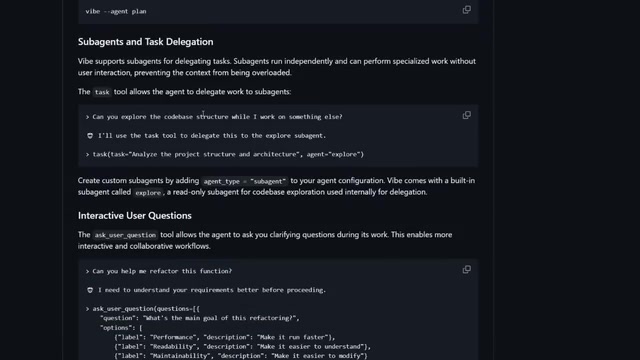
Sub-agents inherit project context while focusing on your specified domain. This design solves the context window limitations and attention diffusion problems that single large models face when handling complex tasks — each sub-agent only needs to focus on its assigned subtask, resulting in more precise output. This achieves composable automation that scales flexibly with your team and development workflows. For example, you simply tell Mistral Vibe "create a sub-agent that handles PR reviews and run it" to quickly set up an automated code review process.
More importantly, sub-agents support parallel execution. Multiple sub-agents can simultaneously send requests to different model endpoints, significantly reducing total execution time for large-scale tasks. This pattern has been widely validated in multi-agent frameworks like CrewAI and AutoGen. In actual demos, when asked to analyze an entire codebase and generate tests for all utility functions, it can delegate tasks to multiple sub-agents for simultaneous processing and run validation loops to ensure output correctness.
Multi-Choice Clarification: Safer Human-AI Collaboration
When Vibe is uncertain about your intent, it doesn't guess blindly — instead, it presents multiple options for you to choose from. This multi-choice clarification mechanism ensures safer automation and more precise output.
This design embodies the "Human-in-the-Loop" philosophy in human-AI collaboration — preserving human judgment authority at critical decision points, avoiding error accumulation from fully autonomous execution without interrupting workflow like step-by-step confirmations would. In practice, for example when creating a frontend page, it proactively asks whether you'd like to upload a reference image, and you can choose to upload, skip, or enter a text description.
Slash Commands and Custom Skills System
Mistral Vibe CLI supports pre-configured workflows accessible via slash commands. You can use slash commands to deploy, lint, generate documentation, or execute any custom task.
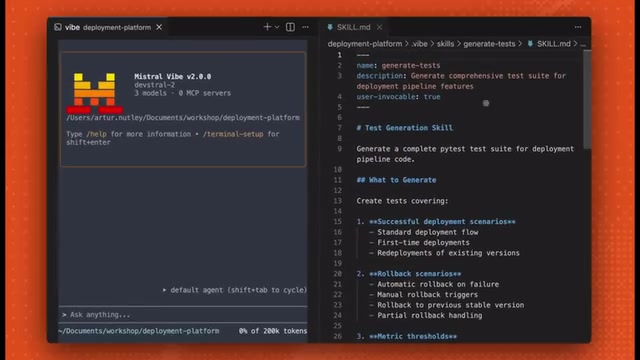
Even more powerful is the ability to create custom slash commands through the Skills system. Similar to Claude Code's skills directory, you can create skills.md files defining command logic, descriptions, and triggers. This Markdown-file-based configuration approach lowers the customization barrier — developers don't need to write complex plugin code, just describe the skill's behavioral logic in natural language. For example, you can create a skill that deploys directly to a GitHub repository, then simply specify that skill in the CLI for one-click execution.
Mistral Vibe Installation and Quick Start Guide
Installation is straightforward. Go to Mistral's AI Studio, find Vibe CLI in the left panel, copy the curl installation command, and execute it in your terminal.
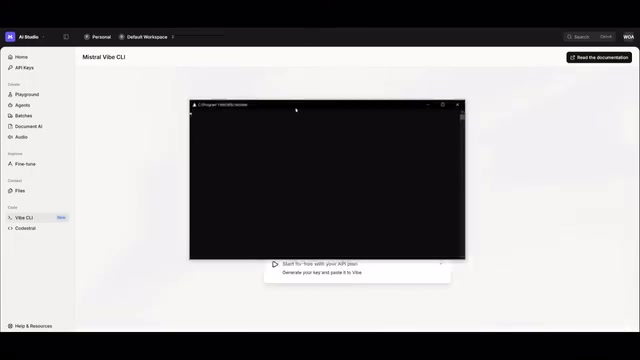
Once installed, there are two launch modes:
vibe: Standard CLI mode — manually run commands and interact step by step- ACP mode: A more autonomous agent-driven automation mode capable of orchestrating tasks and managing workflows
ACP (Agent Control Protocol) mode represents a key step in the evolution of AI coding agents from "tool" to "autonomous assistant." In standard CLI mode, users need to confirm each operation step by step; in ACP mode, the agent has greater autonomous decision-making authority, capable of planning task sequences, managing execution state, and handling exceptions on its own. This design aligns with the current "ReAct" (Reasoning + Acting) paradigm in the AI Agent field — the agent reasons and judges at each step, decides the next action, forming a "think-act-observe" loop.
The CLI interface after launch is quite polished. You can choose to use the official plan or bring your own API key. The /help command shows all available commands, special features, and keyboard shortcuts.
If you prefer working in an IDE, Mistral Vibe also offers integration plugins for VS Code and JetBrains, supporting tab completion and context-aware code editing.
Code Generation Test: From Prompt to Complete Frontend Page
In actual testing, using a detailed prompt asking Mistral Vibe to create a polished frontend landing page, the DevStral model's execution speed was impressive. It first generated a detailed execution plan, then immediately began creating HTML, CSS, and JavaScript files upon confirmation.
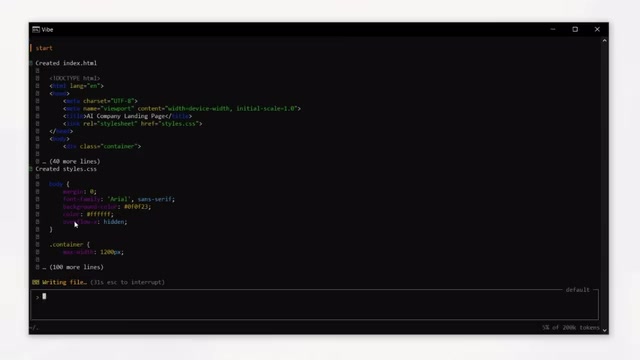
The final landing page quality was solid — from a single prompt to a complete runnable page, the entire process was smooth and efficient. In test generation tasks for large codebases, it performed equally well — leveraging async agents and parallel execution capabilities to handle long-running tasks without blocking the user. This non-blocking async execution model means developers can continue other work while the agent processes time-consuming tasks, resulting in significant productivity gains.
Mistral Vibe Pricing: Detailed Comparison with Claude Code
Mistral Vibe's pricing strategy is one of its biggest selling points:
| Plan | Price | Use Case |
|---|---|---|
| Free | $0 | Basic usage, supports BYOK (Bring Your Own Key) |
| LeChat Pro | $14.99/month | Full-time development, complete CLI and DevStral access |
| LeChat Team | $24.99/seat/month | Team collaboration, higher usage limits |
Notably, students get a 50% discount. Compared to Claude Code's $200/month subscription, Mistral Vibe's cost advantage is striking — even the paid plans cost less than one-tenth of Claude Code.
Claude Code's high pricing has been controversial because it uses a consumption-based model tied to API call volume — heavy users working on complex projects can easily burn through tens of dollars in token consumption per day. Mistral Vibe can offer services at such low prices partly due to Mistral models' inference efficiency advantage (relatively smaller parameter sizes but excellent performance on code tasks), and partly due to Mistral's market strategy — rapidly acquiring developer market share through open-source and low-pricing strategies, creating differentiated competition with OpenAI and Anthropic. The BYOK (Bring Your Own Key) model lets users consume their own Mistral API quota, further lowering the barrier to entry.
Who Is Mistral Vibe Best Suited For?
Mistral Vibe brings structured control to terminal-native AI coding automation. Custom sub-agents, clarification prompts, slash command skills, and unified agent modes — all integrated into a single free, open-source CLI tool.
For developers deterred by Claude Code's steep pricing, Mistral Vibe offers a feature-complete and affordable alternative. While its performance in certain edge cases may still need more real-world validation, based on its current feature set and community feedback, it already has the potential to become a mainstream AI coding tool. The project's GitHub repository documents custom agent setup, system prompt configuration, MCP server configuration, and more in detail, maintaining an active weekly update cadence — definitely worth keeping an eye on.
About MCP Protocol Support
MCP (Model Context Protocol) is an open protocol standard proposed by Anthropic in late 2024, designed to provide AI models with a unified interface for interacting with external tools and data sources. MCP uses a client-server architecture where AI agents communicate as clients with various MCP servers through standardized JSON-RPC protocols, with each server encapsulating specific tool capabilities (such as file system operations, database queries, API calls, etc.).
Mistral Vibe's MCP support means developers can extend the agent's capability boundaries by configuring MCP servers — for example, connecting to GitHub API for automated PR management, integrating with Jira for task status synchronization, or interfacing with Jenkins to trigger build pipelines. This plugin-based architecture design means tool integration no longer requires hard-coding — the community can freely develop and share MCP servers, greatly enriching the agent's ecosystem.
Related articles
 Product Reviews
The Programmer's Desk Setup Guide: Building a Workspace That Feels Like Home
Discover how programmers build productive, comfortable workspaces. From multi-monitor setups to ergonomic design, explore the desk philosophy that drives focus and flow.
 Product Reviews
Qoder vs Cursor Real-World Comparison: Which $20/Month AI IDE Is Better?
Hands-on comparison of Qoder vs Cursor AI IDEs: Agent autonomy, human interaction count, and architecture decisions. Qoder needed only 2 interactions vs Cursor's 8.
 Product Reviews
Cursor Cloud Agent Demo: Eliminating Bottlenecks Across the Entire Software Development Lifecycle
Deep analysis of Cursor's Cloud Agent demo showing how cloud VMs, automated test artifacts, and a full-chain control plane systematically eliminate human bottlenecks across the software development lifecycle.