Model Router Auto-Evaluation: Let Data Decide Whether You're Overpaying for AI

Use Microsoft Foundry's Model Router and open-source eval tool to decide if you're overpaying for AI with real data.
Microsoft Foundry's Model Router dynamically routes prompts to appropriately-sized models to avoid paying flagship prices for every task. The companion open-source Model Router Auto-Evaluation tool measures quality, cost, and latency trade-offs against a baseline model — with a key recommendation to use a different judge model to avoid self-evaluation bias. In a 10-prompt test, routing saved 37.7% in costs with minor quality and latency trade-offs, but the author notes the sample is too small for real conclusions and emphasizes that the right choice depends on which dimension matters most for your specific agent.
Are you paying for model intelligence you don't actually need? When building AI agents, intuition pushes us toward using the most powerful language model for everything. But that approach often means you're paying for "intelligence" that simply isn't required. Microsoft Foundry's Model Router — along with its companion open-source evaluation tool — is designed to address exactly this problem.
The Core Problem Model Router Solves
Model Router's logic is straightforward: it routes your prompts to the most appropriate language model, rather than sending every request to the most expensive, most capable one.
Take the scenario shown in the video demo: the author has an agent running on GPT 5.6 Sol and wants to cut costs without sacrificing answer quality. So they use Model Router to intelligently route between models in the GPT 5.6 family (Luna, Terra, and Sol) — lightweight models handle simple tasks, while more powerful ones are reserved for complex reasoning.
This approach aligns with the mainstream thinking in AI engineering today: model selection shouldn't be one-size-fits-all. It should dynamically match the difficulty of each task. The question is — how do you actually know whether the routing results meet your expectations? Could switching to a routing strategy silently degrade quality?
Model routing isn't a Microsoft-exclusive innovation — it's a rapidly maturing infrastructure pattern in AI engineering. The underlying logic comes from the "mixture of experts" philosophy: tasks of different complexity have vastly different capability requirements. Simple information retrieval, formatted output, or short-text classification can be handled by smaller models; complex multi-step reasoning, code generation, or long-document understanding is where flagship models earn their keep. Common implementations include rule-based routing (by keyword or task type), classifier-based routing (training a lightweight model to predict task difficulty), and self-evaluation-based routing. Independent routing products like RouteLLM and Martian are exploring similar directions. Beyond cost savings, routing can also reduce average latency — lightweight models typically have much shorter time-to-first-token than flagship models, which matters greatly for real-time interaction.
Quantifying Performance with an Open-Source Tool
The truly valuable part of the video is the second tool it introduces: Model Router Auto-Evaluation. This open-source project automatically evaluates how Foundry Model Router performs against any baseline model across three dimensions: quality, cost, and latency.
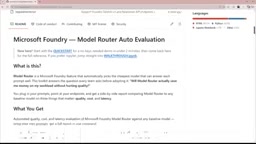
Getting started isn't complicated:
Environment Setup
- Clone the repo in VS Code and create a virtual environment
- Install dependencies
- Copy the
.envfile and fill in your endpoint and API key
Configuring the Baseline and Judge Models
In the configuration, you'll need to enter the deployment names for both the baseline model and the judge model. For example, the author's GPT 5.6 Sol deployment name is GPT-5.6-Sol-1, which can be found in the Foundry portal under Build → Models.
If you're using a custom deployment name, you'll also need to add a corresponding pricing entry in the default.yaml pricing section, specifying input and output token costs — this is the foundation for all cost calculations.
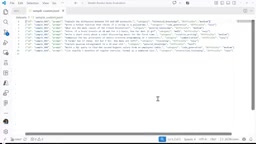
There's an important detail worth highlighting: the official recommendation is to use a different model as the judge, to avoid having a model score its own outputs. This is a well-known pitfall in the LLM-as-a-judge evaluation paradigm — the same model tends to favor outputs that closely match its own style.
LLM-as-a-Judge — using a large language model as an evaluator — is one of the dominant paradigms in AI evaluation today. The core idea: since human annotation is expensive and slow, why not have a sufficiently capable language model play the role of "judge," scoring outputs or ranking preferences? This approach is used in well-known benchmarks like LMSYS Chatbot Arena and Alpaca Eval.
However, research has repeatedly confirmed several systematic biases in this paradigm: self-preference bias (models tend to score outputs stylistically similar to their own higher); position bias (models favor options presented first); and verbosity bias (models prefer longer, more detailed-looking answers, even when they aren't more accurate). For these reasons, choosing a judge model from a different family and capability tier than the model being evaluated is a basic prerequisite for credible results.
Preparing Evaluation Data and Running the Eval
The project ships with a sample dataset of 10 prompts, but you can easily swap in a custom dataset tailored to your own agent's use case. Once configured, run python scripts/run_eval.py in the terminal — append the appropriate parameter at the end when using a custom dataset.
How to Read the Results
After the evaluation completes, a visualization dashboard is generated in the results folder.
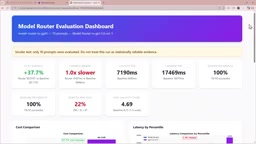
Based on the author's test with 10 prompts, the results paint a classic trade-off picture:
- Cost: Model Router delivers a 37.7% cost reduction — the most immediate benefit
- Latency: Average latency is slightly higher than using GPT 5.6 Sol directly, but the difference in milliseconds is acceptable to the author
- Quality: Switching to the routing approach shows a dip in quality win rate
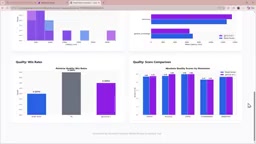
Breaking results down by task type gets more interesting: Model Router is slightly slower on general knowledge and summarization tasks, but performs well on reasoning tasks. In terms of quality scores, GPT 5.6 Sol is more accurate overall — though the margin is small.
The Decision Is Yours
The most practical aspect of the video is that it doesn't hand you a definitive "should you use it or not" answer — instead, it returns the decision logic to you.
The author openly admits that 10 prompts is too small a dataset to draw any real conclusions. For their risk advisor agent, they plan to run another evaluation with 30+ prompts. More importantly, they articulate the core methodology: be clear about which dimension matters most for your agent.
For this author, quality is the priority — so even saving 37.7% in costs, a quality drop might give them pause. But for other use cases, latency or cost could be the decisive factor, or even a balanced trade-off among all three.
This is precisely where tools like this earn their value — they don't make the decision for you. Instead, they transform the vague anxiety of "am I overpaying for a model I don't actually need?" into something quantifiable, reproducible, and verifiable. As AI agent development grows increasingly sophisticated, letting data drive model selection is far more reliable than instinctively reaching for the most powerful model available.
Related articles

ChatGPT Space Launches: Team Collaboration and New Pages Features Explained
ChatGPT Space is OpenAI's new team collaboration feature with Pages, real-time collaboration, and Slack/Google Drive sync. We break down its privacy design, multi-platform integration, and the full workflow from conversation to document.

Migrating Apache Spark UDFs to GPU Acceleration with AI Agents
NVIDIA developer blog explains how AI Agents rewrite Apache Spark UDFs for GPU acceleration, covering migration criteria, agent rewriting and verification workflows, plus pitfalls like result consistency and CPU-GPU transfer overhead.

Zed Editor v0.40.4-rc2 Released: Usage Credits Now Available Without Upgrading
Zed editor releases v0.40.4-rc2, allowing users to use usage credits for AI features without upgrading to a paid plan, lowering the trial barrier.