Mole Review: A Lightweight Native Mac Cleaning Tool with Privacy-First System Management

Mole is a lightweight, privacy-first native Mac tool for system cleaning, app management, and monitoring.
Mole is a native Mac application that combines cache cleaning, app uninstallation, disk space analysis, and system monitoring into one lightweight tool. Built with a privacy-first approach, all operations stay entirely local with no data uploads. Its "preview before delete" design and native macOS development set it apart from bloated alternatives, making it an appealing choice for privacy-conscious Mac users seeking a clean, trustworthy system maintenance solution.
What Is Mole: A Mac System Tool That Returns to the Native Experience
In the Mac ecosystem, system cleaning and management tools have always been essential. However, mainstream products on the market often suffer from bloated file sizes, high background resource consumption, and even uploading user data to the cloud. Mole, which recently debuted on Product Hunt, is attempting to redefine this category with a "native, lightweight, privacy-first" approach.
Built by developer Tw93, Mole positions itself as a native Mac application that combines cache cleaning, app management, disk space analysis, and system status monitoring in one package. After launch, it received 18 upvotes and 7 comments, landing at #19 on the daily leaderboard, and was categorized under Mac, Productivity Tools, and Menu Bar Apps.
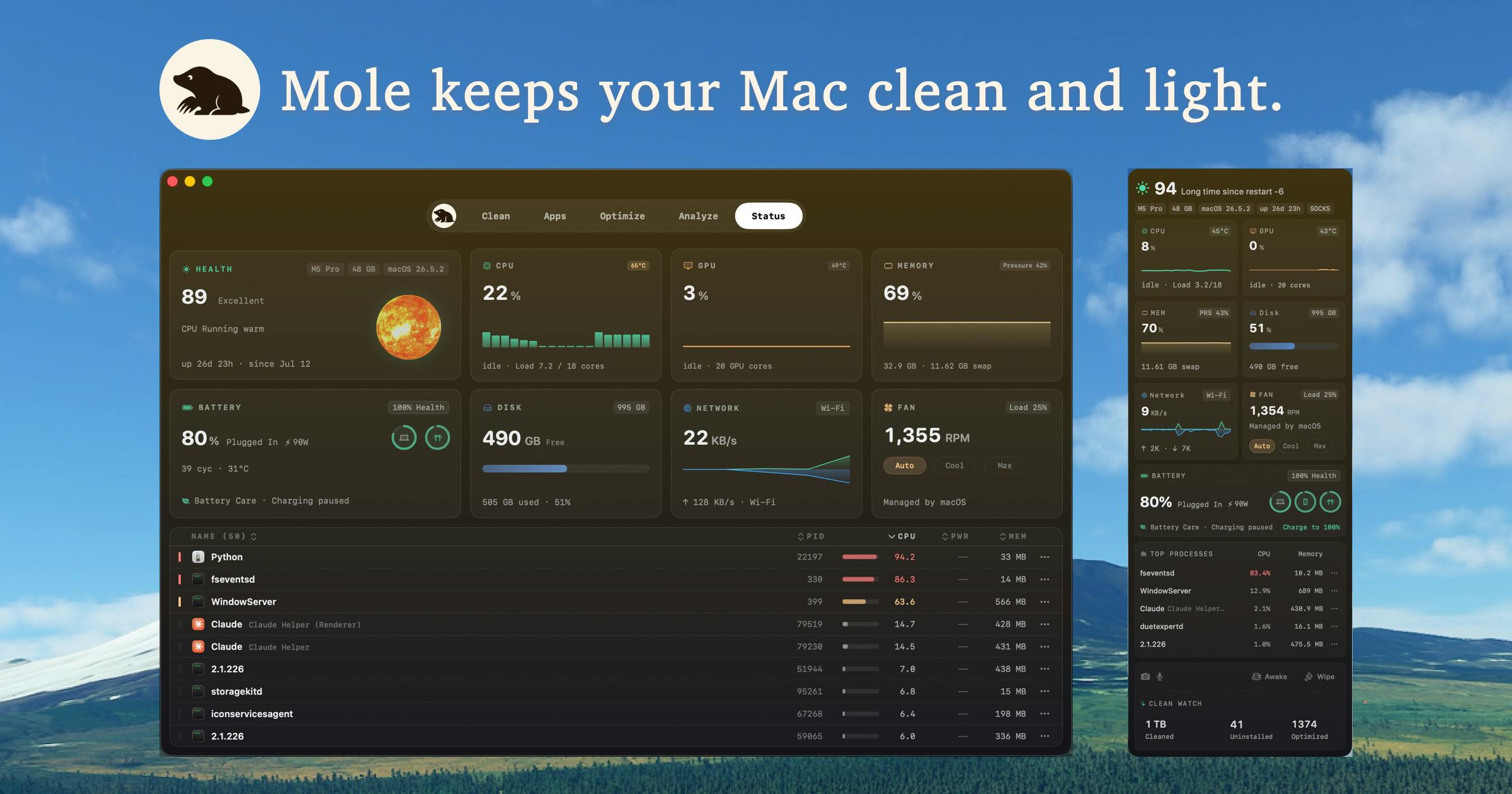
Four-in-One Feature Breakdown: What Can Mole Do?
From a feature design perspective, Mole consolidates several high-frequency system maintenance tasks that Mac users deal with daily into a single application, eliminating the hassle of switching between multiple specialized tools. Let's break down each core feature module.
Cache Cleaning: Preview Before You Delete to Avoid Mistakes
One of Mole's core capabilities is scanning and cleaning cache files generated by the system and applications. These files accumulate over time and can consume significant disk space, yet are often overlooked by everyday users.
Compared to similar Mac cleaning tools, Mole emphasizes a key differentiator: it displays the scanned content first and only executes deletion after user confirmation. This "preview before delete" design reduces the risk of accidentally removing important files and makes the cleaning process more transparent and controllable. For users who worry about cleaning tools accidentally wiping files with a single click, this detail is extremely practical.
App Management: Complete Uninstallation with No Leftover Files
Beyond cache cleaning, Mole also offers app uninstallation and update features. Uninstalling apps on Mac often leaves behind configuration files, support files, and other remnants — simply dragging an app to the Trash doesn't fully remove everything.
Mole's app management module helps users more thoroughly remove applications along with their associated files, while also detecting available updates for installed apps, reducing the burden of manually checking each one. For users who frequently try out new apps but want to keep their system clean, this is a welcome convenience.
Disk Analysis: Quickly Locate Space Hogs
The disk space analysis feature provides a clear visualization of storage distribution, helping users quickly identify "space black holes" — those folders or large files that silently consume dozens of gigabytes. When your Mac warns you about low storage, this feature helps you pinpoint the problem immediately.
System Monitoring: Always Available in the Menu Bar
System status monitoring sits in the menu bar, giving users real-time access to system metrics like memory and CPU usage. This is also why it's categorized under "Menu Bar Apps" — it's lightweight and always accessible, fitting perfectly with how Mac users interact with menu bar tools. No need to open an extra window; a quick glance at the menu bar tells you the current system status.
Privacy First: All Data Stays Local
Beyond its features, the most noteworthy aspect of Mole is its privacy stance. The developer explicitly states that all scanning and cleaning operations remain entirely on the user's Mac, with no data uploaded whatsoever.
This is particularly important today. Many well-known Mac cleaning tools have drawn criticism for cloud-based reporting, bundled promotions, or subscription traps. By making transparency and local processing its core selling points, Mole is directly responding to the long-standing trust crisis users have developed toward this category of tools.
For Mac users who prioritize privacy protection but still need system maintenance tools, Mole's "data never leaves your machine" approach is an attractive option.
What Native Development Actually Means: Performance and Experience
Mole's repeated emphasis on being "Native" isn't just marketing speak — for system tools, this has real, tangible implications.
Native Mac applications typically mean:
- Better system integration: Consistent with macOS interaction patterns and design language
- Lower resource consumption: Faster startup and less memory usage compared to apps wrapped in cross-platform frameworks like Electron
- Smoother user experience: Animations and response times that match the native macOS feel
For a system monitoring tool that needs to run in the background long-term and stay resident in the menu bar, being "native" directly determines whether it becomes a system burden. If Mole delivers on this promise, it gains a genuine experience advantage when competing against established tools like CleanMyMac.
Summary: Which Mac Users Is Mole Best For?
Mole's product philosophy is clear: use a lightweight native app to cover the core system maintenance scenarios for Mac users, while rebuilding user trust through "local processing and preview before delete."
Mole is ideal for users who:
- Want a clean, bundle-free Mac cleaning tool
- Value privacy and don't want system tools uploading any data
- Prefer the lightweight experience of native Mac applications
- Need an all-in-one tool for cache cleaning, app uninstallation, disk analysis, and more
Of course, as a newly launched product, Mole's community feedback is still limited. Its cleaning accuracy in complex scenarios, long-term stability, and feature completeness still need validation from more real-world users. But from its positioning and design philosophy, it accurately targets the core pain points in the Mac system tools market — bloat, opacity, and insecurity.
If you're looking for a clean, trustworthy Mac maintenance tool, Mole is worth your attention. It represents this category's evolution toward being "lighter, more transparent, and more respectful of users."
Related articles

Chain of Thought Isn't Just for AI: How Humans Can Use CoT to Improve Thinking Quality
Chain of Thought isn't just a prompt trick for large models. Starting from a Hacker News discussion, this article analyzes why CoT works for human thinking too, breaks down actionable ways to transfer it, and highlights the key differences between human CoT and machine CoT.
Cloudflare Teams Up with OpenAI: Closi…
Cloudflare Teams Up with OpenAI: Closing the Loop from Vulnerability Discovery to Defense with AI
Cloudflare uses OpenAI Daybreak to investigate security vulnerabilities and generate reviewable remediation plans, while developers use Codex to boost coding efficiency and quality.

Orca Multi-Agent Orchestration in Practice: A Guide to Parallel Collaboration with Claude and Codex
Orca is Stable AI's free open-source agent workbench supporting 34 agents like Claude Code and Codex in parallel. Learn its Git worktree isolation, multi-model orchestration, and mobile management.