Monitor Slows Down Network Speed by 75%: The Hidden Pitfall of Power over Ethernet

Studio Display's built-in Ethernet port caused a 75% drop in network speed due to an Energy-Efficient Ethernet negotiation error, sparking community discussion about silent faults in intermediate devices.
A developer found that when connecting to the network through the Studio Display's Ethernet port, download speed dropped by 75%. Investigation revealed that the root cause was the power negotiation mechanism between the monitor's built-in Ethernet controller and the Mac incorrectly entering a low-power state, compressing link bandwidth. The fault occurs silently and is hard to notice in daily use, and unplugging/replugging the network cable or restarting the monitor only provides temporary recovery. Hacker News community discussions show similar problems are not isolated, but there is disagreement on attribution: some believe it is a monitor firmware defect, while others attribute it to macOS's Energy-Efficient Ethernet strategy. The article suggests that users experiencing unexplained network speed drops can bypass the monitor and connect directly to the host to quickly locate the bottleneck, and calls on manufacturers to improve transparency of link status.
A developer's personal experience sparked heated discussion in the tech community: his Studio Display monitor actually caused his download speed to drop by 75%. The root cause wasn't the monitor itself, but the power negotiation mechanism between its built-in Ethernet port and the Mac.
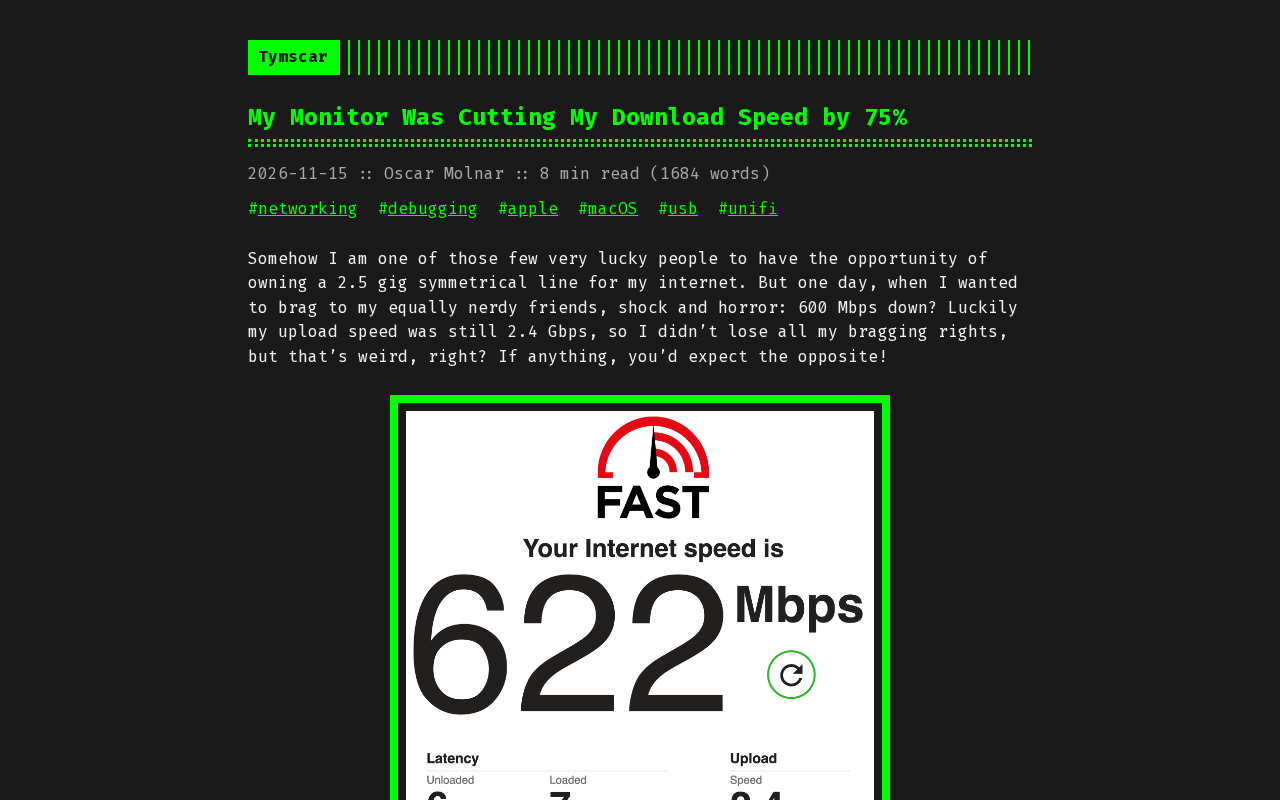
According to a blog post by tymscar, when he connected the network cable to the Studio Display's Ethernet port and then connected to the Mac via Thunderbolt, the speed test results were far below expectations. After further investigation, he found that the monitor's Ethernet controller incorrectly entered a low-power state when negotiating with the host, causing the link bandwidth to be significantly compressed. This phenomenon is not an isolated case—in the Hacker News discussion (327 points, 167 comments), multiple users reported similar experiences.
How the Problem Occurs
The Gray Area of Power over Ethernet Negotiation
The Studio Display's Ethernet port was designed to make desktop cabling simpler: the network cable connects to the back of the monitor, and the Mac only needs one Thunderbolt cable to simultaneously get video, power, and network. The problem is that the monitor, as an intermediate device, its Ethernet PHY chip needs to complete link negotiation separately with the upstream switch and the downstream host. The author observed that under certain firmware versions, the monitor incorrectly passes the Energy-Efficient Ethernet (EEE) negotiation results to the Mac, causing the host-side network card to misjudge the upper limit of link capability.
This misjudgment does not trigger obvious errors; users can only perceive the abnormality through speed tests or large file transfers. In other words, the fault is silent—which is precisely why it is difficult to locate quickly.
Energy-Efficient Ethernet (EEE) is a technology defined by the IEEE 802.3az standard that allows Ethernet PHY chips to reduce power consumption when the link is idle and quickly wake up when data is being transmitted. EEE negotiates whether both parties support low-power mode and the delay required for wake-up. The problem is that the EEE negotiation process relies on the PHY chips at both ends correctly exchanging capability information, and intermediate devices (such as monitors) may fail to accurately convey this information. When the two ends of the link have inconsistent understanding of the EEE state, one end may believe the link is in low-power mode while the other expects full-speed transmission, causing bandwidth to be incorrectly compressed. In addition, some PHY chips fail to renegotiate the link rate promptly after wake-up, causing the rate to be locked at a lower tier. Such problems typically do not trigger operating system-level error logs, so troubleshooting requires inspecting PHY register status with professional tools or using speed test tools to compare results between direct connection and connection through an intermediate device.
Why Ordinary Users Find It Hard to Detect
Daily web browsing and email have bandwidth requirements far lower than a gigabit link; even if the speed is compressed by 75%, the perceived latency may not be obvious. Only when downloading large files, conducting video conferences, or backing up does the bottleneck become exposed. The author mentioned that he initially suspected the router, the ISP, or even the network cable, and only locked onto the monitor after replacing devices segment by segment. This troubleshooting path is too costly for ordinary users.
Link Negotiation is the standard process when Ethernet devices establish a connection, including auto-negotiation of parameters such as speed (10/100/1000 Mbps), duplex mode (half-duplex/full-duplex), and flow control. When the monitor acts as an intermediate device, its internal Ethernet PHY needs to complete two independent negotiations: one with the upstream switch (via network cable) and one with the downstream host (via Thunderbolt interface conversion). If the monitor firmware has a logic error when processing the results of the two negotiations—for example, incorrectly mapping the upstream EEE capability to the downstream, or failing to re-trigger negotiation after downstream wake-up—it will cause the host-side network card to misjudge the link capability. This misjudgment does not produce obvious error prompts; users can only perceive it through bandwidth tests. Ordinary users typically do not have the conditions to replace devices segment by segment or perform packet capture analysis, so such problems are often blamed on the ISP or router, prolonging fault localization.
Community Cross-Validation: More Than One Device
The Hacker News comment section provided multi-source corroboration. According to multiple commenters, similar problems have occurred on other monitors that support Ethernet ports, with manifestations including negotiated rates being locked at lower tiers and links not renegotiating after wake-up. Some users also pointed out that unplugging and replugging the network cable or restarting the monitor can temporarily restore speed, but the problem recurs.
A detail worth noting: there is disagreement in the discussion—some believe this is a defect in the monitor firmware, while others attribute it to macOS's handling strategy for Energy-Efficient Ethernet. There is no official conclusion yet, but the consensus is that the network path of such intermediate devices needs to be included in the troubleshooting checklist.
Thunderbolt is a high-speed serial interface that supports data transfer, video output, and power delivery, with the latest version offering bandwidth up to 40 Gbps. The Thunderbolt interface itself does not directly carry Ethernet signals; instead, it tunnels them via PCIe or USB protocols. When a monitor has a built-in Ethernet port, it usually contains an Ethernet controller (such as a Realtek or Broadcom chip) that communicates with the host via PCIe or USB. The host operating system recognizes this controller as a separate network card. Therefore, link negotiation actually occurs between the monitor's Ethernet PHY and the external switch, while the host-side "network card" merely accesses that PHY through the Thunderbolt tunnel. If the monitor firmware has defects when initializing the PHY or handling power state transitions, it can affect the link rate. This is also why unplugging and replugging the network cable or restarting the monitor can temporarily restore speed—these operations trigger PHY reinitialization.
Implications for Desktop Device Design
This case reveals a typical risk of integrating peripheral functions: when a monitor takes on the responsibility of network access, it simultaneously becomes a variable link in the chain. Any difference in power-saving strategy, firmware version, or negotiation implementation at either end can become a performance bottleneck.
For users, a practical suggestion is: if you encounter an unexplained drop in network speed, try bypassing the monitor and connecting directly to the host to quickly determine whether the problem lies in the intermediate device. For manufacturers, transparently exposing link negotiation status and providing firmware update channels builds more trust than hiding complexity.
The high level of discussion in the tech community itself shows that the prevalence of such silent faults may be underestimated. As devices become "smarter," the difficulty of troubleshooting is also rising in parallel.
One-line Summary
Studio Display's built-in Ethernet port caused a 75% drop in network speed due to an Energy-Efficient Ethernet negotiation error, sparking community discussion about silent faults in intermediate devices.
Paragraph Summary
A developer found that when connecting to the network through the Studio Display's Ethernet port, download speed dropped by 75%. Investigation revealed that the root cause was the power negotiation mechanism between the monitor's built-in Ethernet controller and the Mac incorrectly entering a low-power state, compressing link bandwidth. The fault occurs silently and is hard to notice in daily use, and unplugging/replugging the network cable or restarting the monitor only provides temporary recovery. Hacker News community discussions show similar problems are not isolated, but there is disagreement on attribution: some believe it is a monitor firmware defect, while others attribute it to macOS's Energy-Efficient Ethernet strategy. The article suggests that users experiencing unexplained network speed drops can bypass the monitor and connect directly to the host to quickly locate the bottleneck, and calls on manufacturers to improve transparency of link status.
Related articles

Hero or Luck? Technical Reflections Sparked by an Arizona Grandfather Finding a Missing Toddler in the Desert
An Arizona grandfather finding a missing toddler in the desert hits Hacker News. This article analyzes emergency search, drone thermal imaging, child location devices, and community collaboration, exploring the boundaries of technology and human effort in extreme environments, while noting the material's limitations.

Run Agentic Coding on Mac with One Command: The Localcode Open-Source Tool
Localcode is an open-source agentic coding tool for Mac that launches with a single command. This article examines its local, open-source, minimal-install positioning, who it suits, and the information gaps to consider before adoption.

Lean Formalization of Masullo Manuscript: Progress Map Sparks Discussion
A public progress map for a Lean formalization project of Alessandro Masullo's manuscript sparks Hacker News discussion on formalization costs, collaboration, and AI-assisted proving.