Muse AI Zero-Code SaaS App Prototyping Practical Guide

Meta's Muse AI lets users generate interactive app prototypes with zero code using natural language, validating ideas in four steps.
Muse AI is Meta's personal AI agent that compresses the idea-to-prototype cycle from weeks to minutes. Users describe what the app should do in natural language, and Muse AI assembles the interface and logic into a clickable, interactive working prototype as an artifact. The four-step process covers describing the idea, automatic building, real-user testing, and iteration. It's ideal for validating ideas as an MVP, but production-grade apps still need professional developers.
When Ideas Meet No-Code: What Muse AI Can Do
Have you ever had an app idea—a booking tool, a quote calculator, or a customer portal—but shelved it because you can't code? According to the YouTube channel Rank with Harris, Meta's personal AI agent Muse AI lets users turn ideas into working app prototypes without writing a single line of code.
Muse AI's core value lies in compressing the "idea to prototype" cycle from weeks to minutes. It generates app interfaces and logic from natural language descriptions and outputs a clickable, interactive working prototype in the form of an "artifact." This prototype runs in its own compute environment, so users can open and experience it directly.
AI Agent is the key context for understanding Muse AI's positioning. Unlike traditional chatbots that only "answer," AI agents are designed to perceive goals, plan steps autonomously, and invoke tools to "complete tasks." Meta calls Muse AI a "personal AI agent," meaning it doesn't just generate text—it can assemble interfaces, orchestrate logic, and produce runnable results within its own compute environment. This shift upgrades AI from a "conversational assistant" to an "execution assistant," and it's also the technical prerequisite that makes no-code app generation possible.
No-code / Low-code refers to building applications through visual interfaces, drag-and-drop components, and natural language configuration without handwriting programming languages. Traditional no-code platforms still require users to understand concepts like data tables, fields, and triggers. Muse AI's differentiation is that it hands the "configuration" step over to natural language too—users only need to describe what users should be able to do, and the AI translates that into interfaces and logic. This further lowers the barrier, but it also means users have less control over the underlying implementation.
Four Steps to Build Your First App Prototype
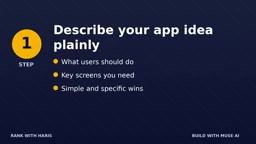
Step 1: Describe Your App in Plain Language
Tell Muse AI what users should be able to do and which core pages are needed—for example, a booking form, a results page, or a dashboard. The key principle is: simple and specific beats long and vague. Rather than saying "build me a cool booking system," say "users fill in their name, date, and time slot, submit, and then see a confirmation page."
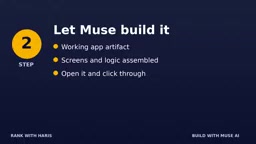
Step 2: Let Muse Build Automatically
Muse AI assembles pages and logic based on your description, generating a runnable prototype. This process doesn't require you to understand any technical details—the AI completes interface construction and logic orchestration in its own compute environment.
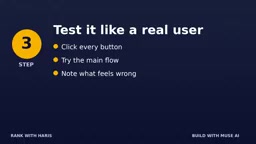
Step 3: Test Like a Real User
Click every button, walk through the main flow, and note where things feel off. Then tell Muse in plain language what needs fixing—no technical jargon required. This step is the foundation of iteration and the key to ensuring the prototype is truly usable.
Step 4: Iterate Repeatedly Until Satisfied
Request new features, a cleaner layout, or better copy. According to the video, each round of iteration takes only seconds, and you can keep refining until the prototype matches your vision.
The Boundary Between Prototype and Product: An Honest Reminder
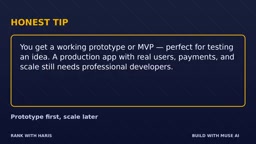
The video offers an important reminder: what Muse AI generates is a working prototype or MVP, ideal for quickly validating ideas. But if you want to build a production-grade app for real users with payment support and scalable deployment, professional developers are still needed.
This positioning is actually very clear—Muse AI solves the "validation" problem, not the "delivery" problem. For entrepreneurs, product managers, or business professionals, getting a demoable prototype in minutes is far more efficient than spending weeks writing requirement documents. It makes "validate first, then invest" a reality.
MVP (Minimum Viable Product) refers to a product version built with the least functional investment that can be quickly used by real users to collect feedback. Its core purpose isn't "feature completeness" but "hypothesis validation"—confirming whether users truly need the product. The working prototype generated by Muse AI is naturally suited to play the MVP role: the main flow can be demoed in minutes, and entrepreneurs can use it to meet users and investors. But between an MVP and a production-grade app lie engineering thresholds such as security, payment compliance, high concurrency, and data persistence—which is exactly why the article reminds readers that professional developers are needed.
Who Is Best Suited to Build Prototypes with Muse AI
Based on the video description, the target users include entrepreneurs with app ideas but no coding ability, product managers who need to quickly validate product concepts, and freelancers who want to use prototypes to communicate with clients. For these groups, Muse AI lowers the barrier from idea to interactive demo.
Interestingly, as Meta's personal AI agent, Muse AI's "artifact" mechanism means the prototype is immediately usable, rather than just a piece of code or a design mockup. This "interactive prototype" delivery format has clear advantages in the creative validation stage.
Artifact in this type of AI tool usually refers to an independently runnable, interactive output generated by AI, such as a web app, executable code, or a dashboard, rather than just static text or images. Compared with returning code snippets, an artifact's runtime environment is hosted by the AI platform, so users can click and experience the full interaction flow without setting up a local environment. This delivery format makes the "clickable demo" a universal language for creative communication, especially suitable for product managers, entrepreneurs, and freelancers aligning expectations with clients or teams in the early stage.
One-line Summary
Meta's Muse AI lets users generate interactive app prototypes with zero code using natural language, validating ideas in four steps.
Paragraph Summary
Muse AI is a personal AI agent launched by Meta. Its core value is compressing the "idea to prototype" cycle from weeks to minutes. Users only need to describe in natural language what the app should do, and Muse AI automatically assembles the interface and logic, outputting a clickable, interactive working prototype as an artifact. The process has four steps: describe the idea, build automatically, test like a real user, and iterate repeatedly. The article emphasizes that what Muse AI generates is a working prototype or MVP, suitable for quickly validating ideas, but production-grade apps for real users with payment support and scalable deployment still require professional developers. Target users include entrepreneurs without coding ability, product managers who need to quickly validate concepts, and freelancers who want to use prototypes to communicate with clients.
Related articles

Ollama Local LLM Deployment Tutorial: From Installation to GUI Client
Complete Ollama local LLM deployment tutorial: three-platform installation, importing GGUF and SafeTensors models, connecting GUI clients to OpenCode and WebSearch with hands-on testing, plus key settings like model storage paths and selection advice.

TenetBench: Testing AI Compliance with Russian Professional Ethics Clauses
TenetBench is a benchmark of 3,433 Russian professional ethics clause-conflict requests evaluating whether LLMs comply with professional codes. It finds 11 of 14 model configurations generate violating content, and reasoning mode may reduce refusal rates.

OmniSimulator: How Small Models Achieve High-Fidelity User Simulation
OmniSimulator proposes a structured five-dimensional behavioral reasoning framework, distilling reasoning trajectories from a teacher model to train small models—Qwen3-8B improves 34.33%, competitive with Claude-Sonnet-4.5, and supports self-hosted high-fidelity user simulation.