n8n Action Nodes Explained: The Core Execution Unit of Automation Workflows

Action nodes are the core units in n8n workflows that automatically execute tasks and land data into the target system.
The article focuses on Action nodes in n8n, first distinguishing the roles of trigger nodes and action nodes: triggers decide when a flow starts, and Action nodes decide what exactly to do. It then lists typical applications of common Action nodes such as Google Sheets, Gmail, and Slack, and uses the example of automatically writing to a sheet and sending a confirmation email after form submission to illustrate their combined use. The article points out that Action nodes receive upstream data, operate on the target system according to configuration, and pass results downstream, and that building them requires attention to three elements: node type selection, authentication credential configuration, and input field mapping. Finally, it emphasizes that a robust workflow should consist of a trigger plus multiple Action nodes, with tasks reasonably broken down to improve maintainability.
What Is an Action Node?
In n8n workflows, nodes fall into two categories: trigger nodes (Trigger) and action nodes (Action). Trigger nodes are responsible for starting the flow, while Action nodes are the part that actually "does the work"—they let the workflow automatically perform concrete tasks, such as saving data, sending emails, or updating records. Without Action nodes, a workflow is just a string of logic idling away.
Simply put, the Trigger is the starting point and the Action is the endpoint. A complete automation flow is one in which Action nodes land the data into the target system.
n8n is an open-source workflow automation tool that connects different applications and services through visual nodes. Each workflow consists of several nodes, which pass data between one another via connections, with data flowing between nodes in JSON format. n8n comes with hundreds of built-in integration nodes, and it also supports calling any API through the HTTP Request node or custom code nodes. Action nodes are precisely the execution units within this system; they share the same node framework as Trigger nodes, differing only in how they are triggered: Trigger nodes listen for external events and actively start workflows, while Action nodes passively receive upstream data and perform operations. Understanding that n8n nodes are "input—processing—output" data processors helps you grasp the position of Action nodes within the overall workflow.
Typical Use Cases for Action Nodes
Action nodes cover the vast majority of operational needs in everyday automation. Common examples include: the Google Sheets node for storing customer information, the Gmail node for sending emails, and the Slack node for team notifications. These nodes turn work that would otherwise require manual copy-pasting and switching between apps into a single step in the flow.

Take form submission as an example: after a user fills out and submits a form on a web page, an Action node can automatically write fields such as name and email into Google Sheets, while simultaneously triggering the Gmail node to send a confirmation email. The entire process requires no human intervention, and data flows smoothly from start to finish.
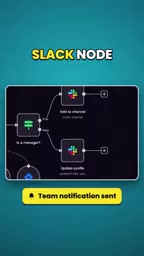
This "form → storage → notification" chain is the most classic combined use of Action nodes.
How Action Nodes Drive Automation
The core value of Action nodes lies in "execution." They receive data from upstream nodes, operate on the target system according to preset configuration, and pass the results to downstream nodes. For example, after sending an email, the Gmail node can return the sending status so that subsequent nodes can determine whether it succeeded.

When actually building workflows, you need to focus on three elements: choosing the correct node type, configuring authentication credentials, and mapping input fields. As long as these three steps are in place, Action nodes can reliably and automatically complete repetitive tasks.
Credentials in n8n are a separately managed concept and are not written directly into node configuration. Users need to create and save authentication information such as OAuth2, API Key, or account passwords in the credentials management interface, and nodes reference the corresponding credential ID at runtime. The advantage of this approach is that the same credential can be reused by multiple nodes, and sensitive information does not appear in exported workflow files. Field mapping relies on n8n's expression system, using double curly brace syntax (such as {{ $json.email }}) to reference specific fields output by upstream nodes, enabling dynamic data transfer between nodes. Mastering credential reuse and expression references is the two details most prone to error and most deserving of attention when configuring Action nodes.
The Collaborative Logic of Triggers and Actions
A robust n8n workflow is usually composed of "a trigger plus multiple Action nodes." The trigger captures events (such as form submissions or scheduled tasks), while Action nodes sequentially perform operations such as data writing and message pushing. The division of labor between the two is clear: the trigger decides "when to start," and Action nodes decide "what to do."
Understanding this helps you reasonably break down tasks when designing workflows, avoid cramming all logic into a single node, and improve maintainability.
Conclusion
Action nodes are the execution engine of n8n automation. From storing customer data to sending confirmation emails, they transform manual operations into reusable automated flows. Mastering the configuration and combination of Action nodes is a key step in building efficient n8n workflows.
One-line Summary
Action nodes are the core units in n8n workflows that automatically execute tasks, responsible for landing data into the target system.
Related articles

Chain of Thought Isn't Just for AI: How Humans Can Use CoT to Improve Thinking Quality
Chain of Thought isn't just a prompt trick for large models. Starting from a Hacker News discussion, this article analyzes why CoT works for human thinking too, breaks down actionable ways to transfer it, and highlights the key differences between human CoT and machine CoT.
Cloudflare Teams Up with OpenAI: Closi…
Cloudflare Teams Up with OpenAI: Closing the Loop from Vulnerability Discovery to Defense with AI
Cloudflare uses OpenAI Daybreak to investigate security vulnerabilities and generate reviewable remediation plans, while developers use Codex to boost coding efficiency and quality.

Orca Multi-Agent Orchestration in Practice: A Guide to Parallel Collaboration with Claude and Codex
Orca is Stable AI's free open-source agent workbench supporting 34 agents like Claude Code and Codex in parallel. Learn its Git worktree isolation, multi-model orchestration, and mobile management.