n8n AI Agent in Practice: A Complete Breakdown of Models, Memory, and MCP Tools

Hands-on breakdown of n8n AI Agent's Model, Memory, and Tools components, plus MCP integration with Jira.
Using n8n's AI Agent node, this article shows how to upgrade a basic QA chatbot into a customizable assistant with memory and external system access. It covers five steps: beautifying the chat UI with custom CSS; swapping the Chat Model from Gemini to Claude Sonnet; adding Simple Memory to fix the Agent's amnesia; connecting the Atlassian MCP Server to read Jira user stories (and resolving the OAuth whitelist pitfall); and summarizing the workflow's component logic. Core takeaway: Model handles reasoning, Memory handles context, Tools handle action — clearly separated and replaceable.
Title
n8n AI Agent in Practice: A Complete Breakdown of Models, Memory, and MCP Tools
Meta Description
Through a hands-on demonstration, this article breaks down the three core components of the n8n AI Agent: Chat Model switching, Simple Memory conversation history, and Atlassian MCP Server tool integration — showing step by step how to make a QA chatbot remember context and read Jira user stories.
Article Content
The n8n AI Agent node integrates large language models, conversation memory, and external tools into a visual workflow, making it possible to build intelligent assistants with zero code. In the previous video, a basic QA requirements analysis chatbot was built using the Google Gemini model, but that Agent had no memory and could not access external systems. In this complete hands-on demonstration, we break down the three core components of the AI Agent — Model, Memory, and Tools — and show how to use the Atlassian MCP Server to let the Agent read user stories directly from Jira.
1. From a Basic Chatbot to a Customizable Assistant
The starting point in the video is an already-published QA assistant with a fairly plain interface. The creator's first step is to improve its appearance through Custom Chat Styling — he pastes CSS generated by ChatGPT into n8n's style field, and also modifies the initial message and the input box placeholder text, changing the original "type your question" to the more business-appropriate "provide your requirement," then publishes a new version.
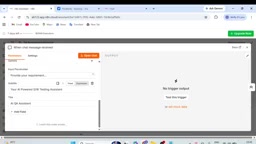
This step requires no coding — the CSS can be generated by any AI assistant and simply copied and pasted. After publishing and refreshing the page, the chat window's visual style and interaction prompts take effect immediately.
2. Model Switching: From Gemini to Anthropic
The n8n AI Agent node connects to large language models through the Chat Model sub-node, and supports swapping at any time. In the demonstration, the creator deletes the original Google Gemini node and adds an Anthropic Chat Model via the + button, selecting the Cloud Sonnet version (i.e., the Claude Sonnet series).
This "plug-and-play" model design is a key advantage of n8n: the Agent's prompts, tools, and memory configuration stay unchanged, and by simply replacing the model node, you can compare how different models perform on the same task. For teams that need to evaluate model performance or control costs, the switching cost is nearly zero.
Claude Sonnet is a mid-tier model in Anthropic's Claude model series, striking a balance between capability and cost. The Claude series is typically divided into three tiers: Haiku (lightweight, fast, cheap), Sonnet (balanced), and Opus (most powerful, most expensive), with names drawn from poetic forms, each corresponding to tasks of different complexity. Sonnet excels at code generation, multi-step reasoning, and tool use, making it a common choice for building Agent-type applications.
In the n8n AI Agent scenario, model selection directly affects three things: reasoning quality (whether it can correctly decompose user intent), tool-calling accuracy (whether it knows when to call which tool), and per-token cost. After the video creator switched from Gemini to Claude Sonnet, the Agent's prompts, memory, and tool configuration remained completely untouched, which perfectly validates n8n's "model-as-plug-in" design philosophy — treating the model as a replaceable reasoning engine rather than a part hardwired to the entire workflow. In practice, teams typically run the same set of test cases across multiple models, comparing response quality, latency, and cost before deciding.
3. Memory Mechanism: Why Agents "Forget"
This is the most central improvement in this video. An Agent without memory treats each conversation as independent — the creator gives a bank transfer requirement ("Customers can transfer between eligible accounts, with a maximum single transfer amount of one hundred thousand"), and the Agent can generate complete test scenarios, but when immediately asked "What is the maximum transfer amount?" it responds "You haven't provided the actual requirements document, so I cannot determine that."
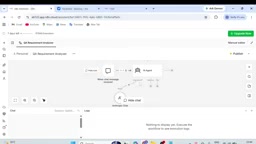
The reason is that the Agent hasn't saved the context. n8n's solution is to add a Simple Memory node, which stores conversation history in memory without any external credentials or database configuration. The "Context Window Length" parameter in the node controls how many rounds of conversation history are passed as context, with a default setting of 5 rounds.
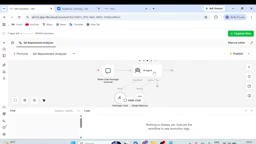
n8n also offers other memory options, including MongoDB Chat Memory, Postgres Chat Memory, and Redis, suitable for production scenarios that require persistence or cross-session memory. Simple Memory is a reasonable entry-level choice, but data is lost after the workflow restarts.
After adding memory, retest: first input the transfer requirement, then follow up with the maximum amount. The Agent accurately responds "Based on the requirements you provided, the maximum single transfer amount is one hundred thousand" — memory is working.
4. MCP Server: Connecting the Agent to External Systems
The third component is Tools. n8n's Tool node supports connecting to MCP Servers, and the video demonstrates the Atlassian MCP Server, used to connect Jira and Confluence.
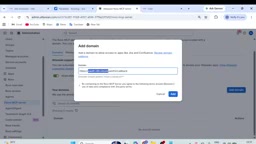
The configuration process involves more steps than expected: add an MCP Server Tool on the AI Agent node, select Atlassian, and clicking Connect redirects to Atlassian's OAuth authorization page. Here a typical pitfall arises — the Atlassian administrator must first add n8n's OAuth callback domain to the whitelist in the organization settings, otherwise the Accept button on the authorization page is grayed out. After the creator added the n8n.cloud domain for the Robo MCP Server in Jira's User Management, authorization went through smoothly.
After authorization is complete, asking the Agent to query "the content of SCRUM-20" returns the full information of that user story: status, priority, summary (Parabank user registration), description, and acceptance criteria. Throughout the process, the Agent automatically calls the Jira API without any manually written integration code.
MCP (Model Context Protocol) is a standard protocol open-sourced by Anthropic at the end of 2024, with the goal of unifying how large language models connect to external data sources and tools. Before MCP, giving models access to Jira, databases, or file systems often required writing separate integration code or plugins for each system, and formats were incompatible across vendors. MCP defines a client-server architecture: the model side acts as the client, external systems expose their capabilities (resources, tools, prompt templates) in the form of an "MCP Server," and both sides communicate through standardized JSON-RPC messages.
The benefit of this design is reusability — the same MCP Server can be called by Claude Desktop, n8n, Cursor, or any other client that supports the protocol, so developers don't have to reinvent the wheel. The Atlassian MCP Server in the video is an implementation provided officially by Atlassian or by the community, packaging Jira's query, create, and update operations into standard tools. n8n's MCP Server Tool node only needs to complete OAuth authorization to use it, which is why it's less hassle than hand-writing a Jira API integration. Understanding MCP's positioning helps distinguish it from ordinary REST APIs or n8n's built-in HTTP Request node: the former is a semantically-oriented tool interface for AI, while the latter is a general-purpose network request.
5. The Combinatorial Logic of the Three Components
Looking back at the whole workflow: the Chat Message Received trigger receives user input → the AI Agent node acts as the hub → the Anthropic Chat Model provides reasoning capability → Simple Memory maintains conversation continuity → the Atlassian MCP Server provides external data access. This structure can be replicated to any similar scenario: a customer service bot connected to a CRM, a testing assistant connected to a defect management system, or a documentation assistant connected to a knowledge base.
n8n turns this process into drag-and-drop node connections, lowering the barrier to AI Agent development, but understanding each component's responsibility boundary — Model for reasoning, Memory for context, Tools for action — is the prerequisite for using this toolset well.
The full demonstration video is available on the YouTube channel Automation Test Insider.
One-line Summary
A hands-on demonstration breaking down the three core components of the n8n AI Agent — Model, Memory, and Tools — and how to connect to Jira via MCP.
Paragraph Summary
Using n8n's AI Agent node as the throughline, the article shows how to upgrade a basic QA chatbot into a customizable assistant with memory and external system access. It proceeds in five steps: first beautifying the chat interface with custom CSS; then switching the Chat Model from Google Gemini to Anthropic Claude Sonnet to verify n8n's plug-and-play model flexibility; next, addressing the Agent's "amnesia" by adding a Simple Memory node and setting the Context Window Length; then introducing the Atlassian MCP Server so the Agent can read Jira user stories directly, while resolving the OAuth callback domain whitelist configuration pitfall; and finally summarizing the combinatorial logic of the entire workflow's components. The core conclusion: Chat Model handles reasoning, Memory handles context, and Tools handle action — three clearly defined and replaceable responsibilities that are the key to lowering the barrier to AI Agent development.
Related articles

How Big Can Stars Really Get? The Physical Limits of the Largest Stars
Red supergiants are the largest stars by volume, with radii up to 2,000 times the Sun, engulfing the inner solar system. But there is no precise upper limit on stellar size—models predict up to 15,000 solar radii. The most massive blue stars are far smaller than red supergiants—biggest and heaviest are two different things.

Apple HomeView Smart Display Full Feature Breakdown: Wall-Mount or Desktop, $299
Apple launches HomeView, a $299 smart display with wall-mount and desktop options, 12MP camera for facial recognition, smart home control, music playback, and recipe step-by-step cooking. Full breakdown of watch faces, apps, privacy, and cooking integration.

Where Did the Promised New Studio Go? Craft Computing Answers After Five Years
Craft Computing's host responds to viewer questions: the new studio promised five years ago was shelved as construction costs soared from $30,000 to $75,000, and was replaced by a 168-square-foot garage conversion.