n8n AI Agent Powers Solar Installation Automation: WhatsApp + Google Sheets End-to-End Workflow

An n8n-based AI Agent scans solar project blockers daily and reaches customers, technicians, and the office.
The article presents an n8n-based AI Agent automation workflow that solves payment stagnation in solar installation projects caused by minor issues like approval delays, missing parts, and technician scheduling conflicts. It triggers daily at 7:00, reads seven Google Sheets sources in parallel, and uses an AI Agent to generate an outreach plan split into 19 instructions, reaching customers, technicians, and the office via WhatsApp, then writing records back to the sheets. It also notes WhatsApp template compliance limits and reusability for HVAC, security, and renovation industries.
Solar installation projects often get their payments stuck due to minor issues like approval delays, missing parts, and technician scheduling conflicts, while traditional manual follow-up is highly inefficient. An AI Agent automation system built on n8n aims to break this deadlock with automated morning outreach—simultaneously reaching customers, technicians, and the office.
The Pain Point: Small Issues Holding Up Big Money
Cash flow at solar installation companies is often dragged down by a large number of "half-finished" projects. Rejected or delayed approvals, missing parts, technicians unable to show up—these seemingly trivial obstacles prevent projects from being closed out, making payment collection a distant prospect.
The traditional approach has project managers calling one by one, sending messages, and checking spreadsheets, but once the customer count grows, follow-ups are easily missed. What's worse, information among customers, technicians, and the office is out of sync, multiplying communication costs.
The design goal of this n8n automation system is clear: scan all project blockers on a daily schedule, let the AI Agent determine which projects need outreach, whom to contact, and what to say, then automatically send personalized messages via WhatsApp and write communication records back to Google Sheets. One workflow replaces the manual juggling of three roles.
Full Data Flow Breakdown: From Seven Spreadsheets to AI Decisions
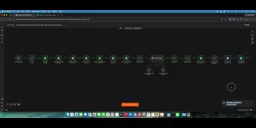
The workflow triggers automatically at 7:00 every morning. It first enters a configuration node to set basic parameters like the spec sheet ID and company name. Then the system reads seven Google Sheets data sources in parallel: site information, planned visits, utility approvals, technician information, payment milestones, parts inventory, and outreach history.
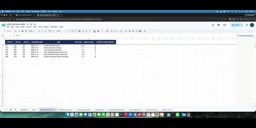
Outreach history is the key—the AI Agent needs to know what was previously said to a customer to generate continuous, non-repetitive personalized messages. A Code node merges all data into unified context and feeds it to the AI Agent.
The AI Agent outputs a combined plan, which is then validated and split by a Code node, ultimately breaking the plan into 19 independent outreach instructions. The system only executes sends for business parties allowed for outreach; at the current stage it actually reaches 4 targets: customers, technicians, the office, and one reserved configuration item.
What is n8n: n8n is an open-source low-code workflow automation platform that connects different services into automated processes through visual node wiring. Each node represents an action—reading Google Sheets, calling an LLM, sending a WhatsApp message, etc. Compared to Zapier, n8n supports self-hosting, code-level customization (Code nodes can run JavaScript), and has no task-volume-based billing limits, so it is often used in vertical industry scenarios requiring complex logic branches and multi-source data fusion. The workflow in this article is a typical n8n use case: scheduled trigger + parallel reads + AI decision-making + multi-channel output.
The difference between an AI Agent and a regular LLM call: A regular call is a one-off Q&A of "input prompt → return text"; an AI Agent has role settings, tool-calling capabilities, and structured output constraints, and can autonomously decide "whether to act, whom to act on, and what to do" based on multi-source context. In this system, the AI Agent receives the merged seven-sheet context and outputs an execution plan that can be directly parsed by downstream Code nodes, rather than natural language suggestions—this is the key to its ability to replace manual scheduling decisions.
WhatsApp Sending: Template Restrictions and MVP Workarounds
Messages are sent via WhatsApp. There is a practical limitation here: a regular send node cannot initiate a conversation proactively; you must use the "send template" node, and the template needs to be approved in advance.
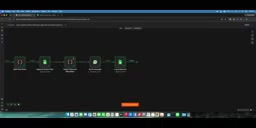
In the demo, because the outreach template had not yet been approved, the author temporarily switched to a regular send message node to complete the flow demonstration. In a formal production environment, the template node should be used to ensure compliance with WhatsApp business policies. After sending is complete, the system writes all outreach records back to Google Sheets, forming a closed loop.
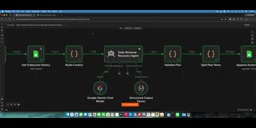
Although this MVP simplifies some steps, it fully demonstrates the potential of n8n + AI Agent in vertical industry automation: multi-source data fusion, AI decision-making, automated outreach, and log write-back, forming a reusable business closed loop.
The template mechanism in WhatsApp business policies: To curb spam, the WhatsApp Business API stipulates that businesses can only freely send messages within the 24-hour session window initiated by the user; to proactively reach users beyond that window, they must use a pre-submitted and approved "Message Template." Templates must explain their purpose and variable placeholders, take effect after Meta review, and are billed per conversation. Therefore, scenarios like "proactively reaching out to customers every morning" in this article are typical template outbound calls and cannot be implemented compliantly before the template is approved. The author's temporary switch to a regular send node only applies to existing active sessions or sandbox demo environments; before launch it must be replaced with a template node, otherwise the account risks being banned.
Implications for Industry Automation
The core value of this solution is not technical showmanship, but precisely hitting the cash flow pain point of the solar installation industry. The AI Agent plays the role of a "scheduling brain," piecing together fragmented information scattered across multiple spreadsheets into an executable outreach plan.
For other project-based service industries—such as HVAC, security, and renovation—similar logic applies: as long as business blockers can be structurally recorded, an AI Agent can automatically identify and trigger follow-ups. The key lies in standardizing data sources and compliantly integrating outreach channels.
n8n's low-code nature lowers the barrier to building, but the real moat lies in understanding business pain points and structuring data. This workflow is not a generic template, but a customized solution for the solar installation scenario; its approach is worth borrowing, while the details need to be adjusted to your own business.
One-line Summary
An n8n-based AI Agent automatically scans solar project blockers daily and reaches out to customers, technicians, and the office.
Paragraph Summary
This article introduces an n8n-based AI Agent automation workflow designed to solve the pain point of payment stagnation in solar installation projects caused by minor issues such as approval delays, missing parts, and technician scheduling conflicts. The system triggers automatically at 7:00 every morning, reads seven Google Sheets data sources in parallel—sites, visits, approvals, technicians, payment milestones, parts inventory, and outreach history—and the AI Agent fuses the context to generate an outreach plan, which is then split into 19 independent instructions. It actually reaches customers, technicians, and the office, sends personalized messages via WhatsApp, and finally writes communication records back to the spreadsheets to form a closed loop. The article also explains the compliance restriction that proactive WhatsApp outreach requires template nodes, and notes that this MVP approach can be reused for payment follow-up scenarios in project-based service industries such as HVAC, security, and renovation.
Related articles

DeepCell: One-Click AI Generation of Documents, Spreadsheets, and Slides
DeepCell tops Product Hunt with one-click generation of documents, spreadsheets, and slides, using the .deepcell format for linked updates, designed for System 2 tasks like modeling and sales reviews.

Doneas: 15-Minute Daily Accountability Calls That Keep Indie Developers From Procrastinating
Doneas is a daily accountability tool for indie developers: plan tasks on Monday, join a 15-minute call with five builders each day, and log deliveries on a public progress page. This article analyzes its core mechanics, effectiveness, and potential issues around retention and matching.

Fastlane 2.0: Fully Automated AI Ad Campaigns, From Creative to Optimization
Fastlane 2.0 is an AI ad automation tool: enter your website and it learns your brand, generates video and image ads, and runs and optimizes them on Meta, TikTok, Instagram, and YouTube.