n8n AI Agent Tutorial: From Rule-Based Automation to an Intelligent Customer Support Bot
n8n AI Agent tutorial: build an intelligent support bot in three steps using Webhook, Edit Fields, and HTTP Request.
This article explains how AI Agents work in n8n and how to build one. Traditional automation relies on fixed rules and fails with messy inputs; LLM-powered AI Agents interpret input, reason, and decide actions, delivering four capabilities: eliminating manual review, understanding natural language, personalizing at scale, and adding reasoning. The run cycle covers triggers, LLM reasoning, tools/actions, memory/context, and self-correction. The hands-on part configures a Webhook trigger, Edit Fields node, and an HTTP Request node calling OpenAI in n8n Cloud, enabling a bot that receives questions, understands intent, and returns context-aware replies—a pattern extensible to ticket assistants and chatbots.
n8n AI Agent Tutorial: From Rule-Based Automation to an Intelligent Customer Support Bot
Traditional automation relies on fixed rules like "if A happens, do B." But when inputs get messy—an angry customer email, a vague request, or a poorly formatted PDF—rules break down. AI Agents are different: they evolve n8n from a rule engine into an intelligent layer that can read, understand, and make decisions. Based on a video tutorial, this article walks you through how AI Agents work in n8n and how to build a working AI customer support bot step by step.
What Is an AI Agent in n8n?
An AI Agent is an automation component powered by a large language model (LLM). Unlike traditional nodes, it doesn't just process data—it interprets input, reasons about it, and decides what to do next. In n8n, an Agent receives input such as text or JSON, sends dynamic prompts to a model like OpenAI, and the model returns a context-aware response. The Agent can then trigger actions like sending emails, updating a CRM, or calling other APIs.
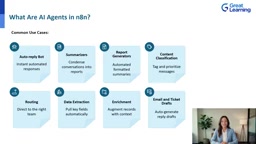
This pattern shifts automation from "predefine every condition" to "given a goal, let the Agent figure out the details." For example, a support team receives all kinds of emails: complaints, feedback, password resets, feature requests. A traditional workflow needs dozens of conditional branches, whereas an AI Agent needs just one prompt: "Classify this email and draft an appropriate reply." It can automatically route, draft responses, and update systems.
Large Language Model (LLM) is the reasoning engine of an AI Agent—a neural network model trained on massive text corpora that can understand and generate natural language, such as OpenAI's GPT series. In n8n's Agent scenarios, the LLM doesn't directly manipulate data; instead, it receives a prompt dynamically assembled by the Agent and outputs structured judgments or natural language responses. Unlike traditional classifiers or rule engines, LLMs can handle unseen phrasing, recognize implicit intent, and play specific roles (like a support tone) based on system instructions. Their limitations include probabilistic output that may be inaccurate, plus latency and cost from external APIs—so production environments often need validation and human fallback.
Why AI Agents Matter: From Rules to Reasoning
The core value of AI Agents is upgrading automation from rule-based workflows to reasoning-based workflows. Traditional automation requires clean, predictable, structured data, but real-world workflows are messy. According to the video summary, AI Agents bring four "superpowers":
- Eliminate manual review: AI can automatically classify, summarize, and respond without manual checks.
- Understand natural language: No more strict if-else rules or perfectly structured text.
- Personalize at scale: Each user or customer gets a different reply instead of a one-size-fits-all template.
- Add reasoning to workflows: Logic becomes adaptive rather than merely rule-driven.
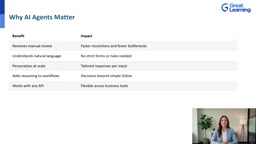
In short, AI Agents let workflows "think," adapt, and personalize, opening up entirely new areas for automation.
How Do AI Agents Run Inside n8n Workflows?
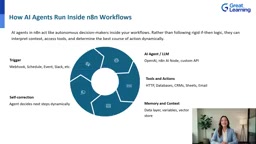
Within n8n, an AI Agent acts like an autonomous decision-maker. Its run cycle includes the following stages:
- Trigger: A webhook, scheduled event, or Slack message starts the workflow.
- AI Agent / LLM: Input is sent to a model like OpenAI for interpretation and reasoning.
- Tools and actions: Based on the AI's decisions, it calls APIs, updates databases, sends emails, or interacts with a CRM.
- Memory and context: Variables, data layers, or vector stores save and retrieve context so each run isn't isolated.
- Self-correction: The Agent evaluates results and dynamically decides the next step, even looping or adjusting responses.
As a result, workflows are no longer linear—they become a "thinking loop." We're no longer just automating tasks; we're automating decisions.
Vector Store is a key component supporting Agent memory and context retrieval: it converts text into high-dimensional vectors (embeddings) and stores them in a database, then recalls relevant content by semantic similarity at query time. In n8n Agent workflows, vector stores are often used to save conversation history, product docs, or knowledge bases, so the Agent can retrieve instead of re-reading everything on each run—enabling long-term memory and answers grounded in enterprise knowledge. Unlike simple variable memory, it excels at unstructured text and large corpora, but requires additional embedding models and index maintenance; retrieval quality directly determines answer relevance.
Hands-On: Build Your First AI Customer Support Bot
The video tutorial demonstrates building a mini AI Agent in n8n Cloud. This support assistant can understand questions, explain meaning, and generate helpful answers. Here are the key steps:
Step 1: Create a Workflow
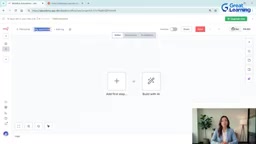
Create a new workflow in n8n Cloud and name it "AI Support Bot." This workflow will act as the Agent: receive input, decide actions, and respond intelligently.
Step 2: Add a Webhook Trigger
The webhook serves as the bot's "inbox" to receive questions from users or systems. Set the method to POST, name the path support-bot, and keep it in test mode for now so it can be triggered.
Step 3: Add an Edit Fields Node
Raw webhook data can be messy. Use a Set node (named Edit Fields) to extract the user prompt and name it clearly. For example, extract the user message into a prompt field. This gives the Agent structured context.
Step 4: Add an HTTP Request Node to Call OpenAI
This is the heart of the AI Agent. Send a request to the OpenAI API with system instructions (giving the AI a personality) and the user message as the prompt. When the workflow runs, OpenAI returns an intelligent, conversational response. If you hit a 401 error, check the API key format—it must start with Bearer.
Bearer Token is a common authentication method in HTTP requests: the client includes Bearer <token> in the Authorization header, and the server verifies the caller's identity. When calling the OpenAI API, the API key must be placed in that header with the Bearer prefix; incorrect formatting is a common cause of 401 Unauthorized errors. Besides the auth header, the request body typically specifies the model name, a messages array (with system instructions and user prompt), and parameters like temperature. Understanding this mechanism helps you manually construct requests in n8n's HTTP Request node and troubleshoot runtime issues like key leakage or insufficient quota.
Step 5: Trigger a Webhook Test
Send a real support question through the webhook, such as "How do I fix a failing workflow in n8n?" The workflow will extract the prompt, call OpenAI, and immediately return a friendly, intelligent answer.
At this point, you have a working AI Agent: it receives questions, interprets them using natural language understanding, reasons via the LLM, and returns context-aware responses. This pattern is fully modular—you can link the output to any tool in n8n. It's the foundation for building ticket assistants, chatbots, and auto-reply systems.
Summary and Recommendations
Traditional automation follows fixed rules and breaks down when inputs are messy. AI Agents add understanding: they read unstructured text, recognize intent, and decide what to do next. Using a Webhook, an Edit Fields node, and an AI call, we built a simple AI customer support bot. n8n's AI Agent node goes further—by adding tools and memory, it lets AI not only answer but also take action. For any sensitive operations, keep human review in the loop. Now, try applying this pattern to one of your own workflows.
Related articles

Chain of Thought Isn't Just for AI: How Humans Can Use CoT to Improve Thinking Quality
Chain of Thought isn't just a prompt trick for large models. Starting from a Hacker News discussion, this article analyzes why CoT works for human thinking too, breaks down actionable ways to transfer it, and highlights the key differences between human CoT and machine CoT.
Cloudflare Teams Up with OpenAI: Closi…
Cloudflare Teams Up with OpenAI: Closing the Loop from Vulnerability Discovery to Defense with AI
Cloudflare uses OpenAI Daybreak to investigate security vulnerabilities and generate reviewable remediation plans, while developers use Codex to boost coding efficiency and quality.

Orca Multi-Agent Orchestration in Practice: A Guide to Parallel Collaboration with Claude and Codex
Orca is Stable AI's free open-source agent workbench supporting 34 agents like Claude Code and Codex in parallel. Learn its Git worktree isolation, multi-model orchestration, and mobile management.