n8n Automation Beginner's Guide: Understanding Low-Code Workflow Automation from Scratch

A Tamil-language n8n beginner course that demystifies low-code automation using real business cases and a full local deployment walkthrough.
This article is based on a Tamil-language n8n introductory course covering the core logic of business process automation and how to get started with n8n. Using a B2B lead-handling scenario as the entry point, the instructor explains why repetitive manual workflows slow down response times and cause data errors. On the tooling side, the course clarifies the difference between low-code and no-code, walks through n8n's Trigger-Process-Act model, and demonstrates a full local deployment via npm. The article closes with a key reminder: AI isn't a silver bullet — robust automation should always keep humans in the loop at critical decision points.
What Is Automation and Why Do Businesses Need It
Is n8n difficult to learn? Based on the content of this Tamil-language tutorial, the answer is: it depends on how you approach it. The instructor puts it plainly — n8n is a purely low-code automation tool, and getting started is actually straightforward. The real challenge often lies in learners' mental expectations and way of thinking.
To understand n8n, you first need to grasp the concept of automation itself. At its core, automation means extracting the repetitive tasks from your daily workflows and handing them off to tools that execute them automatically. The instructor summarizes two key benefits of automation:
- Time savings: Processes that previously required manual, repetitive effort are taken over by machines
- Cost reduction: Less reliance on manual labor lowers operational overhead
This might sound abstract, so the instructor uses a real-world business case to illustrate.
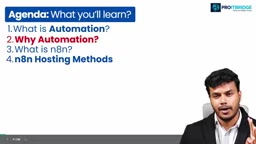
A Real Business Scenario: Novatech's Lead Handling Pain Points
The course references a client case study — Novatech Solution, a company providing B2B technology solutions (i.e., technical services to other businesses).
Their problem is a classic one: every time a new business lead comes in through their website, the sales team has to manually copy the lead's information into a Google Sheet, notify the team via Slack, and send the client a welcome email.
When lead volume is low — say, 5 leads — manual handling is manageable. But once volume spikes to 100 leads, the cracks start to show:
- Repetitive manual processes eat up valuable sales team time
- Data entry errors become increasingly likely
- Response time to potential clients is delayed, which can mean losing them to faster-moving competitors
The instructor highlights a critical insight: in B2B sales, response speed often determines whether a deal closes. If you're slow to respond, the client may already have moved on to someone else. Novatech's goal was to automate the entire lead-handling pipeline — capturing, logging, notifying the sales team, and sending an automated confirmation — all handled by the system. This is the clearest possible illustration of why automation matters.
What Exactly Is n8n
n8n is officially positioned as a node-based, open-source workflow automation platform that lets you connect different apps, APIs, and AI models to automate repetitive tasks.

The instructor draws a clear distinction between Low Code and No Code — one of the most common points of confusion for beginners:
- No Code: No programming whatsoever
- Low Code: Some steps still require writing small amounts of code
n8n is a pure low-code tool — most workflows are built through visual drag-and-drop, but specific nodes can still embed JavaScript or Python to handle complex logic. The instructor notes that which languages are supported and how to integrate custom code will be covered in detail in later chapters.
n8n's Three-Step Workflow Model
n8n operates on a clear three-step process:
- Trigger: An event fires to kick off the workflow — for example, a new lead coming in
- Process: Data is transformed, evaluated, or filtered
- Act: A final action is executed, such as updating a spreadsheet or sending a notification
n8n's core features also include: self-hosting capability, built-in AI support, and flexible pricing options.
It's worth noting that n8n's open-source nature is a meaningful differentiator in this space. Tools like Zapier and Make (formerly Integromat) are closed-source SaaS products — users are locked into the vendor's cloud infrastructure with no ability to self-deploy or modify the underlying code. n8n, by contrast, hosts its source code on GitHub, allowing anyone to download it for free, deploy it on their own servers, and even customize it to fit specific business needs. This is especially important for organizations with strict data privacy requirements — such as those in healthcare or finance — where sensitive data never needs to touch a third-party cloud, staying entirely within their own infrastructure. That said, self-hosting open source also means taking on more operational responsibility: version upgrades, security patches, and server maintenance all fall on the user. This is the deeper reason the course emphasizes that your hosting choice determines your level of control.
"Node" is the central concept for understanding how n8n works. Each node represents a self-contained operation within a workflow — it could be a trigger (e.g., "received a Webhook request"), a data processing step (e.g., "filter array" or "format date"), or a call to an external service (e.g., "write a row to Google Sheets" or "send a Slack message"). Nodes pass JSON-formatted data between each other through connections, with each upstream node's output automatically becoming the input for the next. n8n currently ships with over 400 pre-built nodes covering major SaaS tools, databases, and AI models — which is why it's often described as a "connect everything" platform. For services without native node support, users can call any REST API directly via the HTTP Request node, or implement custom logic using JavaScript or Python inside a Code node.
Hosting Options: Your Choice Determines Data Ownership, Cost, and Control
The course repeatedly drives home one key idea: "your hosting choice determines your data, cost and control."
n8n offers several hosting options, which the instructor illustrates with an analogy: you can work from home (self-host on your local machine) or go into the office (cloud-hosted). Different options correspond to different levels of data ownership:
- Self-host on local machine: Data stays entirely in your own hands
- Managed by n8n (official cloud hosting): The server lives on n8n's side, maintained by the n8n team, but requires a separate paid subscription
Neither approach is inherently better — the right choice depends on your priorities around data privacy, budget, and operational capacity.
Hands-On: Deploying n8n Locally via npm
The course walks through how to self-host n8n on a local machine using npm. First, a quick primer: npm (Node Package Manager) is the default package manager and online software registry for Node.js. Since n8n runs on Node.js, npm is a prerequisite.
Here's the full installation process:
- Install Node.js: Download and install it from the official website (the course uses version 22.x)
- Open Command Prompt and run the install command:
npm install n8n -g - Wait for n8n to finish installing locally
- Start n8n: Run the command
n8n start - Your browser will automatically open
http://localhost:5678, bringing up the n8n initial setup screen - Enter your email address and set a password (minimum 8 characters) to complete account initialization
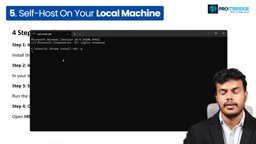
The instructor recommends that beginners go through this self-hosting setup on their own machine from start to finish — it's the essential first step to getting comfortable with n8n.
Installing with the global flag (-g) means n8n's executable is added to your system's PATH, so you can run n8n start from any directory in the command line without navigating to a specific folder each time. A local n8n deployment uses SQLite by default to store workflow configurations and execution logs, with data files saved in the .n8n folder inside your home directory. One important caveat: local machine deployment is only suitable for learning and development testing. Once you shut down your computer, the n8n service stops — meaning any scheduled workflows will no longer run. For production use, n8n should be deployed on a continuously running cloud server (such as a VPS), paired with a more robust database like PostgreSQL. These topics are typically covered in more advanced course content.
Mindset Matters More Than the Tool: AI Isn't a Silver Bullet
The most valuable part of this lesson isn't the technical walkthrough — it's the grounded, reality-check perspective the instructor offers based on hands-on experience.
The instructor points out that many people come in with unrealistic expectations after watching YouTube videos about "one-person companies" with billion-dollar valuations: "I don't want to touch anything — I want my AI agent to do everything." But the reality is: AI is not the solution for everything.
The right approach is to use AI and automation to handle the bulk of a process, while keeping humans in the loop at critical decision points. The instructor uses a simple example: only you know when a payment has truly been received — even with an automated workflow in place, the final call should still rest with a person. Blindly throwing a problem at ChatGPT or copying a solution from a random online source and expecting it to spit out a complete automated workflow simply doesn't work.
The instructor also shares their own journey: from AIML training at an AI product company, to transitioning into the business automation space — with a consistent emphasis on embracing new challenges when opportunities arise. That kind of experience-forged perspective is exactly what sets this type of course apart from purely theoretical instruction.
Wrapping Up
As the first chapter of an n8n series, this lesson covers the fundamentals of automation, n8n's positioning and workflow model, hosting options, and a complete local deployment walkthrough. The core takeaway is clear: the barrier to entry for n8n is low, but using it well requires both the courage to get hands-on and the intellectual honesty to recognize that AI and automation work best when humans stay in control at the moments that matter most. For anyone looking to break into the business automation space, this is a direction worth building a solid foundation in.
Related articles

DeepCell: One-Click AI Generation of Documents, Spreadsheets, and Slides
DeepCell tops Product Hunt with one-click generation of documents, spreadsheets, and slides, using the .deepcell format for linked updates, designed for System 2 tasks like modeling and sales reviews.

Doneas: 15-Minute Daily Accountability Calls That Keep Indie Developers From Procrastinating
Doneas is a daily accountability tool for indie developers: plan tasks on Monday, join a 15-minute call with five builders each day, and log deliveries on a public progress page. This article analyzes its core mechanics, effectiveness, and potential issues around retention and matching.

Fastlane 2.0: Fully Automated AI Ad Campaigns, From Creative to Optimization
Fastlane 2.0 is an AI ad automation tool: enter your website and it learns your brand, generates video and image ads, and runs and optimizes them on Meta, TikTok, Instagram, and YouTube.