n8n Beginner's Guide: What Is AI Automation and Why Should You Learn It?

A beginner's intro to n8n: AI automation concepts, visual workflows, and deployment options explained simply.
This article is based on the first lesson of a Bengali-language n8n beginner course. It explains the difference between automation and AI automation, uses lead collection as a practical example of how automated workflows can trigger instant follow-ups via phone, email, and WhatsApp to boost conversion rates, and introduces n8n as an open-source, visual, drag-and-drop low-code workflow platform. The course advises beginners to focus on logic over memorization and use AI tools for help. It also covers the difference between cloud hosting and self-hosting, with the course starting from a self-hosted setup.
What Is Automation and AI Automation
This beginner tutorial comes from a Bengali-language n8n automation course aimed at newcomers. To understand n8n, you first need to get clear on two concepts: Automation and AI Automation.
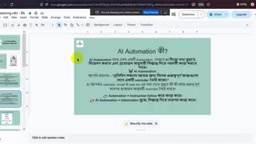
Automation means having a system complete a repetitive task at a fixed time, in a fixed way. The course uses a relatable example: your phone alarm going off at the same time every day — that's the simplest form of automation. But traditional automation doesn't make judgments. It won't change its behavior because today is Friday, a public holiday, or a rainy day.
AI Automation takes things a step further by introducing decision-making on top of automation. Take that same alarm — if it could check the weather and remind you to bring an umbrella, skip alerts on holidays, or automatically read out your to-do list once you're up, then you've integrated AI's judgment capabilities into the workflow. In short: AI Automation = automated execution + intelligent decision-making.
Real-World Problems AI Automation Can Solve
The course emphasizes that automation isn't just a tech novelty — it creates real business value. One scenario gets particular attention: Lead Collection.
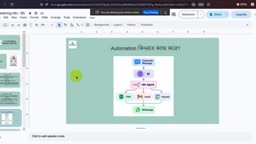
Typically, we collect customer information — names, phone numbers, emails — through various forms. If done manually, entering each record into a database and following up one by one is slow and error-prone. Automate this process, and everything changes:
- After a user submits a form, the system can automatically call them within a set timeframe (say, 5 minutes);
- An email is automatically sent confirming receipt: "We've received your info — here's what happens next";
- The customer is guided directly to book an appointment or move into the next conversion step;
- If a WhatsApp number was provided, follow-up communication can continue there too.
The course makes a key point: the faster you follow up on a lead, the higher the chance of closing the deal. Automation makes "submit and immediately connect" possible — and that's its core value for sales, CRM data management, and social media marketing.
Why Choose n8n
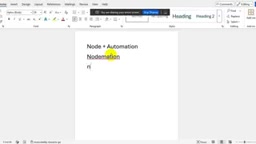
Even n8n's name has a clever backstory: the instructor explains that "n-eight-n" has eight letters sandwiched between two n's — that's where the name comes from. It's positioned as a workflow automation platform built around Node + Automation.
n8n's biggest strength is its visual interface. You connect nodes together using drag and drop to build complete automation workflows — no need to write code from scratch.
At the same time, it's flexible: n8n is a low-code tool that works without any code, but also supports writing code when you need it, letting you customize workflows your way. The platform comes packed with powerful built-in nodes and exposes an open API, giving developers plenty of room to work.
The Right Way to Learn n8n
The instructor offers a practical tip for beginners: you don't need to memorize everything. n8n has a huge number of nodes — you can't and don't need to remember them all. Instead:
- Keep notes on commonly used nodes and refer back to them as needed;
- When you're stuck, just Google it or search YouTube;
- Use AI tools like ChatGPT to help troubleshoot problems.
The focus of learning should be understanding workflow logic, not memorizing every node's parameters.
n8n's main competitors in this space are Zapier and Make (formerly Integromat). Zapier holds the largest market share and is easy to use, but it's pricey, closed-source, and routes your data through third-party servers. Make offers more flexible visual workflow design at a friendlier price point. n8n differentiates itself by being fully open-source (the source code is public and auditable by anyone) and supporting complete self-hosting — meaning businesses or individuals can run all their data and workflows on servers they control, with no dependency on any third-party cloud service. This makes compliance and data privacy far more manageable. It gives n8n a clear edge in data-sensitive industries like healthcare and finance, or for anyone looking to reduce long-term subscription costs. n8n also uses a "fair-code" license: free for personal and internal use, with fees only applying to commercial redistribution.
Cloud Hosting vs. Self-Hosting
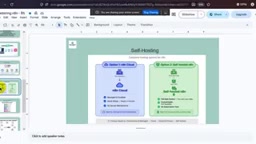
n8n offers two deployment options: Cloud Hosting and Self-Hosting.
The core difference is where the workflow runs. Self-hosting means your workflows run on your own machine or server — which comes with one important caveat: if you're self-hosting on a local computer, your automation stops running the moment that computer shuts down or loses internet access. For production environments, self-hosting typically requires a server that stays online continuously.
The instructor notes that for learning purposes, this course starts with self-hosting. For beginners, self-hosting gives you a more intuitive feel for how n8n operates under the hood, and lets you practice locally for free.
For beginners practicing locally, the most common ways to run a self-hosted n8n instance are via npm (Node.js package manager) or Docker. Docker is a containerization technology that bundles n8n and all its dependencies into a self-contained environment, eliminating compatibility issues caused by differences in your local system setup — it's the community's most recommended method for local deployment. When you're ready to move your automation to a production environment that runs 24/7, a common choice is renting a low-cost cloud VPS such as DigitalOcean, Vultr, or Alibaba Cloud. Monthly costs typically run $5–$10, keeping your workflows running continuously without depending on whether your personal computer is on.
Summary
As the first lesson in this series, this tutorial lays the conceptual groundwork for understanding n8n: distinguishing automation from AI automation, illustrating real-world value through a lead collection scenario, and covering n8n's visual, low-code nature alongside its two deployment options. For anyone looking to get started with AI automation using a low-barrier tool, n8n is genuinely worth investing time in. Upcoming lessons will move into hands-on practice, starting with setting up a self-hosted environment.
Related articles

AI + SRC Automated Vulnerability Hunting: Rebuilding the Three-Step Method with AI Agents
A complete guide to AI+SRC automated vulnerability hunting — comparing traditional methods with AI Agent-powered workflows covering asset recon, false positive filtering, and report generation.

Testing DeepSeek Desktop Agent: Auto-Generate a Full Video for Just $0.35
A blogger tested DeepSeek Harness desktop Agent: auto-generated a full video for $0.35, built a daily briefing, and an app from plain English — all for $0.59 total.

Antigravity 2.0 Complete Guide: MCP, Skills, and Automation Explained
A complete guide to Antigravity 2.0 covering Projects/Conversations/Agents, MCP with Figma, Skills, automation, and 6 real-world use cases including design-to-code and Android app generation.