N8N Chat UI: A No-Code Branded Chat Widget Built for n8n
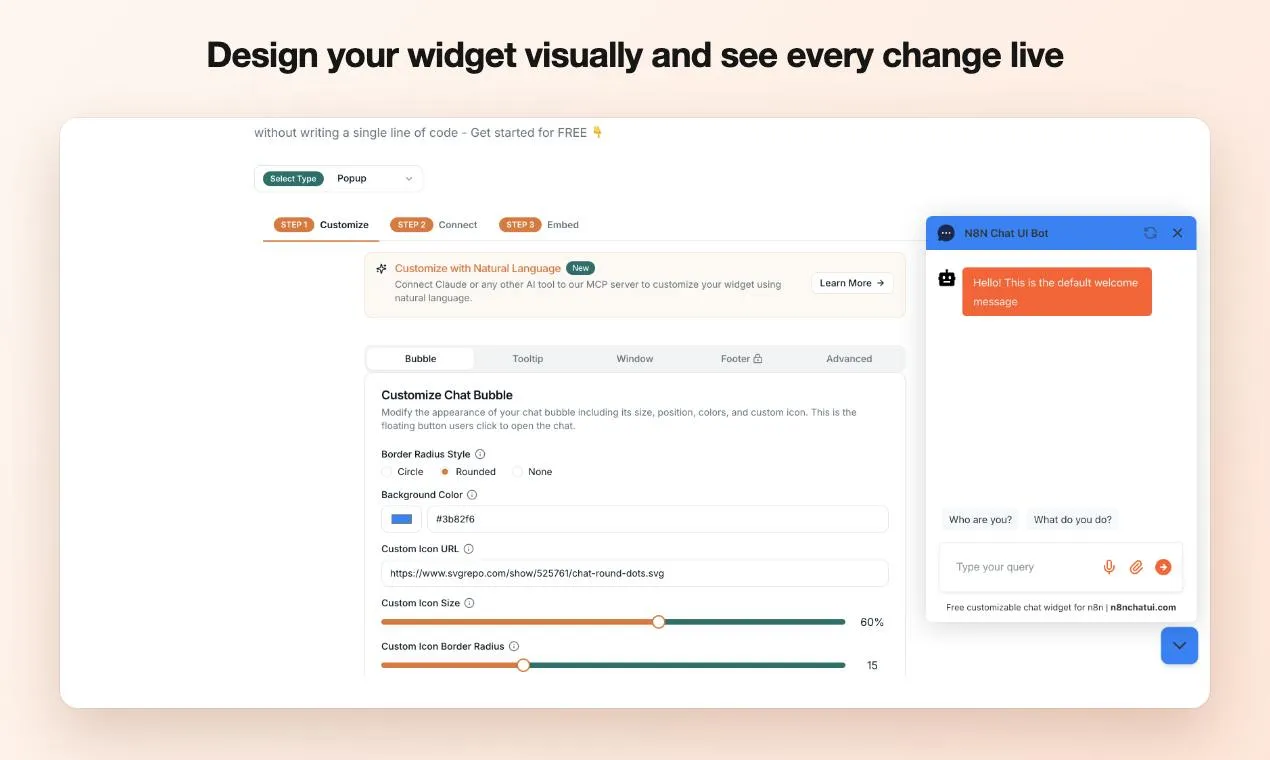
N8N Chat UI is a no-code chat widget builder designed for the n8n ecosystem, filling the branded chat frontend gap.
N8N Chat UI is a no-code chat widget builder for n8n users, agencies, SaaS teams, and enterprises, addressing the limited customization of n8n's native chat interface. It offers a visual builder with live preview for designing branded, mobile-friendly chat windows that connect to any n8n workflow. Features include streaming output, voice input, file uploads, flexible layouts, and a JavaScript API. It earned 120 upvotes and 52 comments on Product Hunt, ranking 3rd for the day. Its value depends on n8n workflows, limiting applicability for non-n8n users.
As an open-source automation platform, n8n's native chat interface has always prioritized functionality, leaving limited room for style and interaction customization. N8N Chat UI targets this gap—it's a no-code chat widget builder designed for n8n users, agencies, SaaS teams, and enterprises, letting users design mobile-friendly chat experiences that match their brand identity and seamlessly connect to any n8n workflow.
From "Functional" to "Polished": Upgrading the n8n Chat Experience
The default n8n chat interface solves the "does it exist" problem, but has clear shortcomings in brand consistency and interaction richness. N8N Chat UI's entry point is precisely these pain points. According to the product description, it offers deep customization, supporting streaming output, voice input, file uploads, and flexible layout options. This means businesses no longer need to develop a separate frontend just for a chat window, nor tolerate default styling that clashes with the rest of their product interface.
For agencies and SaaS teams, the chat widget is often the first touchpoint where customers interact with the product. A brandable, mobile-friendly chat window can directly enhance the product's professionalism and user trust. N8N Chat UI productizes this step, lowering the last-mile barrier between workflow and user interface.
A No-Code Design and Live Preview Workflow
N8N Chat UI's core selling point is "no-code." Users design the chat widget's appearance and layout through a visual builder, adjusting results instantly with live preview. Once designed, connecting the widget to any n8n workflow activates it, and it can be embedded into any webpage.
This design workflow is especially friendly to non-technical users. Traditionally, customizing a chat interface requires frontend development resources, involving writing and debugging HTML/CSS/JavaScript. N8N Chat UI abstracts this work into configuration options, enabling operations staff or product managers to independently build branded chat widgets. The product also provides a JavaScript API, preserving extension space for developers who need deeper integration—balancing no-code ease of use with code-level flexibility.
n8n is an open-source workflow automation platform that uses a node-based visual programming model, where users drag and connect nodes to orchestrate API calls, data processing, and AI logic. It supports both self-hosted and cloud-hosted deployment, with a free community edition and an enterprise edition offering advanced features like SSO and access control. n8n's core strength lies in its node ecosystem covering hundreds of services and protocols, and its allowance for developers to write custom nodes. The "n8n workflow" mentioned in the article refers to automation flows built in the n8n editor, which can include triggers, HTTP requests, AI model calls, and other nodes. To connect a chat widget to an n8n workflow, the workflow typically needs to expose a Webhook node as the entry point for chat messages and return a response at the end of the flow. This architecture decouples the chat frontend from AI logic—the frontend handles only display and input, while backend logic is entirely defined by the workflow.
Feature Matrix: More Than Just Appearance Customization
N8N Chat UI fills several gaps in the default n8n chat's interaction capabilities:
- Streaming output: Replies appear word by word, reducing user wait anxiety and delivering an experience closer to mainstream AI assistants
- Voice and file uploads: Expands input methods to suit more business scenarios
- Flexible layout: Adjusts widget form based on embed location
- JavaScript API: Supports advanced integration and custom logic
- Mobile-friendly: Maintains a usable chat experience on mobile devices
Combined, these features elevate N8N Chat UI from a mere "beautification tool" to a complete chat frontend solution. For teams that have already built AI workflows with n8n, it fills in the user interface piece, making the entire chain more complete.
Streaming refers to an AI model pushing results word by word or sentence by sentence to the frontend as it generates a reply, rather than waiting for the complete response before returning it all at once. Implementing streaming typically relies on server push technologies like Server-Sent Events (SSE) or WebSocket, and the frontend must be able to handle data arriving in chunks and dynamically update the interface. For n8n workflows to support streaming, the AI node in the workflow needs streaming response capability, and the Webhook response mode must be configured for streaming return. N8N Chat UI encapsulates these handling logic at the widget layer, giving non-technical users word-by-word display without writing frontend code. Streaming significantly reduces perceived wait time, with especially noticeable improvements in long-reply scenarios—this is also the standard interaction pattern of mainstream AI assistants like ChatGPT.
Who Needs It: Target Users and Use Cases
From its positioning, N8N Chat UI covers several typical user types. Individual n8n users can give their self-built workflows a presentable chat entry point; agencies can quickly deploy branded chat windows for multiple clients without repeated development; SaaS teams can embed chat capabilities into their products as an interaction layer for customer support or AI assistants; and enterprises can unify the chat experience across internal tools.
On Product Hunt, the product received 120 upvotes and 52 comments, ranking 3rd for the day, with categories covering developer tools, AI, and no-code—indicating it has generated some attention in the n8n community and low-code tool circles. The discussion activity in the comments also reflects the real demand for "n8n chat frontend customization."
Product Hunt is the world's largest platform for launching and discovering new products, with numerous tech products debuting there daily. Product rankings are calculated based on signals like daily upvotes, comment counts, and user activity; "3rd for the day" means the product received relatively high community attention on its launch day. 120 upvotes and 52 comments represent a moderately above-average interaction level on Product Hunt, typically reflecting that a product has hit a real need within a specific niche. Product Hunt voters are mainly developers, product managers, and early adopters, so performance on the platform can serve as a reference indicator of a product's initial influence in tech communities, though it does not directly equate to market size or commercial success.
Positioning and Limitations: Is It Right for You?
It's important to note that N8N Chat UI is not a standalone chatbot platform—its value is built on top of n8n workflows. If your AI logic doesn't run in n8n, the product's applicability drops significantly. Additionally, while the no-code builder lowers the barrier, deep customization may still require the JavaScript API, presenting a learning curve for users with no technical background at all.
From a market competition perspective, chat widget builders are not an entirely new category, but products deeply adapted specifically for the n8n ecosystem are relatively rare. N8N Chat UI's differentiation lies in its native connection to n8n workflows and its complete coverage of features like streaming output, voice, and file uploads. For teams deeply invested in n8n, this ecosystem binding is actually an advantage—eliminating the hassle of cross-platform integration.
Overall, N8N Chat UI solves a specific and practical problem: giving n8n workflow outputs a chat interface worthy of the brand image. For teams pursuing rapid delivery and brand consistency, it offers an option worth evaluating.
One-line Summary
N8N Chat UI is a no-code chat widget builder designed for the n8n ecosystem, filling the branded chat frontend gap.
Paragraph Summary
N8N Chat UI is a no-code chat widget builder designed for n8n users, agencies, SaaS teams, and enterprises, aimed at solving the limited style and interaction customization of n8n's native chat interface. It provides a visual builder and live preview, letting users design branded, mobile-friendly chat windows without frontend development and connect them to any n8n workflow. It fills gaps with streaming output, voice input, file uploads, flexible layouts, and a JavaScript API, balancing no-code ease of use with code-level flexibility. The product received 120 upvotes and 52 comments on Product Hunt, ranking 3rd for the day. Its value depends on n8n workflows, so applicability is limited for non-n8n users, and deep customization still requires JavaScript API support.
Related articles
Agent Project in Practice: Real Delivery and Pitfalls from Requirements to Launch
Based on a real Agent project, this article breaks down the full process from a minimal viable loop to autonomous long-task delivery, analyzes the pitfall of over-constrained prompts, and provides acceptance criteria and pitfall records for context management, tool calling, and long-task decomposition.

When AI Becomes the Manor Lord: A Tech Experiment Behind a Murder Mystery
From YouTube interactive mystery video Brindley Manor, analyze how multi-agent AI plays eight roles, maintains information isolation, and generates dynamic murder puzzles, exploring the potential and current technical shortcomings of AI interactive narrative.

From Pulpit to Senate: A Pastor-Senator on What Sin Is
A pastor-senator at Ebenezer Church reflects on how his Senate experience reshaped his understanding of sin and hubris, making his sermons more powerful—even likening Washington to Sodom and Gomorrah.