n8n + Claude Cold Email Generator: Breaking Down the Automated Outreach Workflow

One-click cold email generation using n8n, Claude, and Google Sheets — with human review built in.
This article walks through a sales outreach automation workflow built with n8n and Claude: it reads prospect data from Google Sheets, uses Claude to generate a personalized cold email for each lead, and saves the results as Gmail drafts rather than sending them directly. This human-in-the-loop design preserves space for manual review while reducing compliance risk. The workflow also writes lead status back to the spreadsheet as "drafted" for easy progress tracking. The article notes its limits: personalization quality depends on input data richness, and scaling cold email sending requires navigating regional anti-spam regulations.
When Sales Outreach Meets Automation
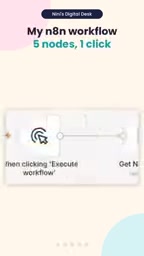
You've got a list of 50 prospects but no time to craft personalized cold emails for each one — this is the daily reality for many sales and marketing professionals. A YouTube Shorts video showcasing a compelling solution went viral: using n8n paired with Claude to compress what used to take hours of email writing down to a single click.
The concept itself isn't complicated, but it clearly demonstrates how the combination of a low-code automation platform and a large language model can be put to practical use in real business workflows. n8n handles process orchestration and data flow; Claude handles content generation. Each does what it does best, forming a complete automated outreach pipeline.
Breaking Down the Three-Step Workflow
The logic behind this workflow is highly intuitive — it's built around three core steps chained together in sequence.
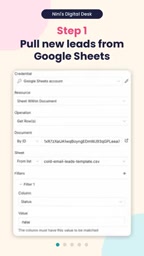
Step 1: Pull Leads from the Data Source
The workflow starts by reading each new prospect record from Google Sheets. The spreadsheet serves as a lightweight database, handling lead management in a way that's easy to populate and maintain manually, while still being directly accessible by n8n nodes. For small and mid-sized teams, this "spreadsheet as data source" approach comes with virtually no migration overhead.
n8n is an open-source workflow automation platform with a visual node editor that lets users connect different services and APIs without writing much code. Compared to similar tools like Zapier or Make (formerly Integromat), n8n supports self-hosted deployment, meaning data never has to pass through third-party servers — a friendlier choice for organizations with data sensitivity requirements. Its node library covers hundreds of common services, including Google Workspace, CRM systems, and databases. Each node represents a unit of action, and connections between nodes define data flow and execution order. This makes n8n a popular "glue layer" for integrating LLM APIs into existing enterprise toolchains.
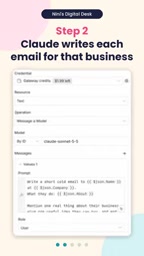
Step 2: Claude Writes a Personalized Email
Once the lead data is retrieved, Claude drafts a personalized email for each target company. The key word here is "personalized" — compared to generic mass-send templates, content generated based on each lead's specific details typically yields significantly better open and reply rates. This is where LLMs shine: they can dynamically adjust tone and wording based on context like company name, industry, and other available information.
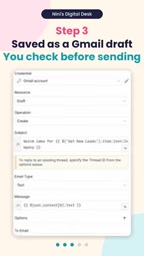
Step 3: Save as a Gmail Draft
The final design choice is worth paying attention to: the generated emails aren't sent automatically — they're saved as Gmail drafts. This "human-in-the-loop" step preserves room for manual review, letting users verify content quality before anything goes out. For cold emails, which directly affect brand perception and carry compliance risk, this is a restrained and pragmatic design decision.
Human-in-the-Loop (HITL) is an important principle in AI system design — it means preserving a mechanism for human intervention at critical decision points within an automated process. The concept originated in control system design for high-stakes fields like aviation and medicine, and was later adopted in AI product development. The core value of HITL is this: when AI-generated content or decisions involve high uncertainty, irreversible consequences, or external relationships, a human should make the final call. In sales outreach specifically, an incorrectly sent email can damage brand reputation or violate anti-spam regulations like GDPR and CAN-SPAM. Separating automated generation from human review is responsible system design. As AI capabilities improve, the frequency of HITL intervention can gradually decrease — but fully removing human checkpoints requires thorough quality validation first.
One Click, End-to-End Visibility
Once configured, you hit Execute, and each n8n node lights up green in sequence, indicating the workflow ran successfully. The demo video shows three personalized emails generated within seconds, while each corresponding lead in the spreadsheet is automatically marked as "drafted."
That status write-back detail matters too — it prevents the same lead from being processed twice and gives the team an at-a-glance view of outreach progress. In automated workflows, state management is often the overlooked detail that determines whether something is actually useful in practice.
The Real Value — and Limits — of This Kind of Workflow
From a technical standpoint, this example doesn't rely on anything particularly sophisticated. Its significance lies in stitching a few mature tools together into a reusable business process. n8n, as an open-source automation orchestration platform, lowers the barrier to integrating LLM APIs; Claude provides reliable text generation. Together, they cover the workflow end to end.
That said, it's worth being clear-eyed about the limitations. The quality of personalization depends heavily on how rich the input data is — if your Google Sheet only contains company names, the "personalization" in the generated emails will inevitably be shallow. Additionally, cold email practices face varying compliance requirements across regions (such as anti-spam laws), so scaling up automated sending still warrants careful evaluation. Keeping the draft review step is a reasonable response to exactly these risks.
For individuals or small teams looking to improve outreach efficiency, this workflow offers a solid starting point: use a low-code platform to absorb the repetitive labor, use an LLM to handle content generation that requires genuine "understanding," and keep a human review step as the final checkpoint.
Cold email compliance varies significantly by country and region. The U.S. CAN-SPAM Act requires commercial emails to include accurate sender information and an unsubscribe mechanism. The EU's GDPR imposes strict restrictions on sending commercial emails to individuals without explicit consent. China has relevant regulations under its Internet Information Services Management measures as well. Automation tools dramatically lower the operational barrier to sending at scale, but they don't reduce legal liability. Common compliance practices include: only contacting individuals whose business contact information is publicly available, providing a clear unsubscribe option in every email, avoiding sender domain spoofing, and maintaining a suppression list to prevent repeat contact with opted-out recipients. Before scaling up use of this type of workflow, a targeted compliance review for your specific target markets is strongly recommended.
Related articles

Chain of Thought Isn't Just for AI: How Humans Can Use CoT to Improve Thinking Quality
Chain of Thought isn't just a prompt trick for large models. Starting from a Hacker News discussion, this article analyzes why CoT works for human thinking too, breaks down actionable ways to transfer it, and highlights the key differences between human CoT and machine CoT.
Cloudflare Teams Up with OpenAI: Closi…
Cloudflare Teams Up with OpenAI: Closing the Loop from Vulnerability Discovery to Defense with AI
Cloudflare uses OpenAI Daybreak to investigate security vulnerabilities and generate reviewable remediation plans, while developers use Codex to boost coding efficiency and quality.

Orca Multi-Agent Orchestration in Practice: A Guide to Parallel Collaboration with Claude and Codex
Orca is Stable AI's free open-source agent workbench supporting 34 agents like Claude Code and Codex in parallel. Learn its Git worktree isolation, multi-model orchestration, and mobile management.