n8n for Beginners: From Core Concepts to Your First Automated Workflow
n8n from scratch: three mental models, 32 key terms, and your first workflow — built to last in interviews and production.
This first episode of an n8n beginner series goes beyond clicking buttons — it builds the mental models you need to reason about workflow automation. Three core ideas anchor everything: a workflow is a chain of single-purpose nodes, data flows as a list of items (looping is built in), and the IF node routes each item independently. From there the article covers cloud vs. self-hosted trade-offs, the test URL vs. production URL distinction, fair-code licensing, and a step-by-step Lead Sorter workflow from manual trigger to form trigger. A 32-term glossary — including RAG, hallucination, and fair-code — closes the episode with interview-ready explanations.
Have you ever wondered whether that Monday morning ritual — copying 212 registration forms into a spreadsheet and replying to each customer one by one — could be finished by a machine before you've even downed your coffee? That's exactly the problem workflow automation tools like n8n exist to solve. This first episode of an n8n beginner series, built on the official documentation, isn't just about dragging boxes around and hitting Run. The goal is to help you clearly explain — in interviews and on the job — why you built it this way, what will break it, and how to fix it.
What n8n Actually Is
The official docs define n8n with three phrases: workflow automation tool, fair-code licensed, and built-in AI capabilities. Each phrase is worth unpacking — especially in an interview.
Workflow automation: A workflow is a series of steps that turns an event into a result. A form gets submitted, a customer receives a reply. An invoice comes due, a reminder goes out automatically. Every Monday at 9 a.m., a report appears in the right folder. Automation means the machine handles those steps instead of a person — not smarter, just tireless, consistent, and fast enough. n8n lets you draw those steps as boxes connected by lines: draw it once, and it runs automatically every time an event fires.
A useful analogy is a relay race: the starting gun is the trigger, and each runner carries the baton one leg before passing it on. In n8n, the runners are nodes, the baton is your data, nobody runs the whole race alone, and nobody takes off before the baton arrives.
Fair-code: This is not the same as open source — interviewers love this distinction. The source code is public; you can read it, run it on your own machine, and use it internally at a company for free. What you can't do is sell n8n itself as a hosted service to other people.
Built-in AI: n8n has nodes for language models, agents, memory, tools, and vector stores. An AI step is just another box on the canvas, sitting right next to your email node. This is also why n8n keeps showing up in job listings.
Keep a triangle in mind: n8n does exactly three things — pull data in (trigger), transform data (data and logic nodes), send data out (app nodes). Every node you encounter will fall into one of those three corners.
Three Mental Models You Need to Internalize
Almost every confusing moment in n8n traces back to missing one of these three concepts.
Concept One: A Workflow Is a Chain of Nodes
Each node does exactly one thing — reads a form, looks something up, makes a decision, sends a message. Data exits from a node's right side and enters the next node's left side; it always flows left to right. The first node is special: it's the trigger, and it does nothing until something happens in the outside world. A trigger is like a doorbell — the house sits dark all night until someone presses the button, and only then do the lights come on and the door open. One trigger, one run.
Concept Two: Data Is a List of Items
This is the point that trips up most beginners. The data flowing along the connecting lines isn't one big blob — it's a list of items. Three people filled out a form? That's three items. Each node runs once per item — the lookup runs three times, the decision runs three times. You never have to write a loop; looping is built in.
Think of a supermarket checkout: the cashier doesn't scan the whole shopping bag as a single item. Each product gets its own scan, three items get three beeps. Under the hood, n8n passes an array between nodes; each element is an object with a json key where your fields live, and files travel in a separate binary key.
There's a common trap worth knowing here: when a node returns just one result (say, a database query that finds a single record), the data is still a list containing one element — not "a single object." That means you always access the current item's fields through $json in expressions, never by reaching directly for "that object." Parallel processing of multiple items also has a side effect: if the third item throws an error at some node, the entire run halts by default and items four and five never get processed. n8n provides two mechanisms to handle this — Continue On Error lets a node skip the failing item and keep going, while Error Workflow triggers a dedicated recovery workflow when the entire run fails. These are things you need to plan for before going to production, not bolt on afterward.
Concept Three: Not Every Item Takes the Same Path
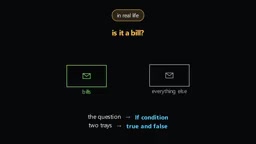
The IF node asks a question about each item, then routes it through one of two doors — true or false. For example, plan equals pro: pro subscribers go to the team chat notification, everyone else gets a welcome email. Same workflow, different paths, one decision per item at a time.

How does a node know a particular item's email address? Through expressions — double curly braces around the field you want. An expression is like a blank on a wedding invitation: you design one card that says "Guest Name," and each envelope gets filled in with a different name.
Every run is saved as an execution record. Open it and you can see exactly what each node received and what it produced. When something goes wrong — say, a form submission with no email address — the run stops there, the node turns red, and you can see precisely which item broke it. The execution record is the workflow's black box: when things go wrong, you don't have to guess; you just replay every second.
Trigger vs. Webhook: A trigger is any node that can start a workflow. A webhook is one type of trigger — a URL that n8n listens on, so when an external system sends a request, your workflow starts. Every webhook is a trigger, but not every trigger is a webhook (scheduled and manual triggers are not).
Cloud or Self-Hosted?
"Cloud vs. Self-hosted" is a staple interview question.
n8n Cloud: No installation required — sign up and go. There's a 14-day free trial that includes Pro features, after which you choose a starter, pro, or enterprise plan. Hosting, updates, backups, and scaling are all handled by n8n; the trade-off is cost and slightly less control over the machine.
Self-hosted: You install it yourself. The free Community edition has nearly full functionality, and registering an email address unlocks extras like folders, debug mode, and custom execution data. The paid Business and Enterprise editions add team features, SSO, environments, projects, external secrets, and more.
For anyone currently learning, running n8n self-hosted on your own machine is the recommended path: it's free, it mirrors how most companies actually use it, and wrestling with the installation teaches you things the cloud version hides from you. A simple mnemonic — cloud is renting an apartment: if a pipe bursts you call the landlord, but you pay rent every month. Self-hosted is owning the house: no monthly payment, but you're the plumber when the pipe bursts.
Two prerequisites before installing: the NPX path needs a recent Node.js LTS version; the Docker path needs Docker Desktop or the Docker engine. There are three installation methods — NPX is the fastest single command, Docker is most common in real teams, and Docker Compose is best for long-running deployments. Regardless of method, n8n opens in your browser at localhost:5678, and the first screen prompts you to create an admin account.
Beyond cost, self-hosting has an even more important advantage in production: data sovereignty. When a workflow handles customers' personal information, financial data, or internal trade secrets, routing data through n8n Cloud means that data leaves your network perimeter — which may conflict with GDPR, HIPAA, or other compliance requirements. Self-hosting lets you deploy n8n inside a corporate intranet or private cloud so data never crosses the boundary. Docker Compose is the most common approach in teams precisely because it integrates with existing container orchestration infrastructure (such as Kubernetes) and manages configuration — database connections, encryption keys, execution data retention — through a .env file that's easy to audit and version-control.
The Editor and Your First Workflow
The center of the editor is the canvas; the side panel is the node library. Two controls at the top matter most: a Test button that runs the workflow immediately, and an Activate toggle that keeps the workflow running automatically in production. Test means you press Run. Activate means the world presses Run.

Open any node and you'll see three panels: left (incoming items), center (parameters — what you're telling the node to do), right (outgoing items). Most of your time in n8n is spent staring at these three panels.
Here's how to build a Lead Sorter workflow step by step:
- Manual Trigger: Create a new workflow, search for the manual trigger and add it. It's ideal for the learning stage.
- Edit Fields (Set): Create some sample data — add three fields:
name,email, andplan=pro. After running, switch between the table view and JSON view in the output panel and notice thejsonkey wrapping the data. - IF Node: Set the condition
{{ $json.plan }}equalspro, then run it. The IF node shows two outputs — one item on the true side, zero on the false side. - Two Endings: On the true branch, set
messagetowelcome to pro; on the false branch, set it tothanks for joining. In a real project, swap these out for a chat notification and an email node. - Test and Save: Click the test button and watch items flow through. Each node shows a count of items that passed through. Save and name the workflow.
The step that makes it real: replace the manual trigger with a Form Trigger (n8n ships a built-in form — no external account needed). Give it name, email, and a plan dropdown (free / pro), then connect it directly to the IF node. Every trigger that listens to the outside world has two URLs: the test URL only works when you click the Test button in the editor; the production URL only works when the workflow is activated. The test URL is a rehearsal — it only runs when the director (you, clicking Test) is in the room. The production URL is opening night — the doors open and it runs whether you're watching or not.
Pro tip — Data Pinning: Pin the output of the form trigger and you can re-run downstream nodes repeatedly without resubmitting the form every time — like a save point in a video game. Production ignores pinned data, but remember to unpin before going live so stale test data doesn't cause confusion.
32 Terms: Where Interview Questions Come From
The n8n docs maintain a glossary of 32 terms, and interview questions are often pulled directly from lists like this. Group them into four buckets for memorization — the key is to remember the mental image next to each term, not just the wording:
- Core terms: workflow, node, trigger node, canvas, editor, credential, expression, template, project, data pinning, evaluation.
- Cluster nodes: cluster node (a root node plus sub-nodes, e.g., an AI Agent with model, memory, and tool sub-nodes attached).
- Business terms: edition (self-hosted variants), plan (cloud pricing tiers), license, entitlement.
- AI vocabulary: LLM, AI completion, AI agent, AI chain, AI tool, AI memory, embedding, vector store, RAG, reranking, groundedness, hallucination, LangChain, API.

One image that makes RAG instantly click: a model answering on its own is like a student taking a closed-book exam — it answers confidently even on questions it doesn't know, and that confidence is hallucination. RAG turns it into an open-book exam: same student, but they get to consult notes before answering. RAG and groundedness exist precisely to fight hallucination.
The standard interview answer for fair-code: Source is visible, self-hosting for internal use is free, but you cannot resell it as a hosted service. Enterprise features are under a separate paid license. Keep in mind that licenses change — if you're building a business on top of a tool, read the current terms first.
The term RAG (Retrieval-Augmented Generation) deserves a closer look. It works in three steps: first, your private documents are split into chunks, each chunk is converted into a high-dimensional numerical vector by an embedding model, and those vectors are stored in a vector store. When a user asks a question, the question is also converted into a vector and used to run a similarity search against the vector store, retrieving the most relevant source passages. Finally, those passages are injected into the LLM's prompt alongside the user's question, so the model answers "with the notes open." That's the open-book exam mechanism in concrete terms. Reranking is an optional optimization step in the RAG pipeline — after the vector similarity search retrieves 20 candidate chunks, a dedicated reranking model rescores all 20 and selects only the top 3 to send to the LLM, reducing the risk that irrelevant content confuses the model's reasoning.
Learning Path and Next Steps
The official docs recommend the interactive courses on n8n Academy, which include exercises, quizzes, a final exam, and a certificate. A practice API is provided so you don't need accounts with any other services. This series isn't a replacement for those courses — it's a deeper companion commentary running alongside them. When you run into problems, search the community forum first. When you post a question, attach your workflow exported as JSON and describe clearly what you expected vs. what actually happened — that habit alone will make you look like a professional.
The road ahead: deep dives into workflows and nodes, data and items, expressions, flow logic (IF / switch / merge / loop), errors and debugging, the HTTP node and APIs, credentials and security, AI nodes and agents — and one real-world business scenario per episode.
Today's exercise: Rebuild this workflow from memory, then make three variations — add a third plan value team and a third branch; add a second condition (plan is pro AND the email ends with a company domain); make the false branch use a Wait node to pause for 10 seconds before continuing. Each variation will surface exactly what the next episode covers.
That's the foundation. You now know what n8n is, how it thinks, how it runs, how to build and debug a workflow, and what every word in its glossary means. What actually gets you hired — and keeps you employed — was never "make it work." It's being able to explain why you built it this way, what will break it, and how to fix it.
Related articles

How Big Can Stars Really Get? The Physical Limits of the Largest Stars
Red supergiants are the largest stars by volume, with radii up to 2,000 times the Sun, engulfing the inner solar system. But there is no precise upper limit on stellar size—models predict up to 15,000 solar radii. The most massive blue stars are far smaller than red supergiants—biggest and heaviest are two different things.

Apple HomeView Smart Display Full Feature Breakdown: Wall-Mount or Desktop, $299
Apple launches HomeView, a $299 smart display with wall-mount and desktop options, 12MP camera for facial recognition, smart home control, music playback, and recipe step-by-step cooking. Full breakdown of watch faces, apps, privacy, and cooking integration.

Where Did the Promised New Studio Go? Craft Computing Answers After Five Years
Craft Computing's host responds to viewer questions: the new studio promised five years ago was shelved as construction costs soared from $30,000 to $75,000, and was replaced by a 168-square-foot garage conversion.