n8n Getting Started: Build Your First Automated Workflow with AI

Build your first n8n automation workflow using visual nodes, a manual trigger, and structured JSON data output.
Based on the first episode of a Tamil-language n8n hands-on tutorial series, this article introduces the open-source workflow automation tool n8n from the ground up. It covers the three core elements of automation — triggers, data processing, and output — and guides readers through building their first workflow on n8n's visual Editor Canvas using a Manual Trigger node and an Edit Fields node, with results displayed in JSON format. The tutorial series will next cover deploying n8n on a Linux server using Docker.
n8n: Your Starting Point for Visual Workflow Automation
n8n is an open-source workflow automation tool built around a simple idea: let repetitive tasks run themselves. This article is based on the first episode of a Tamil-language n8n hands-on tutorial series, walking through the complete process of building your very first automated workflow from scratch.
Workflow automation means letting a task execute automatically without repeated manual intervention. A typical automated flow consists of three stages: a Trigger, followed by a Process, and finally an AI-powered step that transforms the data before sending results to a target service like Gmail or Google Sheets. This chain structure is the foundation for understanding n8n.

Getting to Know the n8n Editor Canvas
The heart of n8n's interface is the Editor Canvas, where all workflows are built. It uses a visual, node-based approach: each node represents a discrete operation, and by connecting nodes together you can see exactly how data flows between steps and how automation runs from start to finish.
This visual design lowers the barrier to automation — you can map out business logic through drag-and-drop and wiring, without writing a lot of code. For beginners, the combination of nodes and connections on the canvas serves as a natural way to think through automation logic.
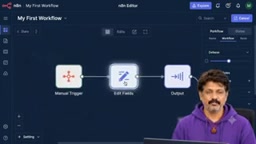
The main difference between n8n and similar tools like Zapier or Make (formerly Integromat) lies in its open-source, self-hosting capability. n8n uses a "Fair Code" license, allowing users to deploy it freely on their own servers — your data never passes through a third-party platform, giving you greater privacy and security. Zapier and Make primarily operate on SaaS subscription models where you pay once you exceed free-tier task/operation limits, whereas a self-hosted n8n instance has no execution limits as long as your server resources allow. This makes n8n especially attractive to developers and small-to-medium teams, particularly in scenarios involving sensitive data or tight operational budgets.
Building Your First Workflow: Starting with a Manual Trigger
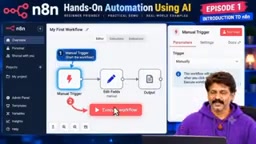
The first step in practice is adding a Manual Trigger node. As the name suggests, this trigger doesn't rely on a schedule or external event — instead, the user kicks off the entire flow by clicking the "Execute Workflow" button. For learning and debugging, manual triggering is the most straightforward and controllable way to get started.
Next, configure the Edit Fields node, which is used to define and manipulate data fields. In the tutorial example, the author enters "SOMU" in the name field and "Welcome to AITEN" in the message field. This step demonstrates how to construct structured data inside a workflow, preparing it for downstream processing and output.
Executing the Workflow and Viewing the Output
Once you click "Execute Workflow," the Manual Trigger activates and the flow officially begins. The Edit Fields node then processes the data, and the entire workflow completes.
Opening the output node reveals that the name and message values are correctly displayed in JSON format — that's the final result of your first workflow. While this example is extremely simple, it demonstrates the complete "Trigger → Process → Output" loop and confirms the fundamental mechanism by which data is passed between nodes in JSON form within n8n.
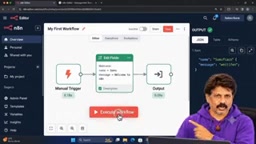
JSON (JavaScript Object Notation) is a lightweight data exchange format that organizes data as key-value pairs — for example, {"name": "SOMU", "message": "Welcome to AITEN"}. It's easy for both humans to read and programs to parse, and has become the de facto standard for data exchange between modern Web APIs. In n8n, all data flowing between nodes is packaged as JSON, which means the output of an upstream node can be directly referenced by a downstream node — for example, using the expression {{ $json.name }} to retrieve the value of the name field. Understanding this mechanism is a prerequisite for using advanced features like conditional logic, loops, and AI nodes later on.
Episode Recap and What's Next
This first episode accomplished two things: understanding n8n's core concepts and interface, and hands-on building and successfully running a first workflow. The process is basic, but it covers the three essential elements of automation — triggers, data processing, and output.
According to the tutorial roadmap, the next episode moves into deployment: installing n8n on a Linux server using Docker, with a live environment setup walkthrough. Moving from local canvas experiments to server deployment marks the critical step from "knowing how to use it" to "being able to go live." For learners looking to boost efficiency with AI and automation, mastering this complete pipeline — from building to deploying — is the foundation for developing real-world business automation capabilities.
Docker is a containerization technology that packages an application and all its dependencies into a self-contained "container" that runs consistently on any Docker-supported system, regardless of environment differences. Compared to installing n8n directly on a server, deploying with Docker offers several advantages: upgrades and rollbacks are simpler (just swap the image version), isolation from the host system avoids dependency conflicts, and using docker-compose lets you manage n8n and its dependent database services with a single command. For learners without Linux operations experience, Docker is one of the lowest-barrier entry points into server deployment.
Related articles

Chain of Thought Isn't Just for AI: How Humans Can Use CoT to Improve Thinking Quality
Chain of Thought isn't just a prompt trick for large models. Starting from a Hacker News discussion, this article analyzes why CoT works for human thinking too, breaks down actionable ways to transfer it, and highlights the key differences between human CoT and machine CoT.
Cloudflare Teams Up with OpenAI: Closi…
Cloudflare Teams Up with OpenAI: Closing the Loop from Vulnerability Discovery to Defense with AI
Cloudflare uses OpenAI Daybreak to investigate security vulnerabilities and generate reviewable remediation plans, while developers use Codex to boost coding efficiency and quality.

Orca Multi-Agent Orchestration in Practice: A Guide to Parallel Collaboration with Claude and Codex
Orca is Stable AI's free open-source agent workbench supporting 34 agents like Claude Code and Codex in parallel. Learn its Git worktree isolation, multi-model orchestration, and mobile management.