n8n in Practice: Building an AI Email Summarizer with Slack Notifications

Build a 4-node n8n workflow that auto-summarizes Gmail emails with AI and pushes results to Slack.
This article breaks down a real Upwork project: building an n8n workflow that goes from Gmail → AI summary → Slack push. The four-node pipeline covers a Gmail trigger (polling for unread emails), an Edit/Set node (cleaning fields and splitting sender info), a Basic LLM Chain (using OpenAI to summarize, extract action items, and assess priority), and a Slack send node. Two key lessons emerge: always map your process before building, and use Basic LLM Chain instead of AI Agent for summarization tasks to keep things simple and cost-effective.
A real client request from Upwork: whenever a new email arrives in Gmail, automatically generate an AI summary, identify action items, assess priority, and push the results to Slack. This kind of seemingly simple automation is a classic use case — both for freelancers looking to monetize their skills and for busy founders who want to reclaim their time. This article breaks down the entire build process, based on a YouTube creator's walkthrough, showing you how to build this workflow in n8n from scratch.
From Client Brief to Process Mapping
The client's original description was straightforward: "I need a simple automation that uses AI to summarize incoming emails. Whenever Gmail receives a new email, automatically read its content, use OpenAI to generate a short summary, identify action items, then send the summary to me via Slack." The client also made it clear that the tool choice was open — Make.com, Zapier, or anything else — the priority was simple, reliable, and easy to modify later.
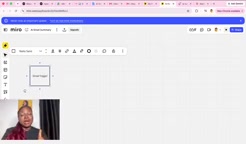
The most overlooked yet critical step before building any automation is process mapping. The creator emphasized that you should never rush to open a tool and start building the moment you receive a brief. Instead, read the requirements line by line and map out the flow first. Tools like draw.io or Miro work great for this, but even pen and paper will do. The value of mapping is simple: once you understand the role and sequence of each node, the actual build becomes far less chaotic.
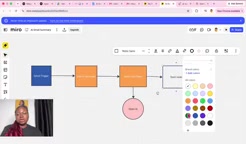
Breaking the brief down sentence by sentence, the entire flow maps to four core nodes: Gmail Trigger → Edit/Set Node → Basic LLM Chain → Slack Send Node. Each node is color-coded for clarity, forming a clean processing pipeline.
Gmail Trigger and Data Cleaning
The first node is the Gmail trigger. n8n's Gmail node offers a single trigger option — "Message Received" — which listens for incoming emails. The creator set the polling interval to once per hour and added a filter for unread emails only, ensuring no duplicate processing.
Once triggered, the Gmail node returns a large number of fields — ID, threadId, snippet, payload, and more — resulting in noisy, cluttered data. This is where the second key node comes in: the Edit/Set node. Its job is to clean the data and retain only the fields we actually need: sender name, email address, email body, date, and subject.
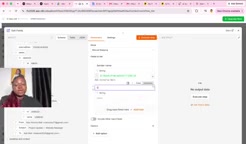
There's a practical technique here worth calling out. The sender field returned by Gmail often combines the name and address into a single string (e.g., "Adaptory Awali <email>"). The creator splits this using the .split() method with < as the delimiter: index [0] captures the name, index [1] captures the email address. This touches on the concept of JSON arrays — computers start counting from 0, which is one of the most common stumbling blocks for beginners. The date field is also formatted into a human-readable DD-MM-YYYY format using .format(), sparing the client from having to parse long timestamp strings.
n8n triggers operate in two modes: Webhook (event-driven, real-time push) and Polling. The Gmail node uses polling — n8n actively queries the Gmail API at set intervals rather than Gmail pushing notifications to n8n. This means there's a delay between email arrival and workflow execution, equal at most to the polling interval. Set to hourly, the worst-case delay is close to 60 minutes. If your use case demands near-real-time processing, you can shorten the polling interval (at the cost of more API calls) or switch to an email service that supports webhook push. For this scenario — daily email summaries — an hourly delay is well within acceptable limits and represents a sensible default that balances cost and efficiency.
Using Basic LLM Chain Instead of an AI Agent
For the AI processing step, the creator makes an important call: not every automation needs an AI Agent. When the task is simply generating a summary, categorizing content, or routing a message — without requiring the AI to autonomously reply or invoke tools — the lighter-weight "Basic LLM Chain" node is sufficient. This is the key distinction between n8n's two AI node types.
The Basic LLM Chain needs a language model attached as its "brain" — here, an OpenAI model is used. During configuration, the connection type is changed from chat trigger to "define below", allowing you to manually specify the User Message and System Prompt.
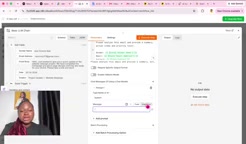
The user message maps in the cleaned fields from the Edit node — sender name, email address, subject, date, and body. This is where the Edit node's value fully pays off: all fields are neatly available, with no need to dig through raw data. The system prompt gives the AI three clear instructions:
- Write a concise 2–3 sentence summary
- Extract all action items or tasks mentioned in the email
- Assess the priority level (High / Medium / Low)
The output format is specified as a structured "Summary — Action Items — Priority" layout, with instructions to keep it professional, clear, and concise. When executed, the AI accurately returns the key points — for example: "The sender reports that the homepage and About page designs are complete and ready for review. Action items: review homepage, review About page. Priority: Medium."
The fundamental difference between an AI Agent and a Basic LLM Chain comes down to autonomous decision-making. An AI Agent has a built-in reasoning loop (the ReAct loop) that lets it independently decide which tools to call, execute multi-step operations, and dynamically adjust its next action based on intermediate results — for example, first querying a database, then sending an email, then updating a calendar. This flexibility comes at the cost of higher latency, more token consumption, and less predictable behavior.
A Basic LLM Chain is a one-way pipeline: input → model → output. It has no tool-calling capability and doesn't self-iterate. For tasks with well-defined inputs and fixed output formats — like text summarization, sentiment classification, or content extraction — this simpler structure is more stable, faster, and cheaper. In the n8n ecosystem, incorrectly reaching for an AI Agent when a Basic LLM Chain would do the job is one of the most common over-engineering mistakes beginners make.
Sending to Slack
The final node handles sending the Slack message. Start by creating a channel in Slack (named "ai summary" in this example), connect your account, select the "Send a Message" action, and target that channel.
The message body maps in the sender name, email address, subject, body, and AI summary fields in sequence, producing a clean, structured notification. Once the workflow runs, the Slack channel receives a complete summary card — including sender info, email subject, AI-generated summary, action items, and priority level. The entire flow, from email arriving to Slack notification, completes in the blink of an eye.
The Business Value of This Workflow
The creator wraps up by highlighting the monetization angle for this type of project. At its core, this automation does the work of an administrative assistant or virtual assistant (VA) — filtering, summarizing emails, and extracting action items. For a busy founder or business owner, it's often more cost-effective to run an n8n workflow than to hire someone to monitor their inbox.
This makes the workflow viable both as a deliverable on Upwork and as a productized offering for entrepreneurs who need administrative support. The build logic is simple, reliable, and easy to modify — hitting all three of the client's original requirements: simple, reliable, easy to modify.
Related articles

Chain of Thought Isn't Just for AI: How Humans Can Use CoT to Improve Thinking Quality
Chain of Thought isn't just a prompt trick for large models. Starting from a Hacker News discussion, this article analyzes why CoT works for human thinking too, breaks down actionable ways to transfer it, and highlights the key differences between human CoT and machine CoT.
Cloudflare Teams Up with OpenAI: Closi…
Cloudflare Teams Up with OpenAI: Closing the Loop from Vulnerability Discovery to Defense with AI
Cloudflare uses OpenAI Daybreak to investigate security vulnerabilities and generate reviewable remediation plans, while developers use Codex to boost coding efficiency and quality.

Orca Multi-Agent Orchestration in Practice: A Guide to Parallel Collaboration with Claude and Codex
Orca is Stable AI's free open-source agent workbench supporting 34 agents like Claude Code and Codex in parallel. Learn its Git worktree isolation, multi-model orchestration, and mobile management.