n8n's New Agents Feature: Comparing Two Ways to Build a Telegram AI Agent

Comparing n8n node-based vs. no-code approaches to building a Telegram AI agent in terms of complexity and use cases.
This article uses a hands-on demo to compare two paths for building a Telegram AI agent. The n8n approach requires six nodes and, when self-hosted, demands HTTPS webhook configuration and SSL certificates — with Telegram's one-webhook-per-bot limit causing test/production conflicts. n8n's real strength lies in complex multi-system workflows, making it overkill for a simple chat assistant. No-code tools like Better Claw reduce the process to pasting a token, eliminate server hosting, support bring-your-own API keys with no markup, and enable scheduled automation. The verdict: use lightweight tools for fast single-use-case deployment, and reach for n8n only when complex orchestration is truly needed.
Want to build an AI agent on Telegram but not sure which approach to take? A hands-on YouTube demo lays out two distinctly different paths: the traditional n8n node-based setup, and a lighter no-code alternative. Both end up running the same Telegram AI Agent, but the building experience — and the number of pitfalls along the way — differs considerably.
n8n Node-Based Setup: Six Nodes and a Pile of Webhook Headaches
Following the traditional n8n approach, a basic Telegram AI agent requires chaining together six nodes: a Telegram trigger, an AI Agent, a chat model, a memory module, a tool node, and finally a Telegram send node.
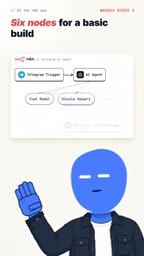
The node logic itself isn't that complicated — the real trouble starts at deployment. If you're self-hosting n8n, Telegram only accepts HTTPS webhooks, which means you first need a public-facing URL with an SSL certificate. That requirement alone stops a lot of users without a DevOps background in their tracks.
To make things worse, Telegram only allows one webhook per bot. This means your n8n test URL and production URL will constantly overwrite each other — switch to the test environment for debugging, then switch back to production when you go live, and the two keep fighting. The demo points out that this is exactly why Google autocompletes "n8n Telegram trigger not working" as a search suggestion.

Where n8n Actually Shines
To be fair, n8n was never designed for "quickly spinning up a small bot." It's built for complex, highly customized large-scale workflows — multi-system integrations, branching logic, conditional flows, data transformations — scenarios where visual node-based orchestration genuinely earns its keep.

In other words, using n8n to build a straightforward Telegram AI chat assistant is overkill. You end up paying the overhead costs of webhook configuration, SSL hosting, and environment switching for extensibility you'll never use.
A note on webhooks: A webhook is a real-time server-to-server notification mechanism — when an event occurs, the source server proactively sends an HTTP request to a pre-registered URL, rather than the recipient repeatedly polling for updates. Telegram's Bot API relies on this mechanism to push user messages to your n8n instance. This requires your n8n server to be publicly accessible with a URL starting with https:// — Telegram enforces TLS encryption for security reasons and rejects plain HTTP callback addresses. When self-hosting n8n, this means registering a domain, deploying an SSL certificate (commonly Let's Encrypt paired with an Nginx reverse proxy), and ensuring your firewall allows traffic on port 443 — a real technical hurdle for users without ops experience. The cloud-hosted version of n8n (such as n8n.cloud) handles all of this at the network layer, at the cost of a subscription fee and data not stored locally.
The No-Code Shortcut: Paste a Token and Go Live
The demo's alternative is a no-code tool called Better Claw. The process is stripped down to the bare minimum: create your agent, grab your bot token from Telegram's Botfather, paste it in, and your agent is live.

This eliminates the two biggest pain points — no manual node wiring, and no need to self-host webhooks or manage a public URL. For anyone who just wants a working Telegram AI assistant up and running quickly, the barrier to entry is essentially zero.
Another detail worth noting is the "bring your own AI key with zero markup" model — you use your own OpenAI or other model API key, billed at the standard rate, with no platform surcharge on token usage. For agents that run continuously or handle high call volumes, this is a meaningful cost advantage.
The tool is positioned as a no-code AI agent that connects various apps and can run scheduled tasks within Telegram — meaning it's not just reactive, but also supports automated, time-triggered workflows.
A note on Botfather: Botfather is an official Telegram meta-bot (@BotFather) used to create and manage Bot accounts. Send it the /newbot command, fill in the bot's name and username, and Botfather generates an API token in the form 110201543:AAHdqTcvCH1vGWJxfSeofSs4teoE6gFbK4. This token is your bot's identity credential — whoever holds it controls the bot entirely — so keep it secure and never commit it to a public code repository. Whether you use n8n or a no-code platform, the core of connecting to Telegram is handing this token to the relevant service. The difference lies in who handles the subsequent webhook registration and message forwarding: n8n requires you to do it yourself, while no-code platforms handle it automatically in the background once you paste the token.
How to Choose Between the Two
The demo distills a clear decision framework:
- Choose n8n when your needs involve multi-system, multi-step, complex branching custom workflows; when you're willing to bear deployment and maintenance costs; and when maximum flexibility is a priority.
- Choose a no-code solution when you just want a functional Telegram AI agent, care about speed to launch, and don't want to deal with webhooks, SSL, or server hosting.
One caveat worth mentioning: this content itself carries a promotional angle toward a specific tool (Better Claw), and represents a single-source perspective without third-party comparative benchmarks. The no-code solution's ease-of-use advantage is real, but how far it can go in terms of complex logic and scalability isn't explored in depth. For actual tooling decisions, it's worth testing against your own task complexity before committing.
Conclusion
For the same Telegram AI agent, the n8n path wins on flexibility but loses on deployment simplicity; the no-code path wins on speed to launch but has a narrower range of applicability. The fact that n8n is rolling out Agents-related capabilities also signals that "building AI agents" is evolving away from node-wiring toward lower-barrier approaches. For most users who simply want to validate a single use case quickly, the pragmatic path is to start with a lightweight solution, then migrate to n8n only when complex orchestration genuinely becomes necessary.
Related articles

How Big Can Stars Really Get? The Physical Limits of the Largest Stars
Red supergiants are the largest stars by volume, with radii up to 2,000 times the Sun, engulfing the inner solar system. But there is no precise upper limit on stellar size—models predict up to 15,000 solar radii. The most massive blue stars are far smaller than red supergiants—biggest and heaviest are two different things.

Apple HomeView Smart Display Full Feature Breakdown: Wall-Mount or Desktop, $299
Apple launches HomeView, a $299 smart display with wall-mount and desktop options, 12MP camera for facial recognition, smart home control, music playback, and recipe step-by-step cooking. Full breakdown of watch faces, apps, privacy, and cooking integration.

Where Did the Promised New Studio Go? Craft Computing Answers After Five Years
Craft Computing's host responds to viewer questions: the new studio promised five years ago was shelved as construction costs soared from $30,000 to $75,000, and was replaced by a 168-square-foot garage conversion.